
Gespeichert
Wähle den Namen, der im Menü Gespeichert angezeigt werden soll.
Fertig!
| Entwickler: | VDT LABS S.R.L. (6) | ||
| Preis: | * $7.99 | ||
| Klassifizierungen: | 0 | ||
| Kommentare: | 0 Kommentar posten | ||
| Listen: | 1 + 0 | ||
| Punkte: | 3 + 0 ¡ | ||
| Mac App Store | |||
Beschreibung

PLIST Editor is one of the few source control "friendly" property list editors that you can find on the market. For all plist formats (XML, Binary and OpenStep/ASCII), it maintains the order of dictionary elements and the editing capabilities are on parity with Xcode, so you don't see a difference between a file edited in PLIST Editor and one edited in Xcode.
PLIST Editor can be used as a lightweight Xcode alternative, having more features, using less disk space, less memory and starting up faster.
Core Features
• Open & save property list files in XML, Binary and OpenStep/ASCII format, including those created using NSKeyedArchiver
• Side-by-side tree & text editor. Any changes made in one of the editors are automatically reflected in the other.
• "Source control" friendly - the order of dictionary elements is preserved, showing them in the same order as defined in the file. Similarly, when the plist is written to disk, the order of items from a dictionary written to disk is the same as the one seen on screen. This is especially useful when you keep the files in a repository, because only the relevant changes will be shown when diff-ing the edited files.
Tree Editor
• Presents the plist data in a "tree" like interface, making easier for you to understand how the data is structured
• Makes the process of editing plist data error-free and way more easier than dealing with raw text
• Its selection is automatically reflected in the text editor
Tree Editor - Features
• Multiple selection of sibling elements
• Cut, copy, paste, duplicate, delete and reorder elements, even when multiple elements are selected
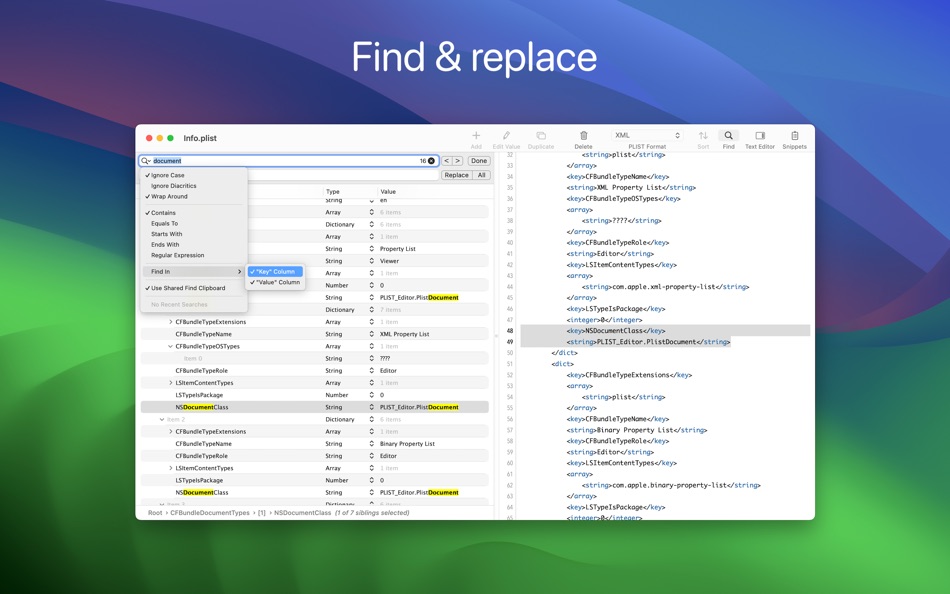
• Find & replace text in the plist elements. Support for "Regular Expression" is included, too
• Choose where the Find (or Replace) will take place: in "Key" or "Value" column or both
• Sort elements, either by clicking one of the column headers or using the dedicated panel
• Set label for child dictionaries to help you understand what each dictionary represents
• Edit the elements, even when multiple are selected (via "Edit -> Edit Value...")
• Paste plist data, either from raw XML or from Xcode
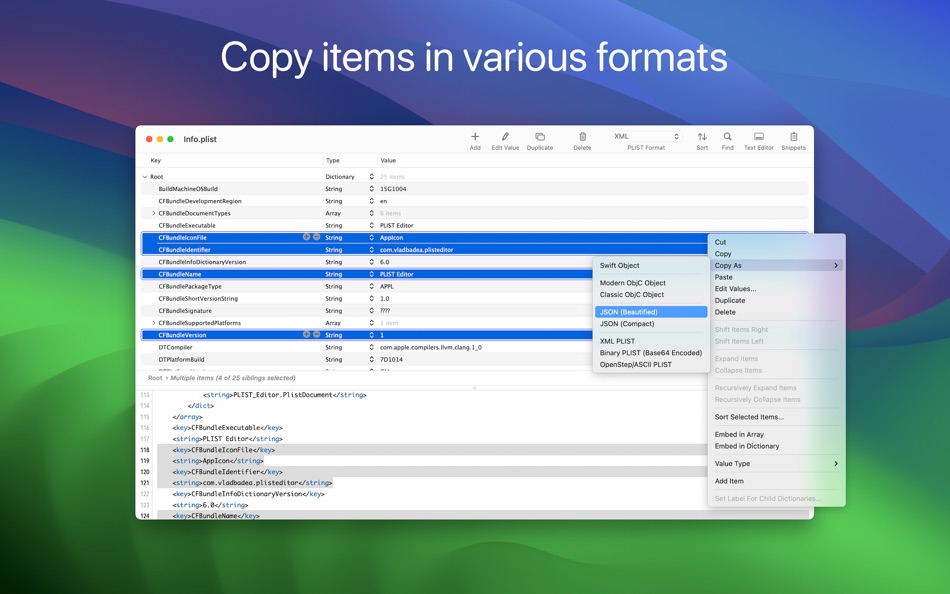
• Copy elements as Swift or Obj-C objects or JSON data or PLIST data
• Embed elements in array or dictionary
• Shift elements left or right
• Move elements up or down
• Row height which accommodates multi-line text
• Undo & redo
Text Editor
• Visualize and edit plist's textual content
• Any changes made in the text editor will automatically be synchronized with the tree editor
• For any errors during editing (i.e. you mistyped something and the plist XML becomes invalid) you'll be informed about this
Text Editor - Features
• Syntax coloring
• Customize the font and its size
• Change editor's location (right or bottom)
• Toggle the visibility of the the text editor
• Show (or hide) invisible characters, like tab or new lines
• Undo & redo
Folder Browser
• Browse folders' content by dragging them on the app's Dock icon or by using "File → Open" panel
• Choose .plist files to make quick edits or to view their content
Snippets
• Save plist items for later reuse
• Access the Snippets by clicking the corresponding toolbar button
Quick Look Preview Extension
• Preview the .plist files in Finder using the Quick Look extension provided by the app
CMS Support
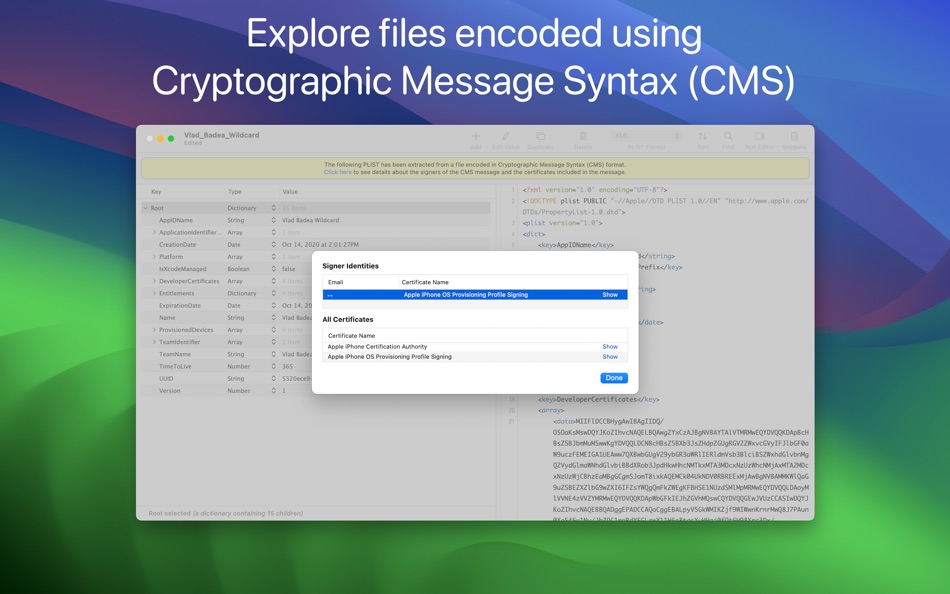
• Import plist data contained in files which are encoded using Cryptographic Message Syntax (CMS), like .mobileconfig or .mobileprovision files
• View information about the signers and the additional certificates which might be included in the message
Other Features
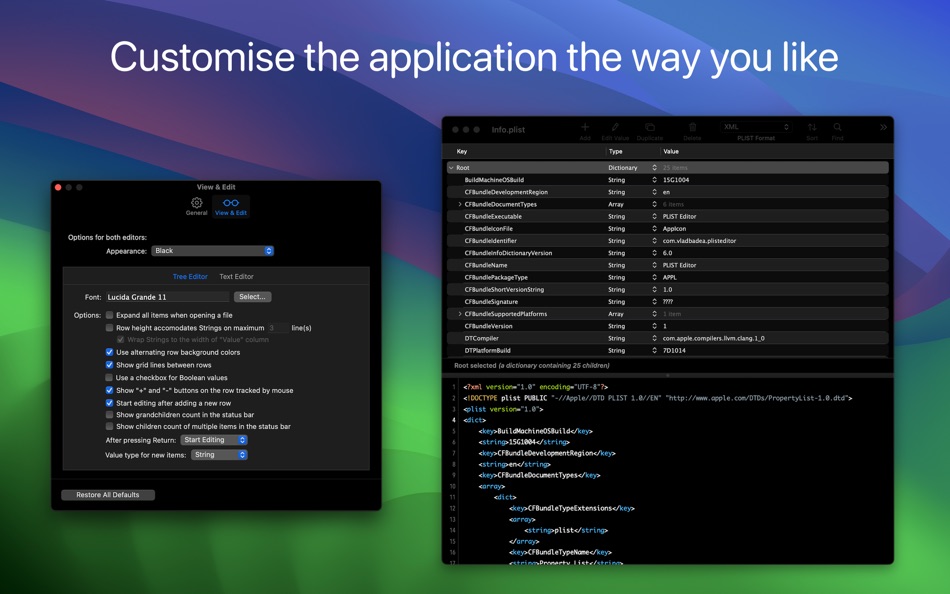
• Dark mode, including a beautiful "black" mode
• Auto Save & Versions support, including the possibility to disable them
• Detect when the file is changed by another application
• Toolbar to access common operations
Ad
Screenshots




Preisentwicklung
-
* In-App Käufe - Aktueller Preis: $7.99
- Mindestens: $3.99
- Maximale: $7.99
Preise beobachten
Weitere informationen
- Veröffentlichungsdatum:
- Kategorie:
macOS Apps›Entwickler-Tools - Betriebssysteme:
macOS,macOS 11.0 oder höher - Größe:
5 Mb - Unterstützte Sprachen:
English - Altersfreigabe:
4+ - Mac App Store Bewertung:
0 - Webseite:
 https://vdt-labs.com/plist-editor/
Neue Funktionen
- Version: 1.63
- Aktualisiert:
- Improvements
• The PLIST items of type "date" are now displayed, in the Tree editor, using ISO-8601 format. This is similar how the latest version of Xcode displays the dates. However, if you want to revert to the previous format, you can do this by choosing "Settings/Preferences → View & Edit → Show Dates in → Medium format, using System timezone".
―――
If you enjoy PLIST Editor and find it useful, please also consider PLIST Editor Mobile, the sibling app specifically made for iPhones and iPads.
We constantly want to improve the quality of our apps. For any feedback, questions and ideas please contact us at plist.editor.contact@gmail.com
Entwickler
- VDT LABS S.R.L.
- Plattformen: iOS Apps (3) macOS Apps (3)
- Listen: 2 + 2
- Punkte: 8 + 44 ¡
- Klassifizierungen: 0
- Kommentare: 0
- Rabatte: 0
- Videos: 0
- RSS: Abonnieren
Listen (1)
- PLIST Editor

Punkte (3)
-

- 1 Sebasrian Koszorek
- +1
-
- 1 David Dennison
- +1
-
- 1 hab eth
- +1


Klassifizierungen (0)
0 ☹️
Kommentare (0)
Seien Sie der Erste, der einen Kommentar abgibt 🌟
«PLIST Editor». Plattform: macOS. Kategorie: Entwickler-Tools. Entwickler: «VDT LABS S.R.L.». Erste Veröffentlichung: . Letzte Aktualisierung: . Aktueller Preis: $7.99. Niedrigster aufgezeichneter Preis: $3.99 (). Höchster aufgezeichneter Preis: $7.99 (). Dieser Titel hat noch keine Bewertungen oder Rezensionen auf AppAgg erhalten. Listen: öffentliche 1, private 0. Verfolgte Punkte: bestätigte 3, indirekte 0. Verfügbare Sprachen: English. AppAgg verfolgt den Preisverlauf, Bewertungen und Benutzerfeedback für «PLIST Editor». Verfolgen Sie zukünftige Rabatte und Updates über RSS. AppAgg hostet keine Anwendungen und vertreibt keine Software. Alle Marken, Logos und Screenshots gehören ihren jeweiligen Eigentümern.
PLIST Editor Kurz-URL: Kopiert!- 🌟 Teilen
- Mac App Store
Ähnliches
-
- Power Plist Editor
- macOS Apps: Entwickler-Tools Von: 基伟 徐
- $3.99
- Listen: 0 0 0
- Punkte: 0 Version: 1.6.0 Power Plist Editor is a powerful Plist editor supports both Binary and XML plist formats for developers. By Power Plist Editor, developers can easily view, explore and edit plist files ⥯
-
- Giraffe Plist Editor
- macOS Apps: Entwickler-Tools Von: Giorgio Maria Giannotta
- $0.99
- Listen: 0 0 0
- Punkte: 1 Version: 1.3 Giraffe Plist Editor is a fast and intuitive property list editor for macOS. Designed for developers, testers, and power users, it makes managing .plist files as easy as editing a ... ⥯
-
- Smart PList Editor for Mac OS X
- macOS Apps: Entwickler-Tools Von: iMakezAppz
- $2.99
- Listen: 0 0 0
- Punkte: 1 Version: 1.0.1 Smart PList Editor is an easy to use, lightweight and fast editor for property lists. Instead of manually editing plists in a text editor, or waiting for Xcode to boot up, simply use ... ⥯
-
- Penguin - Plist Editor
- macOS Apps: Entwickler-Tools Von: Triplane
- * Kostenlos
- Listen: 1 + 2 0 0
- Punkte: 6 Version: 2.2 Looking for an easier way to edit plist files? Penguin lets you edit any plist file in a beautiful and easy to understand tree view. Drag, drop, expand, reorder and modify your plist ... ⥯
-
- Plist Converter
- macOS Apps: Entwickler-Tools Von: App Tyrant Corp
- $0.99
- Listen: 0 + 1 0 0
- Punkte: 0 Version: 2.0.1 Plist Converter is the fastest and easiest way to convert plist files on the Mac. Convert a plist to and from the XML, JSON, and Binary plist formats with this GUI app. You can also ... ⥯
-
- Plist Extractor
- macOS Apps: Entwickler-Tools Von: 红 陈
- Kostenlos
- Listen: 0 + 1 0 0
- Punkte: 1 Version: 1.2 This tool can extract png image files from sprite sheet(.pvr.ccz or .pvr or .png and plist). Make sure you have both the image and plist files in the same directory and open both the ... ⥯
- -67%
- Plist Array Merger: Pro Tool
- macOS Apps: Entwickler-Tools Von: 栋 王
- ▼ $0.99
$2.99-67% - Listen: 0 0 0
- Punkte: 0 Version: 1.0 Stop fighting with massive SKAdNetwork lists. Integrating ad monetization into your iOS apps usually means managing dozens sometimes hundreds of SKAdNetworkIdentifiers. Manually ... ⥯
-
- Editor Usage for Cursor AI
- macOS Apps: Entwickler-Tools Von: Inside Internet
- $3.99
- Listen: 0 0 0
- Punkte: 0 Version: 1.3.2 Effortlessly track your Cursor AI editor usage with our powerful menubar app, designed to keep you informed and in control of your requests. Whether you re a heavy user or just want to ⥯
-
- WYSIWYG HTML Editor
- macOS Apps: Entwickler-Tools Von: Wicher B Donga
- $22.99
- Listen: 0 0 5 (1)
- Punkte: 0 Version: 26.1 WYSIWYG HTML Editor just got a major upgrade. You can now work seamlessly with: - HTML and CSS - JavaScript - React and JSX - Vue - Alpine - Markdown or any combination of these in a ... ⥯
-
- Py Editor for Python
- macOS Apps: Entwickler-Tools Von: Andromeda Corp LTD
- * Kostenlos
- Listen: 1 0 0
- Punkte: 2 Version: 26.0.1 Python Editor is a native macOS application that lets you write and run Python code instantly, with no installation or configuration required. Python 3.11 is embedded directly in the ... ⥯
-
- Xliff Editor
- macOS Apps: Entwickler-Tools Von: SweetP Productions, Inc.
- $19.99
- Listen: 0 + 2 0 0
- Punkte: 0 Version: 3.3.2 Xliff Editor - its fast to load, easy to use, and has a low memory footprint. Did we forget to mention Inline tag protection, Search & Replace, Regex search, Fuzzy search, intuitive ... ⥯
-
- Mermaid Live Editor
- macOS Apps: Entwickler-Tools Von: Omer UCEL
- $4.99
- Listen: 0 0 0
- Punkte: 2 Version: 4.1 Transform text into beautiful diagrams with AI-powered assistance. This professional diagram editor supports Mermaid syntax to create flowcharts, timelines, user journey maps, charts, ... ⥯
-
- Bonsai JSON Editor
- macOS Apps: Entwickler-Tools Von: Jerry COMBS
- $5.99
- Listen: 0 0 0
- Punkte: 0 Version: 1.0 Bonsai is a native macOS JSON viewer, editor, and query tool built for developers who work with JSON every day. Open any JSON file and instantly explore it as an interactive, ... ⥯
-
- Brackets JSON Editor
- macOS Apps: Entwickler-Tools Von: junichi nakamura
- $2.99
- Listen: 0 0 0
- Punkte: 0 Version: 1.4 Brackets JSON Editor is simple and easy-to-use JSON editor. You can edit the JSON data displayed in the outline. ⥯