
Сохранённое
Выберите имя, которое будет отображаться в меню Сохранённое.
Готово!
| Разработчик: | Erik Wegener (28) | ||
| Цена: | $2.99 | ||
| Рейтинги: | 0 | ||
| Комментарии: | 0 Оставьте комментарий | ||
| Списки: | 1 + 0 | ||
| Очки: | 3 + 0 ¡ | ||
| Mac App Store | |||
Описание

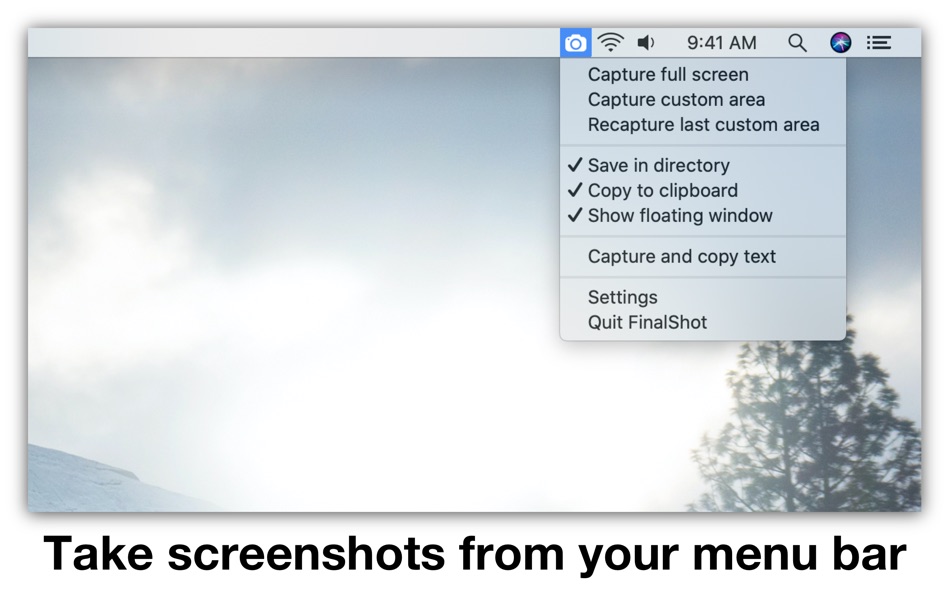
You can customize what happens after you take a screenshot. There are four available output options, and multiple can be active at the same time:
• Save in directory (customizable in FinalShot settings)
• Copy to clipboard (paste screenshots into other apps)
• Open in Preview (makes it easy to annotate screenshots using the Preview app)
• Show floating window (keep screenshots visible after capture)
You can screenshot your full screen or a specific area. To screenshot a specific area, simply select the top left corner and drag your cursor to the bottom right corner to outline the area to be captured. You can also recapture the last custom area you selected.
Floating windows help you keep information visible across different apps! They come in handy when compiling information or when comparing data from different sources. You can use the slider to adjust the transparency of the floating window.
FinalShot stores your screenshots as PNG or JPEG files and you can lower the quality if you require a lower file size. You can also choose between retina and non-retina resolution.
FinalShot can also copy un-selectable text and text from images using OCR (optical character recognition)!
Please read:
FinalShot features four output options: "Save in directory", "Copy to clipboard", "Open in Preview" and "Show floating window". Multiple output options can be active at the same time. Click on an option in the FinalShot menu to enable or disable it. At least one option must be active.
Tip: If you want to quickly enable only one output option while disabling all others, hold the option-key and select the output option you want to enable exclusively.
FinalShot needs permission to record your screen. Please follow the instructions in the app to enable this permission.
Ad
Скриншоты


История цен
- Текущая цена: $2.99
- Минимум: Бесплатно
- Максимум: $5.99
Отслеживайте цены
Дополнительная информация
- Дата выпуска:
- Категория:
macOS Приложения›Производительность - Операционные системы:
macOS,macOS 10.13 и выше - Размер:
2 Mb - Поддерживаемые языки:
English - Возрастные ограничения:
4+ - Mac App Store Рейтинг:
0 - Сайт:
 http://wegenerlabs.com
Что нового
- Версия: 2.6.4
- Обновлено:
- • FinalShot has been rebuilt with the latest macOS technology for better speed, stability, and performance.
Разработчик
- Erik Wegener
- Платформы: iOS Приложения (11) iOS Игры (5) macOS Приложения (12)
- Списки: 6 + 2
- Очки: 60 + 3,667 ¡
- Рейтинги: 0
- Комментарии: 0
- Скидки: 0
- Видео: 0
- RSS: Подписаться
Списки (1)
- FinalShot Screenshot Capture

Очки (3)
-

- 767 Erin
- +1
-
- 661 IMO FUCASHI
- +1
-
- 2,979 바람처어럼
- +1



Рейтинги (0)
0 ☹️
Комментарии (0)
Будьте первым, кто оставит комментарий 🌟
«FinalShot Screenshot Capture». Платформа: macOS. Категория: Производительность. Разработчик: «Erik Wegener». Первый выпуск: . Последнее обновление: . Текущая цена: $2.99. Самая низкая зарегистрированная цена: $0.00 (). Самая высокая зарегистрированная цена: $5.99 (). Этот материал пока не получил оценок и обзоров на AppAgg. Списки: публичные 1, приватные 0. Отслеживаемые баллы: подтверждено 3, косвенно 0. Доступные языки: English. AppAgg отслеживает историю цен, рейтинги и отзывы пользователей для «FinalShot Screenshot Capture». Следите за будущими скидками и обновлениями через RSS. AppAgg не размещает приложения и не распространяет программное обеспечение. Все товарные знаки, логотипы и снимки экрана принадлежат их владельцам.
FinalShot Screenshot Capture Короткий URL: Скопировано!- 🌟 Поделиться
- Mac App Store
Похожие
-
- Capture Note - Note On Screen
- macOS Приложения: Производительность От: Jaeil Roh
- Бесплатно
- Списки: 0 0 0
- Очки: 2 Версия: 0.1.15 "Capture Note" provides fastest and easiest way to make notes over the screenshot. You can easily take screenshots and writes notes on them. You can easily save it image file or copy ... ⥯
-
- Screenshot for Street View
- macOS Приложения: Производительность От: Bilaal Rashid
- $0.99
- Списки: 0 + 1 0 0
- Очки: 6 Версия: 1.1 Capture breathtaking views from Google Street View with ease. Frame your desired location in Street View, and with a click of a button, preserve stunning snapshots of real-world ... ⥯
-
- Screenshot Text Extractor
- macOS Приложения: Производительность От: thomas pentzek
- $9.99
- Списки: 0 0 0
- Очки: 0 Версия: 1.0 Screenshot Text Extractor Turn screenshots into editable text fast. Screenshots are great for saving information, but copying the text inside them is usually slow and frustrating. ... ⥯
-
- Screenshot Inventory
- macOS Приложения: Производительность От: Marcelo Mafra
- * Бесплатно
- Списки: 0 0 0
- Очки: 0 Версия: 1.0 Screenshot Inventory is a macOS menu bar app that keeps your screenshots always within reach. Capture the full screen or select an area, then access everything from a fast, organized ... ⥯
-
- Screenshot One
- macOS Приложения: Производительность От: Ruizheng Liu
- $4.99
- Списки: 0 0 0
- Очки: 1 Версия: 5.0 Screenshot One adds icon to Mac status bar, so you can take screenshot easily anytime! With Screenshot One, you can take screenshot for: - Selected window - Selected window without ... ⥯
-
- Screenshot App: Snipping Tool
- macOS Приложения: Производительность От: Moon Technolabs Pvt Ltd
- Бесплатно
- Списки: 0 0 0
- Очки: 2 Версия: 1.7.0 The Ultimate Screenshot & Annotation Tool for Mac & Windows Say hello to your new favorite screen capture tool built for speed, flexibility, and total control. Whether you re snapping ... ⥯
-
- Screenshot Editor
- macOS Приложения: Производительность От: 科 姚
- $4.99
- Списки: 0 0 0
- Очки: 0 Версия: 2.3 Screenshot Editor helps you to easily take screenshot and annotate the screenshot with a set of useful markup tools. Quickly take a screenshot with useful capturing modes: - Capture ... ⥯
-
- Shot Assistant SE
- macOS Приложения: Производительность От: Sunset Magicwerks, LLC
- Бесплатно
- Списки: 0 0 0
- Очки: 4 Версия: 1.0.1 Shot Assistant provides functionality needed by Media and Entertainment professionals that is not provided elsewhere. -Create and remove multiple Projects as desired. -Import ALEs into ⥯
-
- Final Draft 13
- macOS Приложения: Производительность От: Cast & Crew Production Software, LLC
- $199.99
- Списки: 0 + 1 0 0
- Очки: 0 Версия: 13.3.0 Write your screenplay with Final Draft 13, the best-selling screenwriting software in the world. Final Draft 13 is used by production companies, studios, and filmmakers worldwide ... ⥯
-
- Screenshot Text Recognition
- macOS Приложения: Производительность От: chan hong wing
- Бесплатно
- Списки: 0 0 0
- Очки: 2 Версия: 1.4 Text recognition by screenshot, no need Internet Support different languages Fast and accurate recognition using native engine Free, no restrictions and hidden charges ⥯
-
- Capture&Paste − Offline OCR
- macOS Приложения: Производительность От: Doyoung Gwak
- Бесплатно
- Списки: 0 0 0
- Очки: 2 Версия: 1.1 Open the "Capture&Paste" app and then just press "shift + command + 2" and drag to copy the text on the screen. - When you want to extract letters on the screen while watching a ... ⥯
-
- RICH Shot
- macOS Приложения: Производительность От: Wise Tech Labs Private Limited
- $9.99
- Списки: 1 + 1 0 0
- Очки: 14 Версия: 2.0 RICH Shot is the fastest tool to Swiftly capture your Mac s screen. Get powerful screen capture and recording with RICH Shot. Swiftly capture Mac s screen without desktop icons, ... ⥯
-
- Precise Screenshot 2
- macOS Приложения: Производительность От: Roberto Panetta
- $7.99
- Списки: 0 0 0
- Очки: 1 Версия: 2.4.1 Precise Screenshot is a powerful and user-friendly tool for capturing screenshots on your Mac. With its small size, fast performance, and full range of features, you can take ... ⥯
-
- TrarrenShot - Screenshot
- macOS Приложения: Производительность От: Ko Jui Lin
- Бесплатно
- Списки: 0 0 0
- Очки: 1 Версия: 1.1.1 TrarrenShot is a high efficiency screenshot and annotation tool built specifically for macOS, allowing you to capture, annotate, and share all in one seamless flow. Whether you need to ⥯