
| ผู้พัฒนา: | 兰桂 吴 (72) | ||
| ราคา: | $6.99 | ||
| การจัดอันดับ: | 0 | ||
| ความเห็น: | 0 เขียนความเห็น | ||
| ความเห็น: | 0 โพสต์ความคิดเห็น | ||
| รายการ: | 1 + 2 | ||
| แต้มแล: | 0 + 0 ¡ | ||
| Mac App Store | |||
คำอธิบาย

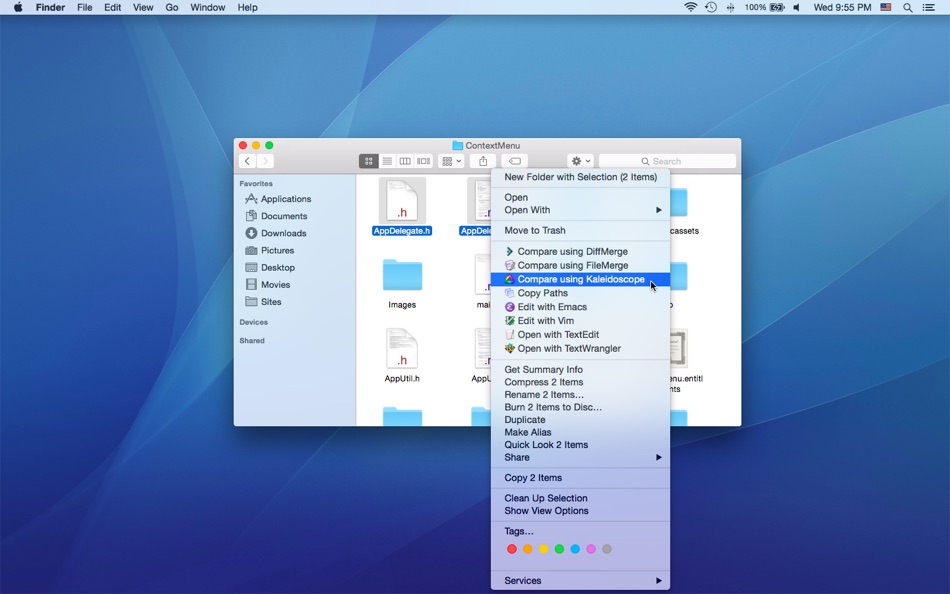
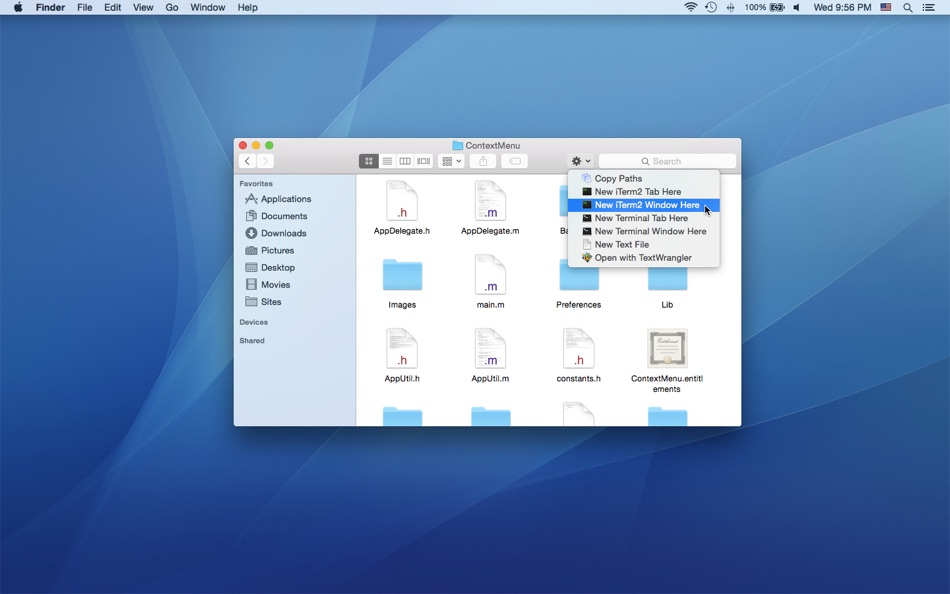
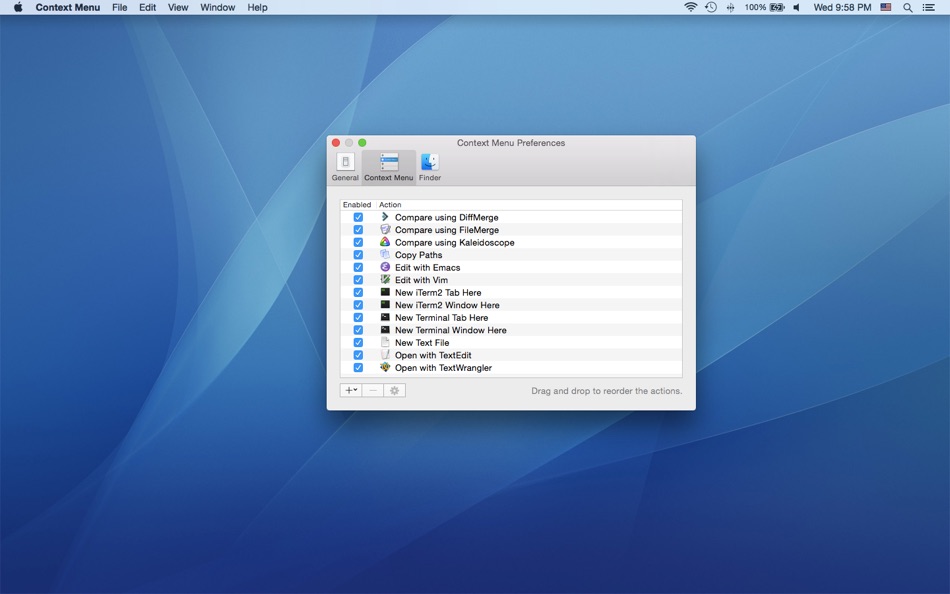
You can easily attach applications / shell scripts / services to the contextual menu of Finder with the help of Context Menu.
Note: Context Menu is implemented as a Finder extension, you need to enable "Context Menu Extension" in "System Preferences » Extensions" to make the context menu appear.
* FAQ
Q: I can't find the context menu?
A: Please make sure that you've enabled "Context Menu Extension" in "System Preferences » Extensions", and make sure that you've added the specific location to the Context Menu preferences.
If the problem persists, please disable "Context Menu Extension" in "System Preferences » Extensions" and then enable it again. The last resort is to relaunch Finder or restart your computer.
Q: Is it possible to add the context menu to mounted volumes?
A: Yes. You need to add the volumes to the Context Menu preferences first.
Q: How to hide Context Menu from the Dock?
A: Please simply quit Context Menu, the context menu extension will continue to work.
Q: Where are the actions stored?
A: You can find all the installed actions at "~/Library/Group Containers/85P8ZUTQL8.net.langui.ContextMenu/Actions".
Ad
ภาพหน้าจอ
ประวัติราคา
- วันนี้: $6.99
- ต่ำสุด: $4.99
- มากที่สุด: $6.99
ติดตามราคา
มีอะไรใหม่
- เวอร์ชัน: 1.5.5
- อัปเดต:
- • Shows the keyboard shortcuts in the search box
• Added more actions
ผู้พัฒนา
แต้มแล (0)
0 ☹️
การจัดอันดับ (0)
0 ☹️
รายการ (1)
- Context Menu

ความเห็น (0)
แสดงรีวิวเป็นคนแรกเลย 🌟
ข้อมูลเพิ่มเติม
«Context Menu». แพลตฟอร์ม: macOS. หมวดหมู่: ยูทิลิตี้. ผู้พัฒนา: «兰桂 吴». การเปิดตัวครั้งแรก: . อัปเดตล่าสุด: . ราคาปัจจุบัน: $6.99. ราคาต่ำสุดที่บันทึกไว้: $4.99 (). ราคาสูงสุดที่บันทึกไว้: $6.99 (). ชื่อนี้ยังไม่ได้รับการให้คะแนนหรือบทวิจารณ์บน AppAgg รายการ: สาธารณะ 1, ส่วนตัว 2. ภาษาที่ใช้ได้: Chinese, English. AppAgg ติดตามประวัติราคา การให้คะแนน และคำติชมของผู้ใช้ «Context Menu». ส่วนลดและอัปเดตในอนาคต: RSS. AppAgg ไม่ได้โฮสต์แอปพลิเคชันหรือแจกจ่ายซอฟต์แวร์ เครื่องหมายการค้า โลโก้ และภาพหน้าจอทั้งหมดเป็นของเจ้าของที่เกี่ยวข้อง
ความเห็น (0)
เป็นคนแรกที่แสดงความเห็น 🌟
Context Menu URL แบบสั้น: คัดลอกแล้ว!- 🌟 แชร์
- Mac App Store
Ad
คล้ายกัน
-
- Menu Bar Shortcuts
- macOS แอป: ยูทิลิตี้ โดย: Present Day Media LLC
- $3.99
- รายการ: 0 + 0 การจัดอันดับ: 0 ความเห็น: 0
- แต้มแล: 0 + 0 0 เวอร์ชัน: 1.14 Menu Bar Shortcuts brings four everyday productivity tools to the one place you check all day long the macOS menu bar. Instant Calculator A full-featured calculator that supports ... ⥯
-
- Menu Bar Manager
- macOS แอป: ยูทิลิตี้ โดย: 泳诗 陈
- $5.99
- รายการ: 0 + 1 การจัดอันดับ: 0 ความเห็น: 0
- แต้มแล: 15 + 0 0 เวอร์ชัน: 1.7 With Menu Bar Manager, you can customize the display or hiding of your menu bar to help users solve the problem of cluttered menu bar icons. 1. Drag the Menu Bar Manager icon to the ... ⥯
-
- Menu Drop
- macOS แอป: ยูทิลิตี้ โดย: Sindre Sorhus
- ฟรี
- รายการ: 0 + 0 การจัดอันดับ: 0 ความเห็น: 0
- แต้มแล: 2 + 0 0 เวอร์ชัน: 1.0.2 AirDrop files simply by dragging them onto the app's menu bar icon. You can drop files, images, and links. Note: The app uses the system AirDrop dialog. It has no control over the ... ⥯
-
- Menu World Time
- macOS แอป: ยูทิลิตี้ โดย: Steve Foster
- ฟรี
- รายการ: 0 + 0 การจัดอันดับ: 0 ความเห็น: 0
- แต้มแล: 1 + 0 0 เวอร์ชัน: 1.12 Get times for cities around the world straight from the menu bar. - Show a clock for each city right in the menu bar - Click the icon in the menu bar to quickly see city times - ... ⥯
-
- Context Switch
- macOS แอป: ยูทิลิตี้ โดย: 兰桂 吴
- $3.99
- รายการ: 0 + 0 การจัดอันดับ: 0 ความเห็น: 0
- แต้มแล: 0 + 0 0 เวอร์ชัน: 1.0 Context Switch allows you to switch apps, windows and browser tabs quickly. Click the Context Switch menu bar icon or press the option-space keyboard shortcut to select the apps, ... ⥯
-
- Menu Bar Icon Manager
- macOS แอป: ยูทิลิตี้ โดย: 金玲 李
- $1.99
- รายการ: 0 + 1 การจัดอันดับ: 0 ความเห็น: 0
- แต้มแล: 2 + 0 0 เวอร์ชัน: 6.7.3 Menu Bar Icon Manager is a macOS-based menu bar icon management tool that helps users hide, aggregate, and quickly access cluttered menu bar icons. - By simulating the interaction ... ⥯
-
- Menu Wifi - Signal Monitor
- macOS แอป: ยูทิลิตี้ โดย: Z9Apps LLC
- ฟรี
- รายการ: 0 + 1 การจัดอันดับ: 0 ความเห็น: 0
- แต้มแล: 3 + 0 0 เวอร์ชัน: 1.1 Menu Wifi is a system menu bar app that provides real-time insights into your Wi-Fi connection, helping you monitor signal strength, troubleshoot issues, and optimize network ... ⥯
-
- Menu Calendar
- macOS แอป: ยูทิลิตี้ โดย: Roberto Panetta
- $1.99
- รายการ: 0 + 0 การจัดอันดับ: 0 ความเห็น: 0
- แต้มแล: 0 + 0 0 เวอร์ชัน: 1.5.5 Menu Calendar brings a convenient and easily accessible calendar to your menu bar, no matter which application you are using. With a simple click, you can bring up a small calendar ... ⥯
-
- Menu Mirror
- macOS แอป: ยูทิลิตี้ โดย: Alexander Brunner
- ฟรี
- รายการ: 0 + 0 การจัดอันดับ: 0 ความเห็น: 0
- แต้มแล: 1 + 0 0 เวอร์ชัน: 1.0 Menu Mirror lets you quickly toggle the camera from your menu bar ⥯
-
- Menu Volume – System & Music
- macOS แอป: ยูทิลิตี้ โดย: Alexander Kohlhofer
- $1.99
- รายการ: 0 + 0 การจัดอันดับ: 0 ความเห็น: 0
- แต้มแล: 0 + 0 0 เวอร์ชัน: 1.1 Menu Volume gives you two simple sliders in your menu bar: one for your Mac and one for Apple Music. Adjust each volume independently from a single, fast menu. Mac volume slider ... ⥯
-
- Menu Bar Quick Links
- macOS แอป: ยูทิลิตี้ โดย: Florian Schweizer
- ฟรี
- รายการ: 2 + 1 การจัดอันดับ: 0 ความเห็น: 0
- แต้มแล: 4 + 0 0 เวอร์ชัน: 1.2 Easily access your most important links right in the menu bar. Add a link via the textfields. Copy links with a single button press or directly open it by right clicking the link's ... ⥯
-
- Menu Eclipse 2
- macOS แอป: ยูทิลิตี้ โดย: Mohsan Khan
- ฟรี
- รายการ: 0 + 1 การจัดอันดับ: 0 ความเห็น: 0
- แต้มแล: 5 + 0 0 เวอร์ชัน: 2.4.3 Dim, Colorize and Scrub the menu bar. Gain better focus on your work & play, and away from the menu bar. Runs in the background, and does not show up in the Dock. Please visit the ... ⥯
-
- Menu Bar Currency Converter
- macOS แอป: ยูทิลิตี้ โดย: Verbari LLC
- $2.99
- รายการ: 0 + 1 การจัดอันดับ: 0 ความเห็น: 0
- แต้มแล: 3 + 0 0 เวอร์ชัน: 2.1 The fastest way to check exchange rates right from your Mac's menu bar. Menu Bar Currency Converter gives you instant access to 130+ world currencies without switching apps or opening ... ⥯
-
- Menu Translate
- macOS แอป: ยูทิลิตี้ โดย: 甲斌 孙
- $0.99
- รายการ: 0 + 1 การจัดอันดับ: 0 ความเห็น: 0
- แต้มแล: 2 + 0 0 เวอร์ชัน: 1.1 A menu translation software that requires the use of an OpenAI API Key. Tutorial: 1. Open settings and input the OpenAI API Key. 2. Select the text and press Command (⌘) + C. 3. Press ... ⥯