
Saved
Choose the name that will be shown in your Saved menu.
Done!
| Developer: | Matthias Gansrigler-Hrad (11) | ||
| Price: | $5.99 | ||
| Rankings: | 0 | ||
| Comments: | 0 Add a comment | ||
| Lists: | 11 + 11 | ||
| Points: | 7 + 1,038 (4.7) ¡ | ||
| App Store | |||
Description

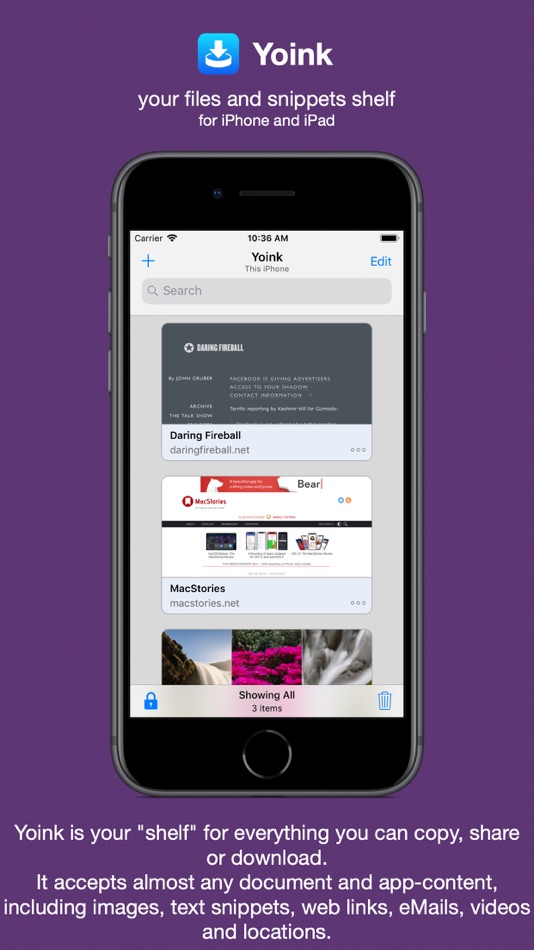
This way, you can collect items in a central place without having to constantly move back and forth between your source- and destination applications.
The app accepts virtually any file type, for example app-content like images from websites, text snippets, web urls, eMails and documents - no matter if you drag, copy, share or download them.
Here's what users say about Yoink:
"The best shelf app on iOS" - Igloouk, UK App Store
"Most useful app in the iOS store. What a gem." - noway170, Austrian App Store
"A godsend. Get this. Now." - mr chairboy, US App Store
As a Slide-Over or Side-by-Side app on iPad, Yoink is always ready for you to drag something to it, no matter what app you're in. Just slide Yoink into view and conclude your drag operation.
On iPhone, use Yoink's Share extension, or copy-paste items into Yoink.
Items are stored in Yoink for later use, featuring rich previews for easy identification and full previews for most file types.
Drags containing multiple items are combined into a Stack.
Yoink comes with deep system integration:
- Clipboard Monitor:
Yoink's clipboard monitor saves everything you copy or cut, even when Yoink itself is in the background.
Use the Picture-in-Picture overlay to select what type of data Yoink should save, as well as to pause or stop it at any time.
- Picture-in-Picture for more than just videos:
Among others, Yoink can show pictures, PDFs, eMails and even websites in the Picture-in-Picture overlay, and lets you scroll through pages of documents right there.
- iCloud Sync
Synchronize Yoink's items across your devices using iCloud
- Handoff
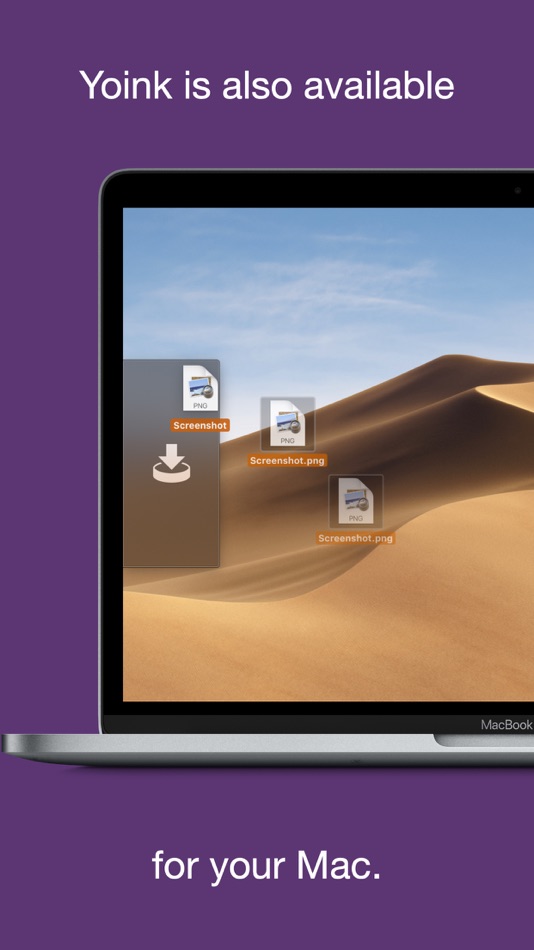
Transfer files between iPhones, iPads and Macs (separate Mac Yoink app required) using Handoff
- Action/Share Extension
Almost any item you can share via the system-wide Share sheet, you can send directly to Yoink from there
- Keyboard
Yoink has its own keyboard so that inserting items you've stored in Yoink is easy and quick, without having to launch Yoink.
- Spotlight Integration
Any item in Yoink can be found via Spotlight - and the search-results are draggable.
- Today Widget
Access Yoink's items and save the contents from your clipboard in Yoink from Notification Center
- Shortcuts / Siri Suggestions
Yoink offers you Siri Shortcuts and Suggestions so you can automate processes, like adding items from the clipboard to Yoink, or copying items from Yoink, as well as starting downloads in Yoink.
- Files Integration
Access Yoink's files from any app that supports iOS 11's document browser
Here's what the press says about Yoink:
"Yoink is the shelf app Apple should have made." - Federico Viticci, MacStories.net
"Yoink is a must-have app" - Jeff Benjamin; 9to5mac.com
"Indispensable for power users." - Craig Grannell; techradar.com
Ad
Screenshots


Price History
- Current price: $5.99
- Minimum: $1.99
- Maximum: $5.99
Track prices
Additional Information
- Release Date:
- Category:
iOS Apps›Productivity - OS:
iPad,iPhone,iOS 15.0 and up - Size:
16 Mb - Supported Languages:
Chinese,English,German,Japanese,Korean - Content Rating:
17+ - App Store Rating:
4.7(1,038) - Website:
 https://eternalstorms.at/yoink/ios
What's new
- Version: 2.5.4
- Updated:
- Yoink for iPhone and iPad v2.5.4 (2026.01.31) contains the following improvements and bugfixes:
= IMPROVEMENTS =
- Improved contextual menus on iOS 16 and newer
- Yoink in the Files app now only shows the highest-fidelity representation of a file instead of all reps inside a “folder” container, allowing for easier, and multiple selection
- Yoink in the Files app now has two custom contextual menus: “Copy Contents” to copy a file's contents instead of the file itself, and “Copy Plain Text” for files that are rich-text formats
- Improved support for webloc, mailloc, etc files (which are also easier to use in the File Provider)
- Improves the overall stability of the app
= BUGFIXES =
- Fixes a crash when the Clipboard Monitor was active and multiple items were copied
- Fixes filename integrity
- Fixes a crash when a website requested microphone access
- Fixes a crash in the Files Provider
- Fixes a bug where launching Yoink from a Quick Shortcut (long-pressing its icon on the Home screen) wouldn't work correctly
- Fixes a bug where the Shortcuts.app shortcut to start Yoink's Clipboard Monitor didn't work
- Fixes a bug where long-pressing a stack wouldn't show a proper preview of its contents
- Fixes a UI issue in the Info popover
Thank you for using Yoink for iPhone and iPad. I hope you're enjoying the app!
If you have some time and if it's not too much to ask, please consider leaving a rating or review of Yoink on the App Store - it would help me out a lot!
If you'd like to get in touch or connect with me, please visit https://eternalstorms.at/contact for all options.
Yours truly,
– Matthias
Developer
- Matthias Gansrigler-Hrad
- Platforms: iOS Apps (4) macOS Apps (7)
- Lists: 19 + 20
- Points: 36 + 1,080 ¡
- Rankings: 0
- Comments: 0
- Deals: 1
- Videos: 0
- RSS: Subscribe
Lists (11)
- Yoink - Improved Drag and Drop


Points (7)
-

- 822 Michael Alco Guerrero
- +1
-
- 3,002 Alan
- +1
-
- 312 Mifune Mika
- +1
-
- 2,020 Luciole
- +1
-
- 75 HO5
- +1
-
- 88 Jára Novák
- +1


Rankings (0)
0 ☹️
Comments (0)
Be the first to comment 🌟
«Yoink - Improved Drag and Drop» is a Productivity app for iOS, developed by «Matthias Gansrigler-Hrad». It was first released on and last updated on . The lowest historical price was $1.99 on , and the highest was $5.99 on . This app has not yet received any ratings on AppAgg. It has been added to 11 public lists and 11 private lists created by users. AppAgg has tracked 7 confirmed points plus 1,038 indirect points for this app. On App Store, the current store rating is 4.7 based on 1,038 votes. Available languages: Chinese, English, German, Japanese, Korean. AppAgg continuously tracks the price history, ratings, and user feedback for «Yoink - Improved Drag and Drop». Subscribe to this app or follow its RSS feed to get notified about future deals or updates. AppAgg does not host applications or distribute software. All trademarks, logos and screenshots belong to their respective owners.
Yoink - Improved Drag and Drop Short URL: Copied!- 🌟 Share
- App Store
Similar
-
- Data Drop: QR File Transfer
- iOS Apps: Productivity By: Ion Postolachi
- Free
- Lists: 0 + 1 0 0
- Points: 3 + 152 (4.7) Version: 2.4.2 Effortless File Sharing Made Simple Sharing files, photos, and documents between your iPhone and any computer has never been easier. With QR File Transfer, you can securely transfer ... ⥯
-
- CamScanner - PDF Scanner App
- iOS Apps: Productivity By: INTSIG Information Co., Ltd
- * Free
- Lists: 2 + 2 0 0
- Points: 11 + 1,790,353 (4.9) Version: 7.16.0 The most intelligent scanner app Trusted by 300M+ users CamScanner is an all-in-one scanner app. It turns your mobile device into a powerful portable scanner that recognizes text ... ⥯
-
- VPN Proxy Master - Super VPN
- iOS Apps: Productivity By: ALL Connected Co.,Ltd
- Free
- Lists: 3 + 3 0 0
- Points: 4 + 307,652 (4.6) Version: 6.9.9 VPN Proxy Master best VPN proxy for WiFi hotspot security and privacy protection. You can stay anonymous online and enjoy your favorite content anytime, anywhere. Features * 6700+ ... ⥯
-
- ChatOn AI - Chat Bot Assistant
- iOS Apps: Productivity By: AIBY
- Free
- Lists: 0 0 0
- Points: 3 + 271,006 (4.7) Version: 1.83 ChatOn Your AI Chatbot & Virtual Assistant Meet ChatOn, your chat AI and virtual assistant, engineered to streamline your personal and professional tasks. ChatOn brings together the ... ⥯
-
- PDF Expert: Editor & Converter
- iOS Apps: Productivity By: Readdle Technologies Limited
- Free
- Lists: 6 + 5 0 0
- Points: 11 + 214,512 (4.7) Version: 7.25.4 Unlock your potential with a fast and easy PDF Expert app with all the features you need in a well-designed and intuitive user interface. BEST FOR iPHONE, iPAD, MAC & VISION PRO Read ... ⥯
-
- Structured: Daily Planner Todo
- iOS Apps: Productivity By: unorderly GmbH
- Free
- Lists: 4 + 2 0 0
- Points: 6 + 157,678 (4.8) Version: 4.4.7 Plan your day visually. Stay focused. Get things done. 400,000+ five-star ratings · Trusted by 1.5 million active users The daily planner built for how your brain actually works. Map ... ⥯
-
- Google Tasks: Get Things Done
- iOS Apps: Productivity By: Google
- Free
- Lists: 1 + 3 0 0
- Points: 2 + 102,569 (4.8) Version: 26.15.0 Get more done with Google Tasks. Manage, capture, and edit your tasks from anywhere, at anytime, with to-dos that sync across all your devices. Integrations with Gmail and Google ... ⥯
-
- Plain Org
- iOS Apps: Productivity By: Xenodium Ltd.
- $14.99
- Lists: 3 + 1 0 0
- Points: 4 + 155 (4.7) Version: 1.10.0 View and edit your org mode tasks while on the go. Org is a wonderfully rich markup language, so **please check** if your favorite feature is supported below (or check ... ⥯
-
- Animation Sketch
- iOS Apps: Productivity By: Arjun Gupte
- * Free
- Lists: 0 + 1 0 0
- Points: 0 + 416 (3.4) Version: 3.6 Animate your dreams and bring them to life! An extremely fast hand-drawn animation software using Apple Pencil and iPad for precise brush control and intuitive workflow. Animators will ⥯
-
- CalenGoo Calendar
- iOS Apps: Productivity By: Dominique Andr Gunia
- $6.99
- Lists: 1 0 0
- Points: 0 + 290 (4.6) Version: 1.5.104 CalenGoo gives you a fast and easy way to access and modify your Google Calendar with your iPhone, iPod Touch or iPad. It can also be used when you have no Internet connection, using ... ⥯
-
- Corkulous - Your Ideas
- iOS Apps: Productivity By: Corked Labs, LLC
- Free
- Lists: 0 0 0
- Points: 0 + 968 (4.4) Version: 8.3 Corkulous© for Mac OS and iOS is the incredible way to collect, organize, and share your ideas that feels completely natural. If you have a Mac, iPhone. or iPad, you need this app! ... ⥯
-
- YouMind - Mind Map Brainstorm
- iOS Apps: Productivity By: 炜春 唐
- Free
- Lists: 0 0 0
- Points: 0 + 111 (4.5) Version: 2.0.68 Features: 1. Create mindmap quickly. 2. Change font, text size ,color , background color,line color , topic shape easily. 3. Support drag-drop, cut and paste to edit it's level. 4. ... ⥯