
Saved
Choose the name that will be shown in your Saved menu.
Done!
| Developer: | Beijing Yunsi Software Technology Co., Ltd (3) | ||
| Price: | Free | ||
| Rankings: | 0 | ||
| Comments: | 0 Add a comment | ||
| Lists: | 9 + 3 | ||
| Points: | 7 + 5,043 (4.7) ¡ | ||
| App Store | |||
Description

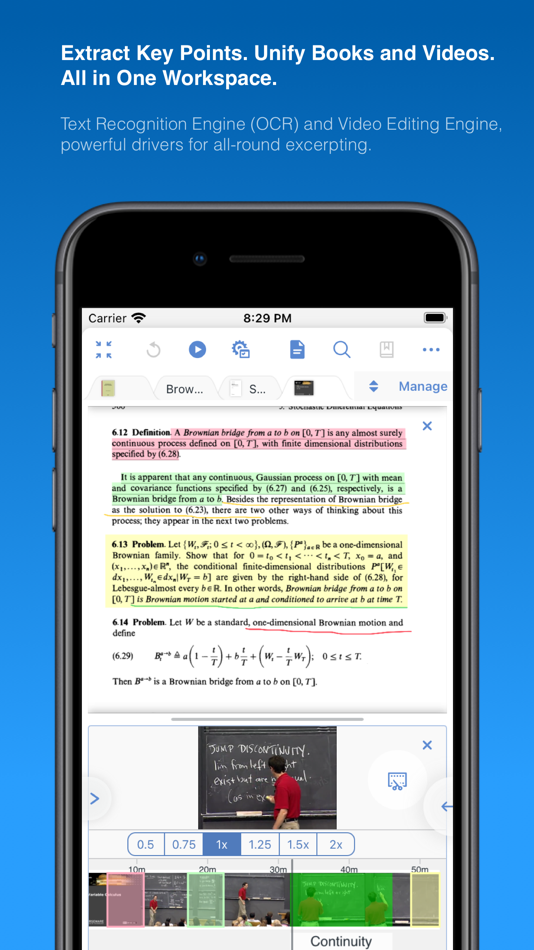
Integrating powerful tools for book annotation, mindmapping, flashcards and more, to build up your reading notes as never before.
============================================
Welcome to MarginNote. This is a highly powerful reading and study software and is applicable to Mac, iPad, and iPhone. By integrating the PDF/EPUB reader and multiple powerful study tools, MarginNote will enable learners to reorganize and connect knowledge from different aspects, then memorize and grasp it accordingly.
Whatever your profession, such as student, educator, researcher, lawyer, or life-long learner, you may annotate and take notes through MarginNote, organize notes via Mindmap and Outline, connect knowledge horizontally via Hashtag and raise memory effect via the Flashcards.
You will discover what MarginNote does is not to simply integrate these tools. Instead, it combines them deeply and skillfully, which makes it easier for users to toggle between different tools.
What's New in MarginNote 3
* New and Clean UI Completely redesigned.
* Improved performance and Running more smoothly
* Support both Document Reading mode & Study Reading mode.
* Excerpts & Note-taking
* Enhanced Handwriting & apple-pencil support.
* Support TextBox on PDF.
* Support direct text-typing & sketching when editing note cards.
* Support Auto OCR when excerpting on scanned PDFs.
* Emphasis & Cloze
* Support direct emphasis in powerful Emphasis mode both on PDF or Outline.
* Support auto convert emphasis to Cloze in CardDeck.
* Support creating Image-Occlusion flashcards.
* Multi-Documents
* Support both document tabs & split views to switch between documents.
* MindMap
* Auto grouping new excerpts by Document Table of Contents.
* Support new brach display mode: Framework.
* Swipe/Drag gestures to slide in/out Outline & Documents in Study mode.
* Enhanced grouped cut/paste, drag to merge,.. etc.
* Outline
* Improved search and displaying keywords in results.
* Improved styles.
* CardDeck:
* View Flashcards in MindMap mode and Document mode.
* Enhanced Anki Export: Card styles, Image occlusions, Cloze
* Enhanced Research web browser.
* iCloud Sync
* Fixed several design issue in previous versions.
* More stable & improved performance.
* Categories
* Separate categories for Document, Study and Review.
* Trash
* Recover data from Trash and make data more safe.
* Trial
* 14-days free trial.
MarginNote 2 features:
Reading:
- Support PDF and EPUB format;
Annotating and NoteTaking:
- Support text highlight and rectangular highlight;
- Add notes directly at the page margin; the note editing area will not overlap with the book content at all;
- Text, voice, picture, sketching and many other forms of comments in note;
- Add hashtags to notes to facilitate the connection of notes;
Outline and Mindmap:
- Outline and Mindmap in one view;
- Create Outline tree by swipe gestures;
- Multi-selection editing such as group, merge, clone, etc;
- Quick searching and filtering according to colors, hashtags, books.
Flashcard:
- Highlights and notes can be automatically turned into flashcards for review;
- Spaced repetition adopting the Anki-based algorithm;
- Switch to the linking book page at any time;
iPad Pro & Apple pencil:
- Split View of multiple tasks;
- High-precision drawing by Apple pencil;
- Fine tuned for Apple pencil;
- Keyboard shortcuts;
Import, Export and Sync:
- Import webpages and notes from Evernote;
- Export flashcards to Anki;
- Export Outline to OmniOutliner;
- Export Mindmap to iThoughts or MindManager;
- Export to Evernote;
- Export all the margin notes, MindManager, Outline and Pages to a printable PDF;
- Sync books & notes with iCloud;
Terms of Use:
https://www.marginnote.com/press/marginnote-3-term-of-use
Privacy Policy:
https://www.iubenda.com/privacy-policy/92678020
Ad
Screenshots


Price History
- Current price: Free
- Minimum: Free
- Maximum: Free
Track prices
Additional Information
- Release Date:
- Category:
iOS Apps›Productivity - OS:
iPad,iPhone,iOS 11.2 and up - Size:
392 Mb - Supported Languages:
Chinese,English,Japanese - Content Rating:
17+ - App Store Rating:
4.7(5,043) - Website:
 http://marginnote.com
Developer
- Beijing Yunsi Software Technology Co., Ltd
- Platforms: iOS Apps (2) macOS Apps (1)
- Lists: 11 + 4
- Points: 12 + 5,713 ¡
- Rankings: 0
- Comments: 0
- Deals: 0
- Videos: 0
- RSS: Subscribe
Lists (9)
- MarginNote 3




Points (7)
-

- 29,620 Lance Eliakim Sotto
- +1
-
- 1 1 Love
- +1
-
- 1 Kapelusz
- +1
-
- 1 Star Tim
- +1
-
- 548 zhuc4
- +1
-
- 178 Taban Bovin
- +1



Rankings (0)
0 ☹️
Comments (0)
Be the first to comment 🌟
«MarginNote 3» is a Productivity app for iOS, developed by «Beijing Yunsi Software Technology Co., Ltd». It was first released on and last updated on . This app is currently free. This app has not yet received any ratings on AppAgg. It has been added to 9 public lists and 3 private lists created by users. AppAgg has tracked 7 confirmed points plus 5,043 indirect points for this app. On App Store, the current store rating is 4.7 based on 5,043 votes. Available languages: Chinese, English, Japanese. AppAgg continuously tracks the price history, ratings, and user feedback for «MarginNote 3». Subscribe to this app or follow its RSS feed to get notified about future deals or updates. AppAgg does not host applications or distribute software. All trademarks, logos and screenshots belong to their respective owners.
MarginNote 3 Short URL: Copied!- 🌟 Share
- App Store
Similar
-
- Note: Widget Notes App
- iOS Apps: Productivity By: Monelyze Inc.
- Free
- Lists: 0 0 0
- Points: 5 + 1,019 (4.6) Version: 2.3.0 "Note" is a simple notes app. You can organize your notes by adding tags, and it supports lock screen and home screen widgets. It can be used on iPhone, iPad, and Mac. Features You can ⥯
-
- Note!
- iOS Apps: Productivity By: RIEU Limited
- Free
- Lists: 0 0 0
- Points: 2 + 1,035 (4.7) Version: 1.3.1 Nothing more, nothing less. Designed to be as minimal as possible for quick plain text notes. + Sorted by latest modified + Pinch to zoom/change text size + Set a passcode to lock your ⥯
-
- Element Note
- iOS Apps: Productivity By: Soysauce Lab
- Free
- Lists: 2 + 1 0 0
- Points: 6 + 2,321 (4.6) Version: 2.8.1 Element Note is the next-gen note taking, PDF annotation, and light sketching app. We stripped down the unnecessaries and carefully polished the elemental functions for a digital ... ⥯
-
- Summary - AI Note Taker
- iOS Apps: Productivity By: Labhouse Mobile
- Free
- Lists: 0 0 0
- Points: 1 + 34,795 (4.7) Version: 2.12.0 Summary AI makes meetings more productive by automatically recording, transcribing, and summarizing conversations. Whether it s a business meeting, interview, classroom lecture, or ... ⥯
-
- Safety Note+ Pro
- iOS Apps: Productivity By: Eightythree Technology
- * $3.99
- Lists: 2 + 2 0 0
- Points: 35 + 732 (4.8) Version: 7.8.30 Introducing Safety Note+: Keep Your Most Private Notes Secure Have you ever experienced the frustration of lending someone your phone, only to have them intrude on your personal ... ⥯
-
- Plaud: AI Note Taker
- iOS Apps: Productivity By: PLAUD LLC
- Free
- Lists: 0 0 0
- Points: 3 + 17,938 (4.9) Version: 3.15.1 [Product Introduction] Plaud is building the world's most trusted AI work companion for professionals to elevate productivity and performance through note-taking solutions, trusted by ... ⥯
-
- Sticky Notes App & Remind Note
- iOS Apps: Productivity By: Epiphany Labs
- * Free
- Lists: 5 + 2 0 0
- Points: 2 + 5,906 (4.4) Version: 3.1.48 *Over 1.5 million downloads* Featured in 'What's Hot' & 'New & Noteworthy' Organize your to do list, task list, and reminders with StickMe Notes - the most awesome sticky note & task ... ⥯
-
- Wave AI Note Taker & Recorder
- iOS Apps: Productivity By: Mohrer Associates LLC
- Free
- Lists: 0 0 0
- Points: 0 + 11,252 (4.9) Version: 3.7.6 Wave AI Note Taker: Audio and Phone Call Recorder for Transcription, Note-Taking & More Whether you're in a business meeting, classroom lecture, or on a call, Wave ensures you never ... ⥯
-
- Notedrafts: Note Taking
- iOS Apps: Productivity By: Appycron Interactive e.K.
- Free
- Lists: 0 + 2 0 0
- Points: 17 + 727 (4.8) Version: 1.0.15 Notedrafts is a note taking app that lets you write and organize your thoughts across different types of documents. Whether you're marking up a PDF, writing on a large canvas, or ... ⥯
-
- Notes Writer - Note Taking
- iOS Apps: Productivity By: Kairoos Solutions SL
- Free
- Lists: 0 + 1 0 0
- Points: 3 + 7,171 (4.5) Version: 18.5.0 Transform the way you write, annotate, and organize on your iPad and iPhone. Perfect for students, educators, writers, professionals, and anyone who needs a powerful, all-in-one ... ⥯
-
- EasyNotes - Note Taking Apps
- iOS Apps: Productivity By: Gulooloo Tech
- Free
- Lists: 0 + 1 0 0
- Points: 7 + 3,210 (4.6) Version: 1.1.27 Transform your concepts into reality with EasyNotes. Write notes, attach photos, craft a checklist, sketch ideas, record audio, capture moments, and explore more. We Can Empower You ... ⥯
-
- HyNote: AI Note Taker, Summary
- iOS Apps: Productivity By: Tuling Network Limited
- Free
- Lists: 0 0 0
- Points: 3 + 6,513 (4.8) Version: 17.5 HyNote (AI Notebook) is your all-in-one AI note taker that captures, understands, and transforms everything into clear, actionable output. From meetings and lectures to PDFs, videos, ... ⥯
-
- Notee: AI Note Taker
- iOS Apps: Productivity By: GM UniverseApps Limited
- Free
- Lists: 0 0 0
- Points: 3 + 3,950 (4.8) Version: 1.4.4 Transform your smartphone into an intelligent AI note taker and voice recorder that captures every word accurately. Instantly transcribe meetings, lectures, interviews, video, and ... ⥯
-
- iNote - Sticky Note by Color
- iOS Apps: Productivity By: CONG DUC TRAN
- Free
- Lists: 0 + 1 0 0
- Points: 1 + 2,353 (4.1) Version: 5.4.3 iNote Free is a simple and quick sticky notepad app. This helps you organize your notes, memos, messages, emails, shopping lists, check lists and to-do lists by COLOR. Taking color ... ⥯