
ที่บันทึกไว้
เลือกชื่อที่จะแสดงในเมนูที่บันทึกไว้ของคุณ
เสร็จแล้ว
| ผู้พัฒนา: | CELSYS,Inc. (4) | ||
| ราคา: | ฟรี | ||
| การจัดอันดับ: | 0 | ||
| ความเห็น: | 0 โพสต์ความคิดเห็น | ||
| รายการ: | 4 + 2 | ||
| แต้มแล: | 4 + 12,225 (4.7) ¡ | ||
| +1 แต้มแล | |||
คำอธิบาย

・Up to 3 months free with your first plan
・Subscribe for the time you want to use it. Get all the latest features, materials, and cloud storage (10 GB)!
*Please note that after your trial, you will need to make an in-app payment to save and export.
Clip Studio Paint makes drawing a piece of cake, in any style!
Whether you are a beginner or a pro, Clip Studio Paint will improve your creative experience while helping you grow. Now with new, powerful features!
Unlimited amount of brushes at your fingertips to recreate any style
- Use brushes with the same textures as real art materials
- Adjust details such as brush shape and paper quality to your liking
- Make unique colors with realistic color mixing, like traditional paints
- Draw with transparency to erase, so no need to switch brushes
Countless artist-made materials
- Level up your art with free materials, for backgrounds and more
- Discover community-made brushes from creators worldwide
- Add details with materials like frills and more
Coloring made easy
- Easily color even with line gaps using the magnetic lasso tool
- Lock transparency to paint over layers without affecting other areas
- Set light source and shadow position with Shading Assist
- Instantly reference and apply colors from an image to your art using Color Match
- Enhance your art with filters like Chromatic Aberration, Retro Film, Pencil, and more
Learn alongside other creators
- Loads of official tutorials and creator tips available
- Watch tutorials on our YouTube channel, for step-by-step advice
- Ask questions on the Clip Studio Ask community
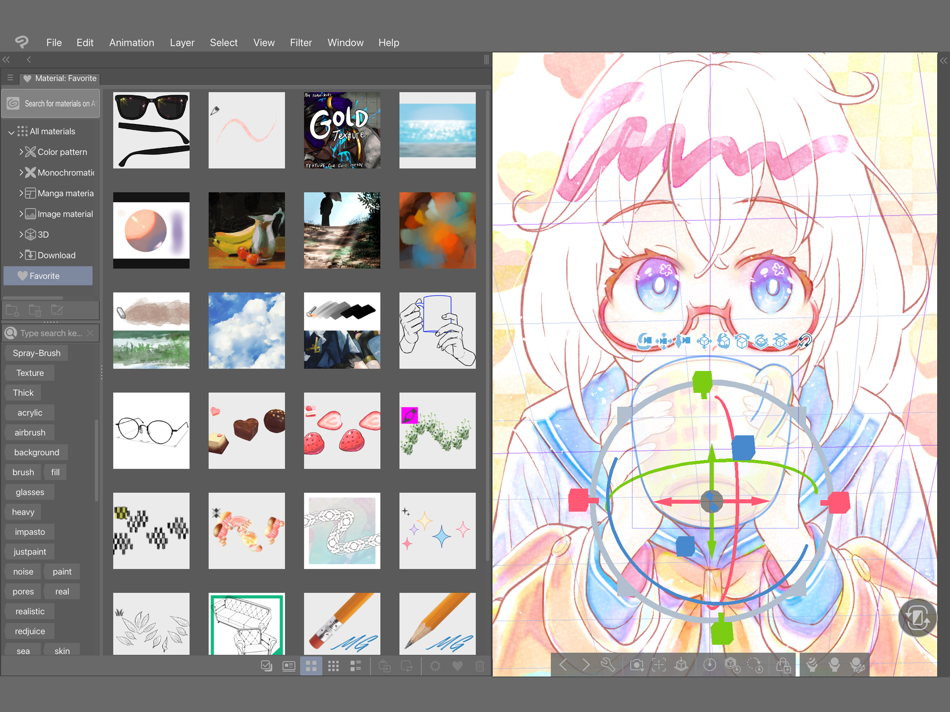
Create the perfect reference with 3D models
- Use 3D drawing figures to help with drawing anatomy
- Customize character face and body models with beginner-friendly tools
- Attach 3D objects like hats and shoes to characters for more specific references
- Use 3D shapes to draw perspective
- Use snap to quickly place objects on your canvas
Adjust after you draw
- Liquify to make adjustments to the balance of your illustrations
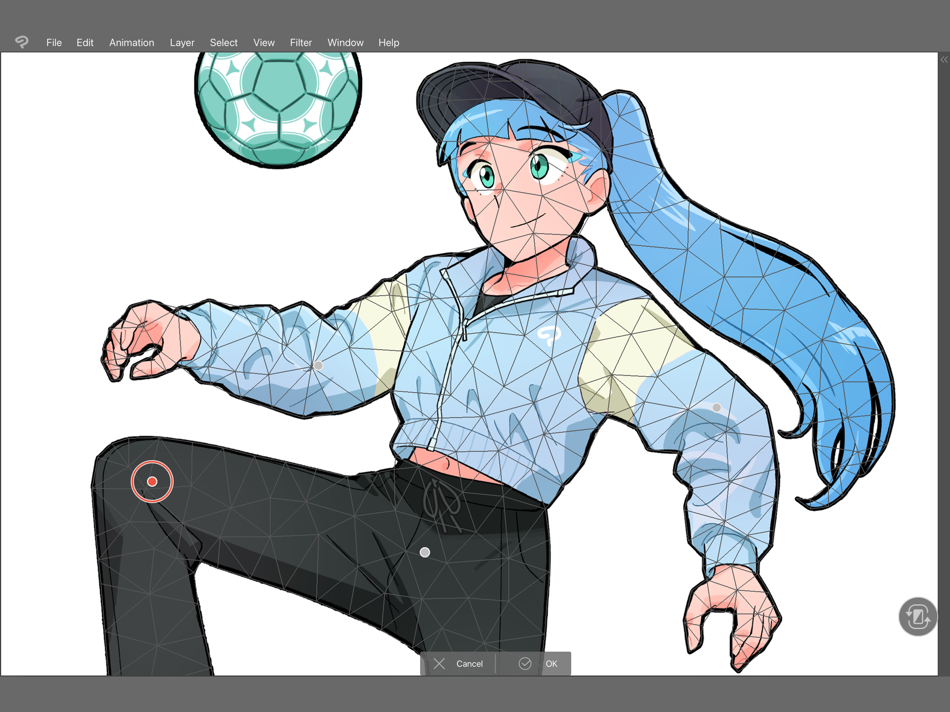
- Mesh Transformation allows you to transform to different shapes
- Change up the poses of your character drawings with Puppet warp
- Non-destructive color adjustment layers to get your art just right
- Gradient maps give color to your grayscale illustrations
Stress-free layer features
- Assign colors and make multiple columns of layers to browse them at a glance
- Enjoy the freedom of masking and clipping on multiple layers to edit and move your work
- Add various effects to apply to the layer in a non-destructive way
The ultimate comic creation app
- All the tools you need for comic creation, from storyboard to finishing touches
- Panel frames, speech balloons, text, effect lines, and screen tones in an instant
- Make data for prints, web comics, manga, or webtoons (6 GB+ memory recommended)
- Manage multi-page projects
Professional animation, on any device
- Use all the same tools as animation studios
- Unique features allow you to draw your frames as you like
- Enjoy a pencil and paper look and feel, but digitally
- Expand your drawings to 4K resolution without losing quality by saving it as vector data
●Grade features
・PRO: All the tools you need to create stunning illustrations & short animations
・EX: All the above + multi-page functionality for comic/manga artists and unlimited animation frames
*Clip Studio account needed to buy a plan.
● Target Devices and Specifications
・Minimum free storage space: 3GB, 4GB recommended
・Recommended display size: 10.5"+
Please see the following for supported devices.
https://support.clip-studio.com/en-us/faq/articles/20200153
Supported pressure-sensitive pens
・Apple Pencil
● In-app purchases
・Required to save the canvas and export it to various file formats on iPad.
Note:
You will be charged to the Apple ID used for subscription.
Terms of Service
https://www.celsys.com/en/information/csp/
ภาพหน้าจอ






ประวัติราคา
- ราคาปัจจุบัน: ฟรี
- ต่ำสุด: ฟรี
- มากที่สุด: ฟรี
ติดตามราคา
Ad
ข้อมูลเพิ่มเติม
- วันที่วางจำหน่าย:
- หมวดหมู่:
iOS แอป›กราฟิกและการออกแบบ - ระบบปฏิบัติการ:
iPad,iOS 18.0 และสูงกว่า - ขนาด:
577 Mb - ภาษาที่สนับสนุน:
Chinese,English,French,German,Indonesian,Japanese,Korean,Portuguese,Spanish,Thai - การจัดประเภทเนื้อหา:
4+ - App Store คะแนนโดย:
4.7(12,225) - เว็บไซท์:
 https://www.clipstudio.net/en
มีอะไรใหม่
- เวอร์ชัน: 5.0.4
- อัปเดต:
- ・ When tapping Edit on the Smart Shape launcher, the shape converted at the start of the Smart Shape now appears at the left end of the launcher.
・ If a shape is initially converted to an ellipse or triangle with Smart Shape, it can now always be converted to a perfect circle or equilateral triangle. Also, quadrilaterals can now always be converted to a rectangle or a standard square.
・ When switching to edit mode for Smart Shape, you can now snap to fixed angles when moving shapes or control points while holding down the Shift key.
・ Changed some specifications of the sliders for adjusting fingers in the 3D hand model's slider mode. When you select a handle for editing fingers, the slider for bending the fingers now appears on top. Also, moving the slider to the left bends the fingers, and moving it to the right extends them.
・ Improved behavior when drawing on a vector layer using a brush with multiple image materials registered to its tip shape, while Save recovery data for every operation is turned on in the Preferences dialog.
ผู้พัฒนา
- CELSYS, Inc.
- แพลตฟอร์ม: Android แอป (1) iOS แอป (2) Windows แอป (1)
- รายการ: 4 + 3
- แต้มแล: 5 + 53,819 ¡
- การจัดอันดับ: 0
- ความเห็น: 0
- ลดราคา: 0
- วิดีโอ: 1
- RSS: ติดตาม
รายการ (4)
- Clip Studio Paint


การจัดอันดับ (0)
0 ☹️
ความเห็น (0)
เป็นคนแรกที่แสดงความเห็น 🌟
«Clip Studio Paint». แพลตฟอร์ม: iOS. หมวดหมู่: กราฟิกและการออกแบบ. ผู้พัฒนา: «CELSYS,Inc.». การเปิดตัวครั้งแรก: . อัปเดตล่าสุด: . ราคาปัจจุบัน: ฟรี. ชื่อนี้ยังไม่ได้รับการให้คะแนนหรือบทวิจารณ์บน AppAgg รายการ: สาธารณะ 4, ส่วนตัว 2. จุดที่ติดตาม: ยืนยันแล้ว 4, ทางอ้อม 12,225. ร้านค้า: App Store. คะแนนร้านค้า: 4.7. โหวต: 12,225. ภาษาที่ใช้ได้: Chinese, English, French, German, Indonesian, Japanese, Korean, Portuguese, Spanish, Thai. AppAgg ติดตามประวัติราคา การให้คะแนน และคำติชมของผู้ใช้ «Clip Studio Paint». ส่วนลดและอัปเดตในอนาคต: RSS. AppAgg ไม่ได้โฮสต์แอปพลิเคชันหรือแจกจ่ายซอฟต์แวร์ เครื่องหมายการค้า โลโก้ และภาพหน้าจอทั้งหมดเป็นของเจ้าของที่เกี่ยวข้อง
Clip Studio Paint URL แบบสั้น: คัดลอกแล้ว!- 🌟 แชร์
- App Store
คล้ายกัน
-
- Clip Studio Paint for iPhone
- iOS แอป: กราฟิกและการออกแบบ โดย: CELSYS,Inc.
- ฟรี
- รายการ: 2 + 1 0 0
- แต้มแล: 0 + 1,467 (4.4) เวอร์ชัน: 5.0.4 Draw with unlimited features for free for 30 hours monthly with no ads! Now with new, powerful features! Clip Studio Paint makes drawing a piece of cake, in any style! Whether you are ... ⥯
-
- Paint AI - Color Visualizer
- iOS แอป: กราฟิกและการออกแบบ โดย: REIMAGE AI INC.
- ฟรี
- รายการ: 1 0 0
- แต้มแล: 1 + 1,283 (4.3) เวอร์ชัน: 1.5.1 Transform Your Space with Paint AI Discover the easiest and most innovative way to choose the perfect paint colors for your home with Paint AI, the cutting-edge app that brings your ... ⥯
-
- ibis Paint X
- iOS แอป: กราฟิกและการออกแบบ โดย: ibis inc.
- ฟรี
- รายการ: 4 + 3 0 0
- แต้มแล: 13 + 276,786 (4.7) เวอร์ชัน: 14.0.1 ibis Paint X is a popular and versatile drawing app downloaded more than 500 million times in total as a series, which provides over 47000 brushes, over 27000 materials, over 2100 ... ⥯
-
- AR Drawing: Sketch & Paint
- iOS แอป: กราฟิกและการออกแบบ โดย: Digital Solutions Technologies Limited
- ฟรี
- รายการ: 4 + 2 0 0
- แต้มแล: 21 + 76,252 (4.5) เวอร์ชัน: 5.1.0 Just trace a projected picture on paper and color it! - Use your phone camera to draw - Lots of templates: Animals, Cars, Nature, Food etc. - Built-in flashlight - Share the result ... ⥯
-
- Mandalas Drawing Studio
- iOS แอป: กราฟิกและการออกแบบ โดย: Marco Antônio Pompei
- ฟรี
- รายการ: 0 0 0
- แต้มแล: 0 + 3,044 (4.7) เวอร์ชัน: 2.1.1 With Mandalas: Drawing Studio, you can create beautiful mandala paintings with just few strokes. A simple virtual canvas app with nice clean modern UI that doesn t get in your way. You ⥯
-
- Adobe Fresco: Draw & Paint App
- iOS แอป: กราฟิกและการออกแบบ โดย: Adobe Inc.
- ฟรี
- รายการ: 3 + 5 0 0
- แต้มแล: 5 + 57,249 (4.7) เวอร์ชัน: 7.2.0 Adobe Fresco is a free drawing and painting app designed for digital artists. Built for iPad and iPhone with Apple Pencil Pro compatibility, Fresco offers a wide variety of brushes and ⥯
-
- MediBang Paint – Drawing & Art
- iOS แอป: กราฟิกและการออกแบบ โดย: MediBang inc.
- ฟรี
- รายการ: 4 + 2 0 0
- แต้มแล: 3 + 31,713 (4.6) เวอร์ชัน: 28.21 Draw Anywhere, With Anything. MediBang Paint is an art app with more than 100 million downloads in over 150 countries! 【Key Features】 Everything You Need to Make Art ・180 default ... ⥯
-
- Artstudio Pro: Draw, Paint
- iOS แอป: กราฟิกและการออกแบบ โดย: Lucky Clan
- ฟรี
- รายการ: 13 + 11 0 0
- แต้มแล: 7 + 3,932 (4.6) เวอร์ชัน: 5.2.9 Introducing Artstudio Pro, the most powerful painting and photo editing app available for both iOS and macOS. The successor to our famous ArtStudio app has been redesigned bringing ... ⥯
-
- Picsart Color: Draw & Paint
- iOS แอป: กราฟิกและการออกแบบ โดย: PicsArt, Inc.
- ฟรี
- รายการ: 3 + 1 0 0
- แต้มแล: 2 + 22,268 (4.5) เวอร์ชัน: 2.9.1 Picsart Color is a drawing app where you can paint, color, and draw digital illustrations. Drawing and creating digital art has never been easier and more fun! Picsart Color offers a ... ⥯
-
- Pixel Studio for pixel art
- iOS แอป: กราฟิกและการออกแบบ โดย: Farida Yarullina
- ฟรี
- รายการ: 0 + 1 0 0
- แต้มแล: 5 + 5,402 (4.7) เวอร์ชัน: 5.47 Pixel Studio is a new pixel art editor for artists and game developers. Simple, fast and portable. No matter whether you are a beginner or a professional. Create amazing pixel art ... ⥯
-
- AI Studio - AI Video Generator
- iOS แอป: กราฟิกและการออกแบบ โดย: Generative AI Teknoloji Anonim Sirketi
- ฟรี
- รายการ: 0 0 0
- แต้มแล: 3 + 3,233 (4.7) เวอร์ชัน: 2.0.1 AI Studio - AI Video Generator Create AI Videos, Clips & Reels from Text or Images Turn ideas into cinematic video content in seconds. No editing skills required. AI Studio transforms ... ⥯
-
- HiPaint- Sketch & Paint
- iOS แอป: กราฟิกและการออกแบบ โดย: 艾戈科技(武汉)有限公司
- ฟรี
- รายการ: 0 0 0
- แต้มแล: 1 + 2,655 (4.6) เวอร์ชัน: 6.1.6 Hi Paint is a professional and versatile drawing apps for pad and phone. You can use it to draw, sketch, illustrate, art design, and create digital art anywhere, and it can also be ... ⥯
-
- Head Model Studio - Art Study
- iOS แอป: กราฟิกและการออกแบบ โดย: Wes Castain
- ฟรี
- รายการ: 1 + 2 0 0
- แต้มแล: 0 + 2,281 (4.6) เวอร์ชัน: 2.19.0 Draw better portraits with Head Model Studio. Study faces in detail from simple planes to complex geometry. It is the best iOS / iPadOS application to learn and study faces in detail. ... ⥯
-
- FLYP - Fashion Design Studio
- iOS แอป: กราฟิกและการออกแบบ โดย: FLYP LTD
- ฟรี
- รายการ: 0 0 0
- แต้มแล: 2 + 3,262 (4.7) เวอร์ชัน: 4.1.23 FLYP is the fashion design app built for creators. Design, launch, and sell custom clothing in a 3D fashion studio with no upfront costs, no inventory, and no limits on creativity. ... ⥯