
Сохранённое
Выберите имя, которое будет отображаться в меню Сохранённое.
Готово!
| Разработчик: | Sindre Sorhus (55) | ||
| Цена: | Бесплатно | ||
| Рейтинги: | 0 | ||
| Комментарии: | 0 Оставьте комментарий | ||
| Списки: | 1 + 2 | ||
| Очки: | 7 + 0 ¡ | ||
| +1 Очки | |||
Описание

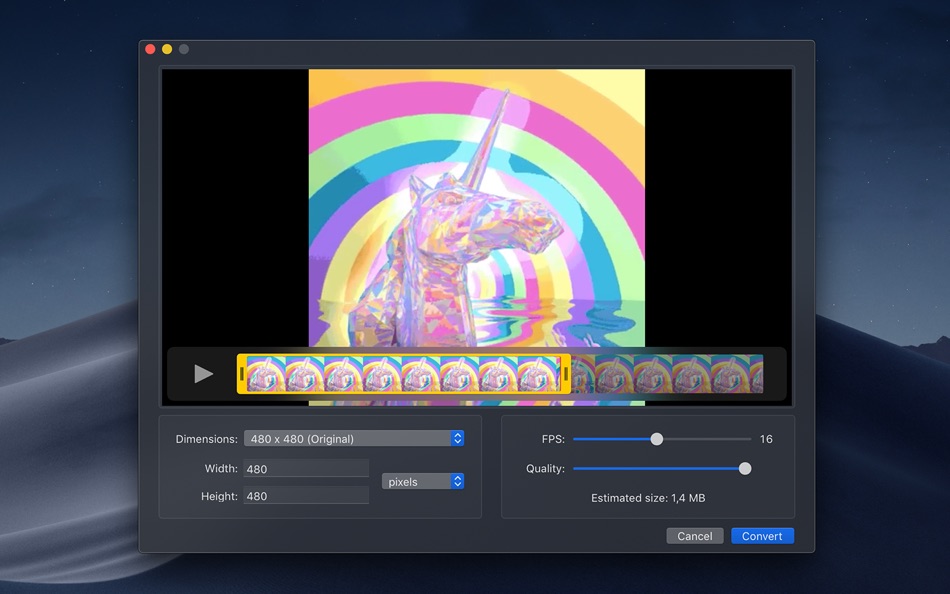
Gifski converts videos to animated GIFs that use thousands of colors per frame. This is made possible by some fancy features for efficient cross-frame palettes and temporal dithering.
Keep in mind that Gifski is a converter, not a GIF creator. It will never support features like adding text and elements to a GIF. That's better done in a proper video editing app.
■ Features
- Video trimming and cropping
- Precise control of dimensions
- Control over GIF looping and bouncing (yo-yo) playback
- Adjust the speed
- Loop delay
- GIF preview before converting
- Copy, share, or drag the GIF
- Share extension
- System service
- Optionally produce smaller lower quality GIFs
- Automatically save GIFs to Downloads
- Generate up to 50 FPS GIFs (for showing off design work on Dribbble)
- Export modified video without converting to GIF
- Shortcuts support
■ To convert, either:
- Drag and drop your video onto the window or the Dock icon.
- Click the “Open” button in the window or in the “File” menu and then choose a video.
- Right-click a video in Finder and select this app in the “Open With” menu.
Gifski supports all the video formats that macOS supports (.mp4 or .mov with H264, HEVC, ProRes, etc). The QuickTime Animation format is not supported. Use ProRes 4444 XQ instead. It's more efficient, more widely supported, and like QuickTime Animation, it also supports alpha channel.
■ Share extension
Gifski includes a share extension that lets you share videos to Gifski. Just select Gifski from the Share menu of any macOS app.
You can share a macOS screen recording with Gifski by clicking on the thumbnail that pops up once you are done recording and selecting “Share” from there.
■ System service
Gifski includes a system service that lets you quickly convert a video to GIF from the “Services” menu in any app that provides a compatible video file.
■ Bounce (yo-yo) GIF playback
Gifski includes the option to create GIFs that bounce back and forth between forward and backward playback. This option doubles the number of frames in the GIF so the file size will double as well.
■ Tips
‣ Quickly copy or save the GIF
After converting, press Command+C to copy the GIF or Command+S to save it.
‣ Change GIF dimensions with the keyboard
In the width/height input fields in the editor view, press the arrow up/down keys to change the value by 1. Hold the Option key meanwhile to change it by 10.
■ FAQ
‣ The generated GIFs are huge!
The GIF image format is very space inefficient. It works best with short video clips. Try reducing the dimensions, FPS, or quality.
‣ Why are 60 FPS and higher not supported?
Browsers throttle frame rates above 50 FPS, playing them at 10 FPS.
■ Support
Click the “Send Feedback” button in the “Help” menu in the app.
Скриншоты


Ad
История цен
- Текущая цена: Бесплатно
- Минимум: Бесплатно
- Максимум: Бесплатно
Отслеживайте цены
Дополнительная информация
- Дата выпуска:
- Категория:
macOS Приложения›Фото и видео - Операционные системы:
macOS,macOS 26.0 и выше - Размер:
4 Mb - Поддерживаемые языки:
English - Возрастные ограничения:
4+ - Mac App Store Рейтинг:
0
 https://sindresorhus.com/gifski
Что нового
- Версия: 3.0.0
- Обновлено:
- - The app now requires macOS 26. You can get the last macOS 15 compatible version from the app's website.
- Added the ability to crop the video.
- Added a GIF preview feature.
- Added the ability to export the modified video (cropped and/or trimmed).
- Added a loop delay setting.
- Added an "Automatically save GIFs to Downloads" setting.
Разработчик
- Sindre Sorhus
- Платформы: iOS Приложения (21) macOS Приложения (34)
- Списки: 19 + 19
- Очки: 222 + 2,110 ¡
- Рейтинги: 1 (2)
- Комментарии: 0
- Скидки: 0
- Видео: 0
- RSS: Подписаться
Списки (1)
- Gifski

Очки (7)
-

- 1,906 sam
- +1
-
- 534 MichaelTheGeek
- +1
-
- 3,777 Dragon
- +1
-
- 91 Dekaritae
- +1
-
- 576 Raphael Pinheiro
- +1
-
- 2,979 바람처어럼
- +1




Рейтинги (0)
0 ☹️
Комментарии (0)
Будьте первым, кто оставит комментарий 🌟
«Gifski». Платформа: macOS. Категория: Фото и видео. Разработчик: «Sindre Sorhus». Первый выпуск: . Последнее обновление: . Текущая цена: бесплатно. Этот материал пока не получил оценок и обзоров на AppAgg. Списки: публичные 1, приватные 2. Отслеживаемые баллы: подтверждено 7, косвенно 0. Доступные языки: English. AppAgg отслеживает историю цен, рейтинги и отзывы пользователей для «Gifski». Следите за будущими скидками и обновлениями через RSS. AppAgg не размещает приложения и не распространяет программное обеспечение. Все товарные знаки, логотипы и снимки экрана принадлежат их владельцам.
Gifski Короткий URL: Скопировано!- 🌟 Поделиться
- Mac App Store
Похожие
- -100%
- After Focus - Photo Background Blur Bokeh Effects
- macOS Приложения: Фото и видео От: 秀英 朱
- ▼ Бесплатно
$2.99-100% - Списки: 0 + 1 0 0
- Очки: 32 + 0 Версия: 1.5.5 On Sale. Original $29.99. Don't forget to download "Super PhotoCut" - A great photo background eraser. 50% OFF! After Focus professionally adds focus and depth to your photos without ... ⥯
-
- Hot Viewer
- macOS Приложения: Фото и видео От: Jupiter Valley LLC
- Бесплатно
- Списки: 1 + 2 0 0
- Очки: 16 + 0 Версия: 1.6.1 Hot Viewer is keyboard and mouse controlled viewer intended to make viewing of files easy. Inspired by good ol' Irfan view it uses simply shortcuts: - space to move to next file in ... ⥯
-
- Magic Hider Lite
- macOS Приложения: Фото и видео От: Pavel Kosykh
- * Бесплатно
- Списки: 1 + 1 0 0
- Очки: 13 + 0 Версия: 1.4.2 New level of hiding of any part of an image, this "smart" application will automatically find parts to hide. Just choose what you need to filter - faces or text*, than drag and drop ... ⥯
-
- Minitube for YouTube
- macOS Приложения: Фото и видео От: Flavio Tordini
- * Бесплатно
- Списки: 0 + 1 0 0
- Очки: 13 + 0 Версия: 4.0.3 Minitube is a lightweight and elegant YouTube application for your Mac. With Minitube you can watch YouTube videos in a new way: you type a keyword, Minitube gives you an endless video ⥯
-
- Movavi Screen Recorder
- macOS Приложения: Фото и видео От: Movavi Emea LLC
- * Бесплатно
- Списки: 0 + 1 0 0
- Очки: 13 + 0 Версия: 24.7.1 Record any screen action you want with our handy app Movavi Screen Recorder! Capture video of your display and grab sound. Add a personal touch with webcam overlays. Engage your ... ⥯
-
- Camcorder Video Converter
- macOS Приложения: Фото и видео От: effectmatrix
- Бесплатно
- Списки: 0 + 1 0 0
- Очки: 12 + 0 Версия: 3.40 On Sale - Original $24.99. Camcorder Video Converter, automatically import videos from various digital AVCHD/MOD/TOD/XDCAM Camcorders and DVs, then convert to various different ... ⥯
-
- Normally
- macOS Приложения: Фото и видео От: Gustav Gaidelevicius
- * Бесплатно
- Списки: 0 + 1 0 0
- Очки: 11 + 0 Версия: 2026.04.24 If you download videos, you know the problem: audio levels are all over the place. One file barely audible, the next painfully loud. Normally fixes this automatically. Point it at your ⥯
-
- Photo Pixel Filter
- macOS Приложения: Фото и видео От: Jan Nutbroek
- Бесплатно
- Списки: 0 + 2 0 0
- Очки: 11 + 0 Версия: 1.9 Unleash Your Creativity with Our User-Friendly Photo Editing App! Master the art of photo editing with ease using our intuitive application, designed to eliminate the learning curve. ... ⥯
-
- Video Subtitler
- macOS Приложения: Фото и видео От: Anand
- Бесплатно
- Списки: 0 + 1 0 0
- Очки: 10 + 0 Версия: 3.0 Super simple to use. Just 3 steps: 1. Drag & Drop any video. 2. Add Subtitle(s). 3. Save Video. That s it! Two Modes. Switch between them just with a click of a button. Hard Subtitle ... ⥯
-
- Domino Image Viewer
- macOS Приложения: Фото и видео От: 思奇 徐
- * Бесплатно
- Списки: 0 + 1 0 0
- Очки: 9 + 0 Версия: 1.3.5 Domino Image Viewer is a professional macOS app for local image viewing and multi-image comparison. Unlike ordinary image viewers built for single-image preview or casual browsing, ... ⥯
-
- Image Converter - Kompressor
- macOS Приложения: Фото и видео От: Lucas Fischer
- * Бесплатно
- Списки: 0 + 2 0 0
- Очки: 9 + 0 Версия: 1.3.1 Kompressor makes image conversion a breeze! For ease of use, you can drag n' drop to convert between over 50 supported image formats like JPEG, HEIC, AVIF, WebP, PNG, camera raw ... ⥯
- -100%
- MiniTube Player
- macOS Приложения: Фото и видео От: Another Half
- ▼ Бесплатно
$0.99-100% - Списки: 0 + 1 0 0
- Очки: 9 + 0 Версия: 26.0.0 MiniTube player is a simple video player based on YouTube™ links, you can run videos, and playlists. The Goal of this application is to show you the video as Picture-in-Picture style ... ⥯