ที่บันทึกไว้
เลือกชื่อที่จะแสดงในเมนูที่บันทึกไว้ของคุณ
เสร็จแล้ว
| ผู้พัฒนา: | Movavi Emea LLC (9) | ||
| ราคา: | * ฟรี | ||
| การจัดอันดับ: | 0 | ||
| ความเห็น: | 0 โพสต์ความคิดเห็น | ||
| รายการ: | 1 + 1 | ||
| แต้มแล: | 12 + 0 ¡ | ||
| Mac App Store | |||
คำอธิบาย

Take image editing to the next level with Movavi:
► Create beautiful collages and humorous photo manipulations with the Change Background tool. Thanks to Movavi’s unique optimized algorithm, people in pictures can be selected automatically, and easy-to-use tools separate objects from the background in no time. Then replace the current background with a solid color or apply a different image – it’s that simple.
► Easily remove random bystanders, intrusive fences, or ugly power lines from your travel panoramas with AI.
► Handy retouching tools help you hide skin blemishes, remove wrinkles, reduce shine, whiten teeth, and remove red-eye.
► Give yourself a complete makeover with our all-in-one make-up kit: experiment with different shades of blusher, eyeshadow and lipstick, redefine eyebrows, add mascara and foundation. Give your eyes or hair a new color. Want more? You can even reshape your face and enlarge your eyes!
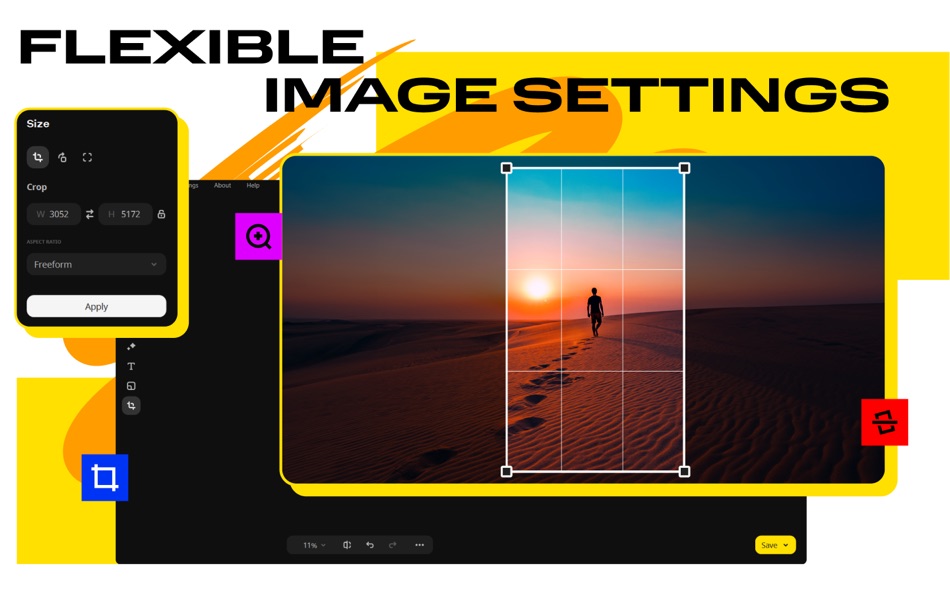
► Movavi makes it easy to fix the most common image flaws: salvage overexposed or overly dark images manually or let the smart automatic filter improve the quality of your photos, and remove digital noise. Work with image elements individually: select problem areas and adjust the settings to get the result you want. Take care of composition issues, too: crop, rotate, and flip images with one click.
► Rescue old photos with the smart restoration tool: get rid of scratches and creases, apply magic enhancement to revive colors.
► Finally, give your shots that special touch with stylish presets, expressive text captions, elegant frames, and more!
PRICING
Movavi Photo Editor requires a subscription. There's also a trial version so you can try the program before you commit.
LEGAL
The duration and price of each subscription are shown on the Movavi Photo Editor plan page at the time of purchase. Payment will be charged to your iTunes account at the time of purchase. Subscriptions automatically renew unless auto-renewal is turned off no later than 24 hours before the end of the current period. Subscriptions and auto-renewal can be managed or turned off in your iTunes account settings. Any unused portion of a free trial period is forfeited as soon as a subscription is purchased.
Terms of Use: https://www.movavi.com/tos.html
Privacy Policy: https://www.movavi.com/privacy.html
We’re always happy to hear from you and help you out if you’re stuck with something: movavi.com/support.html
Ad
ภาพหน้าจอ







ประวัติราคา
-
* การซื้อภายในแอพ - วันนี้: ฟรี
- ต่ำสุด: ฟรี
- มากที่สุด: $29.99
ติดตามราคา
ข้อมูลเพิ่มเติม
- วันที่วางจำหน่าย:
- หมวดหมู่:
macOS แอป›การถ่ายภาพ - ระบบปฏิบัติการ:
macOS,macOS 10.15 และสูงกว่า - ขนาด:
88 Mb - ภาษาที่สนับสนุน:
Chinese,Dutch,English,French,German,Italian,Japanese,Korean,Portuguese,Russian,Spanish,Turkish - การจัดประเภทเนื้อหา:
4+ - Mac App Store คะแนนโดย:
0 - เว็บไซท์:
 http://www.movavi.com/mac-photo-editor/
ผู้พัฒนา
รายการ (1)
- Movavi Photo Editor: Edit Easy

แต้มแล (12)






การจัดอันดับ (0)
0 ☹️
ความเห็น (0)
เป็นคนแรกที่แสดงความเห็น 🌟
«Movavi Photo Editor: Edit Easy». แพลตฟอร์ม: macOS. หมวดหมู่: การถ่ายภาพ. ผู้พัฒนา: «Movavi Emea LLC». การเปิดตัวครั้งแรก: . อัปเดตล่าสุด: . ราคาปัจจุบัน: ฟรี. ชื่อนี้ยังไม่ได้รับการให้คะแนนหรือบทวิจารณ์บน AppAgg รายการ: สาธารณะ 1, ส่วนตัว 1. จุดที่ติดตาม: ยืนยันแล้ว 12, ทางอ้อม 0. ภาษาที่ใช้ได้: Chinese, Dutch, English, French, German, Italian, Japanese, Korean, Portuguese, Russian, Spanish, Turkish. AppAgg ติดตามประวัติราคา การให้คะแนน และคำติชมของผู้ใช้ «Movavi Photo Editor: Edit Easy». ส่วนลดและอัปเดตในอนาคต: RSS. AppAgg ไม่ได้โฮสต์แอปพลิเคชันหรือแจกจ่ายซอฟต์แวร์ เครื่องหมายการค้า โลโก้ และภาพหน้าจอทั้งหมดเป็นของเจ้าของที่เกี่ยวข้อง
Movavi Photo Editor: Edit Easy URL แบบสั้น: คัดลอกแล้ว!- 🌟 แชร์
- Mac App Store
คล้ายกัน
-
 Photo Editor for Seedream
- macOS แอป: การถ่ายภาพ
- ผู้พัฒนา: Yasir Islam
- ราคา: * ฟรี
- การจัดอันดับ: 0
- ความเห็น: 0
- รายการ: 0 + 0
- แต้มแล: 0 + 0
- อัปเดต:
- เวอร์ชัน: 1.3 Photo Editor for Seedream is an all-in-one AI photo editing app that turns your imagination into art. Create stunning visuals with Text to Image or transform existing photos using ...⥯
-
- Photo Editor
- macOS แอป: การถ่ายภาพ
- ผู้พัฒนา: Codeway
- ราคา: * ฟรี
- การจัดอันดับ: 0
- ความเห็น: 0
- รายการ: 0 + 0
- แต้มแล: 0 + 0
- อัปเดต:
- เวอร์ชัน: 1.1 Fotoris AI Photo Editor is your ultimate creative powerhouse packed with advanced AI tools to transform any photo into something extraordinary. Create, design, edit, and imagine ...⥯
-
- Photo Meta Edit
- macOS แอป: การถ่ายภาพ
- ผู้พัฒนา: Tranquillity Base
- ราคา: $4.99
- การจัดอันดับ: 0
- ความเห็น: 0
- รายการ: 0 + 2
- แต้มแล: 1 + 0
- อัปเดต:
- เวอร์ชัน: 3.07 Photo Meta Edit is a powerful tool that lets you easily edit various types of photo metadata, including Exif, GPS, IPTC, and XMP, in JPEG, TIFF, HEIC, and PNG files. Supported Metadata⥯
-
- Photo Editor: Presets, Filters
- macOS แอป: การถ่ายภาพ
- ผู้พัฒนา: TS Technology
- ราคา: * ฟรี
- การจัดอันดับ: 0
- ความเห็น: 0
- รายการ: 0 + 0
- แต้มแล: 0 + 0
- อัปเดต:
- เวอร์ชัน: 1.2 Photo Editor - AI Background Eraser offers everything you want to edit pictures on this pics art tour. 100+ stylish effects, filters, photo collage, blur photo, grids, change ...⥯
-
- Photo Editor: Filters & Frames
- macOS แอป: การถ่ายภาพ
- ผู้พัฒนา: HESHAM ABDEL GAWAD
- ราคา: $14.99
- การจัดอันดับ: 0
- ความเห็น: 0
- รายการ: 0 + 0
- แต้มแล: 0 + 0
- อัปเดต:
- เวอร์ชัน: 1.0.3 Transform Your Photos with Our Powerful Photo Editor! Unlock your creativity with our all-in-one photo editor App,Choose from multiple one click Filters,Frames and Overlays and your ...⥯
-
- Photo 360 Pro - Amazing Photo Editor and Stylish Filters Effects
- macOS แอป: การถ่ายภาพ
- ผู้พัฒนา: LI HUNG WANG
- ราคา: $29.99
- การจัดอันดับ: 0
- ความเห็น: 0
- รายการ: 0 + 0
- แต้มแล: 0 + 0
- อัปเดต:
- เวอร์ชัน: 1.0 Photo 360 brings your amazing collection of filters and photo effects on the Mac App Store, provides 260 filter effects beloved by professional photographers. Photo 360 themes vary ...⥯
-
- Photo Editor Irix HDR Classic
- macOS แอป: การถ่ายภาพ
- ผู้พัฒนา: Binaire
- ราคา: * ฟรี
- การจัดอันดับ: 0
- ความเห็น: 0
- รายการ: 0 + 1
- แต้มแล: 6 + 0
- อัปเดต:
- เวอร์ชัน: 2.3.58 Irix HDR Classic brings true to life HDR photo editing offering one click edits to full scale pro editing toolset. Sky Replacement (SkyXpress)- Replace skies and introduce weather. ...⥯
-
- Photo Editor: Cut Out Shapes
- macOS แอป: การถ่ายภาพ
- ผู้พัฒนา: Any Case Solutions
- ราคา: * ฟรี
- การจัดอันดับ: 0
- ความเห็น: 0
- รายการ: 0 + 0
- แต้มแล: 2 + 0
- อัปเดต:
- เวอร์ชัน: 4.3.1 Enhance your favorite pictures and selfies with our fast & efficient photo eraser! Remove, change, blur background and unnecessary objects by using adjustable brushes. Use a wide range⥯
-
- Movavi HD Video Converter
- macOS แอป: การถ่ายภาพ
- ผู้พัฒนา: Movavi Emea LLC
- ราคา: $24.99
- การจัดอันดับ: 0
- ความเห็น: 0
- รายการ: 0 + 0
- แต้มแล: 0 + 0
- อัปเดต:
- เวอร์ชัน: 22.1.1 Movavi s HD Video Converter is perfect for working with large files. It ensures high-speed conversion with no loss of quality just what you need for 4K resolution! OPTIMIZATION FOR HD ...⥯
-
- Batch Photo Editor - Watermark, Resize and Effects
- macOS แอป: การถ่ายภาพ
- ผู้พัฒนา: effectmatrix
- ราคา: $4.99
- การจัดอันดับ: 0
- ความเห็น: 0
- รายการ: 0 + 1
- แต้มแล: 21 + 0
- อัปเดต:
- เวอร์ชัน: 1.0.0 On sale. Original $14.99. Download it Now. Don't forget to download "Super PhotoCut" which replace photo background within 1 min. 50% OFF! Batch Photo Editor, an easy-to-use image bulk⥯
-
- Visio AI Studio Photo Editor
- macOS แอป: การถ่ายภาพ
- ผู้พัฒนา: Neural Techlabs
- ราคา: * ฟรี
- การจัดอันดับ: 0
- ความเห็น: 0
- รายการ: 0 + 0
- แต้มแล: 1 + 0
- อัปเดต:
- เวอร์ชัน: 1.0.4 Transform your ideas into stunning visuals with Visio AI Studio Photo Editor, the intelligent macOS photo editor powered by advanced Google AI. Whether you're an entrepreneur, artist, ...⥯
-
- Fotor: AI Photo Editor, Design
- macOS แอป: การถ่ายภาพ
- ผู้พัฒนา: Chengdu Everimaging Science and Technology Co., Ltd
- ราคา: * ฟรี
- การจัดอันดับ: 5 (1)
- ความเห็น: 0
- รายการ: 1 + 1
- แต้มแล: 5 + 0
- อัปเดต:
- เวอร์ชัน: 5.1.9 Join 800 million creators worldwide on Fotor! Designed for Mac, Fotor opens directly from your desktop and gives you powerful AI tools to create stunning photos and videos no editing ...⥯
-
- Adobe Lightroom: Photo Editor
- macOS แอป: การถ่ายภาพ
- ผู้พัฒนา: Adobe Inc.
- ราคา: * ฟรี
- การจัดอันดับ: 0
- ความเห็น: 0
- รายการ: 3 + 2
- แต้มแล: 4 + 0
- อัปเดต:
- เวอร์ชัน: 9.2 ** Apple App Store Awards 2024 Winner Mac App of the Year ** A qualifying Adobe Photoshop Lightroom subscription is required. Non-subscribers may try the product free for 7 days before⥯
-
- PhotoScape X - Photo Editor
- macOS แอป: การถ่ายภาพ
- ผู้พัฒนา: Mooii Tech
- ราคา: ฟรี
- การจัดอันดับ: 5 (1)
- ความเห็น: 0
- รายการ: 2 + 0
- แต้มแล: 3 + 0
- อัปเดต:
- เวอร์ชัน: 4.2.1 All-in-One: Photo Editor, Batch Editor, Photo Viewer, Cut Out, Collage Maker, Animated GIF Creator, Combine, Print, Screen Capture, Color Picker, RAW image and More. PhotoScape X is a ...⥯