
| Dezvoltator: | 晨亮 贾 (4) | ||
| Preț: | * Gratuit | ||
| Clasificări: | 0 | ||
| Recenzii: | 0 Scrie o recenzie | ||
| Comentarii: | 0 Postează comentariu | ||
| Liste: | 1 + 0 | ||
| Punctele: | 6 + 0 ¡ | ||
| Mac App Store | |||
Descriere
SQLiteFlow is an SQLite editor for Mac & iOS which is intuitive, stable and reliable to use.
It includes the following features:
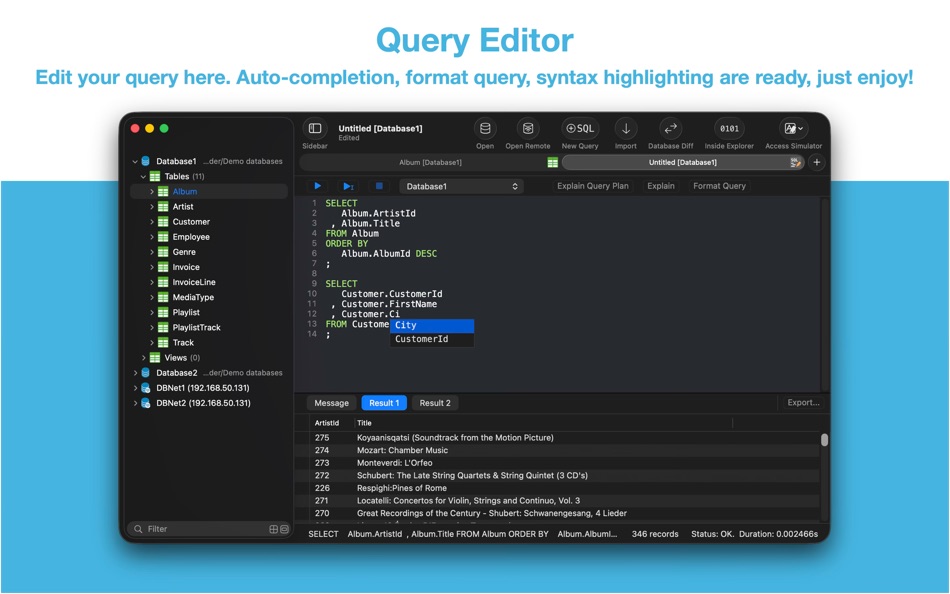
Query Editor
• Multi-query execution.
• Customize syntax highlighting.
• SQL auto-completion.
• Format query.
• Copy query as code.
• Paste recent query sessions.
• Explain query.
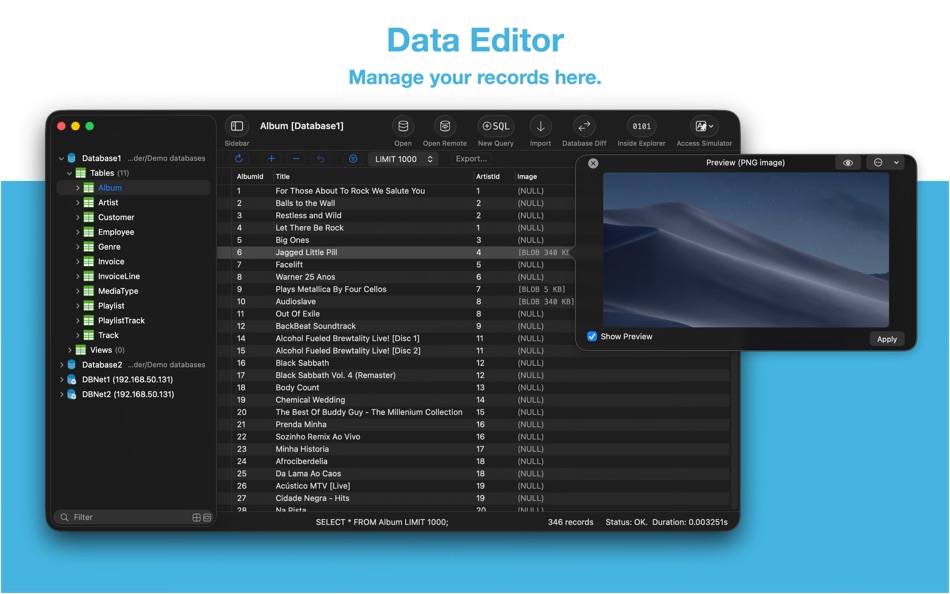
Data Editor
• View, edit, add or remove records.
• View table data with a convenient data filter.
• Edit blob data as hex or show it as preview if possible.
• Edit JSONB as JSON.
• Copy data to CSV,JSON, Markdown, and to Insert Statement or Update Statement if possible.
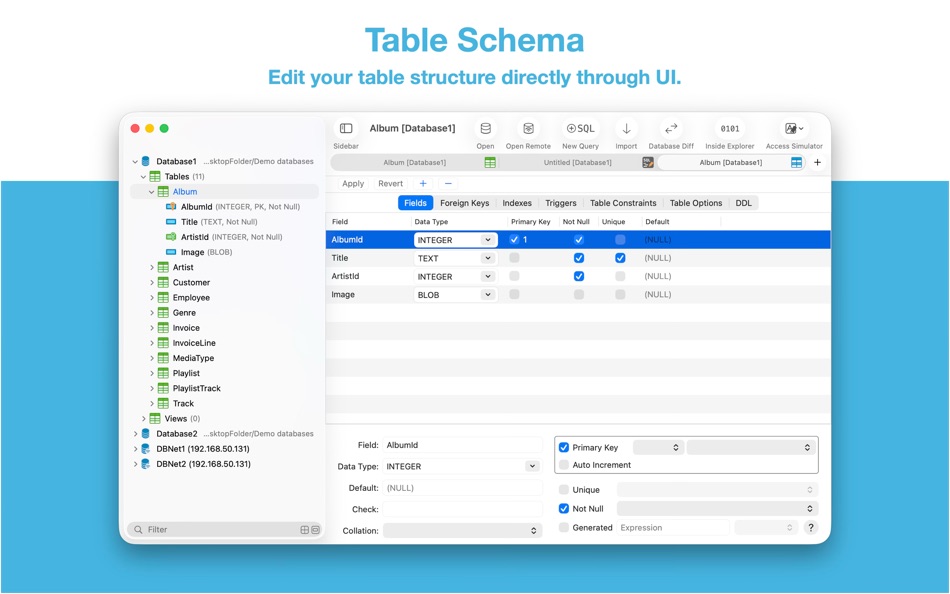
Table Schema
• View, edit or add table fields, indexes, foreign keys, checks.
• View triggers.
• View DDL.
• Preview the query that for altering table.
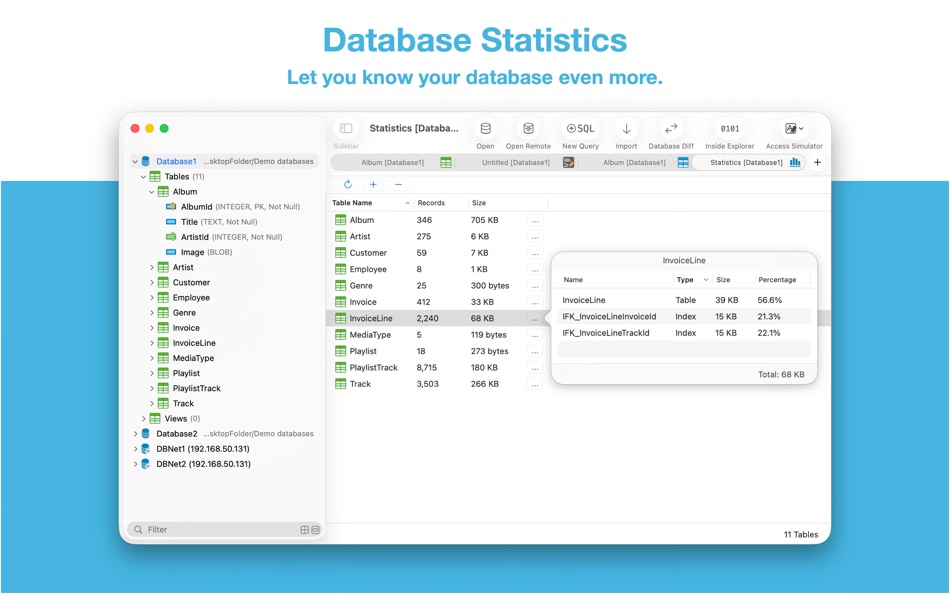
Database Statistics
• Display tables count and each table's records count.
• Display total size of each table, size of each table's content and size of each table's indexes.
ER Diagram
• Supports display ER diagram.
• Supports toggle field type hide or show.
• Supports Relationship Guessing.
• Supports copy as Mermaid markdown.
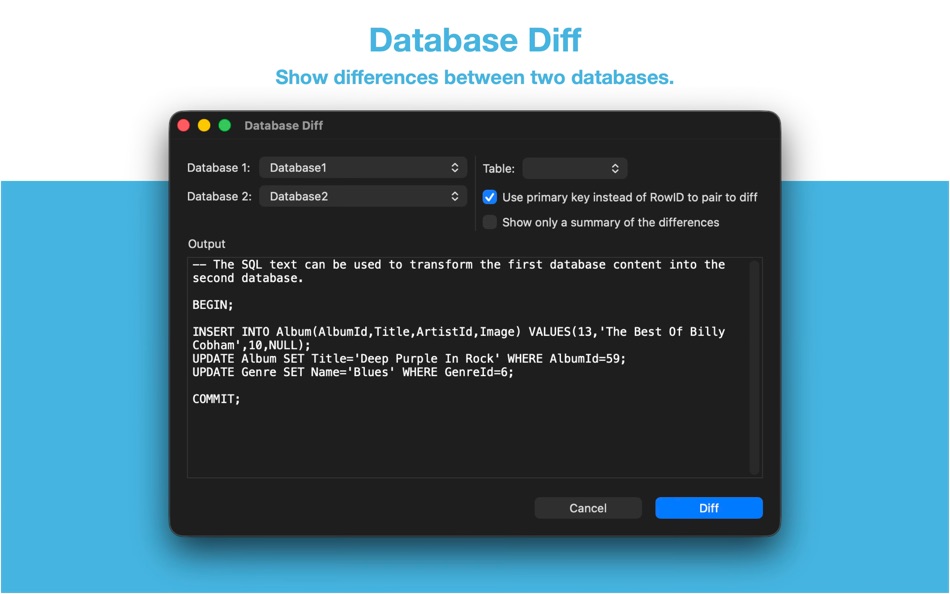
Database Diff
• Supports generate SQL text that can let you transform a database into another.
• Supports show a summary of the differences between two databases.
Import
• Supports import CSV data to a table.
• Supports import JSON data to a table.
• Supports import data by SQL file.
Export
• In Data Editor or Query Results, supports export data to CSV, JSON, Markdown or List.
• In Data Editor, supports export data to Insert Statement or Update Statement if possible.
Database Encryption
• Supports access encrypted SQLite database which is encrypted by SQLCipher library.
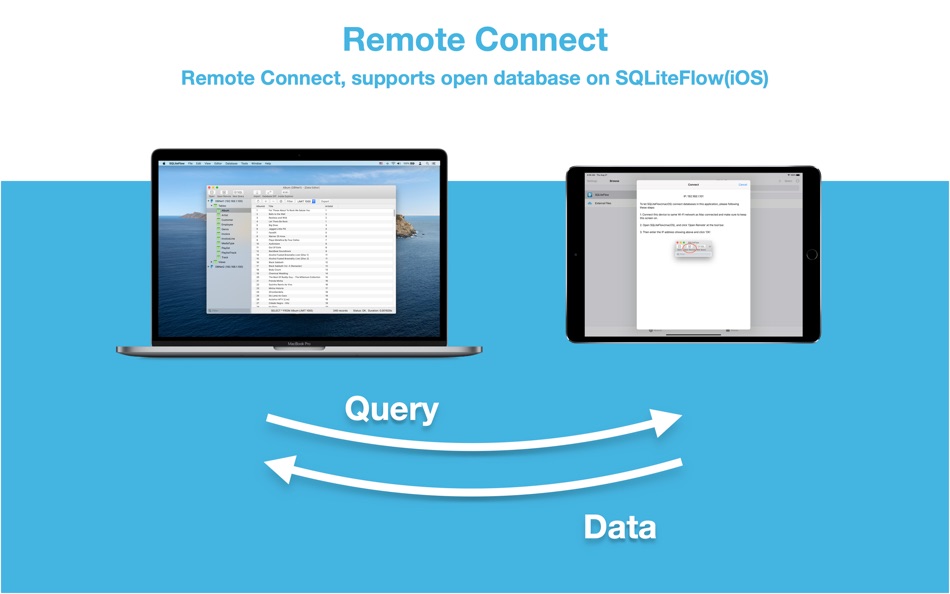
Remote Connect
• Supports open remote SQLite databases on SQLiteFlow(iOS). One use case is that you can debug query performance issue on your iPhone or iPad directly through your Mac.
Dark Mode
• Supports Dark Mode for macOS Mojave or later.
Drag and Drop
• Open databases and SQL scripts.
• Create multiple windows.
Access Apple simulator
• Supports access Apple simulator. So you can open your app's Documents directory more easily than before when developing your apps.
Handle Database File Name or Directory Changes
• One of a cool thing that benefit from this feature is, this makes SQLiteFlow can work friendly with your SQLite databases in iOS simulator.
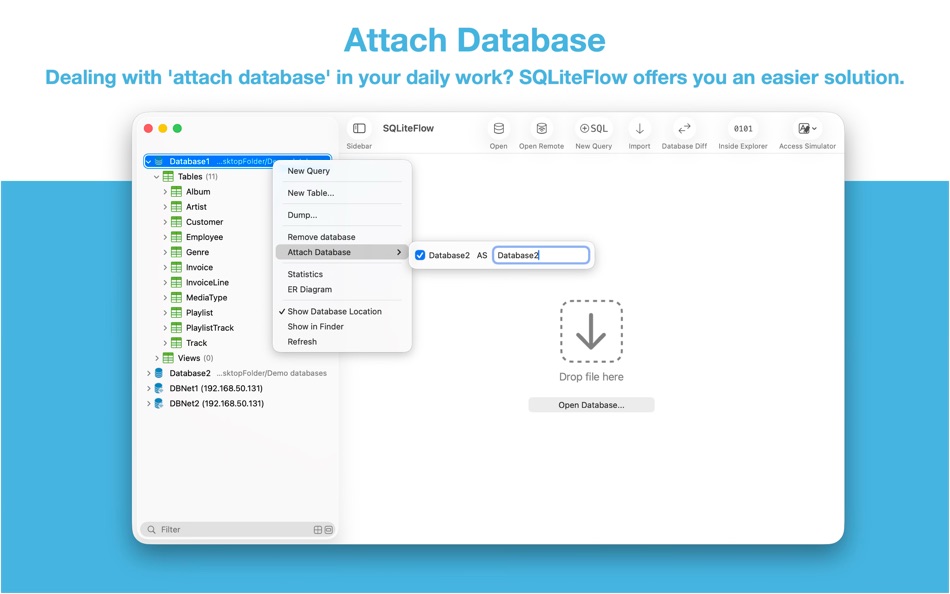
Attach Database
• Attach opened databases without any code. This is a very handy way to do attach database thing, and could save a lot of your time from writing ATTACH DATABASE commands if your business mode relies on it.
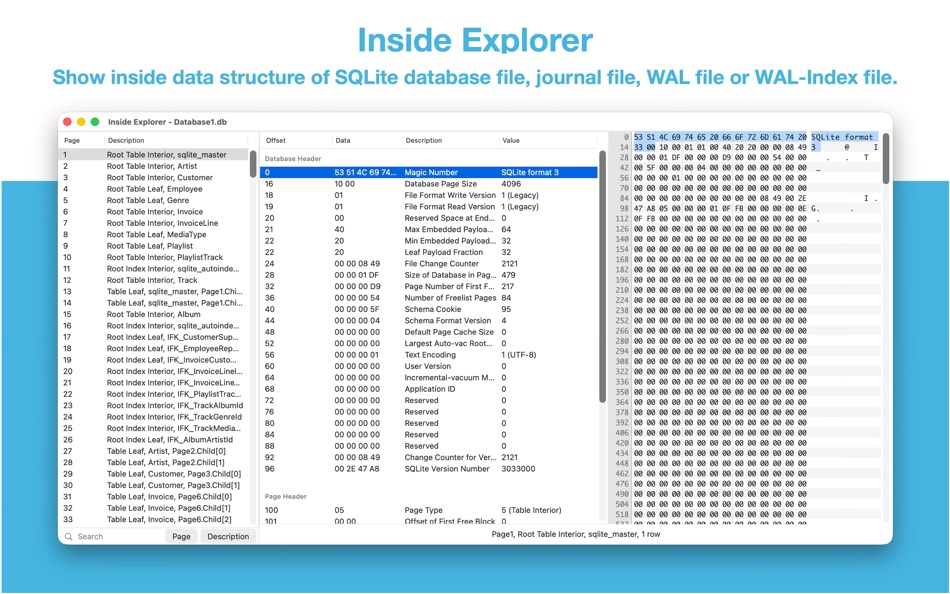
Inside Explorer
• Show binary data structure of SQLite database file, journal file, WAL file or WAL-Index file.
Shortcuts
• Supports "Run Query" action.
• Supports "Import CSV" action.
• Supports "Import JSON" action. (Requires macOS 14.0 or later.)
Create Function
• Supports create scalar function using a simple JavaScript routine.
Load Extension
• Supports SQLite load extension.
LLDB Co-worker
• Supports sfopen command. Let you open a copy of a temporary local database that originally in debugged device.
• Supports sfsave command. Let you copy the temporary local database (that originally created by sfopen command) to debugged device.
Terms of Use: https://www.apple.com/legal/internet-services/itunes/dev/stdeula/
Ad
Capturi de ecran


Istoricul prețurilor
-
* Achiziții în aplicație - Azi: Gratuit
- Minim: Gratuit
- Maxim: $9.99
Urmăriți prețurile
Ce este nou
- Versiune: 6.8.1
- Actualizată:
- • Update SQLite library to version 3.51.3 (2026-03-13).
• Table Schema. Avoid generating same default new field name when adding new fields.
• Table Schema. When remove a column through UI, if this column has a single-column unique constraint, this unique constraint will be removed alongside with this column to avoid further alter table grammar error.
Dezvoltator
- 晨亮 贾
- Platforme: iOS Aplicații (2) macOS Aplicații (2)
- Liste: 1 + 1
- Punctele: 10 + 43 ¡
- Clasificări: 0
- Recenzii: 0
- Comentarii: 0
- Reduceri: 0
- Videoclipuri: 0
- RSS: Abonează-te
Punctele (6)
-

- 523 expat4i
- +1
-
- 40 Mick1234
- +1
-
- 1,100 眰恦(眰恦)
- +1
-
- 3,028 바람처어럼
- +1
-
- 11,118 Simon Chan
- +1
-
- 16 HoMeCracKeR
- +1





Clasificări (0)
0 ☹️

Recenzii (0)
Fii primul care a revizuit 🌟
Informații suplimentare
- Versiune: 6.8.1
- Categorie:
macOS Aplicații›Instrumente - SO:
macOS,macOS 14.0 sau o versiune ulterioară - Mărimea:
7 Mb - Limbă acceptată:
Chinese,English,Japanese - Evaluarea conținutului:
4+ - Mac App Store Evaluare:
0 - Actualizată:
- Data lansării:
Agendă
- Website:
 https://www.sqliteflow.com/
«SQLiteFlow - SQLite Editor». Platforma: macOS. Categorie: Instrumente. Dezvoltator: «晨亮 贾». Prima lansare: . Ultima actualizare: . Prețul actual: gratuit. Acest titlu nu a primit încă evaluări sau recenzii pe AppAgg. Liste: publice 1, private 0. Puncte urmărite: confirmate 6, indirecte 0. Limbi disponibile: Chinese, English, Japanese. AppAgg urmărește istoricul prețurilor, evaluările și feedbackul utilizatorilor pentru «SQLiteFlow - SQLite Editor». Urmăriți reducerile și actualizările viitoare prin RSS. AppAgg nu găzduiește aplicații și nu distribuie software. Toate mărcile comerciale, siglele și capturile de ecran aparțin proprietarilor respectivi.
Comentarii (0)
Fii primul care comentează 🌟
SQLiteFlow - SQLite Editor Adresă URL scurtă: Copiate!- 🌟 Trimite
- Mac App Store
Ad
Similare
-
- Base - SQLite Editor
- macOS Aplicații: Instrumente De: Menial
- * Gratuit
- Liste: 0 + 1 Clasificări: 0 Recenzii: 0
- Punctele: 0 + 0 0 Versiune: 3.3.0 Base is for creating, designing, editing and browsing SQLite 3 database files. It's small, powerful and comfortable - a proper macOS application that's fast to launch and quick to get ... ⥯
-
- Strix SQLite Editor
- macOS Aplicații: Instrumente De: Robert Laabs
- $9.99
- Liste: 0 + 0 Clasificări: 0 Recenzii: 0
- Punctele: 0 + 0 0 Versiune: 1.1.1 SQLiteBrowser is a powerful native macOS app for viewing, querying, and editing SQLite databases. Built with SwiftUI for blazing-fast performance. KEY FEATURES SAFE BY DEFAULT Your ... ⥯
-
- CoreData Studio: SQLite Editor
- macOS Aplicații: Instrumente De: Momentarium LLC
- $4.99
- Liste: 0 + 0 Clasificări: 0 Recenzii: 0
- Punctele: 0 + 0 0 Versiune: 2.0 The Ultimate Developer Tool for CoreData and SwiftData. CoreData Studio is a professional SQLite viewer, editor, and database inspector built specifically for Apple developers. Stop ... ⥯
-
- SQLite Client by SQLPro
- macOS Aplicații: Instrumente De: Hankinsoft Development Inc
- $49.99
- Liste: 2 + 0 Clasificări: 0 Recenzii: 0
- Punctele: 0 + 0 0 Versiune: 2025.77 SQLPro for SQLite is an advanced sqlite editor. It has an easy to navigate interface, with the ability to perform the most basic to advanced tasks. Features include: + Syntax ... ⥯
-
- SQLite Diff
- macOS Aplicații: Instrumente De: .com Solutions Inc.
- $9.99
- Liste: 0 + 0 Clasificări: 0 Recenzii: 0
- Punctele: 0 + 0 0 Versiune: 1.31.0 SQLite Diff is a graphical comparison tool for SQLite database files, comparing both the schema and the data. Schema results include comparisons of tables/columns, triggers, indexes ... ⥯
-
- SQLite Names Extractor
- macOS Aplicații: Instrumente De: 春雷 杨
- Gratuit
- Liste: 0 + 0 Clasificări: 0 Recenzii: 0
- Punctele: 0 + 0 0 Versiune: 1.1.5 This is a small tool for developers. It extracts SQLite table and field names and generates C/C++/Objective-C #define constants. This will save much of tedious and repetitive keyboard ... ⥯
-
- Editor Usage for Cursor AI
- macOS Aplicații: Instrumente De: Inside Internet
- $3.99
- Liste: 0 + 0 Clasificări: 0 Recenzii: 0
- Punctele: 0 + 0 0 Versiune: 1.3.2 Effortlessly track your Cursor AI editor usage with our powerful menubar app, designed to keep you informed and in control of your requests. Whether you re a heavy user or just want to ⥯
-
- Native SQLite Manager
- macOS Aplicații: Instrumente De: Krystian Kolodziej
- $1.99
- Liste: 0 + 1 Clasificări: 0 Recenzii: 0
- Punctele: 9 + 0 0 Versiune: 1.31.1 Native SQLite Manager is an minimalist SQLite database manager. Application features: - support for many versions of SQLite - support for SQLCipher - SQLite extensions support - ... ⥯
-
- WYSIWYG HTML Editor
- macOS Aplicații: Instrumente De: Wicher B Donga
- $22.99
- Liste: 0 + 0 Clasificări: 5 (1) Recenzii: 0
- Punctele: 0 + 0 0 Versiune: 26.1 WYSIWYG HTML Editor just got a major upgrade. You can now work seamlessly with: - HTML and CSS - JavaScript - React and JSX - Vue - Alpine - Markdown or any combination of these in a ... ⥯
-
- SQLiteProX - 强大的SQLite编辑器
- macOS Aplicații: Instrumente De: 钦勇 郑
- Gratuit
- Liste: 0 + 0 Clasificări: 0 Recenzii: 0
- Punctele: 0 + 0 0 Versiune: 6.2.0 欢迎体验 SQLiteProX 一款专为 macOS 打造的高效 SQLite 数据库可视化管理软件。本软件突显三大核心功能 旨在让您轻松驾驭数据库 便捷数据查询和修改 利用直观的界面 您可以迅速进行数据查询和修改 无需深入学习复杂的 SQL 命令。SQLiteProX 提供了简便而强大的工具 让您轻松获取和修改所需数据。 表结构可视化编辑 ... ⥯
-
- Py Editor for Python
- macOS Aplicații: Instrumente De: Andromeda Corp LTD
- * Gratuit
- Liste: 1 + 0 Clasificări: 0 Recenzii: 0
- Punctele: 2 + 0 0 Versiune: 26.0.1 Python Editor is a native macOS application that lets you write and run Python code instantly, with no installation or configuration required. Python 3.11 is embedded directly in the ... ⥯
-
- Xliff Editor
- macOS Aplicații: Instrumente De: SweetP Productions, Inc.
- $19.99
- Liste: 0 + 2 Clasificări: 0 Recenzii: 0
- Punctele: 0 + 0 0 Versiune: 3.3.2 Xliff Editor - its fast to load, easy to use, and has a low memory footprint. Did we forget to mention Inline tag protection, Search & Replace, Regex search, Fuzzy search, intuitive ... ⥯
-
- Mermaid Live Editor
- macOS Aplicații: Instrumente De: Omer UCEL
- $4.99
- Liste: 0 + 0 Clasificări: 0 Recenzii: 0
- Punctele: 2 + 0 0 Versiune: 4.1 Transform text into beautiful diagrams with AI-powered assistance. This professional diagram editor supports Mermaid syntax to create flowcharts, timelines, user journey maps, charts, ... ⥯
- Nou
- Bonsai JSON Editor
- macOS Aplicații: Instrumente De: Jerry COMBS
- $5.99
- Liste: 0 + 0 Clasificări: 0 Recenzii: 0
- Punctele: 0 + 0 0 Versiune: 1.0 Bonsai is a native macOS JSON viewer, editor, and query tool built for developers who work with JSON every day. Open any JSON file and instantly explore it as an interactive, ... ⥯