
ที่บันทึกไว้
เลือกชื่อที่จะแสดงในเมนูที่บันทึกไว้ของคุณ
เสร็จแล้ว
| ผู้พัฒนา: | Logan K (1) | ||
| ราคา: | ฟรี | ||
| การประเมิน: | 6,040 ทอง | ||
| การจัดอันดับ: | 0 | ||
| ความเห็น: | 0 โพสต์ความคิดเห็น | ||
| รายการ: | 2 + 0 | ||
| แต้มแล: | 6 + 38 (3.3) ¡ | ||
| +1 แต้มแล | |||
คำอธิบาย

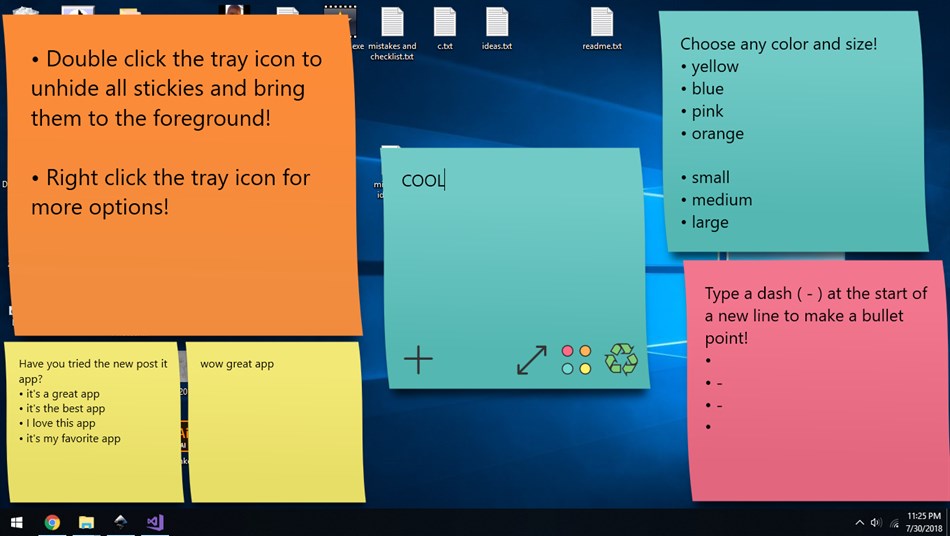
Just post a note on the desktop using the control buttons on each note, and also click the system tray icon for more options. Left clicking its system tray icon adds a new sticky if there are none, or brings all open stickies to the foreground. Right clicking the system tray icon shows controls such as recycling all sticky notes or quitting the app. You can also right click each sticky for more options such as pinning it to the foreground above all windows for ease of use when you need to reference a sticky while working in another program.
ภาพหน้าจอ
Ad
ประวัติราคา
- ราคาปัจจุบัน: ฟรี
- ต่ำสุด: ฟรี
- มากที่สุด: ฟรี
ติดตามราคา
การประเมิน AppAgg
6,040
การประเมิน AppAgg โดยประมาณสำหรับ
Virtual Sticky Notes
6,040 ทอง
การประเมินที่สูงขึ้นมักหมายถึงสัญญาณบน AppAgg ที่แข็งแกร่งขึ้น
อิงจาก: ความนิยม · คะแนนจากผู้ใช้ · ความสดใหม่ · ดีล · ข้อมูลร้านค้า · กิจกรรมชุมชน
คำนวณใหม่ทุกวันจากข้อมูล AppAgg ล่าสุด.
URL แบบสั้น: คัดลอกแล้ว!
มีอะไรใหม่
- เวอร์ชัน: PC
- อัปเดตล่าสุด:
ข้อมูลเพิ่มเติม
- วันที่วางจำหน่าย:
- หมวดหมู่:
Windows แอป›ผลผลิต - ระบบปฏิบัติการ:
HoloLens,PC,Surface Hub - ขนาด:
4 Mb - ภาษาที่สนับสนุน:
English - การจัดประเภทเนื้อหา:
EVERYONE - Windows Store คะแนนโดย:
3.3(38)
ผู้พัฒนา
- Logan K
- แพลตฟอร์ม: Windows แอป (1)
- รายการ: 2 + 0
- แต้มแล: 6 + 38 ¡
- การจัดอันดับ: 0
- ความเห็น: 0
- ลดราคา: 0
- วิดีโอ: 0
- RSS: ติดตาม
รายการ (2)
- Virtual Sticky Notes


แต้มแล (6)
-

- 1 Zsolt Kakucska
- +1
-
- 1 Reigning Phoenix
- +1
-
- 1 Khensani Mdaka
- +1
-
- 1 george chow
- +1
-
- 1 Phillip Vella
- +1




การจัดอันดับ (0)
0
ความเห็น (0)
เป็นคนแรกที่แสดงความเห็น
สรุป
Virtual Sticky Notes URL แบบสั้น: คัดลอกแล้ว!- แชร์
- Windows Store
«Virtual Sticky Notes». แพลตฟอร์ม: Windows. หมวดหมู่: ผลผลิต. ผู้พัฒนา: «Logan K». การเปิดตัวครั้งแรก: . อัปเดตล่าสุด: . ราคาปัจจุบัน: ฟรี. ชื่อนี้ยังไม่ได้รับการให้คะแนนหรือบทวิจารณ์บน AppAgg รายการ: สาธารณะ 2, ส่วนตัว 0. จุดที่ติดตาม: ยืนยันแล้ว 6, ทางอ้อม 38. ร้านค้า: Windows Store. คะแนนร้านค้า: 3.3. โหวต: 38. ภาษาที่ใช้ได้: English. AppAgg ติดตามประวัติราคา การให้คะแนน และคำติชมของผู้ใช้ «Virtual Sticky Notes». AppAgg ไม่ได้โฮสต์แอปพลิเคชันหรือแจกจ่ายซอฟต์แวร์ เครื่องหมายการค้า โลโก้ และภาพหน้าจอทั้งหมดเป็นของเจ้าของที่เกี่ยวข้อง ส่วนลดและอัปเดตในอนาคต: RSS
คล้ายกัน
-
- eBlu Sticky Notes HD
- Windows แอป: ผลผลิต โดย: eBlu for Sticky Notes
- * ฟรี
- รายการ: 0 0 0
- แต้มแล: 4 + 278 22K เวอร์ชัน: PC (eBlu Sticky Notes: Notepad, Note Sticker) can easily save your inspiration, notes, tasks, work, email, phone and other short information.It can create notes, to-do items, shorthand ... ⥯
-
- Sticky Notes Studio
- Windows แอป: ผลผลิต โดย: ModernApp Labs
- ฟรี
- รายการ: 0 0 0
- แต้มแล: 0 + 0 500 เวอร์ชัน: PC Sticky Note Studio lets you add and organize notes on a 2D canvas, just like a real sticky board. Easily add, resize, and move notes to create your perfect workspace. Seamless Note ... ⥯
-
- Sticky Notes Board
- Windows แอป: ผลผลิต โดย: Kodmistrz Studio
- $1.49
- รายการ: 0 0 0
- แต้มแล: 1 + 7 690 เวอร์ชัน: PC Create notes on your virtual corkboard and pin them to the Start screen! Assign your notes to filters, move them freely, and change their sizes and colors as you want. Due to the cloud ⥯
-
- Vov Sticky Notes
- Windows แอป: ผลผลิต โดย: VOVSOFT
- * ฟรี
- รายการ: 0 0 0
- แต้มแล: 0 + 1 530 เวอร์ชัน: PC For many people, the desktop is simply the place where shortcuts and icons are located, without any real functionality. Nonetheless, you can benefit from all the empty space on your ... ⥯
-
- DucklingMemo - Sticky notes app
- Windows แอป: ผลผลิต โดย: Goldfish
- * ฟรี
- รายการ: 0 0 0
- แต้มแล: 0 + 15 880 เวอร์ชัน: PC Ducklingmemo is a sticky note application for your desktop that offers a variety of features and a stylish design. -Customize color scheme and font -Dark mode -Automatic saving & ... ⥯
-
- Sticky Noter
- Windows แอป: ผลผลิต โดย: JimmyRespawn
- * ฟรี
- รายการ: 1 0 0
- แต้มแล: 1 + 20 1K เวอร์ชัน: PC Did you sometimes have issue with other window cover your note/text app when you were trying to copy and paste some text? Or you want to showcase/see other apps but still keep your ... ⥯
-
- Sticky List
- Windows แอป: ผลผลิต โดย: Rosu Ovidiu
- ฟรี
- รายการ: 0 0 0
- แต้มแล: 0 + 58 5K เวอร์ชัน: PC Sticky List is a versatile note taking and organizing app. With over 1,000,000 downloads, Sticky List is one of the best note taking app for Windows. Use Sticky List to create personal ⥯
-
- Notes for Windows 11
- Windows แอป: ผลผลิต โดย: MathewsJ
- ฟรี
- รายการ: 2 0 0
- แต้มแล: 0 + 3 670 เวอร์ชัน: PC Notes++ is a hierarchical note taking application with focus on building large personal knowledge bases. Notes can be arranged into arbitrarily deep tree and single note can be placed ... ⥯
-
- Sticky Tiles
- Windows แอป: ผลผลิต โดย: Nirmit Kavaiya
- * ฟรี
- รายการ: 1 0 0
- แต้มแล: 2 + 210 10K เวอร์ชัน: PC Post Notes, To Do Lists, Reminders etc. as Tiles on your Start Screen. Then, you can just glance at the tiles to get the information you care about in one place. Choose a size, Select ... ⥯
-
- Virtual Teleprompter (Online Meetings)
- Windows แอป: ผลผลิต โดย: ChrisOne AI Apps
- $1.99
- รายการ: 0 + 1 0 0
- แต้มแล: 1 + 0 550 เวอร์ชัน: PC Elevate your presentations, interviews, and online meetings with Virtual Teleprompter Elite your ultimate tool for seamless communication. Say goodbye to the hassle of switching ... ⥯
-
- Virtual Desktop Indicator
- Windows แอป: ผลผลิต โดย: Mara apps
- $3.99
- รายการ: 0 0 0
- แต้มแล: 0 + 23 1K เวอร์ชัน: PC Using Virtual Desktops increases your productivity, but not knowing on which Virtual Desktop you currently are increases annoyance. That is where Virtual Desktop Indicator comes into a ⥯
-
- Sticky Calculator
- Windows แอป: ผลผลิต โดย: Life Code
- * ฟรี
- รายการ: 2 0 0
- แต้มแล: 5 + 20 6K เวอร์ชัน: PC Is that really need the number pad to the calculator? You know, the keyboard! Really small! Memo + Calculator! Characteristic Because there is no number pad, the window size is very ... ⥯
-
- Virtual Meetings Auto Join
- Windows แอป: ผลผลิต โดย: mvkapps
- $3.99
- รายการ: 0 0 0
- แต้มแล: 0 + 299 10K เวอร์ชัน: PC Zoomeetings Auto Join will automatically attend to the Zoom Meetings using the information given so that you will never miss the meeting. You can enter meeting details such as ... ⥯
-
- Notes Sheet
- Windows แอป: ผลผลิต โดย: LCT Works
- * $4.99
- รายการ: 0 0 0
- แต้มแล: 0 + 78 10K เวอร์ชัน: PC A practical, fancy designed app for plain text editing. It can be associated with the .txt file format and use as a replacement of the default Windows notepad. ⥯