
| Developer: | Due Apps LLP (2) | ||
| Price: | * $14.99 | ||
| Rankings: | 0 | ||
| Reviews: | 0 Write a review | ||
| Comments: | 0 Add a comment | ||
| Lists: | 5 + 2 | ||
| Points: | 4 + 0 ¡ | ||
| Mac App Store | |||
Description

1. Captures Intelligently
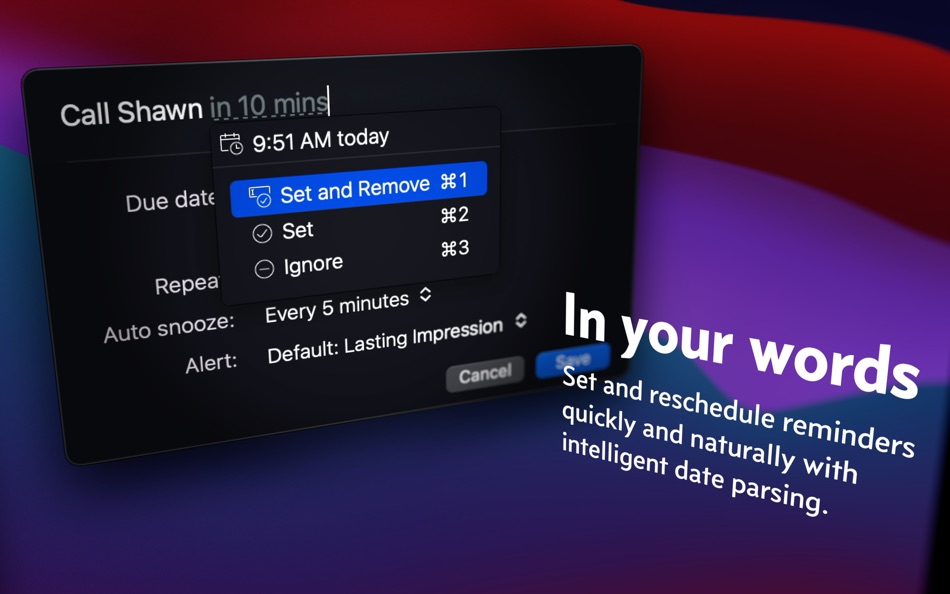
It’s blazingly fast to set reminders with Natural Date Parsing. Type “Make dinner reservation at 9am tomorrow” and your reminder is set for 9 AM tomorrow. There are no awkward date pickers to fight with, nor rigid date and time format to follow. Your reminder is set as soon as you’re done typing.
2. Reminds Persistently
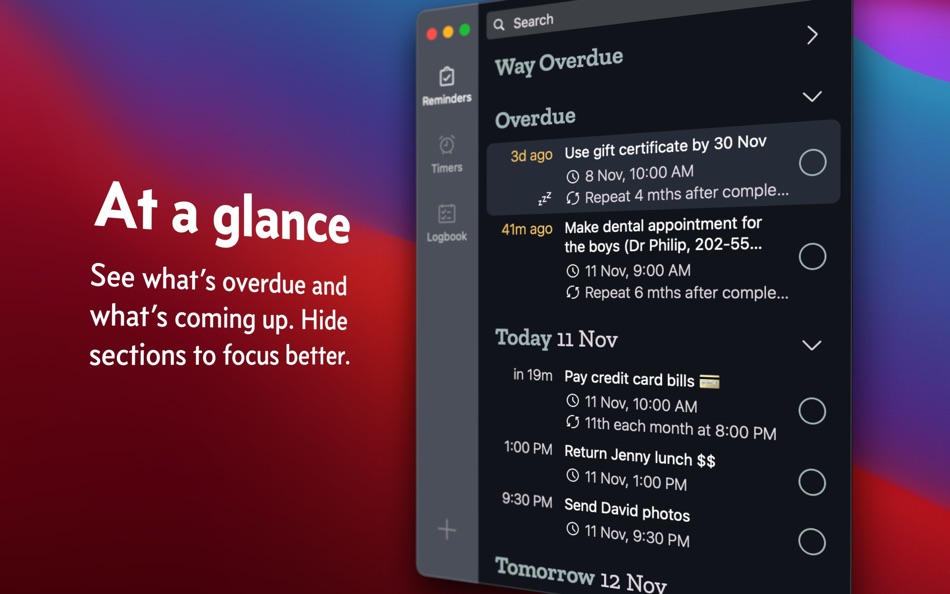
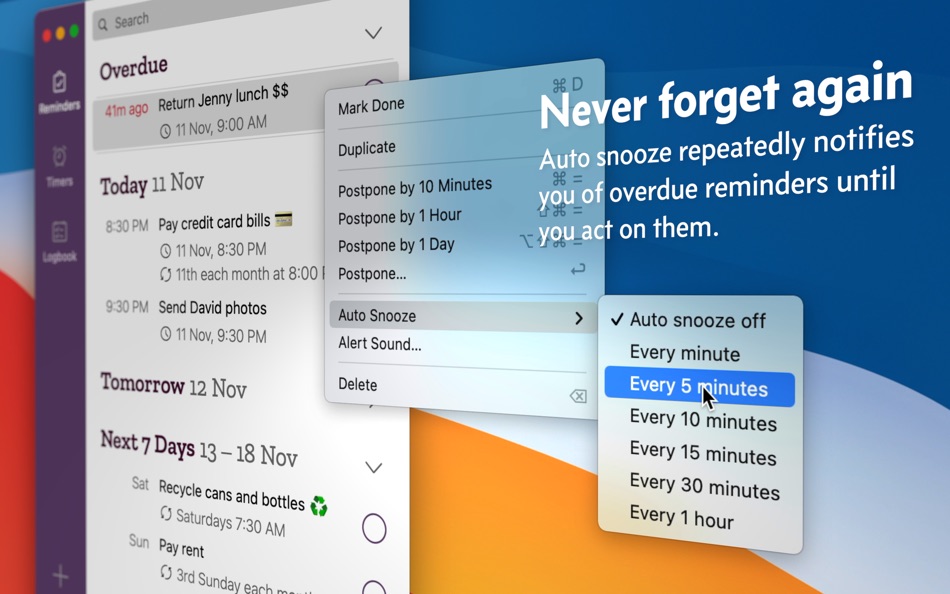
Auto Snooze sends you periodic notifications of reminders that are due until you complete or reschedule them. This way, things actually get done and your todo list never gets stale.
3. Reschedules Quickly
Plans change. Things happen. The same Natural Date Parsing engine that makes setting reminders so easy also makes short work of rescheduling them. And with Bulk Edit, you can reschedule multiple reminders at once.
4. Repeats Flexibly
Vitamins before bed each night? Pay rent every 2 weeks on Monday? Submit a report on the last weekday of the month? Clean aircon filters every 3 months upon completion? Yup, yup, yup and yup.
5. Reuse Effortlessly
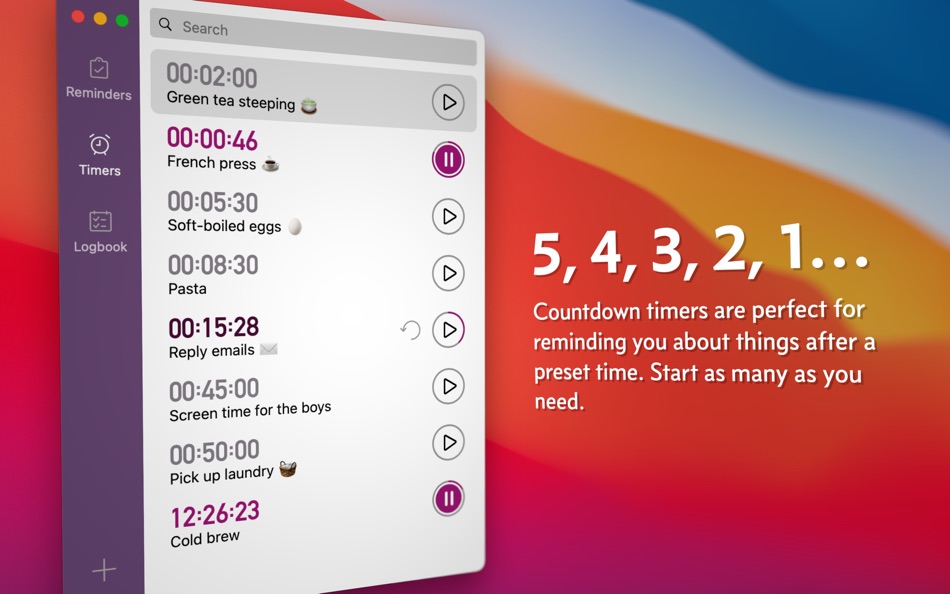
Timers are perfect for reminding you of things after a fixed amount of time. Your 25-minute pomodoro, 1-hour laundry cycle, or a 12-hour overnight bread proofing comes to mind. You set them up once in Due and reuse them forever.
6. Adapts Obligingly
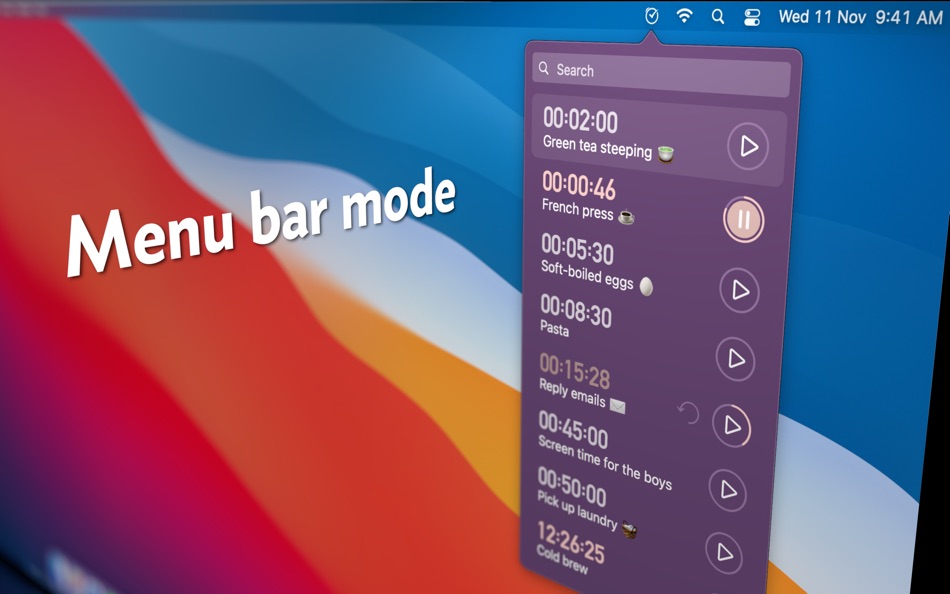
Whether you’d like to have Due show up in your menu bar, hide it from the Dock, or run it completely off the menu bar, Due adapts to your preferences. Notifications are completely customizable too. You can also assign distinctive alert sound for each reminder—louder and longer ones for important reminders, and subtler ones for less critical reminders.
7. Functions Beautifully
Form and function are delicately balanced with a refined design that makes sure your reminders are always front and centre. And themes—light ones, dark ones, fun ones—we’ve got them all covered.
8. Complements Perfectly
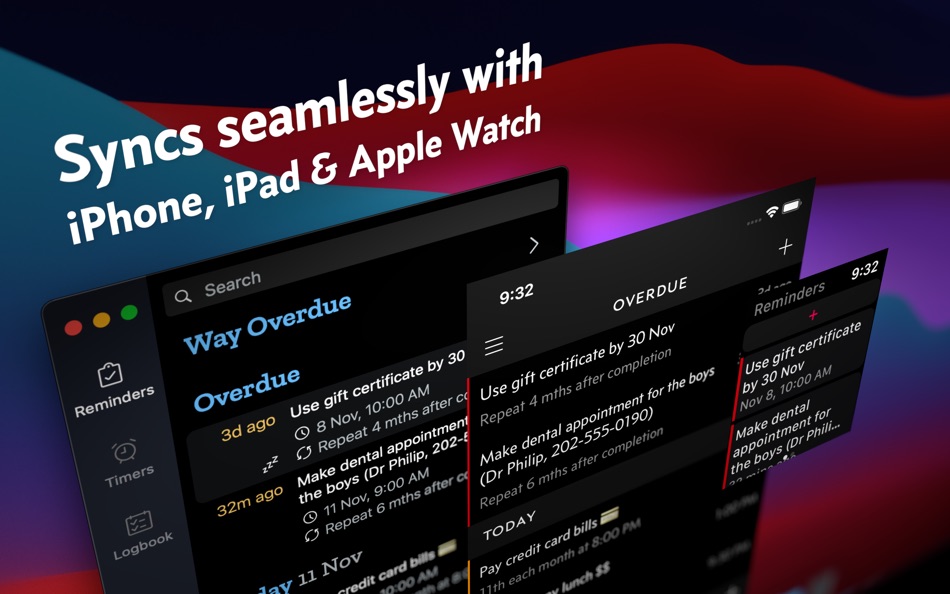
For some of us, the Mac is where we feel most at home with our keyboard and shortcuts. Fully optimized for keyboard operation, Due for macOS makes creating and managing reminders a cinch. The iPhone and Apple Watch, being always with us, make great devices when it comes to reminding us. Together, they make remembering easy, forgetting impossible. It's a perfect partnership.
9. Syncs Seamlessly
Due can sync across your devices using your personal iCloud or Dropbox account. This means you can seamlessly move between devices, all without having to create any accounts with us.
* Due for iPhone, iPad and Apple Watch is a single product sold separately.
---
WHAT’S THAT IN-APP PURCHASE ABOUT?
When you purchase Due today, you will have access to every feature in the app today—no further purchase is required.
You will also get access to all new features released one year from your date of purchase.
The optional Due Upgrade Pass subscription allows you to continue getting access to all new features released one year *after* your date of purchase.
And here’s the deal: Every feature that you have unlocked will remain available to you, forever—even if you stop subscribing.
Even without a subscription, you'll always receive bug-fix and compatibility updates for free. These updates add support for the latest Macs and also help ensure that Due continues to function well on the latest versions of macOS.
TERMS & PRIVACY POLICY
Our terms of use and privacy policy is available here: https://www.dueapp.com/terms.html
COMPATIBILITY
Requires macOS Mojave 10.14 or later.
Ad
Screenshots
Price History
-
* In-App Purchases - Today: $14.99
- Minimum: $9.99
- Maximum: $14.99
Track prices
What's new
- Version: 26.2
- Updated:
- • Fixed AirPods audio switching stopping playback on other devices when interacting with reminders or timers (thanks @jsartelle)
• Fixed a crash when marking reminders as done from notifications (thanks Tim S.)
• Fixed long reminder names being truncated in the Quick Access popover.
Developer
- Due Apps LLP
- Platforms: iOS Apps (1) macOS Apps (1)
- Lists: 12 + 9
- Points: 10 + 2,748 ¡
- Rankings: 3 (1)
- Reviews: 0
- Comments: 0
- Deals: 0
- Videos: 0
- RSS: Subscribe
Points (4)
-

- 16,263 cahiba7911@agenra.com
- +1
-
- 664 IMO FUCASHI
- +1
-
- 1,777 sam
- +1
-
- 543 MichaelTheGeek
- +1


Rankings (0)
0 ☹️
Lists (5)
- Due — Reminders & Timers


Reviews (0)
Be the first to review 🌟
Additional Information
- Version: 26.2
- Category:
macOS Apps›Productivity - OS:
macOS,macOS 10.14 and up - Size:
25 Mb - Supported Languages:
Chinese,English,German,Japanese - Content Rating:
4+ - Mac App Store Rating:
0 - Updated:
- Release Date:
Contacts
- Website:
 https://www.dueapp.com/
«Due — Reminders & Timers» is a Productivity app for macOS, developed by «Due Apps LLP». It was first released on and last updated on . The lowest historical price was $9.99 on , and the highest was $14.99 on . This app has not yet received any ratings or reviews on AppAgg. It has been added to 5 public lists and 2 private lists created by users. AppAgg has tracked 4 confirmed points plus 0 indirect points for this app. Available languages: Chinese, English, German, Japanese. AppAgg continuously tracks the price history, ratings, and user feedback for «Due — Reminders & Timers». Subscribe to this app or follow its RSS feed to get notified about future deals or updates. AppAgg does not host applications or distribute software. All trademarks, logos and screenshots belong to their respective owners.
Comments (0)
Be the first to comment 🌟
Due — Reminders & Timers Short URL: Copied!- 🌟 Share
- Mac App Store
Ad
Similar
-
- Reminders 3
- macOS Apps: Productivity By: Ankercast
- Free
- Lists: 0 + 0 Rankings: 0 Reviews: 0
- Points: 2 + 0 0 Version: 1.0.1 Reminders 3 - It s so easy to set reminders. You can t forget anything with Reminders 3. You can share reminders with several devices. You'll receive your reminders when they are ... ⥯
-
- DeskMinder² Reminders & Tasks
- macOS Apps: Productivity By: Chuta Dmytro
- * $6.99
- Lists: 0 + 0 Rankings: 0 Reviews: 0
- Points: 3 + 0 0 Version: 2.0.7 A simple yet effective app for anyone prone to distractions. DeskMinder focuses on short-term reminders & tasks you can set in seconds. Stay on top of your tasks with easy-to-create ... ⥯
-
- Floating Timers: Sticky timers
- macOS Apps: Productivity By: Phil Trevor
- $0.99
- Lists: 0 + 0 Rankings: 0 Reviews: 0
- Points: 0 + 0 0 Version: 1.0 Floating Timers: Sticky Timers is a macOS app that lets you create unlimited timers that stay visible above all your windows - so you never miss a countdown again. Perfect for work, ... ⥯
-
- Trick - To do list & timers
- macOS Apps: Productivity By: Mainworks Ltd
- * Free
- Lists: 0 + 0 Rankings: 0 Reviews: 0
- Points: 1 + 0 0 Version: 1.2.8 Trick helps to plan your day, track your progress, and build momentum, without distractions. Whether you re managing client work, personal tasks, or long-term goals, Trick is the ... ⥯
-
- BusyCal: Calendar & Reminders
- macOS Apps: Productivity By: Busy Apps FZE
- * Free
- Lists: 0 + 0 Rankings: 0 Reviews: 0
- Points: 3 + 0 0 Version: 2026.1.2 BusyCal is the most powerful, flexible, reliable calendar app for macOS. It's packed with innovative, time-saving features including customizable views, calendar sets, integrated ... ⥯
-
- Gubb - Notes, Timers & Tasks
- macOS Apps: Productivity By: Sohail Hussain
- $9.99
- Lists: 0 + 0 Rankings: 0 Reviews: 0
- Points: 3 + 0 0 Version: 0.1.14 Tired of switching between a dozen apps to capture a thought, set a timer, or find that thing you copied an hour ago? Gubb changes everything. Everything You Need, Nothing You Don't - ... ⥯
-
- Nice Timer 3: colorful timers
- macOS Apps: Productivity By: Jędrzej Gronek
- $2.99
- Lists: 1 + 0 Rankings: 0 Reviews: 0
- Points: 0 + 0 0 Version: 3.4.0 Nice Timer 3 is the next generation of the only app that you really need if you need... a timer! You can use it to add to your desktop as many beautiful timers and stopwatches as you ... ⥯
-
- Lucid - Floating Timers
- macOS Apps: Productivity By: imaginary institute
- Free
- Lists: 0 + 0 Rankings: 0 Reviews: 0
- Points: 0 + 0 0 Version: 1.1.0 Keep your workflow smooth with translucent timers that you can position anywhere on your screen. Simply type natural phrases like "30 minutes" or "2 hours," and watch as Lucid creates ... ⥯
-
- Menu Timers - High Precision
- macOS Apps: Productivity By: DevStorm
- Free
- Lists: 0 + 0 Rankings: 0 Reviews: 0
- Points: 1 + 0 0 Version: 1.0 Time your important tasks straight from the menu bar with this utility app! With millisecond precision, any task can be precisely measured. Features always on screen. The app lives in ... ⥯
-
- LiveTodo - Tasks, Reminders & To-Do Lists
- macOS Apps: Productivity By: 亚萍 任
- Free
- Lists: 0 + 1 Rankings: 0 Reviews: 0
- Points: 2 + 0 0 Version: 1.8 TIME LIMITED FREE,DOWNLOAD ASAP LiveTodo - Tasks, Reminders & To-Do Lists is an intuitive app to help you easily creating tasks, events and ideas. All you want to do will list in a ... ⥯
-
- xCal: Calendar & Reminders
- macOS Apps: Productivity By: 婷 黄
- * Free
- Lists: 0 + 1 Rankings: 0 Reviews: 0
- Points: 0 + 0 0 Version: 2.1.6 Main Features: - Two-way sync with Apple Calendar and Reminders: Easily view events and reminders right from the menu bar one click to open, quick and convenient. - Full-screen ... ⥯
-
- RemindMe: Private Reminders
- macOS Apps: Productivity By: Sreehari Sreekantan Nair
- Free
- Lists: 0 + 0 Rankings: 0 Reviews: 0
- Points: 0 + 0 0 Version: 1.0 "QuickRemind is the fastest way to add reminders on your Mac with natural language. Skip menus and fiddly pickers just tell your Mac what you want, when you want it. Whether you type ... ⥯
-
- Notify - Meeting Reminders
- macOS Apps: Productivity By: Pramod Bhandari
- Free
- Lists: 0 + 0 Rankings: 0 Reviews: 0
- Points: 1 + 0 0 Version: 2.1.3 Notify ensures you never miss an important meeting again. Living quietly in your macOS menu bar, Notify keeps your schedule visible and your meetings just one click away. KEY FEATURES: ⥯
-
- Standro – Stand Reminders
- macOS Apps: Productivity By: Spark Pear
- $2.99
- Lists: 0 + 0 Rankings: 0 Reviews: 0
- Points: 0 + 0 0 Version: 1.0.1 Standro is a lightweight macOS menu bar app designed to help you build healthier work habits without interrupting your focus. During long work sessions, it s easy to stay seated for ... ⥯