
ที่บันทึกไว้
เลือกชื่อที่จะแสดงในเมนูที่บันทึกไว้ของคุณ
เสร็จแล้ว
| ผู้พัฒนา: | HP Inc. (75) | ||
| ราคา: | ฟรี | ||
| การจัดอันดับ: | 0 | ||
| ความเห็น: | 0 โพสต์ความคิดเห็น | ||
| รายการ: | 1 + 1 | ||
| แต้มแล: | 8 + 42 (3.3) ¡ | ||
| Windows Store | |||
คำอธิบาย

Not all HP accessories are supported by HPAC. Please see your device specifications to check whether your device is supported by HPAC.
NOTE: The HP 960/965 4K Streaming Webcam and HP 620/625 FHD Webcam are now supported by the Poly Lens app instead of HPAC. To download Poly Lens, go to www.poly.com/lens and scroll down and download the Desktop app for Windows.
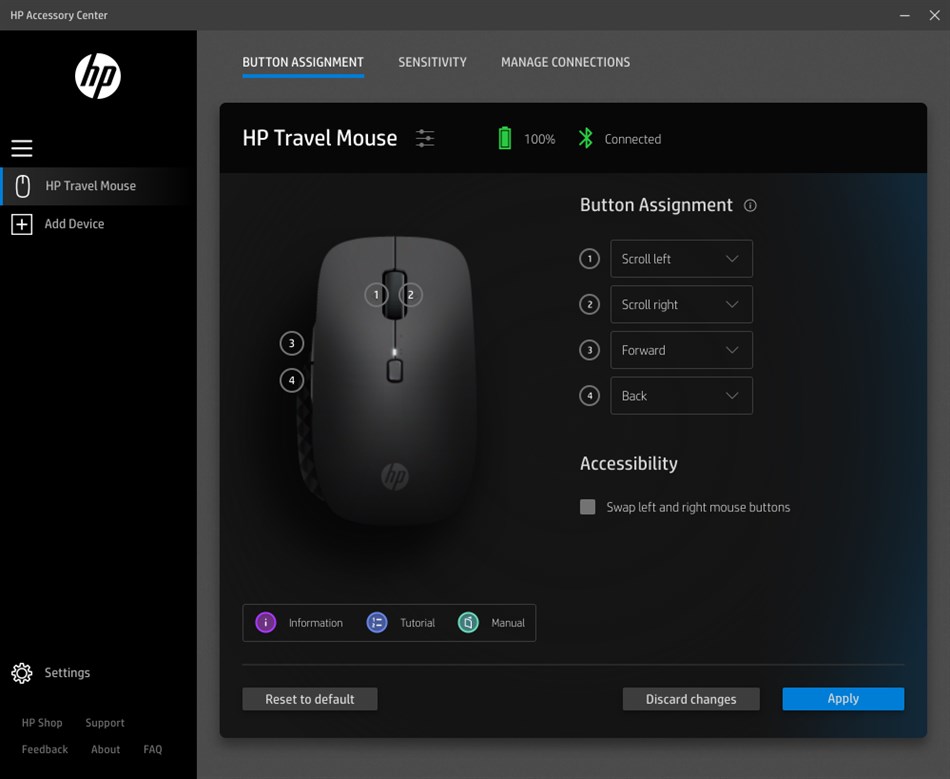
BUTTON ASSIGNMENT
Customize the buttons on your supported HP accessory to make navigation quick and easy. Open a favorite application or execute shortcut key combos with a single click.
BATTERY STATUS
View battery status and customize when you get alerts for low battery.
SENSITIVITY
Adjust the speed and sensitivity of your supported mouse cursor.
MANAGE CONNECTIONS
View and manage all your supported HP accessory connections from a single dashboard.
PRODUCT TUTORIAL
View the highlights of your supported HP accessories and discover how to use product features.
For more information about connecting, setting up, and configuring your supported HP accessories with HPAC, please go to https://support.hp.com/us-en/document/ish_6353060-6336457-16?openCLC=true.
Ad
ภาพหน้าจอ
ประวัติราคา
- ราคาปัจจุบัน: ฟรี
- ต่ำสุด: ฟรี
- มากที่สุด: ฟรี
ติดตามราคา
มีอะไรใหม่
- เวอร์ชัน: PC
- อัปเดต:
ข้อมูลเพิ่มเติม
- วันที่วางจำหน่าย:
- หมวดหมู่:
Windows แอป›เครื่องมือและอรรถประโยชน์ - ระบบปฏิบัติการ:
PC - ขนาด:
47 Mb - ภาษาที่สนับสนุน:
English - การจัดประเภทเนื้อหา:
EVERYONE - Windows Store คะแนนโดย:
3.3(42) - เว็บไซท์:
 http://www.hp.com/
ผู้พัฒนา
- HP Inc
- แพลตฟอร์ม: Android แอป (34) iOS แอป (20) macOS แอป (4) Windows แอป (16) Windows เกม (1)
- รายการ: 88 + 14
- แต้มแล: 339 + 10,630,223 ¡
- การจัดอันดับ: 5 (2)
- ความเห็น: 0
- ลดราคา: 0
- วิดีโอ: 2
- RSS: ติดตาม
รายการ (1)
- HP Accessory Center

แต้มแล (8)
-

- 1 Bye Bye
- +1
-
- 1 Charles Han
- +1
-
- 1 Mostafa Hegazy
- +1
-
- 1 D Simm
- +1
-
- 4 Chris Hale
- +1
-
- 1 ももやす
- +1



การจัดอันดับ (0)
0 ☹️
ความเห็น (0)
เป็นคนแรกที่แสดงความเห็น 🌟
«HP Accessory Center». แพลตฟอร์ม: Windows. หมวดหมู่: เครื่องมือและอรรถประโยชน์. ผู้พัฒนา: «HP Inc.». การเปิดตัวครั้งแรก: . อัปเดตล่าสุด: . ราคาปัจจุบัน: ฟรี. ชื่อนี้ยังไม่ได้รับการให้คะแนนหรือบทวิจารณ์บน AppAgg รายการ: สาธารณะ 1, ส่วนตัว 1. จุดที่ติดตาม: ยืนยันแล้ว 8, ทางอ้อม 42. ร้านค้า: Windows Store. คะแนนร้านค้า: 3.3. โหวต: 42. ภาษาที่ใช้ได้: English. AppAgg ติดตามประวัติราคา การให้คะแนน และคำติชมของผู้ใช้ «HP Accessory Center». ส่วนลดและอัปเดตในอนาคต: RSS. AppAgg ไม่ได้โฮสต์แอปพลิเคชันหรือแจกจ่ายซอฟต์แวร์ เครื่องหมายการค้า โลโก้ และภาพหน้าจอทั้งหมดเป็นของเจ้าของที่เกี่ยวข้อง
HP Accessory Center URL แบบสั้น: คัดลอกแล้ว!- 🌟 แชร์
- Windows Store
คล้ายกัน
-
- HP Display Center
- Windows แอป: เครื่องมือและอรรถประโยชน์ โดย: HP Inc.
- ฟรี
- รายการ: 1 0 0
- แต้มแล: 10 + 151 (3.3) เวอร์ชัน: PC HP Display Center unlocks advanced display capabilities allowing you to personalize your settings to meet your workflows. With just a few clicks, enhance screen quality, ergonomics, ... ⥯
-
- Microsoft Accessory Center
- Windows แอป: เครื่องมือและอรรถประโยชน์ โดย: Microsoft Corporation
- ฟรี
- รายการ: 0 + 1 0 0
- แต้มแล: 3 + 183 (3.0) เวอร์ชัน: PC Microsoft Accessory Center is a new all-in-one app to customize settings for your Microsoft accessories to get the most out of them. Here are things you can do: Microsoft Presenter+ ... ⥯
-
- HP Image Auto-rotate Utility
- Windows แอป: เครื่องมือและอรรถประโยชน์ โดย: Portrait Displays
- ฟรี
- รายการ: 0 0 0
- แต้มแล: 0 + 4 (3.0) เวอร์ชัน: PC Use the HP Image Auto-Rotate utility software to work efficiently and accurately to view clinical data and non-diagnostic images. Use the Auto-rotate feature to view portrait images in ⥯
-
- KYOCERA Print Center
- Windows แอป: เครื่องมือและอรรถประโยชน์ โดย: KYOCERA Document Solutions Inc
- * ฟรี
- รายการ: 65 + 3 0 5 (1)
- แต้มแล: 204 + 154 (4.0) เวอร์ชัน: PC KYOCERA Print Center is a utility app for KYOCERA printers that share a network connection with computers or tablets running on Windows 10 or later. With this app, you can do the ... ⥯
-
- Control Center 3.0
- Windows แอป: เครื่องมือและอรรถประโยชน์ โดย: CLEVO CO.
- ฟรี
- รายการ: 56 + 2 0 1 (1)
- แต้มแล: 429 + 124 (2.9) เวอร์ชัน: PC This app descript what features this notebook support. And user could launch other apps by clicking those icons. User can also switch the power mode via this app. ⥯
-
- Killer Intelligence Center
- Windows แอป: เครื่องมือและอรรถประโยชน์ โดย: INTEL CORP
- ฟรี
- รายการ: 14 + 1 0 5 (1)
- แต้มแล: 98 + 424 (2.0) เวอร์ชัน: PC Note: Killer Intelligence Center requires the Killer drivers and services to be installed. Killer™ Networking products deliver the network performance that enthusiasts and gamers ... ⥯
-
- TA/UTAX Print Center
- Windows แอป: เครื่องมือและอรรถประโยชน์ โดย: TA Triumph-Adler GmbH
- ฟรี
- รายการ: 17 + 3 0 0
- แต้มแล: 37 + 9 (3.7) เวอร์ชัน: PC TA/UTAX Print Center is a utility app for TA/UTAX printers that share a network connection with computers or tablets running on Windows 10 or later. With this app, you can do the ... ⥯
-
- MSI Center
- Windows แอป: เครื่องมือและอรรถประโยชน์ โดย: MICRO-STAR INTERNATIONAL CO., LTD
- ฟรี
- รายการ: 1 + 1 0 0
- แต้มแล: 3 + 8,024 (2.7) เวอร์ชัน: PC MSI Center is a brand new platform which will combine all MSI s exclusive features. Now you can find all your favorite features like Gaming Mode or Smart Priority in the Feature Sets ... ⥯
-
- LG Control Center
- Windows แอป: เครื่องมือและอรรถประโยชน์ โดย: LG Electronics Inc.
- ฟรี
- รายการ: 2 0 0
- แต้มแล: 17 + 2 (5.0) เวอร์ชัน: PC Description: It is a LG Control Center app provided with LG Electronics' computer products. Functions: It allows you to change PC settings, power options, Windows security settings, ... ⥯
-
- VAIO Control Center
- Windows แอป: เครื่องมือและอรรถประโยชน์ โดย: VAIO Corporation
- ฟรี
- รายการ: 2 + 1 0 0
- แต้มแล: 11 + 20 (2.3) เวอร์ชัน: PC VAIO Control Center is a Universal Windows Platform (UWP) application that can be used to set some VAIO performance settings easily on Windows PC of VAIO. ⥯
-
- Simulation Control Center
- Windows แอป: เครื่องมือและอรรถประโยชน์ โดย: Radiation Safety and Control Services
- ฟรี
- รายการ: 0 0 0
- แต้มแล: 0 + 4 (5.0) เวอร์ชัน: PC This application requires a RSCS, Inc. wireless communication dongle. Simulation Control Center (SCC) allows you to use your Windows 10 device to wirelessly control and configure ... ⥯
-
- Soter Center (for Linux NAS)
- Windows แอป: เครื่องมือและอรรถประโยชน์ โดย: 詮力科技股份有限公司
- ฟรี
- รายการ: 0 0 0
- แต้มแล: 0 + 6 (4.3) เวอร์ชัน: PC Soter Center is a sharing target and files backup-restore utility. You can back up your folders and/or files to any server resides in your local-area-network. You can share anything to ⥯
-
- ITE2 Center Lite (for Windows NAS)
- Windows แอป: เครื่องมือและอรรถประโยชน์ โดย: 阿諾科技有限公司
- ฟรี
- รายการ: 0 0 0
- แต้มแล: 0 + 2 (5.0) เวอร์ชัน: PC ** NOTICE: If you do have an ITE2-NAS make sure the ITE2-NAS runs windows 10. ** ITE2 Center is a sharing target and files backup-restore utility. You can back up your folders and/or ... ⥯
-
- Smartphone Service Center and Guider
- Windows แอป: เครื่องมือและอรรถประโยชน์ โดย: Jayaram College Apps Development
- ฟรี
- รายการ: 0 0 0
- แต้มแล: 0 เวอร์ชัน: PC first image is a home screen . second screen for the second image and the last image for fault solving steps. this app for using for the basic smartphones problems can be solved. that ... ⥯