
ที่บันทึกไว้
เลือกชื่อที่จะแสดงในเมนูที่บันทึกไว้ของคุณ
เสร็จแล้ว
| ผู้พัฒนา: | LG Electronics Inc. (65) | ||
| ราคา: | ฟรี | ||
| การจัดอันดับ: | 0 | ||
| ความเห็น: | 0 โพสต์ความคิดเห็น | ||
| รายการ: | 2 + 0 | ||
| แต้มแล: | 17 + 2 (5.0) ¡ | ||
| Windows Store | |||
คำอธิบาย

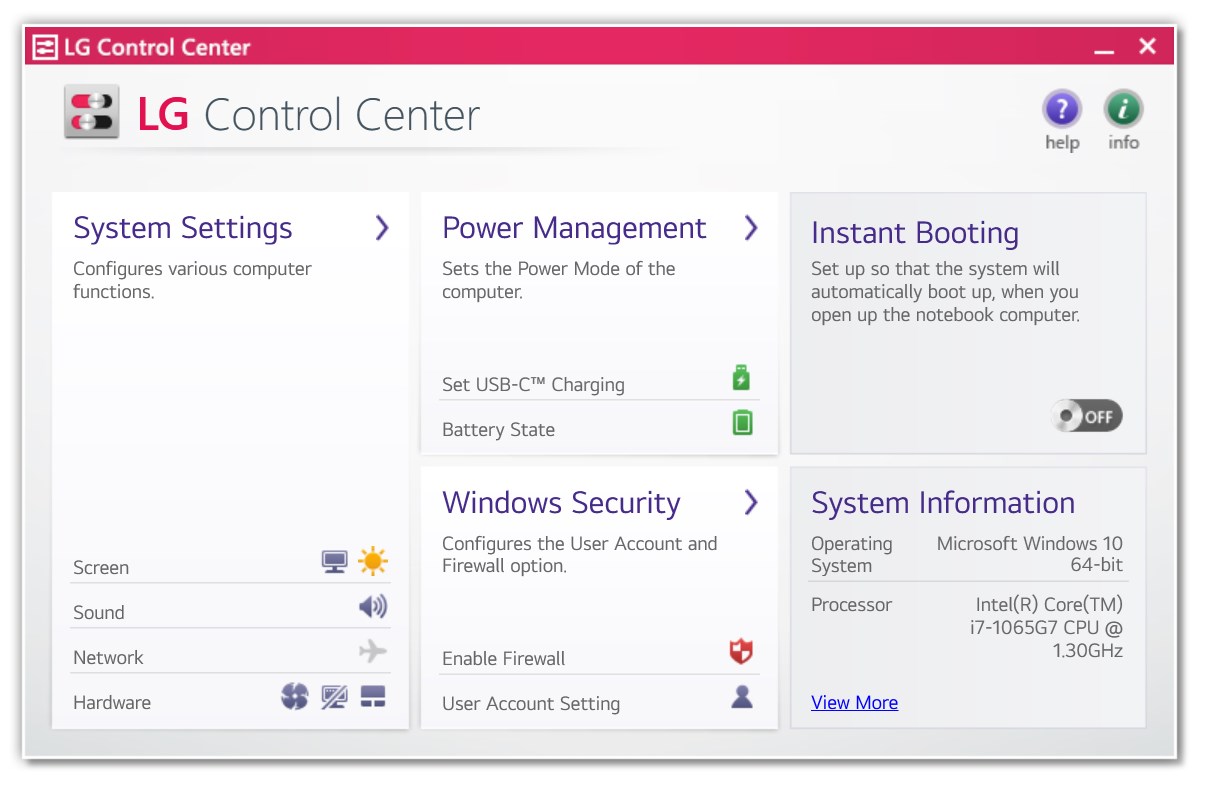
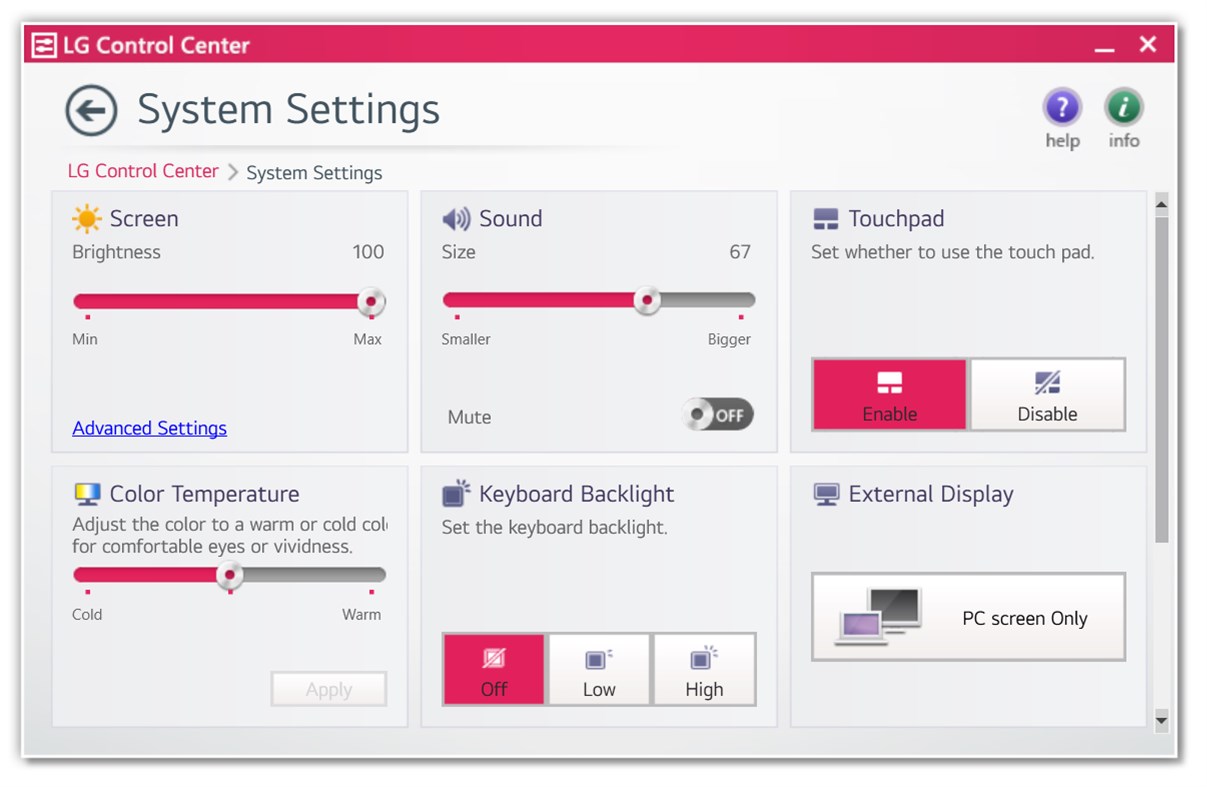
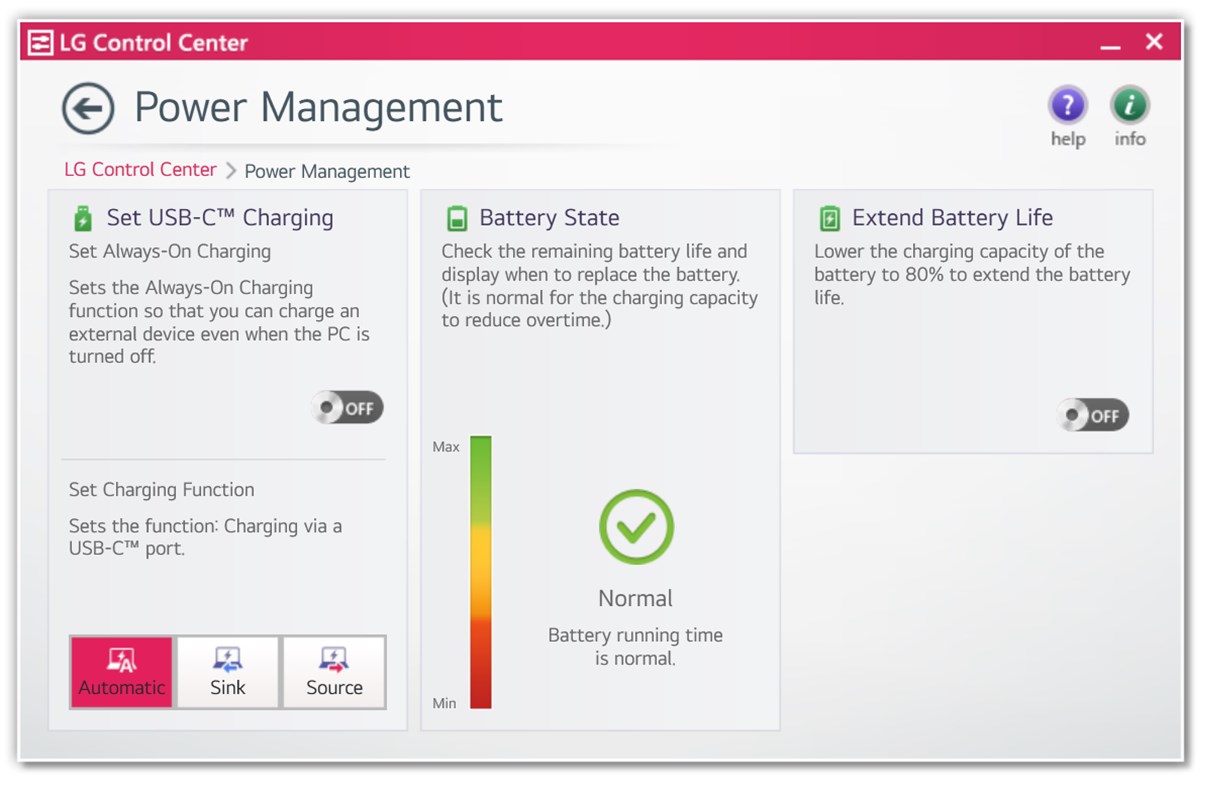
Functions: It allows you to change PC settings, power options, Windows security settings, etc. conveniently and check the current system information.
If a desktop app with the same function is installed, make sure to remove the existing desktop app before installing the new one.
Ad
ภาพหน้าจอ
ประวัติราคา
- ราคาปัจจุบัน: ฟรี
- ต่ำสุด: ฟรี
- มากที่สุด: ฟรี
ติดตามราคา
ข้อมูลเพิ่มเติม
- วันที่วางจำหน่าย:
- หมวดหมู่:
Windows แอป›เครื่องมือและอรรถประโยชน์ - ระบบปฏิบัติการ:
PC - ขนาด:
34 Mb - ภาษาที่สนับสนุน:
Chinese,English,French,German,Italian,Japanese,Korean,Polish,Portuguese,Spanish,Vietnamese - การจัดประเภทเนื้อหา:
EVERYONE - Windows Store คะแนนโดย:
5.0(2) - เว็บไซท์:
 http://www.lge.com
มีอะไรใหม่
- เวอร์ชัน: PC
- อัปเดต:
ผู้พัฒนา
- LG Electronics Inc.
- แพลตฟอร์ม: Android แอป (33) iOS แอป (26) macOS แอป (1) Windows แอป (5)
- รายการ: 7 + 3
- แต้มแล: 36 + 1,546,036 ¡
- การจัดอันดับ: 0
- ความเห็น: 0
- ลดราคา: 0
- วิดีโอ: 1
- RSS: ติดตาม
รายการ (2)
- LG Control Center


แต้มแล (17)
-

- 1 VENERA 47
- +1
-
- 1 ɈøølɨøǤ _69
- +1
-
- 1 MS Raghu Ram
- +1
-
- 1 Ahmed Taha
- +1
-
- 1 mario guijo
- +1
-
- 1 Richiel Caña
- +1


การจัดอันดับ (0)
0 ☹️
ความเห็น (0)
เป็นคนแรกที่แสดงความเห็น 🌟
«LG Control Center». แพลตฟอร์ม: Windows. หมวดหมู่: เครื่องมือและอรรถประโยชน์. ผู้พัฒนา: «LG Electronics Inc.». การเปิดตัวครั้งแรก: . อัปเดตล่าสุด: . ราคาปัจจุบัน: ฟรี. ชื่อนี้ยังไม่ได้รับการให้คะแนนหรือบทวิจารณ์บน AppAgg รายการ: สาธารณะ 2, ส่วนตัว 0. จุดที่ติดตาม: ยืนยันแล้ว 17, ทางอ้อม 2. ร้านค้า: Windows Store. คะแนนร้านค้า: 5.0. โหวต: 2. ภาษาที่ใช้ได้: Chinese, English, French, German, Italian, Japanese, Korean, Polish, Portuguese, Spanish, Vietnamese. AppAgg ติดตามประวัติราคา การให้คะแนน และคำติชมของผู้ใช้ «LG Control Center». ส่วนลดและอัปเดตในอนาคต: RSS. AppAgg ไม่ได้โฮสต์แอปพลิเคชันหรือแจกจ่ายซอฟต์แวร์ เครื่องหมายการค้า โลโก้ และภาพหน้าจอทั้งหมดเป็นของเจ้าของที่เกี่ยวข้อง
LG Control Center URL แบบสั้น: คัดลอกแล้ว!- 🌟 แชร์
- Windows Store
คล้ายกัน
-
- Simulation Control Center
- Windows แอป: เครื่องมือและอรรถประโยชน์ โดย: Radiation Safety and Control Services
- ฟรี
- รายการ: 0 0 0
- แต้มแล: 0 + 4 (5.0) เวอร์ชัน: PC This application requires a RSCS, Inc. wireless communication dongle. Simulation Control Center (SCC) allows you to use your Windows 10 device to wirelessly control and configure ... ⥯
-
- Control Center 3.0
- Windows แอป: เครื่องมือและอรรถประโยชน์ โดย: CLEVO CO.
- ฟรี
- รายการ: 56 + 2 0 1 (1)
- แต้มแล: 430 + 124 (2.9) เวอร์ชัน: PC This app descript what features this notebook support. And user could launch other apps by clicking those icons. User can also switch the power mode via this app. ⥯
-
- VAIO Control Center
- Windows แอป: เครื่องมือและอรรถประโยชน์ โดย: VAIO Corporation
- ฟรี
- รายการ: 2 + 1 0 0
- แต้มแล: 11 + 20 (2.3) เวอร์ชัน: PC VAIO Control Center is a Universal Windows Platform (UWP) application that can be used to set some VAIO performance settings easily on Windows PC of VAIO. ⥯
-
- LG Reader Mode
- Windows แอป: เครื่องมือและอรรถประโยชน์ โดย: LG Electronics Inc.
- ฟรี
- รายการ: 1 0 0
- แต้มแล: 0 เวอร์ชัน: PC New Features of This Version: You can run the LG Reader Mode app and change settings. ⥯
-
- LG Ultrafine Brightness
- Windows แอป: เครื่องมือและอรรถประโยชน์ โดย: Quentez Apps
- ฟรี
- รายการ: 0 0 0
- แต้มแล: 5 + 45 (3.7) เวอร์ชัน: PC Control the brightness of your LG Ultrafine display directly from your keyboard. HotKeys: - CTRL + Volume Up = Increase brightness. - CTRL + Volume Down = Decrease brightness. Boot ... ⥯
-
- Control Program for Magic Light-BLE
- Windows แอป: เครื่องมือและอรรถประโยชน์ โดย: Shipwreck Software
- * ฟรี
- รายการ: 0 0 0
- แต้มแล: 0 + 12 (3.6) เวอร์ชัน: PC Control your Magic Light LED bulb! Available for all Windows 8.1 devices, this app lets you control multiple LED lamps, setting the color, brightness, and more. Personalize your ... ⥯
-
- KYOCERA Print Center
- Windows แอป: เครื่องมือและอรรถประโยชน์ โดย: KYOCERA Document Solutions Inc
- * ฟรี
- รายการ: 65 + 3 0 5 (1)
- แต้มแล: 204 + 154 (4.0) เวอร์ชัน: PC KYOCERA Print Center is a utility app for KYOCERA printers that share a network connection with computers or tablets running on Windows 10 or later. With this app, you can do the ... ⥯
-
- MSI Center
- Windows แอป: เครื่องมือและอรรถประโยชน์ โดย: MICRO-STAR INTERNATIONAL CO., LTD
- ฟรี
- รายการ: 1 + 1 0 0
- แต้มแล: 3 + 8,024 (2.7) เวอร์ชัน: PC MSI Center is a brand new platform which will combine all MSI s exclusive features. Now you can find all your favorite features like Gaming Mode or Smart Priority in the Feature Sets ... ⥯
-
- Killer Intelligence Center
- Windows แอป: เครื่องมือและอรรถประโยชน์ โดย: INTEL CORP
- ฟรี
- รายการ: 14 + 1 0 5 (1)
- แต้มแล: 98 + 424 (2.0) เวอร์ชัน: PC Note: Killer Intelligence Center requires the Killer drivers and services to be installed. Killer™ Networking products deliver the network performance that enthusiasts and gamers ... ⥯
-
- HP Pen Control
- Windows แอป: เครื่องมือและอรรถประโยชน์ โดย: HP Inc.
- ฟรี
- รายการ: 15 + 1 0 0
- แต้มแล: 89 + 54 (1.9) เวอร์ชัน: PC This application allows customization of stylus buttons for HP stylus models (including HP Pen and HP Rechargeable MPP2.0 Tilt Pen). You can seamlessly switch between stylus button ... ⥯
-
- Beamer Control
- Windows แอป: เครื่องมือและอรรถประโยชน์ โดย: Johannes Kreuzer
- ฟรี
- รายการ: 0 0 0
- แต้มแล: 0 เวอร์ชัน: PC Control a PjLink capable projector via this application from a computer in the same network. It supports power on and off and the A_V Mute feature of the projector. ⥯
-
- NVIDIA Control Panel
- Windows แอป: เครื่องมือและอรรถประโยชน์ โดย: NVIDIA Corp.
- ฟรี
- รายการ: 10 + 3 0 0
- แต้มแล: 23 + 14,671 (4.2) เวอร์ชัน: PC Featuring display management, application, and gaming-specific features, the NVIDIA Control Panel ensures the best overall experience using NVIDIA graphics ⥯
-
- TA/UTAX Print Center
- Windows แอป: เครื่องมือและอรรถประโยชน์ โดย: TA Triumph-Adler GmbH
- ฟรี
- รายการ: 17 + 3 0 0
- แต้มแล: 37 + 9 (3.7) เวอร์ชัน: PC TA/UTAX Print Center is a utility app for TA/UTAX printers that share a network connection with computers or tablets running on Windows 10 or later. With this app, you can do the ... ⥯
-
- Odyssey Control
- Windows แอป: เครื่องมือและอรรถประโยชน์ โดย: Samsung Electronics Co. Ltd.
- ฟรี
- รายการ: 3 0 0
- แต้มแล: 13 + 1 (2.0) เวอร์ชัน: PC This application provides system and performance information to use during the gaming experience. Odyssey Control manages Windows key lock, Logo LED, and Game display mode settings. ... ⥯