
Salvati
Scegli il nome che verrà mostrato nel tuo menu Salvati.
Completato!
| Sviluppatore: | 惠源 赵 (19) | ||
| Prezzo: | * Gratis | ||
| Classificazioni: | 0 | ||
| Commenti: | 0 Pubblica commento | ||
| Listes: | 2 + 1 | ||
| Punti: | 8 + 0 ¡ | ||
| Mac App Store | |||
Descrizione

***Key Features***
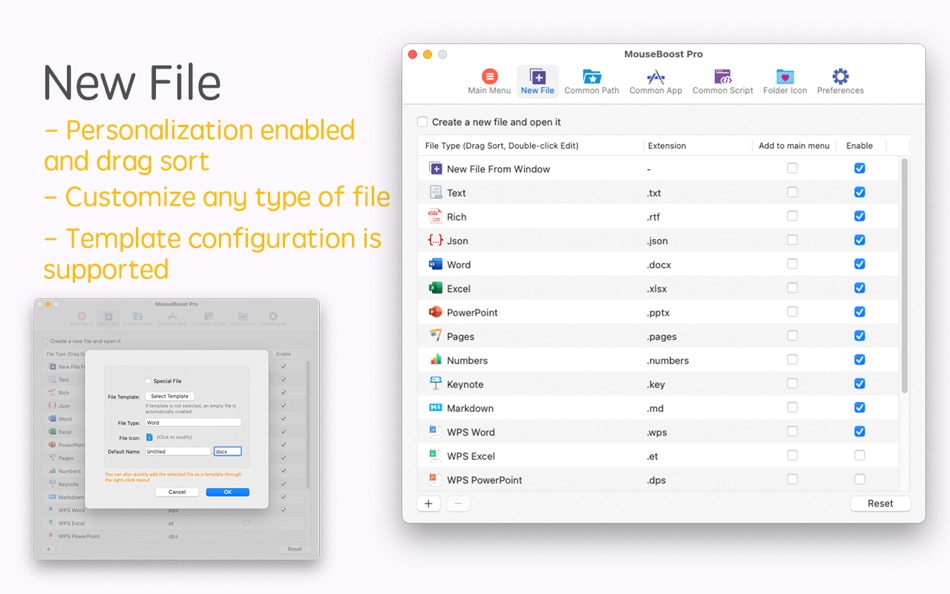
- New File: Instantly create files from custom templates (e.g., .txt, .md, .gitignore).
- Favorite Directories & Apps: Access favorite folders and launch apps right from the context menu. Keep your desktop and Dock clean.
- Cut & Paste Files: Finally, a true Cut-and-Paste (Command+X) for Finder. Move files effortlessly.
- Open in Terminal / iTerm2 / Ghostty / cmux: Right-click any folder to open it directly in your terminal.
- Custom Scripts: Automate your workflow with custom Shell and AppleScript.
- Image Processing: Batch convert images and generate app icons (iOS, Android, macOS) in seconds.
- App Uninstallation: Uninstall an APP and all its associated resources and log files with one click.
- Advanced File Management: Hide/Show private files, Lock files from accidental changes, create Encrypted ZIP archives, and more.
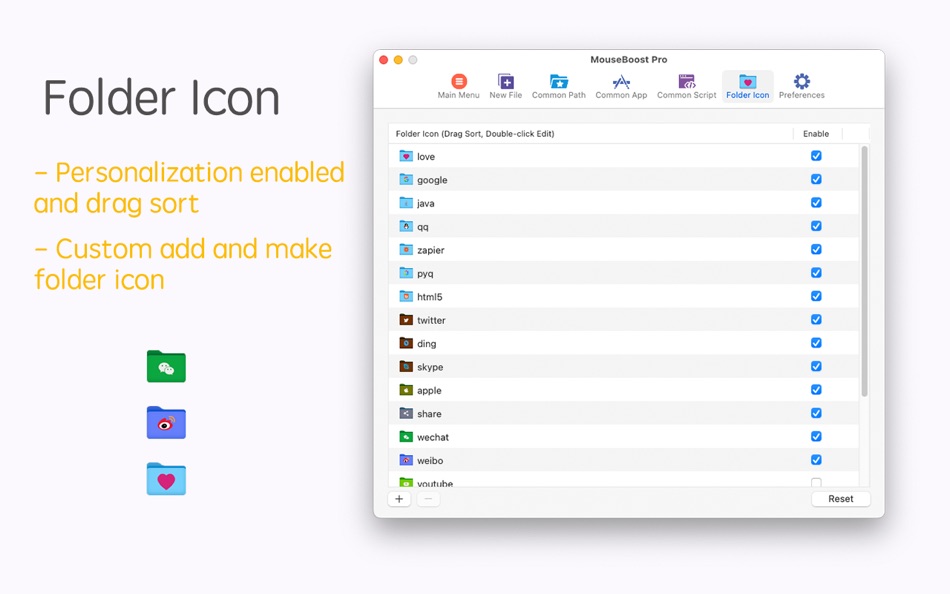
- More Great Tools: Includes a Color Picker, Custom Folder Icons, "Copy Path" action, Force Delete, and iCloud Sync for your settings.
***Highly Customizable***
Reorder, disable, or rename any menu item. Pin your most-used actions to the main menu for lightning-fast access. Tailor MouseBoost to your exact needs.
Boost your efficiency for the price of a coffee. Get MouseBoost today!
***Important Notes***
- iTerm2 Fix: If iTerm2 opens two windows, set Preferences > General > Startup > Window restoration policy to Only Restore Hotkey Window.
- Menu Not Showing? Try these steps:
1. Relaunch Finder.
2. Re-enable MouseBoost in System Settings > Extensions > Finder Extensions.
3. (macOS Sonoma) Disable iCloud Drive > Desktop & Documents Folders in your Apple ID settings. If you need this feature, use the shortcut/middle-click option in MouseBoost's preferences.
Reach us at gmshrekhelp@outlook.com for support.
By using this app, you agree to our Terms of Use, governed by the standard Apple End User License Agreement (EULA). https://www.apple.com/legal/internet-services/itunes/dev/stdeula/
Ad
Screenshot




Cronologia dei prezzi
-
* Acquisti in-app - Oggi: Gratis
- Minimo: Gratis
- Massimo: Gratis
Monitora prezzi
Novità
- Versione: 4.2.0
- Aggiornata:
- - Added: Common paths now support adding URLs.
- New menu: Capture to Clipboard, Screen Recording.
- New menu: Audio Recording, Video Recording (requires activation).
- New menu: cmux terminal (requires activation).
- Optimized the hiding of the main menu icon.
- Fixed some known issues.
Informazioni aggiuntive
- Data di uscita:
- Categoria:
macOS App›Utility - Sistemi operativi:
macOS,macOS 10.11 e versioni successive - Dimensioni:
12 Mb - Lingue supportate:
Arabic,Chinese,Danish,Dutch,English,French,German,Italian,Japanese,Korean,Malay,Polish,Portuguese,Russian,Spanish,Swedish,Thai,Turkish,Ukrainian - Classificazione contenuti:
4+ - Mac App Store Voto:
0 - Sito web:
 https://www.shrekcc.top
Sviluppatore
- 惠源 赵
- Piattaforme: macOS App (19)
- Listes: 6 + 4
- Punti: 50 + 0 ¡
- Classificazioni: 0
- Commenti: 0
- Sconti: 0
- Video: 0
- RSS: Sottoscrivi
Listes (2)
- MouseBoost


Punti (8)
-

- 66 aucruzto
- +1
-
- 322 Mudu
- +1
-
- 474 QenTox
- +1
-
- 2 Timothy Fletcher
- +1
-
- 65 Kai Lee
- +1
-
- 1 Logan Mazzettia
- +1



Classificazioni (0)
0 ☹️
Commenti (0)
Sii il primo a commentare 🌟
«MouseBoost». Piattaforma: macOS. Categoria: Utility. Sviluppatore: «惠源 赵». Prima uscita: . Ultimo aggiornamento: . Prezzo attuale: gratuito. Questo titolo non ha ancora ricevuto valutazioni o recensioni su AppAgg. Elenchi: pubblici 2, privati 1. Punti tracciati: confermati 8, indiretti 0. Lingue disponibili: Arabic, Chinese, Danish, Dutch, English, French, German, Italian, Japanese, Korean, Malay, Polish, Portuguese, Russian, Spanish, Swedish, Thai, Turkish, Ukrainian. AppAgg tiene traccia della cronologia dei prezzi, delle valutazioni e del feedback degli utenti per «MouseBoost». Segui futuri sconti e aggiornamenti tramite RSS. AppAgg non ospita applicazioni né distribuisce software. Tutti i marchi, loghi e screenshot appartengono ai rispettivi proprietari.
MouseBoost URL breve: Copiato!- 🌟 Condividi
- Mac App Store
Simili
-
- Mouse Aura
- macOS App: Utility di: Samuel Barney
- $2.99
- Listes: 0 + 0 0 0
- Punti: 0 + 0 Versione: 1.0 Mouse Aura brings the magic of the aurora borealis to your Mac desktop. Simply shake your mouse to activate a beautiful, flowing trail of colorful particles that follow your cursor ... ⥯
-
- Mouse Jiggler – Mouse Mover
- macOS App: Utility di: Bohdan Bilous
- * Gratis
- Listes: 0 + 2 0 0
- Punti: 8 + 0 Versione: 2.7 Mouse Jiggler - Mouse Mover is a simple utility that generates subtle cursor movements to assist accessibility and interaction needs. It performs smoothly and efficiently without ... ⥯
-
- Mouse Insomnia
- macOS App: Utility di: Braden Aron Mc Corkle
- $0.99
- Listes: 0 + 0 0 0
- Punti: 0 + 0 Versione: 1.1.0 Mouse Insomnia Keep your Mac awake with gentle, human-like mouse movements. Whether you re vibe-coding, running long simulations, or simply need your Mac to stay awake, Mouse Insomnia ... ⥯
-
- Mouse Smoothy
- macOS App: Utility di: Nha Ho
- * Gratis
- Listes: 0 + 0 0 0
- Punti: 0 + 0 Versione: 3.0 Mouse Smoothy makes your mouse scroll like Apple s Magic Mouse smooth, natural, and fluid. Works across all apps, including creative and editor tools Support for multi-monitor setups ... ⥯
- Ad
-
- Mouse Snap Clicker
- macOS App: Utility di: 论 李
- $4.99
- Listes: 0 + 0 0 0
- Punti: 0 + 0 Versione: 1.1.1 Mouse Snap Clicker Essential Mac auto clicker! Customize click intervals (hours/minutes/seconds/ms), select mouse button/type. Define precise positions via coordinates or screenshot. ... ⥯
-
- Mouse Gestures
- macOS App: Utility di: George MacKerron
- $1.99
- Listes: 0 + 1 0 0
- Punti: 1 + 0 Versione: 1.1.1 Mouse Gestures is a tiny macOS menu-bar app. It enables simple mouse gestures for navigation. Mouse Gestures recognises two gestures. Hold the right mouse button and drag leftwards to ... ⥯
-
- Mouse Maestro
- macOS App: Utility di: Essam Abdelhady
- $0.99
- Listes: 0 + 0 0 0
- Punti: 0 + 0 Versione: 1.1 Mouse Maestro - Automate Your Mac with Ease Streamline your workflow and reclaim your time with Mouse Maestro, the elegant automation tool for macOS. Transform repetitive tasks into ... ⥯
-
- Mouse Click Sound
- macOS App: Utility di: 方成 印
- $2.99
- Listes: 0 + 0 0 0
- Punti: 0 + 0 Versione: 1.6 Mouse Click Sound - Add Feedback to Your Silent Mouse and Trackpad Mouse Click Sound enhances your macOS experience by providing audio feedback for every click. Whether you're using a ... ⥯
-
- Mouse Clicker & Shaker
- macOS App: Utility di: Wise Tech Labs Private Limited
- $7.99
- Listes: 0 + 1 0 0
- Punti: 5 + 0 Versione: 2.3 We've all faced this: You're playing a game and you need to click a lot for taking some coins or for another game play. Or you have an app that functions with clicks and you need to do ⥯
-
- Mouse Wheel Scroll Volume
- macOS App: Utility di: 莎 蒋
- $2.99
- Listes: 0 + 0 0 0
- Punti: 0 + 0 Versione: 1.3.0 MouseWheelScrollVolume is a lightweight system utility that lets you adjust macOS system volume by simply holding a modifier key and scrolling your mouse wheel. No need to switch apps ... ⥯
-
- Mouse++ & New File Menu
- macOS App: Utility di: 威 蒋
- * Gratis
- Listes: 2 + 1 0 0
- Punti: 3 + 0 Versione: 3.4 You can directly create new documents and other content on the desktop. It has rich functions to make your right-click menu even more powerful. The deeply rooted interactive design ... ⥯
-
- Mouse skin effects
- macOS App: Utility di: 济南飞鸟文化传媒有限公司
- Gratis
- Listes: 0 + 0 0 0
- Punti: 1 + 0 Versione: 1.0.2 Unleash your mouse's potential and light up every click with CursorPlus! CursorPlus is a mouse enhancement tool meticulously crafted for macOS users, poised to revolutionize how you ... ⥯
-
- Mouse Hider
- macOS App: Utility di: SopoNext
- $0.99
- Listes: 0 + 0 0 0
- Punti: 1 + 0 Versione: 3.5.1 The unique App for hide the cursor on the Mac App Store, and the best app in absolute! Mouse Hider makes the presence of the mouse cursor on the monitor less intrusive. Thanks to Mouse ⥯
-
- Mouse Click Pro
- macOS App: Utility di: 春生 熊
- $2.99
- Listes: 0 + 0 0 0
- Punti: 3 + 0 Versione: 1.0.4 "Auto click and combo functions and features" Top speed up to 80+ clicks per second Support fixed position click Support the definition of left and right mouse buttons Support timer ... ⥯