
| ผู้พัฒนา: | Aura Marker Studio Co., Ltd. (4) | ||
| ราคา: | * ฟรี | ||
| การจัดอันดับ: | 0 | ||
| ความเห็น: | 0 โพสต์ความคิดเห็น | ||
| รายการ: | 2 + 0 | ||
| แต้มแล: | 5 + 0 ¡ | ||
| Mac App Store | |||
คำอธิบาย

Lattics' design principles follow the divergent thinking and the structured info organization of the human brain, providing an immersive, multi-perspective, multi-dimensional, and interconnected info to stimulate creative efficiency.
Users who have used Lattics generally believe that it far surpasses other similar software in both writing efficiency, quantity and quality of their work.
Key Features:
- Good Design: Excellent modern, minimalist, and stylish feel
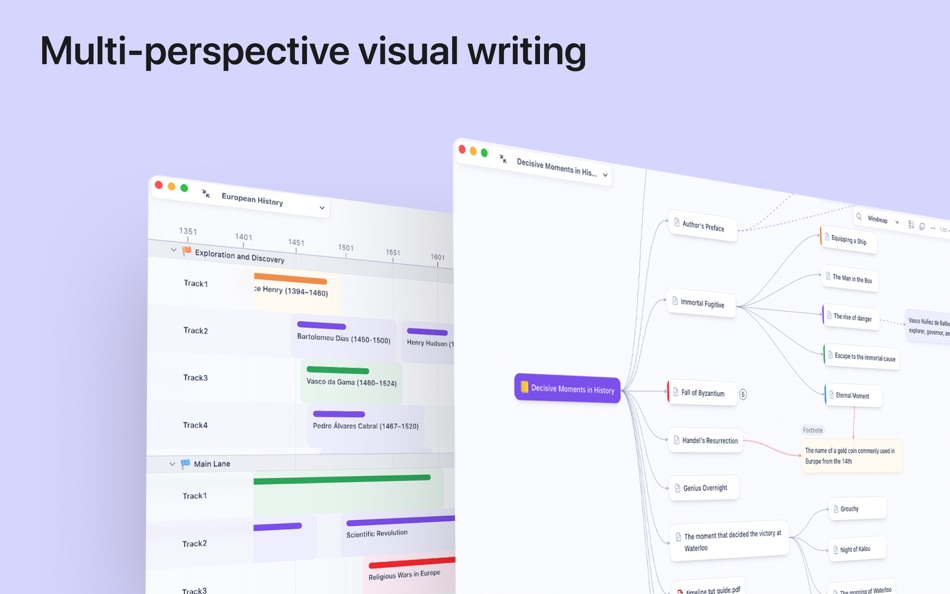
- Visual Writing: Write intuitively with Project Outline, Card Library, Graph, and Timeline
- Non-linear: Allows for chapter-based or card-based writing, with flexible organization and adjustment structure at any time
- Rich Editor: Supports text style, inline image and formula, footnote, comment, highlighting, multi-column, and text formatting
- High Performance: A single article can reach 100,000 words without lag
- Block Elements: Use the "/" syntax to insert heading, text, list, image, code block, table, math formula, bibliography etc
- Style Template: Precisely set styles, font, font size, alignment, indentation, line spacing, paragraph spacing, list numbering, color, borders, etc
- Local Storage: Content is stored locally and not uploaded to any cloud, protecting data privacy and security
- Third-Party Sync: Supports WebDAV protocol
- Content Interconnection: Use the syntax "@" to establish bidirectional links between articles, cards, PDFs, and web pages. Backtracking through forward or backward links
- Interactive Chart: Various table and chart templates
- Citation: Automatically numbers citations and generates biblography. Switch citation styles with just one click
- Image and Table Cross-reference
- Math Formula: Provides commonly used operators, easy to write LaTeX code. chemical formula, alignment line, automatic line wrapping, line numbers. Far surpasses MathType
- PDF Translation: Translate PDF in 92 languages, including scanned PDFs. Preserves original layout, Allows for excerpting, highlighting, and exporting translation result
- OCR: Accurately identify and extract complex table or math formula from PDF
- Zotero Integration: Install the official plugin, you can drag&drop or copy Zotero notes into Lattics and keep their reference
- Browser Plugin: Extract webpage content or save online PDFs to Lattics
- Web App
- Flashcard
- Goal Setting for Article or Project
- Bi-article Comparison
- Sequential Reading
- Hierarchical Tags/Subtags
- Markdown syntax
- High-quality export
- Multi-windows
- .. and more
---- Notice about Auto-Renewal Subscription --
Lattics Pro - Monthly: $5.99 / mon
Lattics Pro - Yeally: $35.99 / 12 mons
The automatic renewal of your Pro membership subscription will be automatically deducted from your iTunes account within 24 hours before the membership expires;
You can go to the account settings to manage the subscription and cancel the subscription after purchase. The specific path is: "Settings" -> Apple ID -> Subscription
Terms of Service: https://lattics.com/en-US/terms_of_service
Privacy Policy: https://lattics.com/en-US/privacy-policy
Ad
ภาพหน้าจอ




ประวัติราคา
-
* การซื้อภายในแอพ - วันนี้: ฟรี
- ต่ำสุด: ฟรี
- มากที่สุด: ฟรี
ติดตามราคา
มีอะไรใหม่
- เวอร์ชัน: 3.4.8
- อัปเดต:
- [New] Automatic update the third-party sync configuration across multiple devices. Settings and changes made on one device will automatically update on other devices without reconfiguration.
[New] PDF files can now be searched in the global search.
[New] When copying and pasting Word and Scrivener text, highlighting, underlining, and font styles are preserved in Lattics.
[Optimized] Further optimized the performance of the editor when displaying long articles.
[Fixed] Resolved issues with data storage mechanisms, preventing the inability to create new articles and occasional content loss when splitting articles.
[Fixed] Resolved issues with blank content during table editing and occasional table loss when copying tables.
[Fixed] Resolved the issues of creating new cards in the card library, editing images, and copying PDF translations.
ข้อมูลเพิ่มเติม
ผู้พัฒนา
- Aura Marker Studio Co., Ltd.
- แพลตฟอร์ม: Android แอป (1) iOS แอป (2) macOS แอป (1)
- รายการ: 2 + 2
- แต้มแล: 16 + 10,207 ¡
- การจัดอันดับ: 0
- ความเห็น: 0
- ลดราคา: 0
- วิดีโอ: 1
- RSS: ติดตาม
รายการ (2)
- Lattics - "Brain-like" Writing


แต้มแล (5)
-

- 534 MichaelTheGeek
- +1
-
- 50 Geoff B
- +1
-
- 715 Erin
- +1
-
- 2,979 바람처어럼
- +1
-
- 65 Kai Lee
- +1




การจัดอันดับ (0)
0 ☹️
ความเห็น (0)
เป็นคนแรกที่แสดงความเห็น 🌟
«Lattics - "Brain-like" Writing». แพลตฟอร์ม: macOS. หมวดหมู่: ประสิทธิภาพการผลิต. ผู้พัฒนา: «Aura Marker Studio Co., Ltd.». การเปิดตัวครั้งแรก: . อัปเดตล่าสุด: . ราคาปัจจุบัน: ฟรี. ชื่อนี้ยังไม่ได้รับการให้คะแนนหรือบทวิจารณ์บน AppAgg รายการ: สาธารณะ 2, ส่วนตัว 0. จุดที่ติดตาม: ยืนยันแล้ว 5, ทางอ้อม 0. ภาษาที่ใช้ได้: Chinese, English, French, German, Italian, Japanese, Korean, Portuguese, Russian, Spanish. AppAgg ติดตามประวัติราคา การให้คะแนน และคำติชมของผู้ใช้ «Lattics - "Brain-like" Writing». ส่วนลดและอัปเดตในอนาคต: RSS. AppAgg ไม่ได้โฮสต์แอปพลิเคชันหรือแจกจ่ายซอฟต์แวร์ เครื่องหมายการค้า โลโก้ และภาพหน้าจอทั้งหมดเป็นของเจ้าของที่เกี่ยวข้อง
Lattics - "Brain-like" Writing URL แบบสั้น: คัดลอกแล้ว!- 🌟 แชร์
- Mac App Store
คล้ายกัน
-
- Writing Challenge
- macOS แอป: ประสิทธิภาพการผลิต โดย: Bartolome Masco Lopez
- $3.99
- รายการ: 0 + 0 0 0
- แต้มแล: 0 + 0 เวอร์ชัน: 2.0 With Writing Challenge you will enjoy a game with creative prompts to spark your inspiration and master free writing. Forget about the fear to blank page. Your writing won't stop. HOW ... ⥯
-
- Writing Shed
- macOS แอป: ประสิทธิภาพการผลิต โดย: Keith Lander
- $9.99
- รายการ: 0 + 0 0 0
- แต้มแล: 1 + 0 เวอร์ชัน: 4.31 If you take your writing seriously, then you need serious tools to help you with your work. Writing Shed has been designed with you, the writer, in mind. It is more than a word ... ⥯
-
- Writing Tracker for Scrivener
- macOS แอป: ประสิทธิภาพการผลิต โดย: Digital Indoorsmen Inc.
- * ฟรี
- รายการ: 0 + 0 0 0
- แต้มแล: 1 + 0 เวอร์ชัน: 1.2 AUTO-TRACKING Tired of having to input your word count, start time, and end time into your writing tracker after each session? Forget about it! This app will automatically detect when ... ⥯
-
- Writing Aid: Readability Tool
- macOS แอป: ประสิทธิภาพการผลิต โดย: Oliver Zimmermann
- $8.99
- รายการ: 0 + 0 0 0
- แต้มแล: 0 + 0 เวอร์ชัน: 1.2 Tired of combing through your writing for overused words or clunky sentences? Writing Aid is your ultimate writing assistant, designed for authors, students, novelists, bloggers and ... ⥯
-
- Autopilot • Writing AI Chatbot
- macOS แอป: ประสิทธิภาพการผลิต โดย: Denk Alexandru
- * ฟรี
- รายการ: 1 + 0 0 0
- แต้มแล: 5 + 0 เวอร์ชัน: 2.2.6 Autopilot is your personal writing assistant, teacher, and copilot. It integrates the power of AI and ChatGPT in all your Mac apps. It is also available inside Safari websites and ... ⥯
-
- Paper: Writing App + Notes
- macOS แอป: ประสิทธิภาพการผลิต โดย: Mihhail Lapushkin
- * ฟรี
- รายการ: 0 + 0 0 0
- แต้มแล: 5 + 0 เวอร์ชัน: 111 This is a super-clean writing space with a lot of configurability that stays out of sight when you don t need it. App Store Review 2020 # STORY Read it here → paper.pro/story # ... ⥯
-
- Remembered- Back Up Your Brain
- macOS แอป: ประสิทธิภาพการผลิต โดย: Michael Gruenthal
- ฟรี
- รายการ: 0 + 0 0 0
- แต้มแล: 4 + 0 เวอร์ชัน: 2.5.8 Have you ever wished that you could back up your brain? Now you can! Remembered keeps track of all those things that are so easy to forget. Things you thought it would be easy to ... ⥯
-
- QuillBot: AI Writing Assistant
- macOS แอป: ประสิทธิภาพการผลิต โดย: QuillBot, a Learneo Inc. business
- * ฟรี
- รายการ: 0 + 0 0 0
- แต้มแล: 1 + 0 เวอร์ชัน: 4.71.0 QuillBot for Safari is a free writing assistant currently helping over 35 million people perfect their communication. How it works: Install QuillBot for Safari in your browser for ... ⥯
-
- Bike Outliner | Writing App
- macOS แอป: ประสิทธิภาพการผลิต โดย: Jesse Grosjean
- * ฟรี
- รายการ: 0 + 1 0 0
- แต้มแล: 1 + 0 เวอร์ชัน: 1.22.2 Bike is a better place to think and write. Use Bike to write, think, organize. Make lists, take notes, create documents. Bike's an unusually fast writing app designed for your Mac. ... ⥯
-
- Paragraphs: A Writing App
- macOS แอป: ประสิทธิภาพการผลิต โดย: Triplane
- ฟรี
- รายการ: 0 + 0 0 0
- แต้มแล: 2 + 0 เวอร์ชัน: 2.1 Paragraphs is a simple, powerful and beautiful markdown editor for macOS. Edit markdown and plain text files in a native text editor that feels right at home on your Mac. # Features: ... ⥯
-
- Draft Writing - Script & Blog
- macOS แอป: ประสิทธิภาพการผลิต โดย: Any Case Solutions
- * ฟรี
- รายการ: 0 + 0 0 0
- แต้มแล: 2 + 0 เวอร์ชัน: 1.4.4 Draft Writing is a creative text editor for writers and bloggers. A writing tool to gather your ideas into one place. Easy writing projects and texts management. AI WRITING ASSISTANT - ⥯
-
- Compose: AI Writing Assistant
- macOS แอป: ประสิทธิภาพการผลิต โดย: Aayush Pokharel
- * ฟรี
- รายการ: 0 + 0 0 0
- แต้มแล: 0 + 0 เวอร์ชัน: 1.0 Compose: Your AI Writing Assistant - Smarter than Grammarly, More Convenient than ChatGPT Better writing everywhere you work - no more app switching Elevate your writing instantly with ⥯
-
- Markdown - Enjoy writing
- macOS แอป: ประสิทธิภาพการผลิต โดย: 潇 罗
- $7.99
- รายการ: 1 + 0 0 0
- แต้มแล: 0 + 0 เวอร์ชัน: 1.3.3 I'm Markdown, the Markdown editor for OS X. This is a powerful Markdown editor, very design, UI simple and user-friendly interactive experience, let us focus more on writing. Markdown ... ⥯
-
- Grammarly: AI Writing App
- macOS แอป: ประสิทธิภาพการผลิต โดย: Grammarly, Inc
- * ฟรี
- รายการ: 0 + 0 0 0
- แต้มแล: 0 + 0 เวอร์ชัน: 9.96.0 Grammarly for Safari is your always-on assistant for clearer, more compelling communication. It helps you brainstorm ideas, overcome writer s block, and refine your writing with ... ⥯