
| ผู้พัฒนา: | ACD Systems International Inc. (15) | ||
| ราคา: | * ฟรี | ||
| การจัดอันดับ: | 0 | ||
| ความเห็น: | 0 เขียนความเห็น | ||
| ความเห็น: | 0 โพสต์ความคิดเห็น | ||
| รายการ: | 1 + 0 | ||
| แต้มแล: | 0 + 0 ¡ | ||
| Mac App Store | |||
คำอธิบาย

ACDSee Photo Studio is designed for photographers who demand both speed and precision. It combines lightning-fast photo browsing, AI-powered photo management, and powerful non-destructive editing in one seamless application.
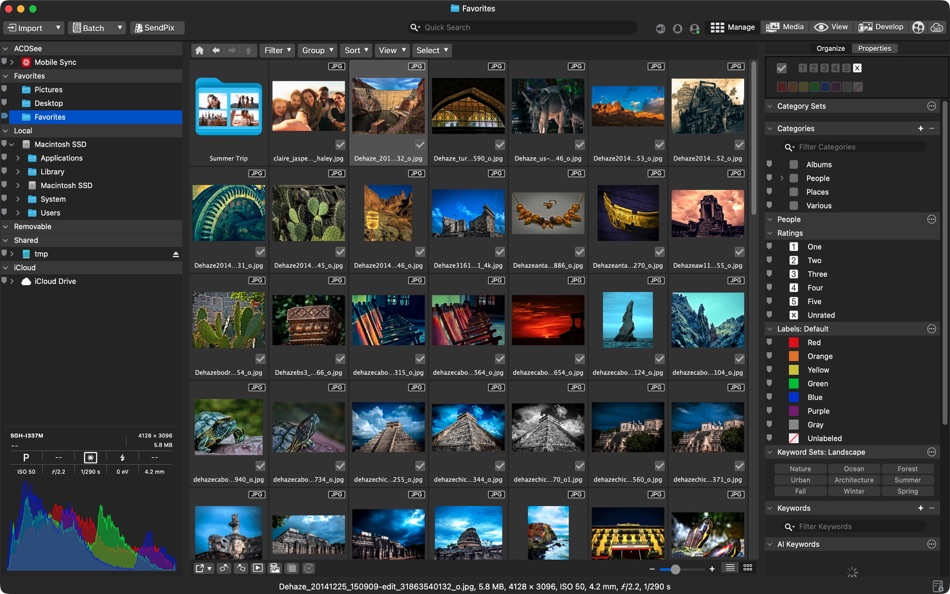
Unrivaled Digital Asset Management
• Work directly with your existing folders without importing or duplicating files
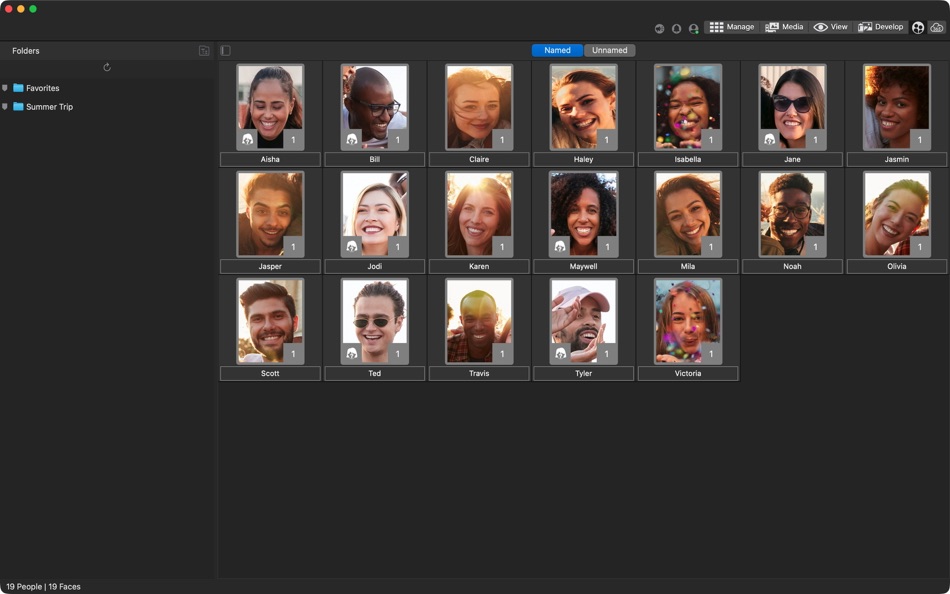
• Automatically find and group photos of people using AI Face Detection and Facial Recognition
• Organize using ratings, color labels, categories, and hierarchical keywords
• Instantly locate any photo using metadata, search, and AI-Keywords
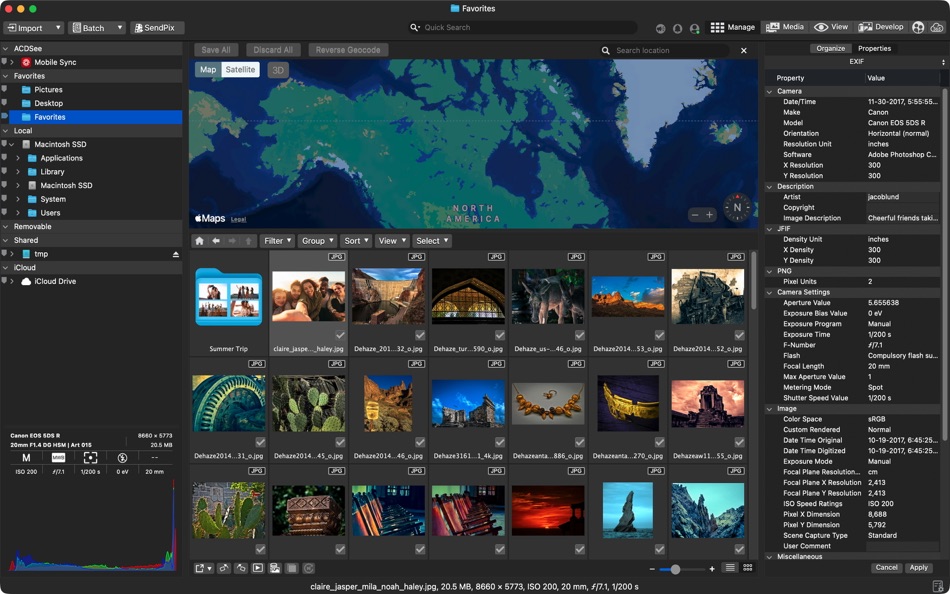
• Add, edit, and search by location, camera data, and EXIF/IPTC metadata
• Detect and remove duplicate files across folders and drives to keep your library clean
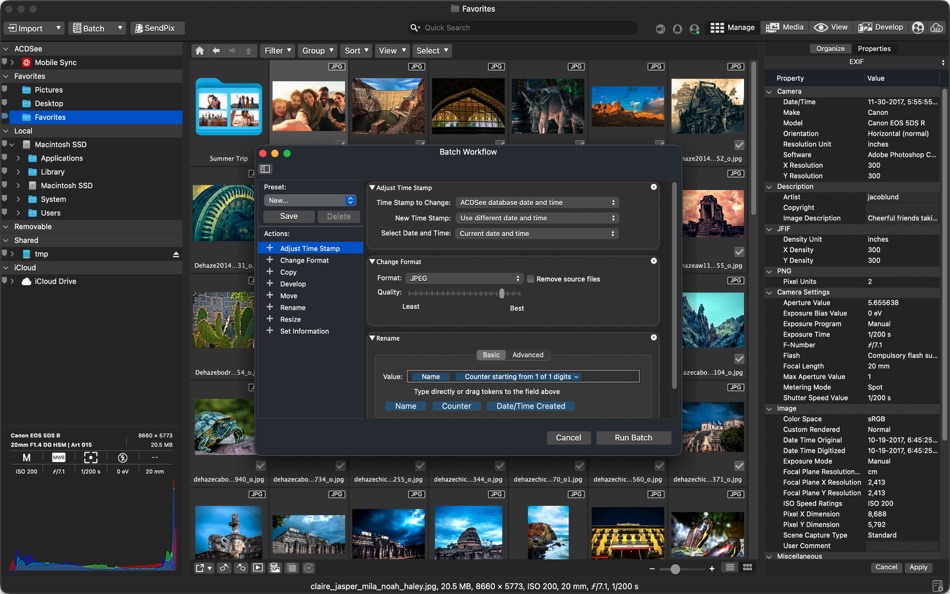
Batch Processing That Saves You Hours
• Build fast, efficient culling and delivery workflows for large shoots and events
• Export hundreds of photos at once with automatic resizing, renaming, and format conversion
• Rename entire folders of files in seconds using flexible custom naming rules
• Apply your saved edits and presets to large batches of photos in one step
• Resize, rotate, and update metadata across multiple files at once
Non-Destructive RAW Editing
• Edit freely knowing your original files are always preserved and never modified
• Perform a complete RAW photo editing workflow from start to finish
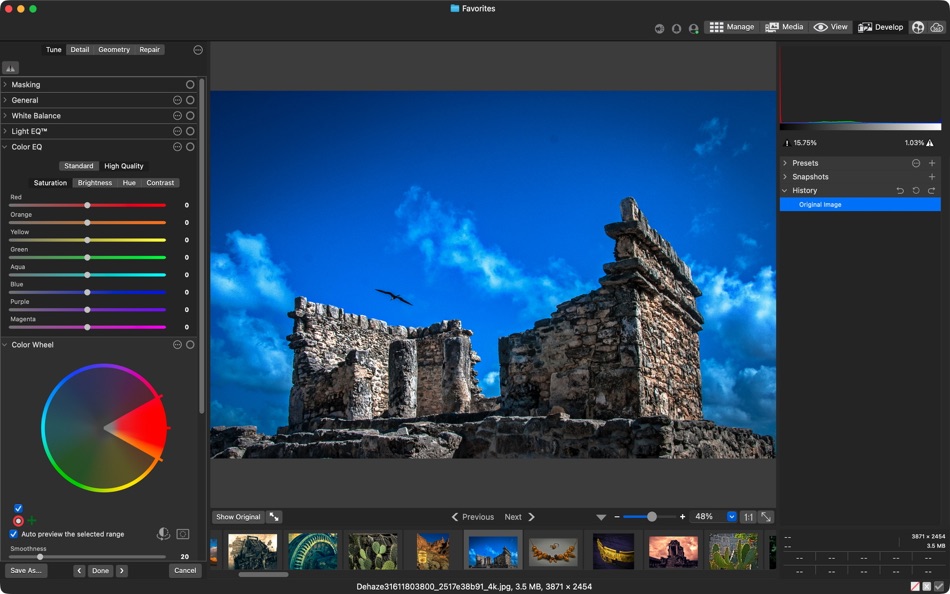
• Fine-tune colors and tones using Light EQ™, Color & Tone Wheels, Curves, Levels, and Color EQ
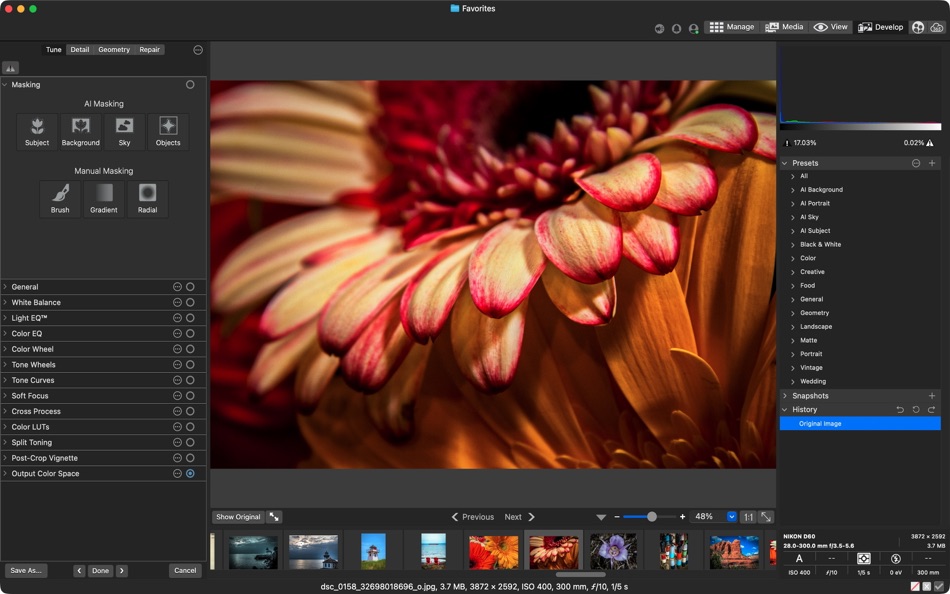
• Make precise local adjustments using the AI masking tools
• Retouch portraits and photos using Heal, Clone, and Skin Tune tools
• Use snapshots and history to return to any previous version of your edit at any time
• Apply LUTs and presets or create your own looks for consistent results
On-Device AI-Powered Tools
• Automatically analyze and tag your photos with AI Keywords to make searching effortless
• Organize your library by person using AI Face Detection and Facial Recognition
• Create perfect selections in one click using AI Subject, Sky, and Object masking
• Upscale images intelligently with AI Super-Resolution while preserving fine detail
• Reduce noise with AI Denoise while keeping textures and edges natural
• Apply AI-powered editing presets that intelligently enhance your photos automatically
• Keep your photos private with all AI processing running entirely on your Mac
Ad
ภาพหน้าจอ

ประวัติราคา
-
* การซื้อภายในแอพ - วันนี้: ฟรี
- ต่ำสุด: ฟรี
- มากที่สุด: ฟรี
ติดตามราคา
มีอะไรใหม่
- เวอร์ชัน: 26.0.0
- อัปเดต:
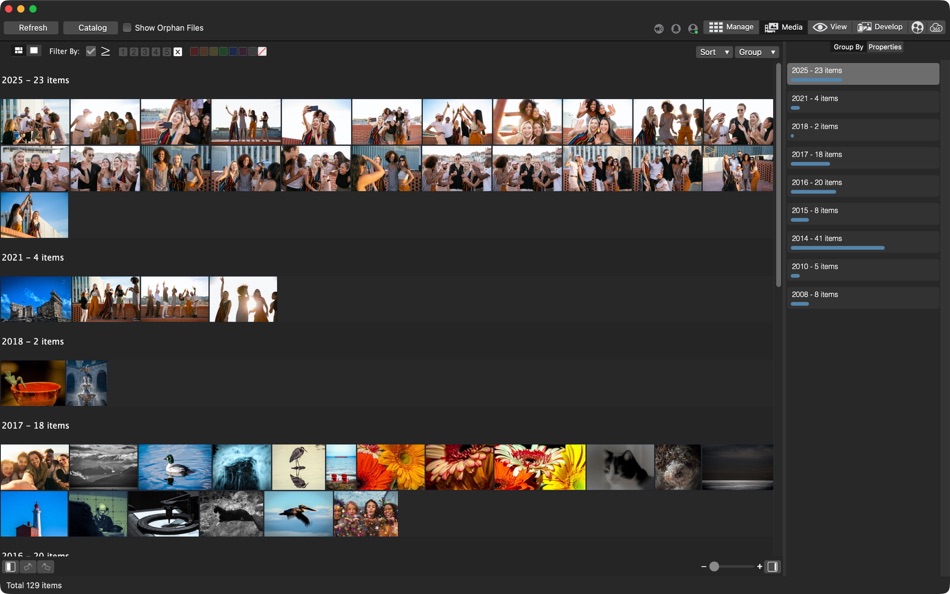
- Discover new and improved tools designed to simplify your editing and management workflow. AI Denoise removes unwanted noise while preserving detail and AI Presets applies intelligent editing adjustments across multiple images with a click. Save immeasurable amounts of time using new AI Keywords to instantly search your images without adding a single piece of metadata and make sense of a massive photo collection with the new Group By options in Manage Mode. ACDSee Photo Studio is packed with time-saving power to help you work smarter, complete tasks faster, and feel unstoppable.
ความเห็น (0)
เป็นคนแรกที่แสดงความเห็น 🌟
ผู้พัฒนา
- ACD Systems International Inc.
- แพลตฟอร์ม: Android แอป (4) iOS แอป (5) macOS แอป (2) Windows แอป (3) Steam เกม (1)
- รายการ: 9 + 5
- แต้มแล: 44 + 9,727 ¡
- การจัดอันดับ: 0
- ความเห็น: 0
- ความเห็น: 0
- ลดราคา: 0
- วิดีโอ: 3
- RSS: ติดตาม
แต้มแล (0)
0 ☹️
การจัดอันดับ (0)
0 ☹️
รายการ (1)
- ACDSee Photo Studio

ความเห็น (0)
แสดงรีวิวเป็นคนแรกเลย 🌟
ข้อมูลเพิ่มเติม
รายชื่อติดต่อ
- เว็บไซท์:
 https://r.acdsee.com/xeOYi
«ACDSee Photo Studio». แพลตฟอร์ม: macOS. หมวดหมู่: การถ่ายภาพ. ผู้พัฒนา: «ACD Systems International Inc.». การเปิดตัวครั้งแรก: . อัปเดตล่าสุด: . ราคาปัจจุบัน: ฟรี. ชื่อนี้ยังไม่ได้รับการให้คะแนนหรือบทวิจารณ์บน AppAgg รายการ: สาธารณะ 1, ส่วนตัว 0. ภาษาที่ใช้ได้: English, French, German, Japanese. AppAgg ติดตามประวัติราคา การให้คะแนน และคำติชมของผู้ใช้ «ACDSee Photo Studio». ส่วนลดและอัปเดตในอนาคต: RSS. AppAgg ไม่ได้โฮสต์แอปพลิเคชันหรือแจกจ่ายซอฟต์แวร์ เครื่องหมายการค้า โลโก้ และภาพหน้าจอทั้งหมดเป็นของเจ้าของที่เกี่ยวข้อง
ACDSee Photo Studio URL แบบสั้น: คัดลอกแล้ว!- 🌟 แชร์
- Mac App Store
Ad
คล้ายกัน
-
- Photo Transfer App
- macOS แอป: การถ่ายภาพ โดย: Mobileware Studio SL
- ฟรี
- รายการ: 0 + 1 การจัดอันดับ: 0 ความเห็น: 0
- แต้มแล: 2 + 0 0 เวอร์ชัน: 4.0.4 Photo Transfer App allows you to quickly download and upload photos between your iPhone/iTouch/iPad and your Mac over wifi. This application requires "Photo Transfer App" installed on ... ⥯
- ใหม่
- Photo Pik
- macOS แอป: การถ่ายภาพ โดย: BTC Studio
- ฟรี
- รายการ: 0 + 0 การจัดอันดับ: 0 ความเห็น: 0
- แต้มแล: 0 + 0 0 เวอร์ชัน: 1.0 Stop wasting hours manually picking client photos! Photo Pik is the ultimate workflow hack for professional photographers and studios. If you ve ever spent hours scrolling through ... ⥯
-
- Hydra › HDR Photo Studio
- macOS แอป: การถ่ายภาพ โดย: Creaceed SRL
- $9.99
- รายการ: 0 + 1 การจัดอันดับ: 0 ความเห็น: 0
- แต้มแล: 0 + 0 0 เวอร์ชัน: 4.6 Hydra lets you create beautiful high-dynamic-range (HDR) images by merging multiple exposures, effectively capturing both dark and bright subjects to make it more natural or to enhance ⥯
-
- Photo Naminator
- macOS แอป: การถ่ายภาพ โดย: Bjoern Goerke
- * ฟรี
- รายการ: 0 + 1 การจัดอันดับ: 0 ความเห็น: 0
- แต้มแล: 8 + 0 0 เวอร์ชัน: 2.26 Photo Naminator is a 3rd-party utility for Apple macOS that takes photo and video files as input (like JPEG, PNG, GIF or RAW format files) and renames their filenames based on metadata ⥯
-
- Photo Editor for Seedream
- macOS แอป: การถ่ายภาพ โดย: Yasir Islam
- * ฟรี
- รายการ: 0 + 0 การจัดอันดับ: 0 ความเห็น: 0
- แต้มแล: 0 + 0 0 เวอร์ชัน: 1.3 Photo Editor for Seedream is an all-in-one AI photo editing app that turns your imagination into art. Create stunning visuals with Text to Image or transform existing photos using ... ⥯
-
- Photo Strip for Mac OS X
- macOS แอป: การถ่ายภาพ โดย: Andre Yonadam
- $0.99
- รายการ: 0 + 0 การจัดอันดับ: 0 ความเห็น: 0
- แต้มแล: 0 + 0 0 เวอร์ชัน: 1.0 Photo Strip is a super fun and easy-to-use photography app that returns your photos just as if you were in a photo booth. The drag and drop interface is super easy to use and makes ... ⥯
-
- Photo Pixel Filter
- macOS แอป: การถ่ายภาพ โดย: Jan Nutbroek
- ฟรี
- รายการ: 0 + 2 การจัดอันดับ: 0 ความเห็น: 0
- แต้มแล: 11 + 0 0 เวอร์ชัน: 1.9 Unleash Your Creativity with Our User-Friendly Photo Editing App! Master the art of photo editing with ease using our intuitive application, designed to eliminate the learning curve. ... ⥯
-
- Photo Distributor M
- macOS แอป: การถ่ายภาพ โดย: Pekka Leppanen
- $6.99
- รายการ: 0 + 0 การจัดอันดับ: 0 ความเห็น: 0
- แต้มแล: 1 + 0 0 เวอร์ชัน: 2.0.1 Perfecting photographs requires adapting them to the viewing situation: scaling them for the viewing or printing device and setting optimal sharpening based on the expected viewing ... ⥯
-
- Photo Flipbook Studio
- macOS แอป: การถ่ายภาพ โดย: Solaz Dazen srl
- $14.99
- รายการ: 0 + 0 การจัดอันดับ: 0 ความเห็น: 0
- แต้มแล: 0 + 0 0 เวอร์ชัน: 1.7.2 Create your own flipbooks with ease! This software takes your chosen photos of pdfs and generates a beautiful HTML flipbook that you can publish online or view on your computer or ... ⥯
-
- Photo Editor
- macOS แอป: การถ่ายภาพ โดย: Codeway
- * ฟรี
- รายการ: 0 + 0 การจัดอันดับ: 0 ความเห็น: 0
- แต้มแล: 0 + 0 0 เวอร์ชัน: 1.1 Fotoris AI Photo Editor is your ultimate creative powerhouse packed with advanced AI tools to transform any photo into something extraordinary. Create, design, edit, and imagine ... ⥯
-
- Photo Date Editor+
- macOS แอป: การถ่ายภาพ โดย: Don Miller
- $4.99
- รายการ: 0 + 0 การจัดอันดับ: 0 ความเห็น: 0
- แต้มแล: 0 + 0 0 เวอร์ชัน: 1.1 Simply, with Photo Date Editor+, you can edit photos with often random or meaningless dates to the actual dates when the photos were taken. That means you can search or sort those ... ⥯
-
- Photo Print
- macOS แอป: การถ่ายภาพ โดย: Brendan Murphy
- $19.99
- รายการ: 0 + 0 การจัดอันดับ: 0 ความเห็น: 0
- แต้มแล: 0 + 0 0 เวอร์ชัน: 4.1.0 The fastest way to format and print your pictures! Photo Print is an application designed to transform your photos into print. Photo Print is as simple as drag and drop. You drop in a ... ⥯
-
- Photo Compressor
- macOS แอป: การถ่ายภาพ โดย: Ruchira Ramesh
- $4.99
- รายการ: 0 + 0 การจัดอันดับ: 0 ความเห็น: 0
- แต้มแล: 0 + 0 0 เวอร์ชัน: 12.2 Compress JPG, PNG & HEIC photos and reduce them to size of your choice.You could either use Lossless method, Lossy method or just set what size you want.For example, if there is a ... ⥯
-
- Photo Organizer - Sort photos
- macOS แอป: การถ่ายภาพ โดย: Giuseppe Cigala
- $3.99
- รายการ: 0 + 0 การจัดอันดับ: 0 ความเห็น: 0
- แต้มแล: 0 + 0 0 เวอร์ชัน: 1.9 It happens to everyone not being able to find a photo because it was saved with a random name and an incremental counter (eg IMG_1234) and not remembering exactly when it was taken. ... ⥯