
저장됨
저장됨 메뉴에 표시할 이름을 선택하세요.
완료!
기술
CREATE, IMPORT, EDIT & EXPORT 3D MODELS
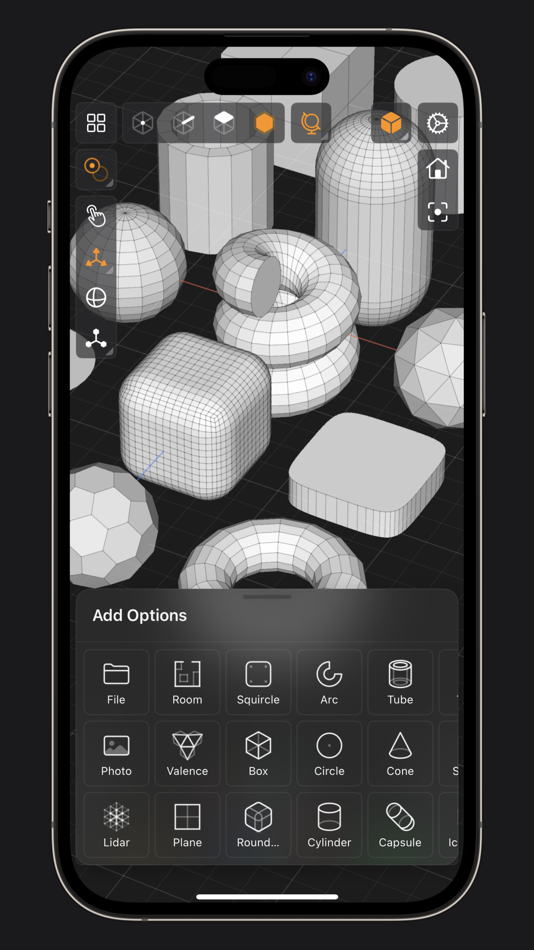
• 25 primitive shapes are built-in & ready to help you start modeling: plane, box, sphere, squircle, rounded box, arc, circle, cylinder, tube, cone, capsule, torus, icosphere, pipe, revolve, helix, voronoi, text, super shape, noise surfaces, torus knot, faceted gem & tube.
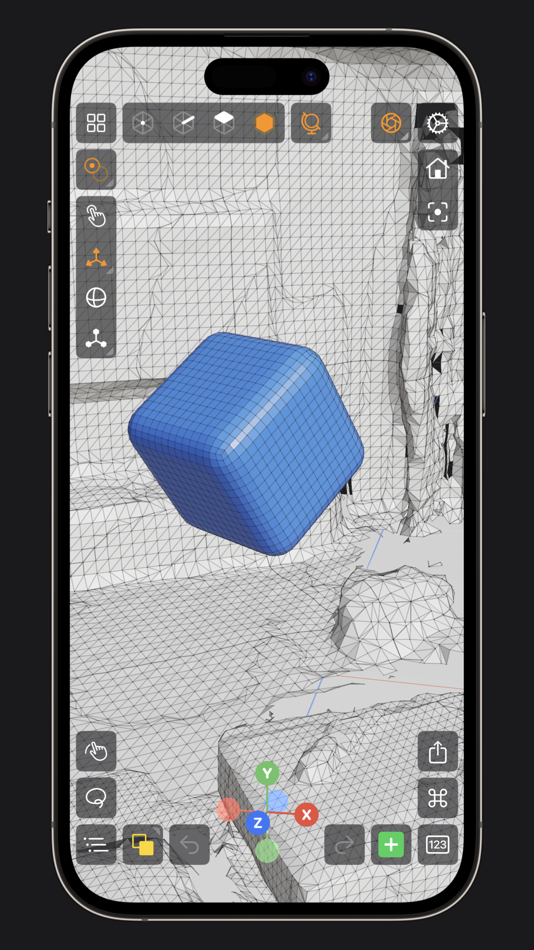
• Import existing models, reference images, lidar scans and room plans
• Imports: OBJ, STL, USD, USDZ
• Exports: PNG, SVG, OBJ, STL, USD, USDZ, GLTF, GLB
• Knife tool to create complex and detailed geometry
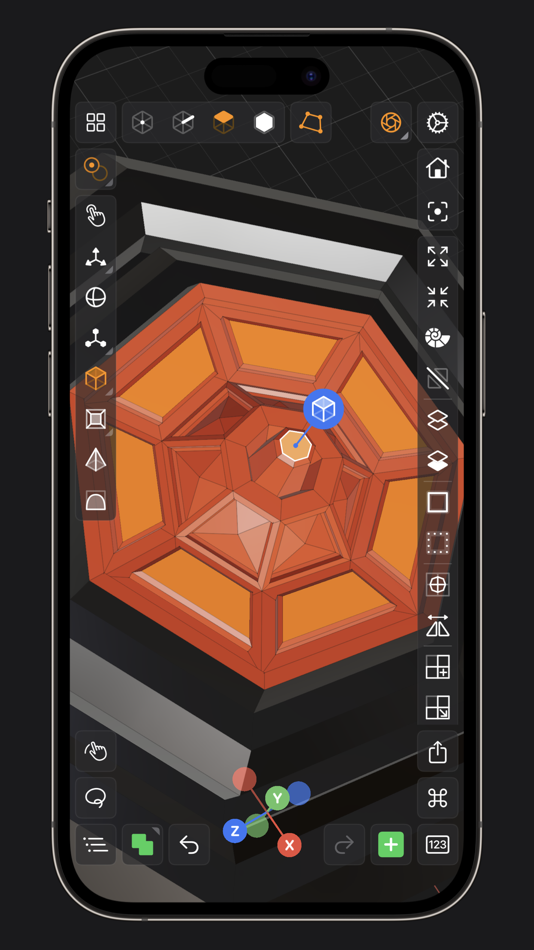
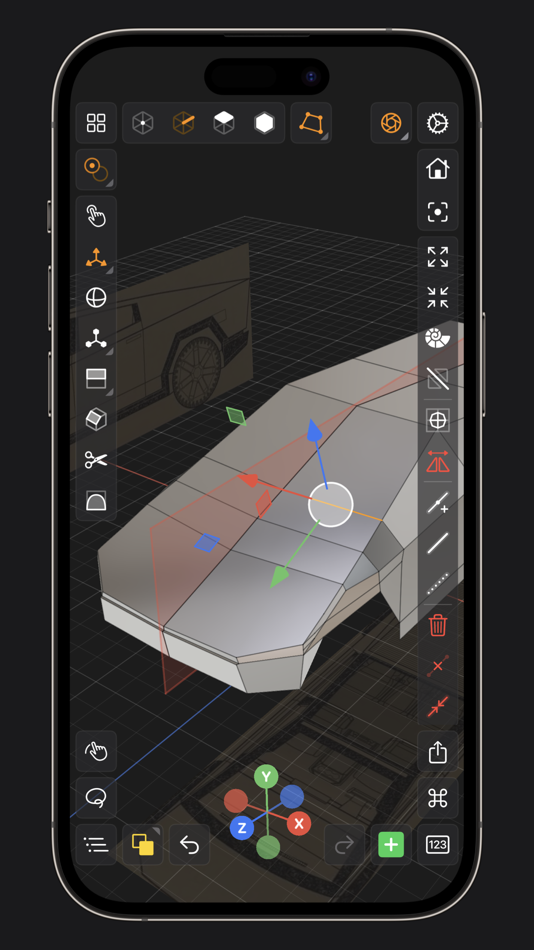
• Move, Rotate, & Scale gizmos make it easy to transform nodes, faces, edges & vertices
• Powerful modeling gizmos for extruding, insetting, beveling, poking, creasing & cutting
• Multiple selection & automatic loop selection help accelerate your modeling
• Tap on one of the gizmo handles to bring up an input field for precise transformations & mesh operations
• Robust snapping & alignment commands
• Selection operations: grow, shrink, select shell & deselect
• Mesh operations: duplicate, instance, set / center pivot, trim by plane, boolean, apply transform & subdivide
• Face operations: separate, combine, bridge, extract, poke, collapse, delete, dissolve, harden & soften
• Edge operations: extrude, insert vertex, collapse, dissolve, bridge, harden & soften
• Vertex operations: insert edge, dissolve, delete & merge
• Non-destructive & configurable mesh modifiers: mirror & subdivision
• Apply complex transformations using different gizmo pivot points & orientations
EASILY NAVIGATE & STAY IN FLOW WHILE DESIGNING
• Carefully crafted & fully optimized for iPhone & iPad
• Designed to minimize cognitive overload by only showing tools & commands that are contextually relevant
• Easily navigate to any part of your model by dragging and pinching: two finger pinch to zoom and roll, and one finger drag to rotate
• Pop into the standard orthographic views by tapping one of the handles of the orientation gizmo
• Use two & three finger tap gestures to undo & redo
• Select components by dragging or using the rectangular selection mode
• Your work is saved automatically every two minutes and every time you go back to the gallery
• Get an overview of your scene’s structure from the Outliner
• Long press on a node in the Outliner to easily rename, duplicate, instance, delete, parent & reorder any object in your scene
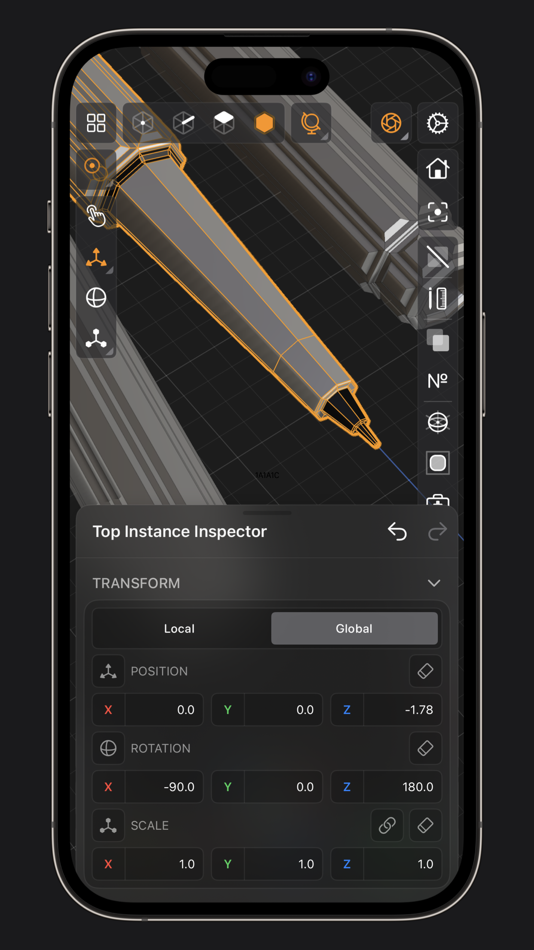
• Precisely adjust any node’s position, rotation & scale with the Inspector
• Adjust material properties, display & modifier options with the Inspector
STAY ORGANIZED ACROSS ALL YOUR DEVICES
• Preview, share, duplicate, delete & rename your models from the gallery
• iCloud syncing keeps all your models up to date, private & accessible across all your devices
PREVIEW, MEASURE, & RENDER YOUR CREATIONS
• 6 powerful rendering modes: Matcap, Modeling, Wireframe, Physically Based, X-Ray & Path Traced
• Export renders in any aspect ratio & scale
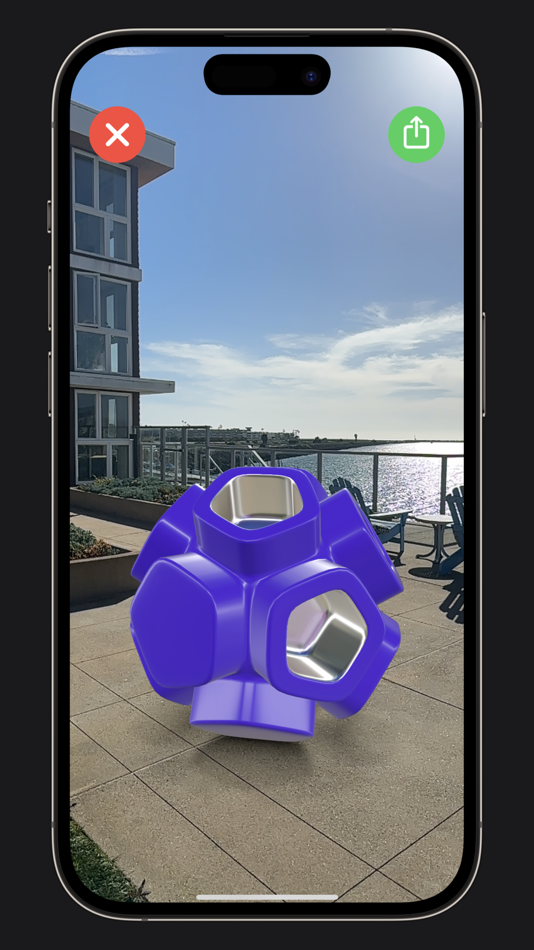
• Preview your model in AR in two taps
• Export your scene as a USDZ & be confident it’ll look consistent on all Apple devices
• Tweak your model’s material & see changes in real-time
• Tweak-able scene settings: camera field of view, background type, blurriness, intensity & rotation
• Get model measurements in one click
• Add persistent dimensions between any two surfaces in your scene
PURCHASE & COMPATIBILITY
• One time purchase unlocks both iPhone & iPad versions
• Apple Pencil supported on select iPads
• 120 FPS supported on devices with ProMotion displays
• Path Tracing is supported on iPads with M series chips & iPhones with A15 Bionic & later
• Lidar Scan & Room Plan is supported on devices with a lidar sensor
Ad
스크린샷




가격 내역
- 오늘: $39.99
- 최소: $29.99
- 최대: $39.99
가격 추적
추가 정보
 https://valence3d.app/
목록 (2)
- Valence 3D


포인트 (1)
-

- 66 Gabriel
- +1

순위 (0)
0 ☹️
댓글 (0)
가장 먼저 댓글을 남겨주세요 🌟
«Valence 3D». 플랫폼: iOS. 카테고리: 그래픽 및 디자인. 개발자: «Hi-Rez». 첫 번째 릴리스: . 마지막 업데이트: . 현재 가격: $39.99. 최저 기록 가격: $29.99 (). 최고 기록 가격: $39.99 (). 이 타이틀은 아직 AppAgg에서 평가나 리뷰를 받지 못했습니다. 목록: 공개: 2, 비공개: 1. 추적된 포인트: 확인됨: 1, 간접: 107. 매장: App Store. 매장 평가: 4.2. 투표: 107. 사용 가능한 언어: Chinese, Danish, English, French, German, Italian, Japanese, Korean, Portuguese, Russian, Spanish, Swedish. AppAgg는 «Valence 3D»의 가격 기록, 평점 및 사용자 피드백을 추적합니다. 향후 할인 및 업데이트 받기: RSS에서 확인할 수 있습니다. AppAgg는 애플리케이션을 호스팅하거나 소프트웨어를 배포하지 않습니다. 모든 상표, 로고 및 스크린샷은 해당 소유자의 자산입니다.
Valence 3D 단축 URL: 복사됨!- 🌟 공유하기
- App Store
유사 항목
-
- 3D Scratchpad
- iOS 앱: 그래픽 및 디자인 게시자: Engineered Stuff
- * 무료
- 목록: 0 + 0 0 0
- 포인트: 0 + 12 (2.7) 버전: 3.12 3D Scratchpad is an easy-to-use, full-featured design tool for creating 3D models. Freehand draw in three dimensions using simple primitive solid shapes and intuitive gestures. ... ⥯
-
- 3D Modeling : AI Text to 3D
- iOS 앱: 그래픽 및 디자인 게시자: CREATIVEENJOYMENT TECH PTE. LTD.
- 무료
- 목록: 0 + 0 0 0
- 포인트: 1 + 4 (1.0) 버전: 1.0.3 Bring Your Imagination to Life in 3D 3D Modeling is an AI-powered 3D model generator and viewer that makes creating high-quality 3D models effortless no experience needed. Whether ... ⥯
-
- 3D AI Model
- iOS 앱: 그래픽 및 디자인 게시자: FREDERIC JEAN PIERRE DUFOUR
- * 무료
- 목록: 0 + 0 0 0
- 포인트: 1 + 0 버전: 1.34 Turn your imagination into 3D reality. 3D AI is the ultimate tool for creators, designers, and hobbyists. Using the power of AI, you can generate complex 3D models simply by describing ⥯
-
- 3D Pose Reference & Easy Poser
- iOS 앱: 그래픽 및 디자인 게시자: Ha Vu Thi
- 무료
- 목록: 0 + 0 0 0
- 포인트: 1 + 16 (3.9) 버전: 1.0.4 Ever tried searching endlessly for the perfect pose or asking a friend to stand still for your artwork? Then 3D Pose Reference & Easy Poser is made for you. 3D Pose Reference & Easy ... ⥯
- Ad
-
- 3D Filter
- iOS 앱: 그래픽 및 디자인 게시자: Maimaitiming Abudukadier
- 무료
- 목록: 0 + 0 0 0
- 포인트: 0 + 1 (5.0) 버전: 1.1 Transform your portrait photos into 3D based on Chromostereopsis! See red pop and blue recede for a mesmerizing depth effect. ⥯
-
- 3D modeling: Design my model
- iOS 앱: 그래픽 및 디자인 게시자: Core five, Inc.
- 무료
- 목록: 0 + 0 0 0
- 포인트: 1 + 12,460 (4.6) 버전: 1.10.7 3D Modeling App lets you easily design 3D content on the go using gestures on iPhone or iPad. No need to use the Apple Pencil, but you can, if you want to. Tons of features: 1. Fast ... ⥯
-
- 3D Simplify
- iOS 앱: 그래픽 및 디자인 게시자: Po hin Ma
- * 무료
- 목록: 0 + 0 0 0
- 포인트: 0 + 0 버전: 1.0.1 3D Simplify reduces polygon count of 3D models while preserving shape and textures. Import USDZ files, compare original and simplified models side by side, fine-tune reduction ratio, ... ⥯
-
- 3D Mockups - T-Shirt Design
- iOS 앱: 그래픽 및 디자인 게시자: Ariel Ortiz
- 무료
- 목록: 0 + 0 0 0
- 포인트: 2 + 101 (4.7) 버전: 1.8.8 3D Mockups - T-Shirt Design Create, customize, and record your own T-Shirt Design in full 3D. From streetwear to hoodies, turn your ideas into real designs fast, easy, and fun. DESIGN ... ⥯
-
- 3D Maker:AI 3D Modeling, AR
- iOS 앱: 그래픽 및 디자인 게시자: Daichi Kusano
- 무료
- 목록: 0 + 0 0 0
- 포인트: 0 + 6 (5.0) 버전: 1.0 3D Maker is an AI 3DCG creation app that generates 3D models from text. The created 3D model can be displayed in AR. [What is AR?] AR is an abbreviation for "Augmented Reality", which ... ⥯
-
- 3D-PaiLiTi
- iOS 앱: 그래픽 및 디자인 게시자: Encoflow Digital Studio Sdn Bhd
- * 무료
- 목록: 0 + 0 0 0
- 포인트: 0 + 0 버전: 1.1 3D-PaiLiTi lets you quickly generate usable 3D models from a single image, preview them in real time on your phone, and easily export to GLB/STL formats. No 3D knowledge required what ... ⥯
-
- 3D Object Easy
- iOS 앱: 그래픽 및 디자인 게시자: Viktoriia Samoilova
- 무료
- 목록: 0 + 0 0 0
- 포인트: 0 + 0 버전: 1.0 3D Object Easy is a powerful yet simple 3D scanning app that transforms real-world objects into high-quality 3D models using your iPhone's advanced camera system and LiDAR scanner. KEY ⥯
- 새로운
- 3D Logo Maker: Text Design Lab
- iOS 앱: 그래픽 및 디자인 게시자: Masumi Masuyama
- * 무료
- 목록: 0 + 0 0 0
- 포인트: 0 + 0 버전: 1.0.3 "3D Text Lab" is a high-performance design tool that allows anyone to easily create professional-grade 3D text. Turn flat text into beautiful 3D in just a few taps. Instantly create ... ⥯
-
- 3D Mug Mockup Designer
- iOS 앱: 그래픽 및 디자인 게시자: Evgeniy Kosilkov
- 무료
- 목록: 0 + 0 0 0
- 포인트: 0 + 3 (5.0) 버전: 1.0 3D Mug Mockup Designer is a free mug designer with 3D preview. The editor allows you to use photos, pictures, add text in different colors, move, rotate and scale objects. You can ... ⥯
-
- 3D Modeling, Design: Shapeyard
- iOS 앱: 그래픽 및 디자인 게시자: Magic Unicorn Inc.
- 무료
- 목록: 0 + 0 0 0
- 포인트: 1 + 5,929 (4.4) 버전: 5.16 Try the subscription-based 3D modeling app Shapeyard! Whether it s 3D modeling on iPhone or 3D modeling for iPad Shapeyard lets you create detailed 3D models using easy and intuitive ... ⥯