
ที่บันทึกไว้
เลือกชื่อที่จะแสดงในเมนูที่บันทึกไว้ของคุณ
เสร็จแล้ว
| ผู้พัฒนา: | Lux Optics Incorporated (4) | ||
| ราคา: | $9.99 | ||
| การจัดอันดับ: | 0 | ||
| ความเห็น: | 0 โพสต์ความคิดเห็น | ||
| รายการ: | 1 + 5 | ||
| แต้มแล: | 1 + 1,839 (4.7) ¡ | ||
| App Store | |||
คำอธิบาย

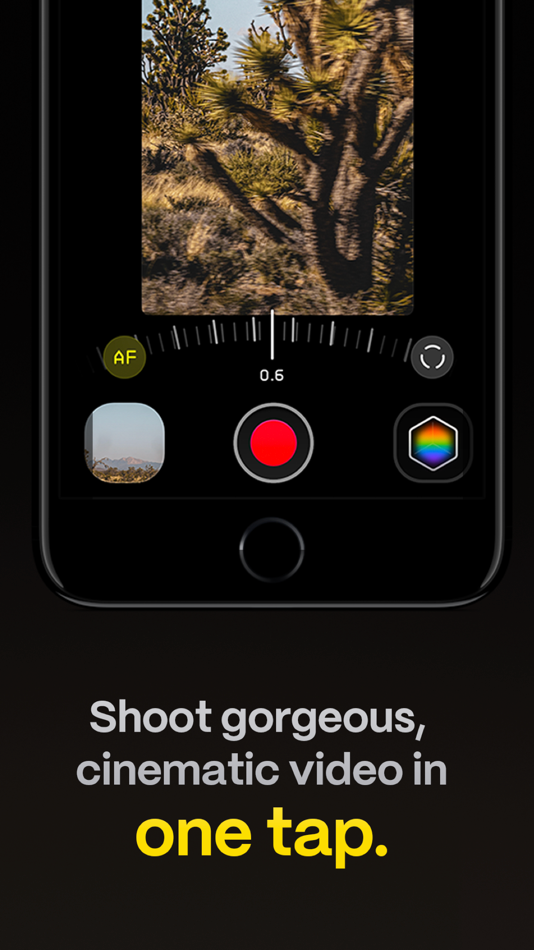
Are you an experienced filmmaker? Kino includes all the features you need to shoot like a Pro, such as a full manual mode, focus peaking, color waveform, audio meters, and more. If you’re experienced in color, you can import LUTs quickly and use the same powerful Instant Grade feature to output video with baked in LUTs.
Regardless of your skill level, Kino adapts to your needs. Pick your experience level when setting up the app to dial things in your way or go with recommended, simple settings. The beautiful, simple interface shows only essential things, while keeping powerful features under thumb’s reach.
INSTANT GRADE
Kino comes packed with pro color presets by experts like Stu Maschwitz, Sandwich Video, Evan Schneider, Tyler Stalman and Kevin Ong. With one tap, you can shoot video with cinematic, film-like color by selecting a Grade preset. With Instant Grade, you don’t have to apply it later or do any editing steps: Kino just saves the processed video for you, ready to share.
LEARN ALONG
Getting started with video? The Kino team has a free series of lessons prepared you can dive into right away to learn filmmaking with the app. Start out with our simple recommended settings and enroll in a lesson plan to get lessons emailed to you that are easy to follow and let you unlock every feature of the app to use for making better videos.
PRO TOOLS
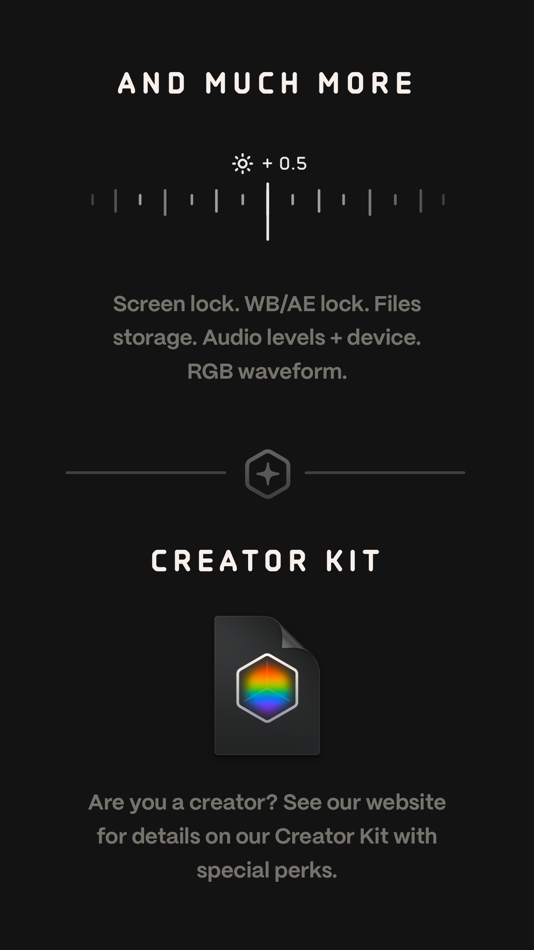
Kino’s simple interface does not mean it lacks in powerful pro tools. Start out with automatic exposure with EV adjustment and AE and WB lock, or drop into full manual mode with shutter speed, angle and ISO adjustment. Compose a shot with the grid with built in level, check exposure with the RGB waveform, and pull focus with focus peaking. Kino can store your recordings in Files instead of Photos for better and easy shot management, and even features a screen lock to prevent inadvertent taps messing up your shot. Set custom recording settings (like 4K 60FPS Apple Log ProRes422HQ on iPhone 15 Pro) or get started with presets for flexibiltiy.
BEAUTIFUL INTERFACE
Thoughtful touches are abound in Kino: from a screen-wide telltale ring to show you are recording, to beautiful custom typography throughout with our own bespoke fonts, Kino balances beauty and simplicity with flexibility and control for users of any skill level.
AUTOMOTION
Get cinematic motion like in feature films. Introducing: AutoMotion. Kino biases exposure towards a 180° shutter speed by default. If you land in this sweet spot, and available light supports it, the ‘Auto’ label turns green — showing you are in the sweet spot for great cinematic motion. Bright day out? Pop an ND filter on your iPhone and don’t worry about adjusting manual settings: Kino will take care of prioritizing shutter angle so you can just shoot and get great results.
LUT FRIENDLY
One of the powerful aspects of Kino is being able to download new looks from your favorite creators or your own making. Author .cube LUT files in Pixelmator Pro, Davinci Resolve, or other apps (up to 33x33) and open them in Kino with a tap.
TRULY PRIVATE
None of our apps gather or collect data, or analyze your videos and photos. We believe the most important thing a camera can be is private.
CREATOR SPECIAL
Are you a creator or filmmaker and want to get started with or love using Kino? Get in touch with us to get our ‘Creator Kit’: see the Kino website for more details. When sharing your work, tag it #shotwithkino so we can feature it online.
Thanks for making it this far! Kino is made by friends — Ben Sandofsky and Sebastiaan de With, with the help of Katie-Rose Summerfield and Doug Broussard. We made this app with love and care and we hope you love it.
Ad
ภาพหน้าจอ


ประวัติราคา
- วันนี้: $9.99
- ต่ำสุด: $9.99
- มากที่สุด: $19.99
ติดตามราคา
มีอะไรใหม่
- เวอร์ชัน: 1.4.2
- อัปเดต:
- In this small update, we have a few improvements in the unlikely event something goes wrong when writing a movie. If you have other suggestions for improvements, please let us know in the Discord!
ข้อมูลเพิ่มเติม
- วันที่วางจำหน่าย:
- หมวดหมู่:
iOS แอป›การถ่ายภาพ - ระบบปฏิบัติการ:
iPad,iPhone,iOS 17.0 และสูงกว่า - ขนาด:
48 Mb - ภาษาที่สนับสนุน:
Chinese,Dutch,English,French,German,Italian,Japanese,Korean,Portuguese,Russian,Spanish - การจัดประเภทเนื้อหา:
4+ - App Store คะแนนโดย:
4.7(1,839) - เว็บไซท์:
 https://shotwithkino.com
ผู้พัฒนา
- Lux Optics Incorporated
- แพลตฟอร์ม: iOS แอป (4)
- รายการ: 24 + 31
- แต้มแล: 51 + 19,744 ¡
- การจัดอันดับ: 0
- ความเห็น: 0
- ลดราคา: 0
- วิดีโอ: 0
- RSS: ติดตาม
รายการ (1)
- Kino - Pro Video Camera

แต้มแล (1)
-

- 604 hx q
- +1

การจัดอันดับ (0)
0 ☹️
ความเห็น (0)
เป็นคนแรกที่แสดงความเห็น 🌟
«Kino - Pro Video Camera». แพลตฟอร์ม: iOS. หมวดหมู่: การถ่ายภาพ. ผู้พัฒนา: «Lux Optics Incorporated». การเปิดตัวครั้งแรก: . อัปเดตล่าสุด: . ราคาปัจจุบัน: $9.99. ราคาต่ำสุดที่บันทึกไว้: $9.99 (). ราคาสูงสุดที่บันทึกไว้: $19.99 (). ชื่อนี้ยังไม่ได้รับการให้คะแนนหรือบทวิจารณ์บน AppAgg รายการ: สาธารณะ 1, ส่วนตัว 5. จุดที่ติดตาม: ยืนยันแล้ว 1, ทางอ้อม 1,839. ร้านค้า: App Store. คะแนนร้านค้า: 4.7. โหวต: 1,839. ภาษาที่ใช้ได้: Chinese, Dutch, English, French, German, Italian, Japanese, Korean, Portuguese, Russian, Spanish. AppAgg ติดตามประวัติราคา การให้คะแนน และคำติชมของผู้ใช้ «Kino - Pro Video Camera». ส่วนลดและอัปเดตในอนาคต: RSS. AppAgg ไม่ได้โฮสต์แอปพลิเคชันหรือแจกจ่ายซอฟต์แวร์ เครื่องหมายการค้า โลโก้ และภาพหน้าจอทั้งหมดเป็นของเจ้าของที่เกี่ยวข้อง
Kino - Pro Video Camera URL แบบสั้น: คัดลอกแล้ว!- 🌟 แชร์
- App Store
คล้ายกัน
-
- Video Up! Video Editor & Maker
- iOS แอป: การถ่ายภาพ โดย: Video editor & maker app
- ฟรี
- รายการ: 1 + 0 0 0
- แต้มแล: 6 + 89,440 (4.6) เวอร์ชัน: 2.5.1 Video Up! makes it easy, quick, and fun to create high-quality videos. Use powerful video editor tools or the new AI video editor to customize your videos with visual effects, music, ... ⥯
-
- Video Lite
- iOS แอป: การถ่ายภาพ โดย: Video Lite, Inc.
- ฟรี
- รายการ: 3 + 2 0 0
- แต้มแล: 48 + 154,877 (4.8) เวอร์ชัน: 6.22.200 Video Lite is an all-in-one browser for video websites that lets you: Experience a seamless, native app experience Chromecast on iOS Picture-in-picture mode Dark mode Sleep timer and ... ⥯
-
- Filmic Pro-Video Camera
- iOS แอป: การถ่ายภาพ โดย: Bending Spoons Apps ApS
- ฟรี
- รายการ: 17 + 12 0 0
- แต้มแล: 14 + 9,811 (3.7) เวอร์ชัน: 7.5.34 Filmic Pro v7 transforms your mobile device into a professional cinema camera, allowing you to capture the highest video quality possible on a smartphone or tablet, with the most ... ⥯
-
- MoviePro - Pro Video Camera
- iOS แอป: การถ่ายภาพ โดย: Deepak Sharma
- ฟรี
- รายการ: 9 + 3 0 0
- แต้มแล: 15 + 1,753 (4.4) เวอร์ชัน: 9.1 MoviePro is a professional video recording app that unlocks advanced camera capabilities on iPhone and iPad. Designed for beginners and professionals alike, MoviePro delivers precise ... ⥯
-
- Deep Movie - Pro Video Camera
- iOS แอป: การถ่ายภาพ โดย: 恒茂 刘
- $0.99
- รายการ: 1 + 0 0 0
- แต้มแล: 1 + 218 (4.8) เวอร์ชัน: 1.3.8 Deep Movie is a powerful, easy-to-use professional video shooting app designed for your iPhone and iPad. You can set the video format and manually control various parameters. This ... ⥯
-
- Video Surveillance Ivideon
- iOS แอป: การถ่ายภาพ โดย: Mobile Video Solutions
- ฟรี
- รายการ: 0 + 0 0 0
- แต้มแล: 1 + 534 (4.1) เวอร์ชัน: 3.6.2 Ivideon offers one of the best apps for video surveillance, remote video monitoring, and video recording for security cameras, DVRs, and NVRs. It lets you keep tabs on things while you ⥯
-
- AI Video - Generator
- iOS แอป: การถ่ายภาพ โดย: Video Bakery Ltd.
- ฟรี
- รายการ: 0 + 0 0 0
- แต้มแล: 5 + 374 (4.3) เวอร์ชัน: 1.0.7 Bring Your Imagination to Life with AI-Powered Video Creation! AI Video Generator app makes it easy to create stunning, animated videos in just a few taps. Whether you want to generate ⥯
-
- Shutter - Sony Camera Remote
- iOS แอป: การถ่ายภาพ โดย: Camera Control Apps sp. z o.o.
- ฟรี
- รายการ: 1 + 1 0 0
- แต้มแล: 12 + 872 (4.3) เวอร์ชัน: 4.32 Remote control for Sony alpha and Cyber-shot cameras. Capture flawless self-portraits, breathtaking travel shots, professional real-estate photos, stunning time-lapses, and more. (See ... ⥯
-
- Video Editor ·
- iOS แอป: การถ่ายภาพ โดย: Luni
- ฟรี
- รายการ: 0 + 1 0 0
- แต้มแล: 5 + 218,286 (4.7) เวอร์ชัน: 3.20.0 Video Editor is the most powerful movie & slideshow editor application on iPhone. Create and edit any video or images, add music, texts, and stickers and export it to your iOS devices ... ⥯
-
- video maker with photo
- iOS แอป: การถ่ายภาพ โดย: Bhalala Hiren Bharatbai
- ฟรี
- รายการ: 0 + 0 0 0
- แต้มแล: 0 + 300 (4.4) เวอร์ชัน: 1.0.9 video maker with photo is the Pro Video Editor and Free Video Maker app.viva video With this movie maker, making memes, creating video or slideshow with photo, picture, music, sticker ... ⥯
-
- Video Star
- iOS แอป: การถ่ายภาพ โดย: Frontier Design Group
- ฟรี
- รายการ: 5 + 2 0 0
- แต้มแล: 14 + 88,701 (4.1) เวอร์ชัน: 15.1.0 Video Star is your #1 video editing app there s no other app like it! Create incredible fan edits and amazing lip-sync music videos with Video Star. There's thousands of effects to ... ⥯
-
- Camera M - Pro Manual Camera
- iOS แอป: การถ่ายภาพ โดย: bxb
- $7.99
- รายการ: 3 + 7 0 0
- แต้มแล: 5 + 1,355 (4.5) เวอร์ชัน: 9.2.1 Camera M is a professional manual camera designed to do one thing exceptionally well help you capture beautiful photos at the highest possible quality with powerful, precise manual ... ⥯
-
- Video Background Changer
- iOS แอป: การถ่ายภาพ โดย: ZipoApps
- ฟรี
- รายการ: 0 + 0 0 0
- แต้มแล: 5 + 285 (4.3) เวอร์ชัน: 4.7.0 Video Background Remover & Changer provides an extraordinary environment for instantly changing or removing the video background. You can add any image background or a picture from the ⥯
-
- Video Downloader HD ~ Vidow
- iOS แอป: การถ่ายภาพ โดย: Ashish Paneliya
- ฟรี
- รายการ: 0 + 0 0 0
- แต้มแล: 0 + 3,153 (4.4) เวอร์ชัน: 1.2 Video Downloader HD ~ Vidow is your all-in-one video management solution for iOS. Whether you're saving videos, compressing them to save space, or enjoying seamless playback, vidow ... ⥯