
Saved
Choose the name that will be shown in your Saved menu.
Done!
| Developer: | SweetP Productions, Inc. (19) | ||
| Price: | $9.99 | ||
| Rankings: | 0 | ||
| Comments: | 0 Add a comment | ||
| Lists: | 3 + 0 | ||
| Points: | 1 + 0 ¡ | ||
| Mac App Store | |||
Description

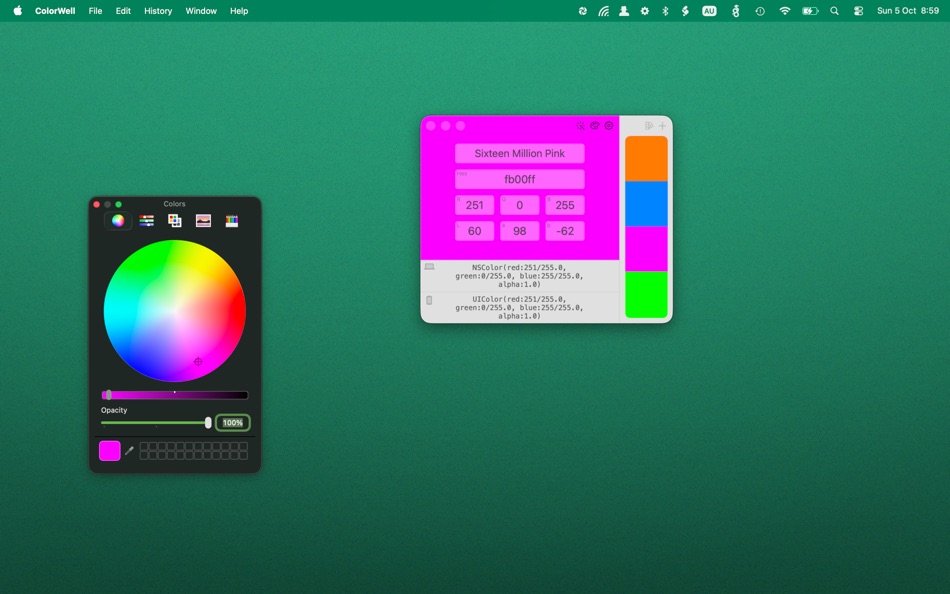
It’s super easy to generate unlimited Color Palettes with quick access to all color information, and on the fly code generation for app development. The editable Palette database allows you to archive and restore any color palette for later use with super quick search. All your carefully crafted palettes are synchronized to the macOS System color picker. So, all your color schemes are available for use in Pages, Affinity Photo, Final Cut Pro or any other first class macOS app!
Its super easy to import and export Palettes to JSON, Adobe .ase, and Apple .clr file formats. And, naturally any imported palettes will be added to the macOS System color picker for reuse in all other apps.
There's no need to remember every little change you make, as all color state changes are saved to History for easy recovery.
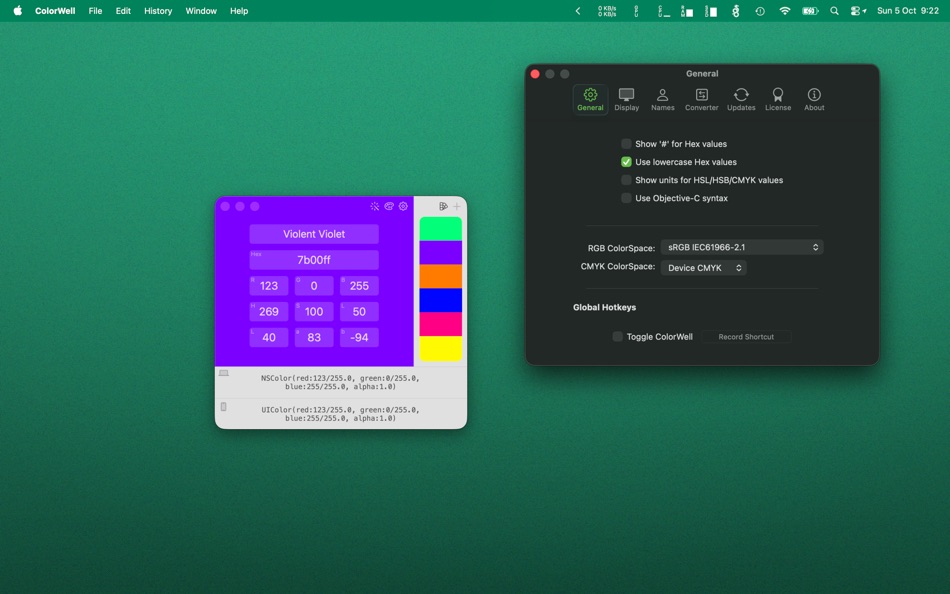
17,000+ color names are baked right into ColorWell, making it a little easier to remember any colors you happen to generate.
Access to the MacOS Color Wheel can be tedious by default, but ColorWell can be configured to show it via global hotkey or a quick mouse click from your system menu bar. This allows you to quickly grab hex/rgb/hsl/hsb/Lab/cmyk and code snippets from any color source.
If you’ve ever needed to quickly generate a color palette from a source (or multiple source) image(s), then the Palette Generator is exactly what you need. You can grab any source image(s) and drop them into the Generator window to generate a color palette of the most common colors present in the image(s). Of course you can save any palettes you generate in the ColorWell Palette database!
Here’s some uses for ColorWell (I’m sure there are many more!):
-Store and instantly retrieve unlimited color palettes
-Create color palettes by dragging and dropping images
-Quickly grab hex / rgb / hsl / hsb / Lab / cmyk / swift/objc code snippets from any source.
-Easily convert between hex / rgb / hsl / hsb / Lab and cmyk.
-Quickly eyeball any color name / hex / rgb / hsl / hsb / Lab / cmyk color.
-Quick conversion of color name / hex / rgb / hsl / hsb / Lab / cmyk or the colorpicker into NSColor / UIColor Objective-C or Swift ready code.
Ad
Screenshots




Price History
- Today: $9.99
- Minimum: $4.99
- Maximum: $19.99
Track prices
What's new
- Version: 8.1.5
- Updated:
- small startup optimizations
fixed an issue with the window position changing when restoring a palette or loading palettes from the Palette generator
fixed an issue with the Palette generator swatches being active
Additional Information
- Release Date:
- Category:
macOS Apps›Developer Tools - OS:
macOS,macOS 13.5 and up - Size:
2 Mb - Supported Languages:
Dutch,English,French,German,Korean - Content Rating:
4+ - Mac App Store Rating:
0
 https://colorwell.sweetpproductions.com
Developer
- SweetP Productions, Inc.
- Platforms: iOS Apps (4) iOS Games (1) macOS Apps (14)
- Lists: 8 + 6
- Points: 11 + 534 ¡
- Rankings: 0
- Comments: 0
- Deals: 0
- Videos: 0
- RSS: Subscribe
Lists (3)
- ColorWell


Points (1)
-

- 534 MichaelTheGeek
- +1

Rankings (0)
0 ☹️
Comments (0)
Be the first to comment 🌟
«ColorWell» is a Developer Tools app for macOS, developed by «SweetP Productions, Inc.». It was first released on and last updated on . The lowest historical price was $4.99 on , and the highest was $19.99 on . This app has not yet received any ratings on AppAgg. It has been added to 3 public lists and 0 private lists created by users. AppAgg has tracked 1 confirmed points plus 0 indirect points for this app. Available languages: Dutch, English, French, German, Korean. AppAgg continuously tracks the price history, ratings, and user feedback for «ColorWell». Subscribe to this app or follow its RSS feed to get notified about future deals or updates. AppAgg does not host applications or distribute software. All trademarks, logos and screenshots belong to their respective owners.
ColorWell Short URL: Copied!- 🌟 Share
- Mac App Store
Similar
-
- Color Code Copy
- macOS Apps: Developer Tools By: Albert Parti
- $1.99
- Lists: 1 0 0
- Points: 3 Version: 2.0 Color Code Copy is a sleek and modern macOS utility that lets developers quickly generate and copy color codes for a wide range of programming languages and frameworks. Simply pick a ... ⥯
-
- Color Contrast Inspector
- macOS Apps: Developer Tools By: Östling IT
- Free
- Lists: 0 0 0
- Points: 0 Version: 1.1 Color Contrast Inspector helps you verify whether your color combinations meet WCAG 2.1 accessibility requirements. Features: Real-time contrast ratio calculation Support for WCAG ... ⥯
-
- Color Clipboard Converter
- macOS Apps: Developer Tools By: Whatever Apps
- $0.99
- Lists: 0 0 0
- Points: 0 Version: 1.1 Copy a color in any supported format and paste it already converted to the one you need. The app automatically converts colors directly in your clipboard. This app is a powerful color ... ⥯
-
- Color Picker Plus
- macOS Apps: Developer Tools By: 万林 彭
- Free
- Lists: 2 + 1 0 0
- Points: 5 Version: 1.8 Color Picker Plus is a simple tool to pick up color for users, which can optimize their workflow and process. Pick HEX, RGB, HSL Main functions Zoom pick up a pixel color Support dark ... ⥯
-
- Color Picker
- macOS Apps: Developer Tools By: Patrik Tomas Chamelo
- $2.99
- Lists: 1 0 0
- Points: 1 Version: 1.6.5 Color Picker, the utility application, designed for all Cocoa developers and application designers. An efficient color picker, for professionals, who care about optimizing their ... ⥯
-
- Color Peeker
- macOS Apps: Developer Tools By: Tongfan Dai
- Free
- Lists: 1 + 1 0 0
- Points: 2 Version: 2 Color Peeker is a realtime digital color meter that sits quietly in your menu bar. It can show the hex value, the precise name, and/or an enlarged display of the color under your mouse ⥯
-
- Color Drop: Menu Bar Picker
- macOS Apps: Developer Tools By: Maria Hollweck
- $2.99
- Lists: 0 0 0
- Points: 0 Version: 1.0 Color Drop lives in your menu bar and lets you pick any color from anywhere on your screen with a single click. Click the eyedropper icon, sample any pixel on your display, and ... ⥯
-
- Color Picker For Xcode
- macOS Apps: Developer Tools By: Kais Karim
- Free
- Lists: 0 + 1 0 0
- Points: 3 Version: 2.0 Color Picker for Swift is a simple but powerful tool that generates a SwiftUI, UIKit, and Cocoa color code for you. Simply pick your colors, save them, and click to see the code. ⥯
-
- Color Picker & Library
- macOS Apps: Developer Tools By: Dan Merlea
- $3.99
- Lists: 0 0 0
- Points: 0 Version: 2.0.2 Color Picker & Library is a handy tool for our community of makers. Great for designers and developers. Easy to keep your colors organized by project and share it between team members. ⥯
-
- Color Picker - Palette Manager
- macOS Apps: Developer Tools By: Elisa Valeria Distefano
- $1.99
- Lists: 0 0 0
- Points: 0 Version: 3.0.0 Color Picker is designed for all macOS, iOS and web developers. Simple and extreme easy to use color picker for pro users who care about a fast workflow to speed up their works. Color ... ⥯
-
- Color Picker - Pikka
- macOS Apps: Developer Tools By: Ruslan Sayfutdinov
- * Free
- Lists: 2 + 1 0 0
- Points: 6 Version: 4.0.4 ** Apple's pick for Apps And Games We Love Right Now ** Pikka - Color Picker is an easy-to-use color picker and palette generator for developers and designers that works well with ... ⥯
-
- Color Assets Creator
- macOS Apps: Developer Tools By: Alexey Ledovskiy
- $5.99
- Lists: 0 + 1 0 0
- Points: 0 Version: 1.0.1 Generate your color system for Xcode project! With few click create your own color system from iOS, Mac OS, watch OS, tvOS development. The app generate aa assets catalog along with ... ⥯
-
- Color Picker Tool
- macOS Apps: Developer Tools By: 冬洋 梁
- $4.99
- Lists: 0 0 0
- Points: 0 Version: 2.1.1 Easy and convenient color picker tool!! Features: - Hotkey to open - Menubar show - Auto copy - Supports multiple color code format Support: - Mac os [NSColor ... ⥯
-
- System Color Picker
- macOS Apps: Developer Tools By: Sindre Sorhus
- Free
- Lists: 1 + 3 0 0
- Points: 6 Version: 2.2.2 Pick colors from anywhere using the built-in color picker. Note: On macOS 26, a system bug causes the color sampler to sometimes pick the wrong color. The app relies on macOS's color ... ⥯