
저장됨
저장됨 메뉴에 표시할 이름을 선택하세요.
완료!
기술

Core Capabilities
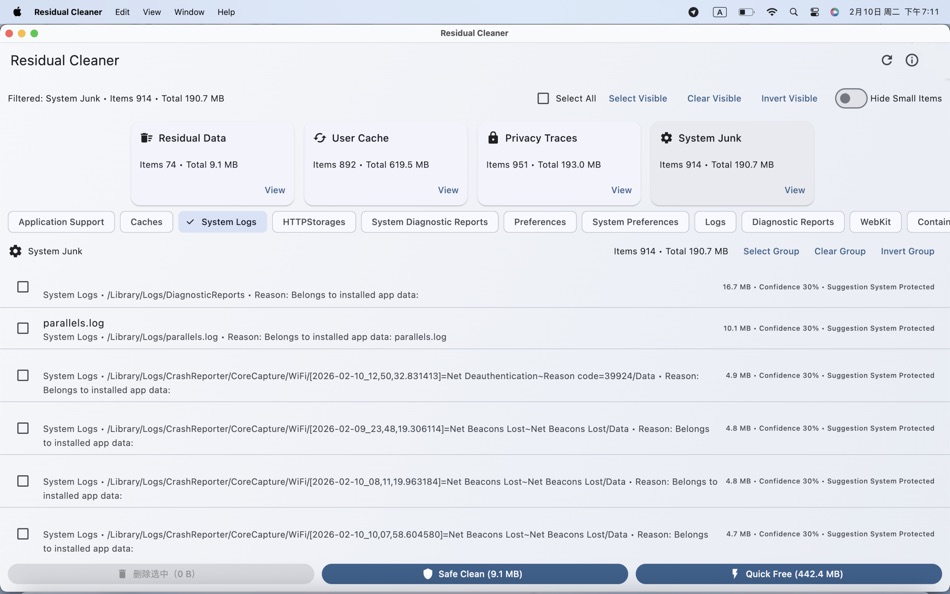
- Comprehensive Scan and Categorization: Aggregates by Residual Data, User Cache, Privacy Traces, and System Junk modules; further subdivided into categories such as Containers, Caches, Application Support, and Logs.
- Identification Criteria and Confidence Level: Provides a reason for identification and a confidence level rating (Safe / Caution / Risk) for each entry, aiding user decision-making.
- Safe Cleaning and Quick Release: Offers two cleanup strategies: "Safe Clean" and "Quick Free," both requiring preview confirmation before execution to avoid accidental deletion.
- Precise Finder Location: Clicking on any entry directly locates its file position in Finder, facilitating review and manual handling.
- Intelligent Filtering and Selection: Supports module filtering, category filtering, hiding small files, sorting by size/confidence, and select all/cancel/invert selection (supports both current group and visible items).
- Protect Critical System Files: System-protected items are marked as "System Protected" and are not deleted; empty parent directories are automatically removed after cleanup, reducing instances of "cleaned but still detected".
- Optimized Scanning Experience: Displays real-time progress and statistics; scans can be canceled or rescanned at any time; displays success/failure counts and brief summaries during cleanup.
Applicable Scenarios
- After uninstalling applications, clear residual files and configurations to free up disk space.
- Periodically clean up user-level caches, logs, and temporary files.
- Identify and group privacy traces for on-demand cleanup.
Features
- All operations require explicit user confirmation; no automatic deletion without prompts.
- Cleanup only targets user-level files that are safe to handle; system-protected items are skipped.
- Fully local workflow, combined with Finder location services for enhanced interpretability and controllability.
Goals and Values
- Provide an intuitive, explainable, and controllable residue cleanup experience, helping users efficiently free up space and maintain system cleanliness while ensuring safety.
Ad
스크린샷
가격 내역
- 오늘: 무료
- 최소: 무료
- 최대: 무료
가격 추적
추가 정보
목록 (1)
- Residual Cleaner

포인트 (1)
-

- 11,217 Simon Chan
- +1

순위 (0)
0 ☹️
댓글 (0)
가장 먼저 댓글을 남겨주세요 🌟
«Residual Cleaner». 플랫폼: macOS. 카테고리: 비즈니스. 개발자: «金玲 李». 첫 번째 릴리스: . 마지막 업데이트: . 현재 가격: 무료. 이 타이틀은 아직 AppAgg에서 평가나 리뷰를 받지 못했습니다. 목록: 공개: 1, 비공개: 1. 추적된 포인트: 확인됨: 1, 간접: 0. 사용 가능한 언어: English. AppAgg는 «Residual Cleaner»의 가격 기록, 평점 및 사용자 피드백을 추적합니다. 향후 할인 및 업데이트 받기: RSS에서 확인할 수 있습니다. AppAgg는 애플리케이션을 호스팅하거나 소프트웨어를 배포하지 않습니다. 모든 상표, 로고 및 스크린샷은 해당 소유자의 자산입니다.
Residual Cleaner 단축 URL: 복사됨!- 🌟 공유하기
- Mac App Store
유사 항목
-
- Cleaner - Clean Space & Cache
- macOS 앱: 비즈니스 게시자: Jayshree Chudasma
- $9.99
- 목록: 0 + 0 0 0
- 포인트: 0 + 0 버전: 1.0 Cleaner - Clean Space & Cache is the ultimate Mac cleaning tool to free up storage, remove junk files, clear cache, and completely uninstall apps for a smoother, faster Mac experience. ⥯
-
- Cleaner One: Disk Clean
- macOS 앱: 비즈니스 게시자: Trend Micro, Incorporated
- 무료
- 목록: 1 + 0 0 0
- 포인트: 2 + 0 버전: 6.5.3 Cleaner One is an all-in-one disk cleaning and optimization master on your Mac. With the minimalist and easy-to-use interface, you can visualize, manage and free up your storage space ... ⥯
-
- Duplicate Cleaner Pro
- macOS 앱: 비즈니스 게시자: 泳诗 陈
- $2.99
- 목록: 0 + 1 0 0
- 포인트: 10 + 0 버전: 6.0.5 Duplicate File Cleaner is a powerful desktop application designed for efficient management and cleaning of duplicate files on your computer. Using advanced file recognition technology, ⥯
-
- Duplicate Photos Cleaner·
- macOS 앱: 비즈니스 게시자: 远腾 李
- $4.99
- 목록: 0 + 1 0 0
- 포인트: 4 + 0 버전: 3.2.1 This app is a powerful and easy to use to find duplicate or similar photo, helping you find duplicate or similar photos and free up more storage space. ⥯
- Ad
-
- Disk Care + Best Drive Cleaner
- macOS 앱: 비즈니스 게시자: Appgrammers LLC
- $9.99
- 목록: 0 + 0 0 0
- 포인트: 1 + 0 버전: 3.0.2 #1 DISK CLEANING APP Apple: Apps We Love This 5-star app has saved thousands of people space on their drive - The reviews are in and they are unanimously positive! "Within a minute I ... ⥯
-
- Uninstaller Pro.
- macOS 앱: 비즈니스 게시자: 仁超 张
- $5.99
- 목록: 0 + 1 0 0
- 포인트: 9 + 0 버전: 5.6.3 Uninstaller Pro helps you completely remove applications and their hidden files to keep your Mac clean and fast. Free up valuable disk space by clearing log files, temporary files, app ⥯
-
- Antivirus BitMedic® Pro
- macOS 앱: 비즈니스 게시자: Pocket Bits LLC
- $9.99
- 목록: 0 + 0 0 0
- 포인트: 0 + 0 버전: 3.1.3 #1 Secure Real-time Antivirus & Adware App by USA based company. AV-Comparatives Tested & Awarded. OPSWAT Anti-Malware Certified. The ONLY macOS antivirus app to be awarded, tested, ... ⥯
-
- Wizard Pro
- macOS 앱: 비즈니스 게시자: Evan Miller
- $249.99
- 목록: 0 + 0 0 0
- 포인트: 0 + 0 버전: 1.9.49 Wizard is a Mac app that makes data analysis easier than ever. No programming, no typing just click and explore. Wizard includes a full set of tools for doing professional research, ... ⥯
-
- ReguLight
- macOS 앱: 비즈니스 게시자: ITSecuConsult
- * 무료
- 목록: 0 + 0 0 0
- 포인트: 0 + 0 버전: 1.0 Master Your Risk & Compliance without an enterprise budget. In a world of escalating cyber threats and increasing regulatory pressure (NIS2, DORA, GDPR, CCPA), proving your ... ⥯
-
- PDF Page Editor Pro Edition
- macOS 앱: 비즈니스 게시자: PDF Technologies, Inc.
- * $13.99
- 목록: 1 + 0 0 0
- 포인트: 2 + 0 버전: 2.0 PDF Page Editor Pro Edition is a modern macOS application completely rebuilt with Swift and SwiftUI, designed to deliver a faster, cleaner, and more responsive PDF page editing ... ⥯
-
- Disk Clean ◎
- macOS 앱: 비즈니스 게시자: AppYogi Software
- * 무료
- 목록: 0 + 0 0 0
- 포인트: 1 + 0 버전: 2.0 Disk Clean does all the work for you! We ve optimized the most efficient locations to quickly scan and remove(pro) all the junk taking up your valuable disk space. Stop wasting disk ... ⥯
-
- Ad Blocker for Youtube.
- macOS 앱: 비즈니스 게시자: Waqas Zafar
- * 무료
- 목록: 0 + 0 0 0
- 포인트: 0 + 0 버전: 2.3 Tired of annoying ads interrupting your YouTube experience? No Ads: YouTube Ad Blocker is the ultimate tool to block video ads on YouTube, Safari, and other browsers completely ... ⥯