
| ผู้พัฒนา: | Automata Labs (7) | ||
| ราคา: | $2.99 | ||
| การจัดอันดับ: | 0 | ||
| ความเห็น: | 0 เขียนความเห็น | ||
| ความเห็น: | 0 โพสต์ความคิดเห็น | ||
| รายการ: | 1 + 0 | ||
| แต้มแล: | 0 + 0 ¡ | ||
| Windows Store | |||
คำอธิบาย

Whether you are compiling code, giving a presentation, or just stepping away to make coffee, StayGreen ensures your screen stays on and your chat status stays active.
Unlike cheap "mouse jigglers" that drain your battery, waste CPU cycles, or trigger corporate IT security alerts, StayGreen is engineered specifically for professionals. It uses native Windows power requests to keep your session alive safely, invisibly, and efficiently.
Why Choose StayGreen?
Zero CPU Overhead: StayGreen doesn't constantly poll your system or fake mouse movements. It uses event-driven Win32 hooks to operate at 0.0% CPU, saving your system resources for actual work.
Smart Thermal Guardrails: Never worry about your laptop overheating in your bag. StayGreen automatically drops to "Paused" mode the second you unplug your charger or close your laptop lid.
Clamshell Mode Support: Using an external monitor with your laptop closed? StayGreen natively detects active displays and safely allows keep-awake to function.
Corporate IT-Safe: StayGreen respects forced IT session locks and intelligently requests PowerCfg overrides to navigate aggressive Group Policy sleep restrictions without triggering security alarms.
Pay Once, Own Forever: Stop paying monthly for basic utilities. StayGreen includes a 14-day unrestricted free trial, followed by a single, $4.99 perpetual license.
How It Works:
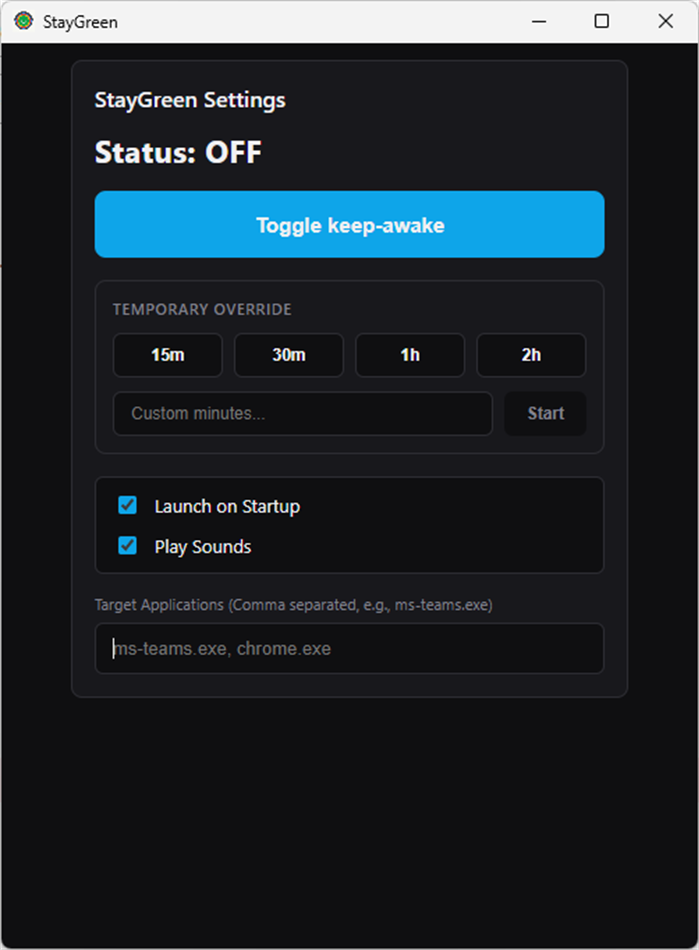
Per-App Auto Mode: Add apps like ms-teams.exe or slack.exe to your Target List. StayGreen will automatically turn on when those apps are in focus, and turn off when they aren't.
The Premium Boost Timer: Need your PC awake for exactly 45 minutes while a download finishes? Use the sleek Boost Dashboard to set a custom timer. Once the time expires, your PC's normal sleep settings automatically resume.
Engineered for reliability. Built for professionals. Stay active with StayGreen.
Ad
ภาพหน้าจอ
ประวัติราคา
- วันนี้: $2.99
- ต่ำสุด: $2.99
- มากที่สุด: $2.99
ติดตามราคา
มีอะไรใหม่
- เวอร์ชัน: PC
- อัปเดต:
ความเห็น (0)
เป็นคนแรกที่แสดงความเห็น 🌟
ผู้พัฒนา
- Automata Labs
- แพลตฟอร์ม: Windows แอป (7)
- รายการ: 1 + 0
- แต้มแล: 0 + 0 ¡
- การจัดอันดับ: 0
- ความเห็น: 0
- ความเห็น: 0
- ลดราคา: 0
- วิดีโอ: 0
- RSS: ติดตาม
แต้มแล (0)
0 ☹️
การจัดอันดับ (0)
0 ☹️
รายการ (1)
- StayGreen: Keep Screen Awake

ความเห็น (0)
แสดงรีวิวเป็นคนแรกเลย 🌟
ข้อมูลเพิ่มเติม
รายชื่อติดต่อ
- เว็บไซท์:
 https://automatalabs.ca
«StayGreen: Keep Screen Awake». แพลตฟอร์ม: Windows. หมวดหมู่: ผลผลิต. ผู้พัฒนา: «Automata Labs». การเปิดตัวครั้งแรก: . อัปเดตล่าสุด: . ราคาปัจจุบัน: $2.99. ราคาต่ำสุดที่บันทึกไว้: $2.99. ราคาสูงสุดที่บันทึกไว้: $2.99. ชื่อนี้ยังไม่ได้รับการให้คะแนนหรือบทวิจารณ์บน AppAgg รายการ: สาธารณะ 1, ส่วนตัว 0. ภาษาที่ใช้ได้: English. AppAgg ติดตามประวัติราคา การให้คะแนน และคำติชมของผู้ใช้ «StayGreen: Keep Screen Awake». ส่วนลดและอัปเดตในอนาคต: RSS. AppAgg ไม่ได้โฮสต์แอปพลิเคชันหรือแจกจ่ายซอฟต์แวร์ เครื่องหมายการค้า โลโก้ และภาพหน้าจอทั้งหมดเป็นของเจ้าของที่เกี่ยวข้อง
StayGreen: Keep Screen Awake URL แบบสั้น: คัดลอกแล้ว!- 🌟 แชร์
- Windows Store
Ad
คล้ายกัน
-
- Screen Recorders
- Windows แอป: ผลผลิต โดย: Screen Recorder
- ฟรี
- รายการ: 0 + 0 การจัดอันดับ: 0 ความเห็น: 0
- แต้มแล: 0 + 7 (2.9) 0 เวอร์ชัน: PC Screen Recorder is a easy-to-use screen recorder that allows you to record your computer screen in high quality. It is perfect for creating tutorials, demos, or just recording your ... ⥯
-
- Screen Recorder Lite
- Windows แอป: ผลผลิต โดย: Yellow Elephant Productions
- * ฟรี
- รายการ: 0 + 1 การจัดอันดับ: 0 ความเห็น: 0
- แต้มแล: 1 + 7,109 (3.9) 0 เวอร์ชัน: PC Screen Recorder Lite - Your wonderful video & audio capture! 100% Easy and Fast! The software provides you all needed functions to record full screen, games, podcasts, films, active ... ⥯
-
- Screen Recorder - Video Recorder for Windows 11
- Windows แอป: ผลผลิต โดย: Queenloft
- * ฟรี
- รายการ: 0 + 0 การจัดอันดับ: 0 ความเห็น: 0
- แต้มแล: 2 + 48 (3.5) 0 เวอร์ชัน: PC Screen Recorder is an app to Record Screen and Take Screenshots anywhere. NO watermark NO recording time limit Screen Recorder helps you capture smooth & clear screen videos, ... ⥯
-
- Screen Time Guardian
- Windows แอป: ผลผลิต โดย: Matt Birch
- ฟรี
- รายการ: 0 + 0 การจัดอันดับ: 0 ความเห็น: 0
- แต้มแล: 0 + 0 0 เวอร์ชัน: PC Screen Time Guardian helps you stay focused and mindful of your screen time with customizable timers, gentle break reminders, and productivity features. Set personalized time limits, ... ⥯
-
- Keep Up: to-dos and notes
- Windows แอป: ผลผลิต โดย: Anas Latique, Inc
- ฟรี
- รายการ: 0 + 0 การจัดอันดับ: 0 ความเห็น: 0
- แต้มแล: 0 + 3 (1.3) 0 เวอร์ชัน: PC Keep Up with your to-dos and notes in an intuitive and clean way, so that it's easy for you to stay on track of whatever you want to do. Keep Up helps you manage your daily to-dos and ... ⥯
-
- Keep Score
- Windows แอป: ผลผลิต โดย: Sunlight Info Tech
- * ฟรี
- รายการ: 0 + 0 การจัดอันดับ: 0 ความเห็น: 0
- แต้มแล: 0 + 5 (4.0) 0 เวอร์ชัน: PC Keep Score is an app that makes keeping score in card games (and board games) fun and easy. Keep score does the math for you as you score a game. It also tracks your history and ... ⥯
-
- Keep note
- Windows แอป: ผลผลิต โดย: Carlos A Goering
- $0.99
- รายการ: 0 + 0 การจัดอันดับ: 0 ความเห็น: 0
- แต้มแล: 0 + 2 (5.0) 0 เวอร์ชัน: PC Keep notes, it's an app for creating notes. In the future I will put more functions, depending on the development of the app. The logo is a fox, because the application is fast ;) ... ⥯
-
- Screen Recorder - Game Capture by Nero
- Windows แอป: ผลผลิต โดย: Nero AG
- * ฟรี
- รายการ: 0 + 1 การจัดอันดับ: 0 ความเห็น: 0
- แต้มแล: 1 + 8 (3.6) 0 เวอร์ชัน: PC The user-friendly screen and gaming recorder. Create screen recordings according to your ideas with one click. Whether you're a gamer, educator, vlogger, or simply someone who wants to ⥯
-
- Screen Recorder+
- Windows แอป: ผลผลิต โดย: Mobilty in Life Applications TEAM
- ฟรี
- รายการ: 0 + 0 การจัดอันดับ: 0 ความเห็น: 0
- แต้มแล: 0 + 679 (3.2) 0 เวอร์ชัน: PC Record any screen activity with sound on your Windows 10 device, with or without the mouse pointer! You are free to record/capture any action that appears on the screen and any sound ... ⥯
-
- Screen text getter
- Windows แอป: ผลผลิต โดย: AKATSUKI, LIMITED LIABILITY CO.
- $4.99
- รายการ: 0 + 0 การจัดอันดับ: 0 ความเห็น: 0
- แต้มแล: 1 + 0 0 เวอร์ชัน: PC Extract text from screen screenshots. for when you need to extract text from uncopyable photos, videos, or PDFs! Simple 3-step operation, multi-language support. Extract text by OCR ... ⥯
-
- Screen Recorder - Lite
- Windows แอป: ผลผลิต โดย: InnovativeCrunch
- ฟรี
- รายการ: 0 + 0 การจัดอันดับ: 0 ความเห็น: 0
- แต้มแล: 0 + 14 (2.2) 0 เวอร์ชัน: PC Now record your screen with microphone audio, pause and resume recording whenever you want. Features: Records screen Supports microphone audio Pause and resume recording Assign hotkeys ⥯
-
- Screen Pen
- Windows แอป: ผลผลิต โดย: y8ngl
- $9.49
- รายการ: 0 + 1 การจัดอันดับ: 0 ความเห็น: 0
- แต้มแล: 0 + 3 (4.3) 0 เวอร์ชัน: PC Drag left or right mouse button to draw lines in desktop or whiteboard. ⥯
-
- Free Screen Recorder
- Windows แอป: ผลผลิต โดย: Free Software Apps
- ฟรี
- รายการ: 0 + 0 การจัดอันดับ: 0 ความเห็น: 0
- แต้มแล: 1 + 189 (2.4) 0 เวอร์ชัน: PC Free Simple tool for high quality video capturing from Tab, Area of the page and full Screen, with Mic, Webcam and System audio Screen Recorder - A smart screen recorder capturing ... ⥯
-
- AirConnect - Screen Mirroring & File Sharing
- Windows แอป: ผลผลิต โดย: CyanFood
- * ฟรี
- รายการ: 1 + 0 การจัดอันดับ: 0 ความเห็น: 0
- แต้มแล: 12 + 117 (2.9) 0 เวอร์ชัน: PC This app enables users to stream content from their iPhones, iPads, or Macs directly to their Windows PCs. Be aware: User need to install Bonjour for Windows for using Airplay Audio ... ⥯