
ที่บันทึกไว้
เลือกชื่อที่จะแสดงในเมนูที่บันทึกไว้ของคุณ
เสร็จแล้ว
| ผู้พัฒนา: | Chun Chen (2) | ||
| ราคา: | $1.99 | ||
| การประเมิน: | 6,240 ทอง | ||
| การจัดอันดับ: | 0 | ||
| ความเห็น: | 0 โพสต์ความคิดเห็น | ||
| รายการ: | 1 + 0 | ||
| แต้มแล: | 1 + 0 ¡ | ||
| +1 แต้มแล | |||
คำอธิบาย

KEY FEATURES
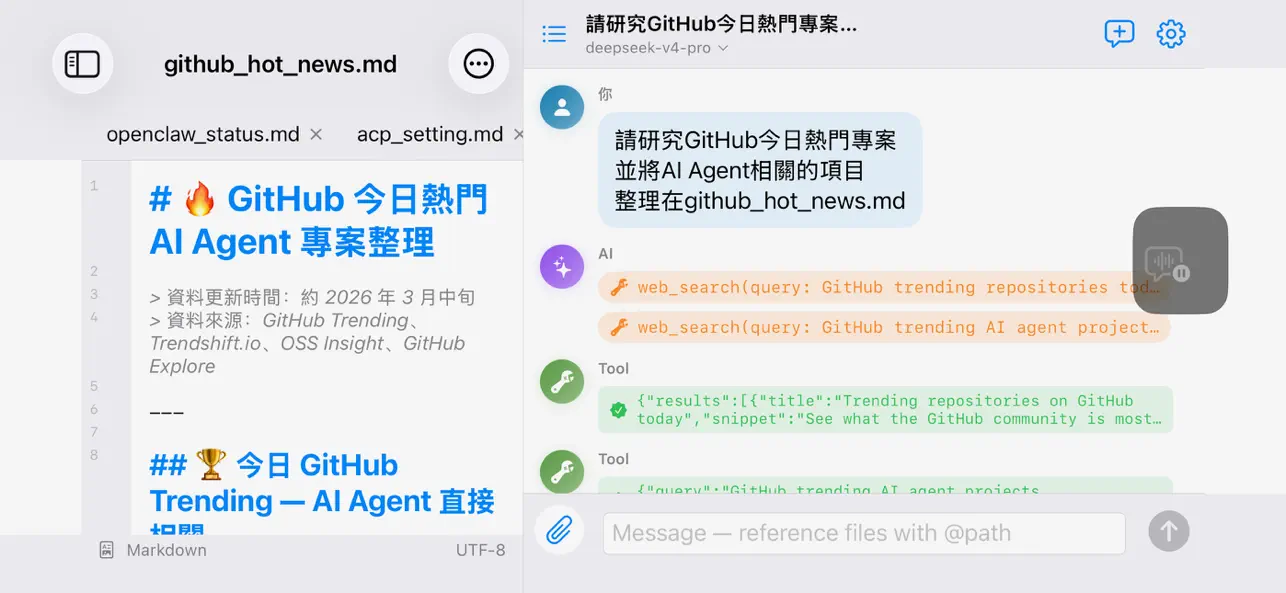
• Mark up the preview, let AI edit — Tap a spot or select a passage and say what to change. Queue marks across the document, send one batch, review one diff.
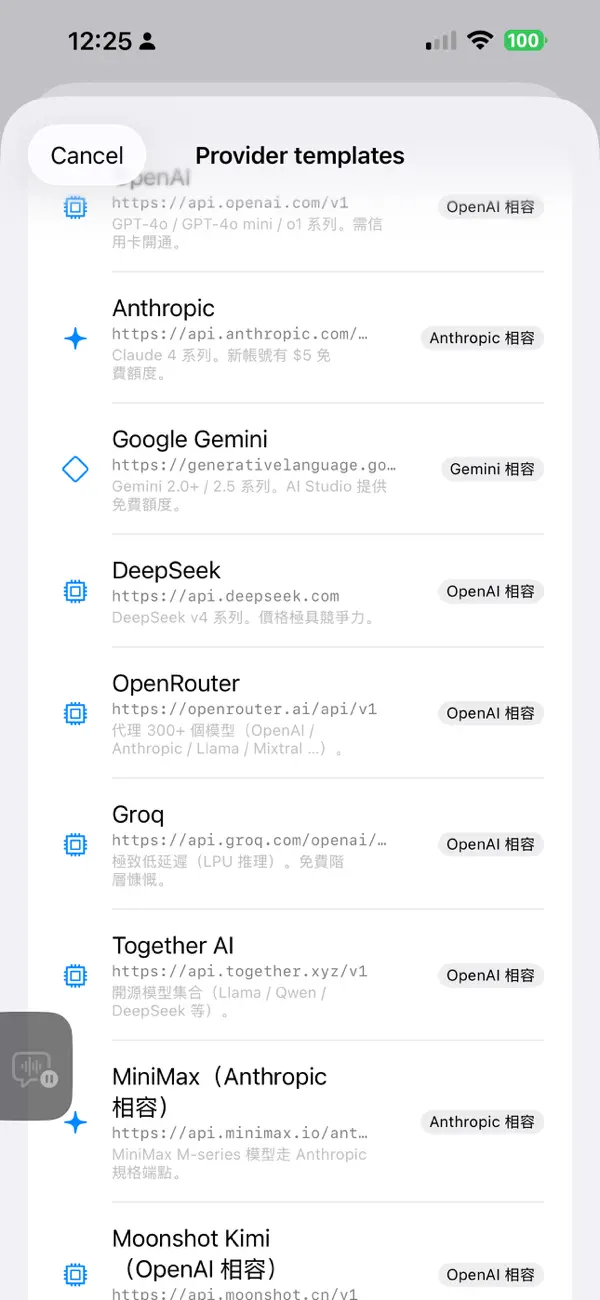
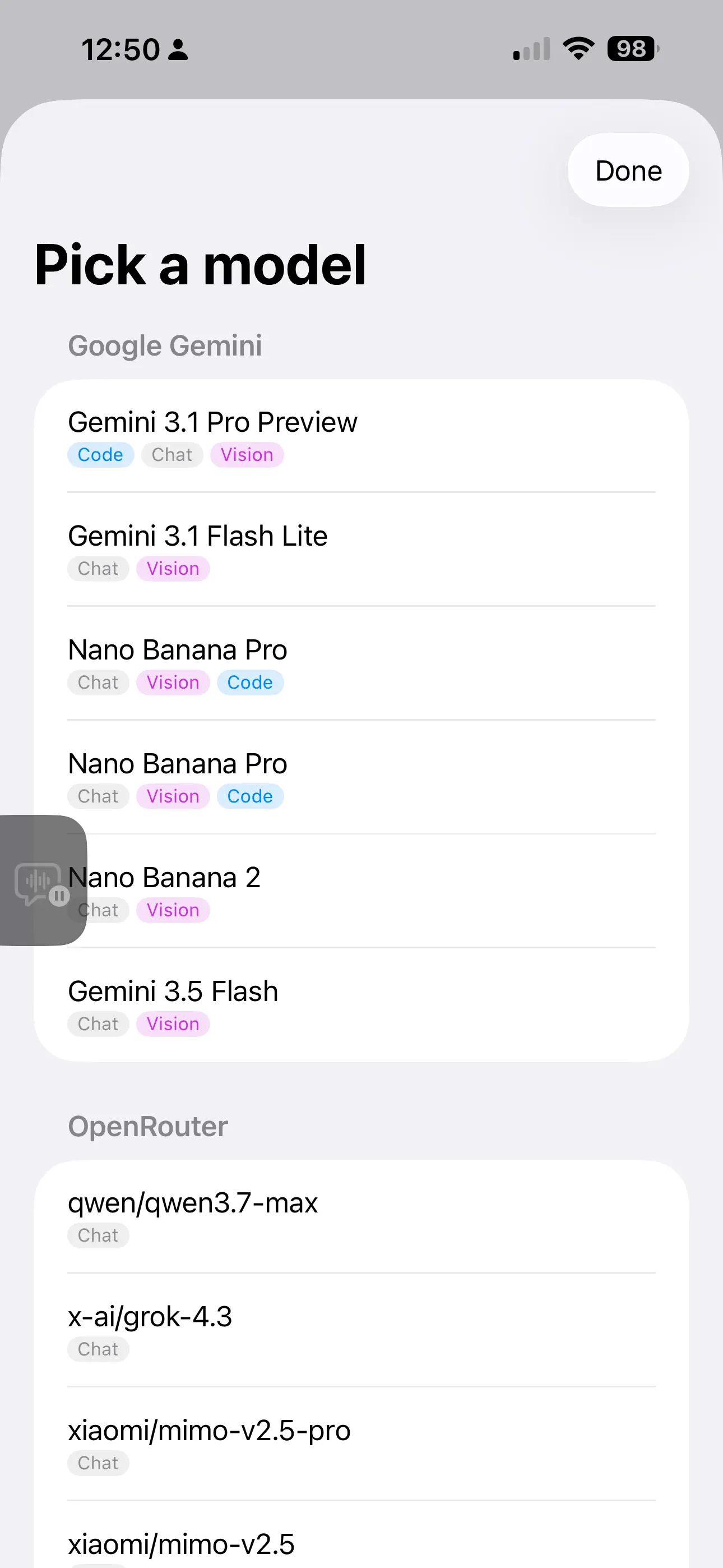
• Bring your own AI — OpenAI, Anthropic, Google Gemini, DeepSeek, AISA (one key for GPT / Claude / Gemini / Grok / Qwen and 70+ models), OpenRouter, Groq, Cerebras, Mistral, NVIDIA NIM, Together, MiniMax, Moonshot, Qwen, or local Ollama. 16 one-tap presets, multiple profiles.
• You approve every change — Edits show a diff card first; nothing is written until you tap Apply, and every overwrite is snapshotted for rollback.
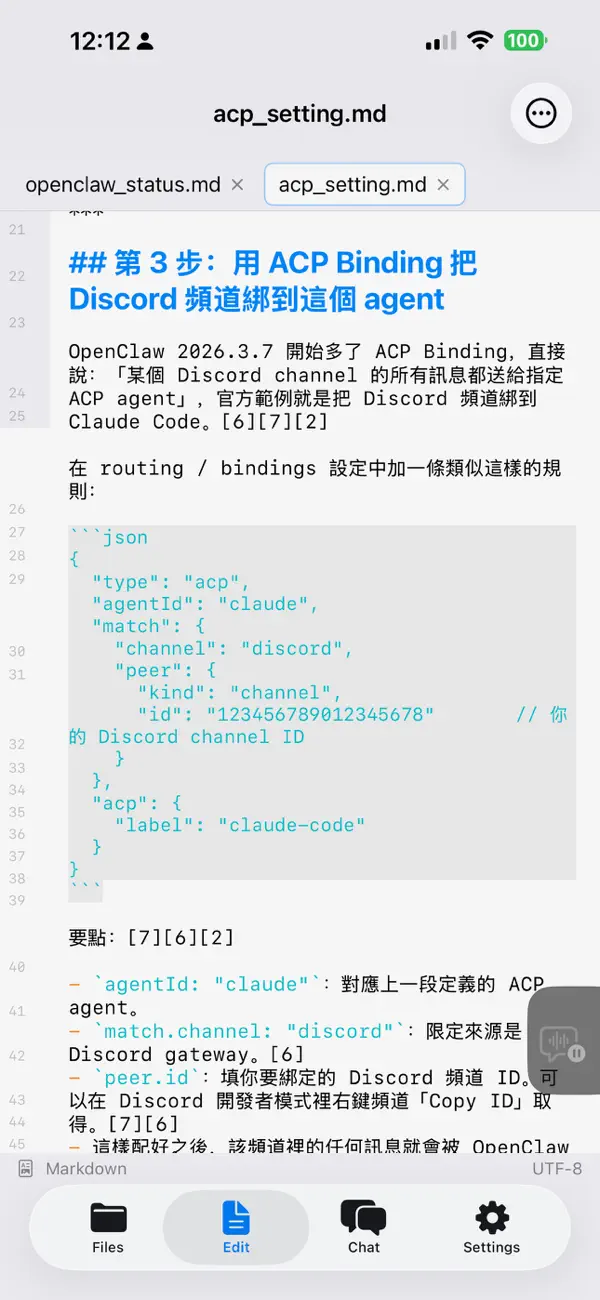
• Multi-tab editor — Syntax highlighting for 10 languages, line numbers, autosave, find & replace, adjustable font size.
• Rich Markdown preview — Outline navigation, in-document search, reading progress with resume, highlighted code with one-tap copy, tables as cards on phones, collapsible lists, task checkboxes, GitHub-style alerts, light/dark themes.
• Export to PDF, Word, Excel & PowerPoint — Generated entirely on device. "AI Refine" turns a document into slides (cover / section / two-column / quote); import your own .pptx to reuse its master and theme. Brand Kits apply your colours, fonts, logo, and cover art everywhere; four layout modes (Reading, Report, Academic, Manual) tune the typography.
• AI illustrations — One prompt generates an illustration (OpenAI gpt-image or Gemini) at the cursor; it flows into PDF, Word, and PowerPoint. Decks can auto-illustrate slides or render each slide as one designed image.
• AISA Skills — Browse 41 official skills in Settings (web & scholar search, US stocks, crypto, prediction markets, X/Twitter, YouTube, SEO, media generation), grouped with localized summaries; preview the full SKILL.md, then import picks into the Prompt Library. One AISA key unlocks the LLM gateway, data skills, and AISA web search. Calls go through a locked-down http_request tool: HTTPS-only, host-whitelisted, key injected on device — never visible to the model.
• Prompt Library — Activate several presets at once, merged in your order with a size meter. Search and origin groups keep big libraries tidy; import skills from GitHub or built-in catalogs; switch from the chat header.
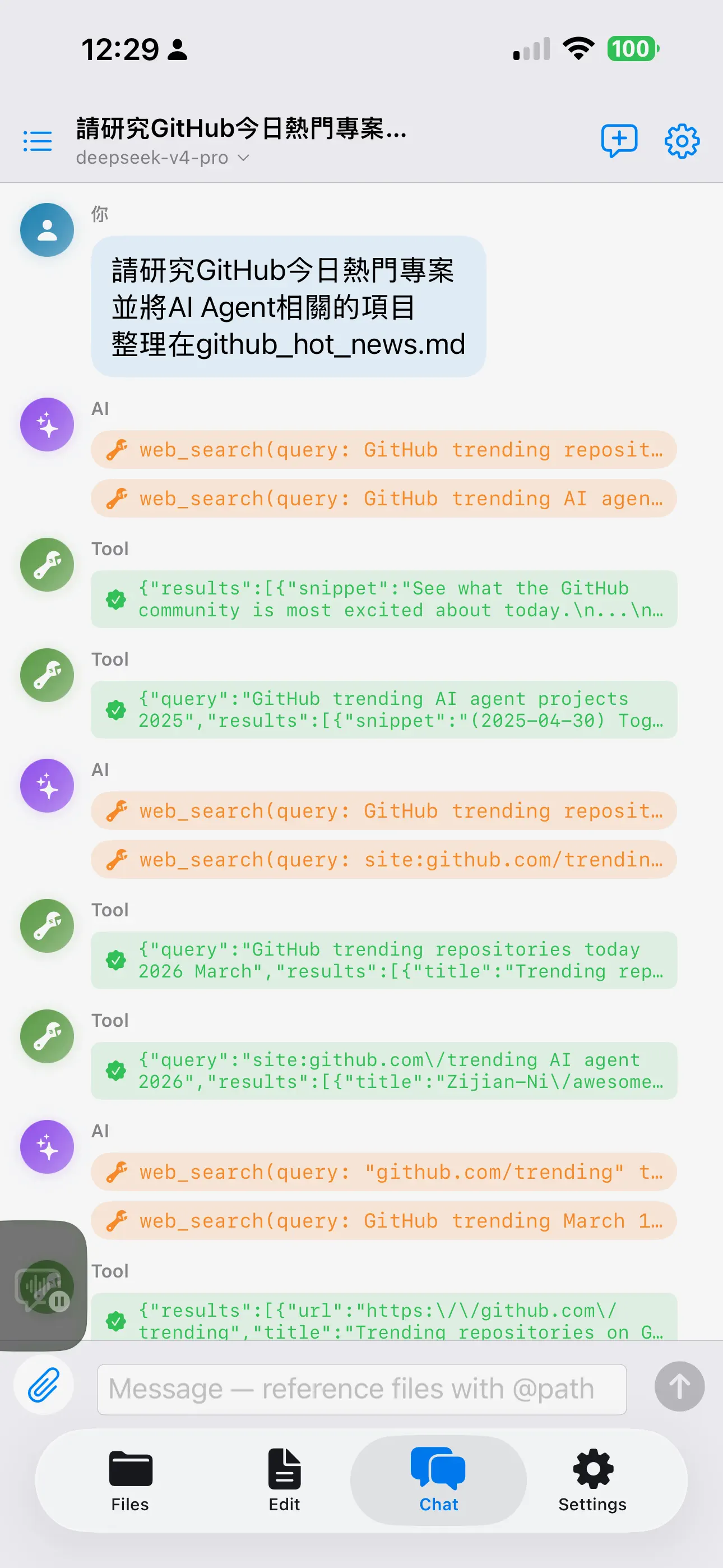
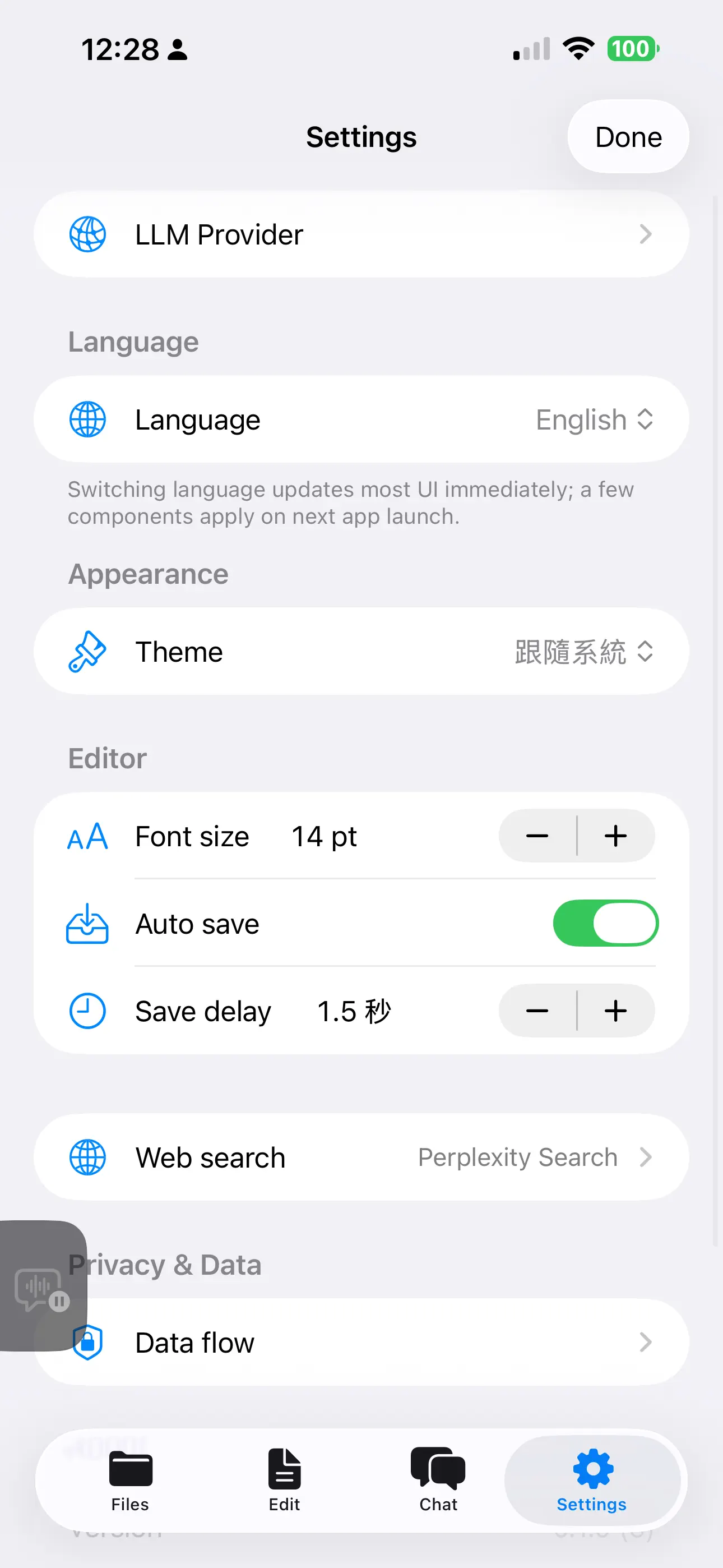
• Tool-using AI — Reads, searches, and writes workspace files. Optional web search via Brave, Tavily, Perplexity, or AISA relays (web / scholar / hybrid / Tavily), each with its own key.
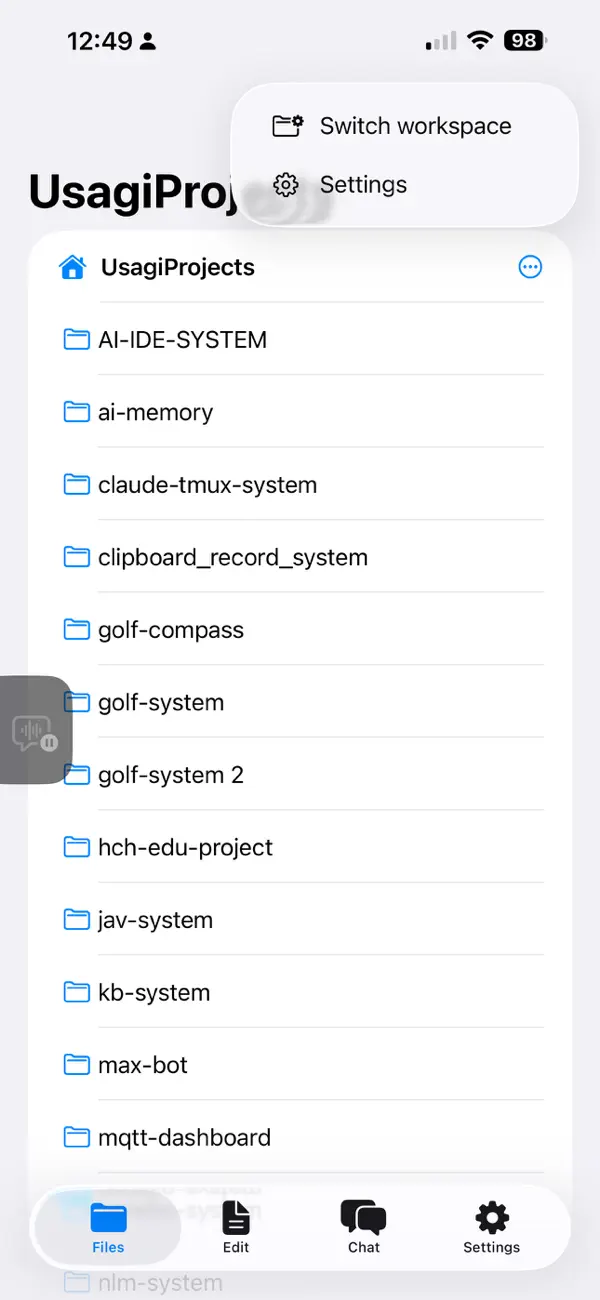
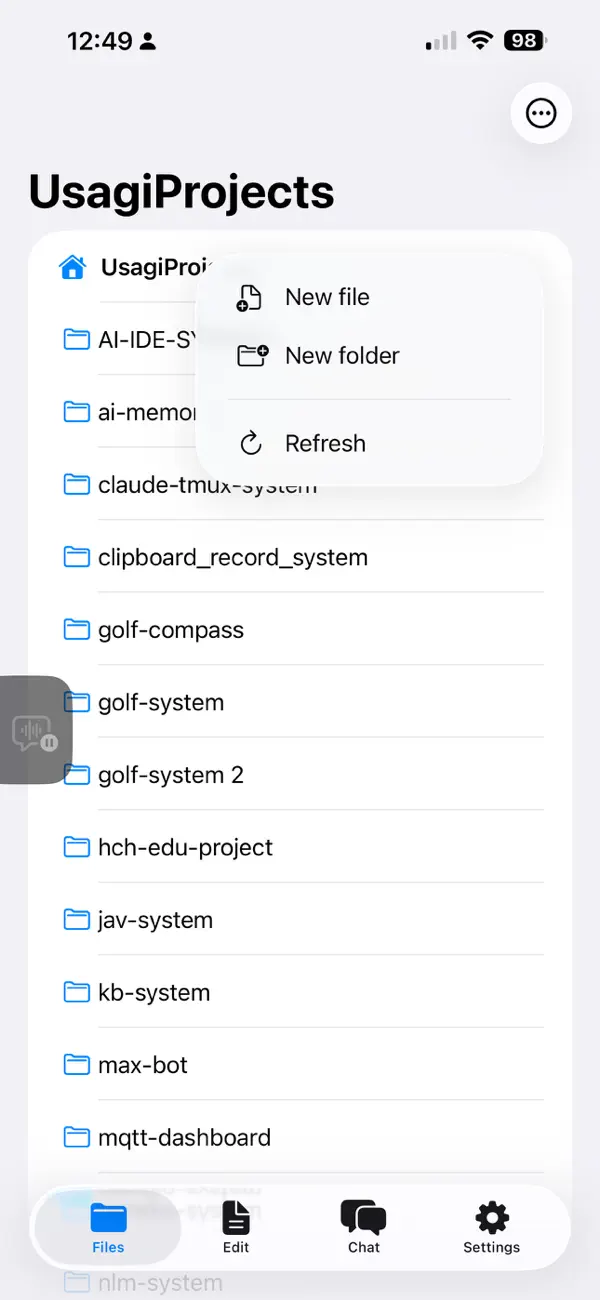
• Files done right — Open .md files from anywhere in iOS; create, rename, move, duplicate, share, and delete in the file tree; multiple pinned workspaces with security-scoped bookmarks.
• Local version control — Snapshot, diff, and revert on device — no git or GitHub account, history never touches iCloud, instant even in huge folders. Optional auto-commit for approved AI changes.
• Smart model routing — Suggests the right model for coding, chat, long context, or vision.
• Multimodal — Attach files, photos, or clipboard images. Vision models get images directly; PDF / DOCX / PPTX / XLSX are transcribed for the LLM.
• Resilient chat — Dropped streams retry with backoff and continue without re-growing the conversation; manual Resume remains.
• Trilingual — Full UI in English, 繁體中文, 简体中文; switch without restart.
• iPad-friendly — Three-pane Split View on iPad, tabs on iPhone, keyboard shortcuts (⌘S, ⌘P, ⌘⇧N, ⌘,).
PRIVACY
• API keys live in the iOS Keychain (device-only). Your content goes directly to the endpoints you configure — no proxy, no telemetry, no analytics. Chat history stays local; delete it anytime.
REQUIREMENTS
• iPadOS / iOS 17.0 or later. You provide the API keys for the LLM services you use.
For support, send mail to sportusagi@gmail.com.
Ad
ภาพหน้าจอ

ประวัติราคา
- ราคาปัจจุบัน: $1.99
- ต่ำสุด: $1.99
- มากที่สุด: $1.99
ติดตามราคา
การประเมิน AppAgg
6,240
การประเมิน AppAgg โดยประมาณสำหรับ
AI-IDE: Code & Markdown Editor
6,240 ทอง
การประเมินที่สูงขึ้นมักหมายถึงสัญญาณบน AppAgg ที่แข็งแกร่งขึ้น
อิงจาก: ความนิยม · คะแนนจากผู้ใช้ · ความสดใหม่ · ดีล · ข้อมูลร้านค้า · กิจกรรมชุมชน
คำนวณใหม่ทุกวันจากข้อมูล AppAgg ล่าสุด.
URL แบบสั้น: คัดลอกแล้ว!
มีอะไรใหม่
- เวอร์ชัน: 1.11
- อัปเดตล่าสุด:
- Token usage stats, one-tap import, portable scripts
Token usage statistics
- New Settings → Token Usage: cumulative input/output tokens broken down by provider and model, with totals and thousands separators.
- Kept separately from chat history — deleting chats doesn't change the numbers; one tap resets everything to zero.
One-tap import (deep links)
- An aiide:// link from a tutorial or website can seed data files, prompt instructions, and a pre-filled chat all at once.
- A confirmation sheet always lists the files, prompts, and their source hosts before anything runs; the chat is only pre-filled, never auto-sent.
- After importing, a fresh chat opens with only the imported prompts active, so the run starts from a clean, predictable state.
Portable scripts & smoother runs
- New prompt command: carry prompt content inside the script (or your synced workspace) so it runs the same on another device, without depending on that device's Prompt Library.
- Preflight: before a run starts, missing providers are reported clearly upfront instead of failing midway.
- When a step fails, a Retry / Skip / Stop dialog appears — no need to re-run the whole script just because the last step hit a hiccup.
Polish
- After you approve an AI edit, the file opens in preview so you see the applied change right away.
- When no AI model is set up, the chat proactively points you to Settings instead of failing only after you send.
- Added a once-a-day "what's new" tip with a tutorial link.
ข้อมูลเพิ่มเติม
- วันที่วางจำหน่าย:
- หมวดหมู่:
iOS แอป›เครื่องมือ - ระบบปฏิบัติการ:
iPad,iPhone,iOS 17.0 และสูงกว่า - ขนาด:
14 Mb - ภาษาที่สนับสนุน:
Chinese,English - การจัดประเภทเนื้อหา:
4+ - App Store คะแนนโดย:
0
 https://www.lovelyduck.cc/usagiweb/app/ai-ide
ผู้พัฒนา
รายการ (1)
- AI-IDE: Code & Markdown Editor

แต้มแล (1)
-

- 5,028 Sam
- +1

การจัดอันดับ (0)
0
ความเห็น (0)
เป็นคนแรกที่แสดงความเห็น
สรุป
AI-IDE: Code & Markdown Editor URL แบบสั้น: คัดลอกแล้ว!- แชร์
- App Store
«AI-IDE: Code & Markdown Editor». แพลตฟอร์ม: iOS. หมวดหมู่: เครื่องมือ. ผู้พัฒนา: «Chun Chen». การเปิดตัวครั้งแรก: . อัปเดตล่าสุด: . ราคาปัจจุบัน: $1.99. ราคาต่ำสุดที่บันทึกไว้: $1.99. ราคาสูงสุดที่บันทึกไว้: $1.99. ชื่อนี้ยังไม่ได้รับการให้คะแนนหรือบทวิจารณ์บน AppAgg รายการ: สาธารณะ 1, ส่วนตัว 0. จุดที่ติดตาม: ยืนยันแล้ว 1, ทางอ้อม 0. ภาษาที่ใช้ได้: Chinese, English. AppAgg ติดตามประวัติราคา การให้คะแนน และคำติชมของผู้ใช้ «AI-IDE: Code & Markdown Editor». AppAgg ไม่ได้โฮสต์แอปพลิเคชันหรือแจกจ่ายซอฟต์แวร์ เครื่องหมายการค้า โลโก้ และภาพหน้าจอทั้งหมดเป็นของเจ้าของที่เกี่ยวข้อง ส่วนลดและอัปเดตในอนาคต: RSS
คล้ายกัน
-
- Markdown Editor for Safari
- iOS แอป: เครื่องมือ โดย: Coffee & Fun LLC
- $2.99
- รายการ: 1 0 0
- แต้มแล: 5 + 1 9K · ทอง เวอร์ชัน: 2.2 Create and view markdown files easily from anywhere with our simple and easy, GitHub-flavored markdown editor. Say hello to your new favorite Markdown editor, designed to make your ...
-
- Markdown Editor MDQuill
- iOS แอป: เครื่องมือ โดย: 献慧 陈
- * ฟรี
- รายการ: 1 0 0
- แต้มแล: 2 + 2 8K · ทอง เวอร์ชัน: 1.1.8 MDQuill Studio is a local Markdown writing app for iPhone, iPad, and Mac. Open .md, .markdown, or .txt files, read them in a clean preview, then switch back to editing whenever you ...
-
- Markdown Editor and Reader
- iOS แอป: เครื่องมือ โดย: Julian Lau
- ฟรี
- รายการ: 0 0 0
- แต้มแล: 2 + 2 860 · เงิน เวอร์ชัน: 1.3.0 Create Markdown files or import exiting .md files and preview them directly in the App and share the files with other people.
-
- Slim Markdown Editor
- iOS แอป: เครื่องมือ โดย: Jan Ameli
- ฟรี
- รายการ: 0 0 0
- แต้มแล: 0 + 1 1K · เงิน เวอร์ชัน: 1.0.3 Slim Markdown Editor is a fast, clean, and privacy-focused Markdown editor built for those who value simplicity and focus. Easily import and export Markdown files directly within the ...
- ใหม่
- TradeScript AI - Algo Code
- iOS แอป: เครื่องมือ โดย: METECAN DUYAL
- * ฟรี
- รายการ: 0 + 1 0 0
- แต้มแล: 0 + 0 1K · เงิน เวอร์ชัน: 1.2 TradeScript AI helps you create, understand, evaluate, convert, and improve trading strategy scripts with AI. Describe your strategy idea in plain language, choose your target script ...
-
- AI Translate - Photo Translate
- iOS แอป: เครื่องมือ โดย: VNSolution AI Limited
- ฟรี
- รายการ: 0 0 0
- แต้มแล: 4 + 0 1K · เงิน เวอร์ชัน: 1.8.2 AI Translate - Photo Translate is a smart translation app powered by advanced AI OCR technology, designed to translate text directly from photos, images, or documents in seconds. Just ...
-
- Python IDE - Code & Run
- iOS แอป: เครื่องมือ โดย: 文禄 张
- ฟรี
- รายการ: 0 + 1 0 0
- แต้มแล: 4 + 31 3K · เงิน เวอร์ชัน: 1.6.8 PythonIDE is a mobile coding workspace built for iPhone and iPad. Run Python 3.14 and JavaScript locally, write scripts, manage files, view results, and connect to remote servers from ...
-
- Marky Mark Markdown Editor
- iOS แอป: เครื่องมือ โดย: 4Utopia, Inc.
- $4.99
- รายการ: 0 + 1 0 0
- แต้มแล: 1 + 0 1K · เงิน เวอร์ชัน: 1.0.4 Transform your markdown writing experience with Marky Mark - a modern WYSIWYG editor designed for iOS and macOS. KEY FEATURES: Live Preview - See your formatted text as you type with ...
-
- WonderChat AI - Vibe Code App
- iOS แอป: เครื่องมือ โดย: Tim Chen
- * ฟรี
- รายการ: 0 + 1 0 0
- แต้มแล: 2 + 2 6K · ทอง เวอร์ชัน: 1.3.1 WonderChat is the best way to create and ship real projects, apps, games, and more right from your phone. With WonderChat, you can create anything, anywhere. Make apps & sites with ...
-
- AI App Localization: xcstrings
- iOS แอป: เครื่องมือ โดย: Sparrow Code
- ฟรี
- รายการ: 0 + 1 0 0
- แต้มแล: 2 + 3 1K · เงิน เวอร์ชัน: 1.5.31 The localizer supports XLIFF XCLOC and Xcstrings files. You can export in any of these formats to edit the localization. Pluralization and all file versions are supported. The ...
-
- Nudge - Swipe AI, Ship Code
- iOS แอป: เครื่องมือ โดย: EnterX LLC
- * ฟรี
- รายการ: 0 0 0
- แต้มแล: 0 + 0 850 · เงิน เวอร์ชัน: 1.1.0 Run AI coding from your phone. Your AI coding agent stops dead at every "approve this command?" prompt so you can't actually walk away. Even when the AI does the typing, you stay ...
-
- Vulk - AI App Builder
- iOS แอป: เครื่องมือ โดย: Code Ahead Lda
- * ฟรี
- รายการ: 0 0 0
- แต้มแล: 1 + 0 1K · เงิน เวอร์ชัน: 1.0.3 VULK is an AI-powered app builder. Describe what you want to build and VULK generates a working web application then preview it live and refine it through chat. HOW IT WORKS 1. ...
-
- AI Website Builder
- iOS แอป: เครื่องมือ โดย: Writecream
- * ฟรี
- รายการ: 0 0 0
- แต้มแล: 0 + 2 9K · ทอง เวอร์ชัน: 2.4 AI Builder is an AI-powered website creation tool that transforms plain text prompts into fully functional, responsive websites. Using natural language instructions, users can design, ...
-
- Code App
- iOS แอป: เครื่องมือ โดย: thebaselab Ltd
- $6.99
- รายการ: 2 + 5 0 0
- แต้มแล: 10 + 299 26K · แพลทินัม เวอร์ชัน: 1.12.1 Code App is a MIT-licensed desktop-class code editor for iPadOS with built-in Node.js, Python, C, C++, PHP and Java runtime. We built it because there is nothing else on the App Store ...