
Salvate
Alege numele care va fi afișat în meniul Salvate.
Terminat!
| Dezvoltator: | Joshua Langberg (7) | ||
| Preț: | $29.99 | ||
| Evaluare: | 7,450 Platină | ||
| Clasamente: | 0 | ||
| Comentarii: | 0 Postează comentariu | ||
| Liste: | 1 + 0 | ||
| Puncte: | 0 + 0 ¡ | ||
| +1 Puncte | |||
Descriere

Point it at your folders and the built-in AI files every document by subject, learning the categories from YOUR collection instead of forcing a fixed list. Research papers are recognized and filed by field with clean titles. Invoices, manuals, receipts, and books each get handled on their own terms.
MORE THAN PDFs
Alongside your PDFs, Bibliome reads Word (.docx), OpenDocument (.odt, .ods), Excel (.xlsx), Rich Text, Markdown, and plain-text files — turn each format on in Settings and the original file is classified, filed, and searched as itself, never converted or copied.
BRING YOUR OLD NOTES WITH YOU
Import an Evernote export (.enex) and choose what comes in, by type, before anything is written. Images and unreadable formats are off by default, damage is named before you commit, stopping keeps what it did, and importing again recognizes what it already brought in. Evernote is a trademark of Evernote Corporation; Bibliome is not affiliated with or endorsed by Evernote.
THE AI LIVES ON YOUR MAC
Built with Llama. A full large language model ships inside the app — classification, semantic search, and "Ask Your Library" answers run entirely on your machine, with no Apple Intelligence required. Requires an Apple silicon Mac (M1 or later). Llama 3.1 is licensed under the Llama 3.1 Community License, © Meta Platforms, Inc.
PRIVATE BY CONSTRUCTION
• The app ships without the network entitlement — macOS makes it impossible for Bibliome to open a connection. Not a promise; a property.
• No accounts, no sign-ins, no API keys, no analytics.
• Optional iCloud sync is performed by macOS inside your own Apple account.
TWO WAYS IN, AND THE SAFE ONE IS THE DEFAULT
• Index & Organize reads every document where it already is and organizes it into searchable categories. Nothing is moved or renamed, and you get the whole app with your folders exactly as you left them.
• Auto-File into Folders is there when you do want the filing done for you, and everything it does is reversible.
WORKS WITH YOUR OTHER TOOLS
Bibliome speaks MCP, an open standard — so any tool that supports it (Claude, Cursor, Zed, editor extensions, your own client) can search, ask and cite your documents. It's read-only, there's nothing to install, and answers come from Bibliome itself, so nothing leaves your Mac.
CHOOSE THE MODEL
The bundled model is the default and the one everything is measured on, but you can point Bibliome at another you've downloaded. It checks the folder before trusting it and tells you plainly whether that model has been tested.
A REAL LIBRARY ENGINE
• Ask a question in plain language. Bibliome finds the passages in your own documents that bear on it, cites them, and writes its answer from them — so you can always check the answer against the source.
• Search by meaning or by keyword — even inside scanned documents (built-in OCR, with a depth you control).
• Highlight as you read, in four colors, with notes — and undo takes one back. They are written into the PDF itself, so Preview and other readers see them, and export as text, Markdown, or CSV.
• Mark up a document: pen, arrows, shapes, text boxes, stamps, images, and a reusable signature.
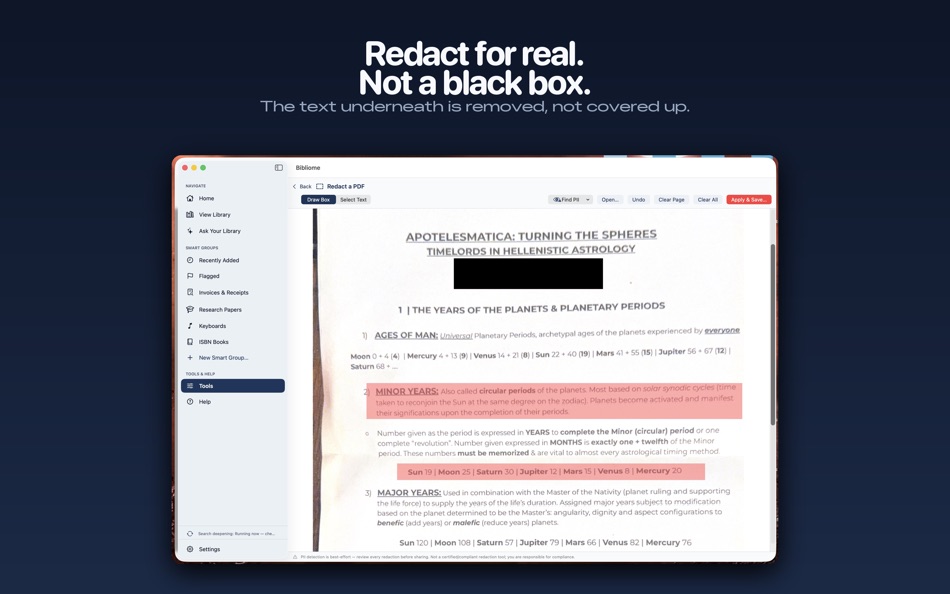
• Redact sensitive content with true rasterization; auto-detect personal info first.
• Merge folders, hunt duplicates, batch-rename cryptic files.
• Page tools, compression, Word-to-PDF, scan-with-iPhone, scheduled overnight runs.
• Smart Groups keep invoices, manuals, and recent additions one click away.
ONE LIBRARY, ALL YOUR DEVICES
The free Bibliome companion for iPhone and iPad lets you read, mark up, bookmark, and file into the same library anywhere — synced through your own iCloud.
One price. No subscription. Your documents never leave your Mac unless you say so.
Publicitate
Capturi de ecran




Istoricul prețurilor
- Prețul actual: $29.99
- Minim: $29.99
- Maxim: $29.99
Urmăriți prețurile Adaugă într-o listă pentru a primi alerte de reduceri prin e-mail sau push
Scor AppAgg
7,450
Evaluare AppAgg estimată pentru
Bibliome Library
Dezvoltator: Joshua Langberg
7,450 Platină
Evaluările mai mari indică de obicei semnale mai puternice pe AppAgg.
Bazat pe: popularitate · evaluări ale utilizatorilor · actualitate · oferte · date din magazine · activitatea comunității
Recalculat zilnic pe baza datelor AppAgg actualizate.
Adresă URL scurtă: Copiat!
Ce este nou
- Versiune: 1.7
- Ultima actualizare:
- Folders you can actually manage. In the Library's Folders pane, Cmd-click or Shift-click to select several folders, then right-click for Merge Into, Reassess Category, Rename, New Folder Inside, and Move to Trash. Every one of them can be undone from Edit > Undo, with the operation named. Merging moves every document across, keeps folder structure, and sends emptied folders to the Trash rather than deleting them.
Tags merge the same way. In the Tags pane, select two or more tags and choose Merge Into: every document under the other tags gets the surviving tag, nothing moves, and Undo puts each one back.
Drop documents in from the Finder. Drag PDFs onto a folder in the Library to copy them in and start a scan right away, so they show up in search without a manual scan. Undo removes the copies; your originals are never touched.
Find your library from Spotlight. Every document is listed in Spotlight by title and category, and choosing a hit opens it in Bibliome. Nothing leaves your Mac.
Informații suplimentare
- Data lansării:
- Categorie:
Aplicații pentru macOS›Productivitate - SO:
macOS,macOS 14.0 sau o versiune ulterioară - Mărimea:
4 Gb - Limbă acceptată:
Chinese,English,French,German,Italian,Spanish - Evaluarea conținutului:
4+ - Mac App Store Evaluare: ¡
0
 https://psychosonicconsulting.com/bibliome
Dezvoltator
- Joshua Langberg
- Urmăritori: 0
- Platforme: iOS Aplicații (6) macOS Aplicații (1)
- Reduceri: 0
- Liste: 1 + 0
- Puncte: 1 + 3 ¡
- Clasamente: 0
- Comentarii: 0
- Videoclipuri: 0
- RSS: Abonează-te
Liste (1)
- Bibliome Library

Puncte (0)
0
Clasamente (0)
0
Comentarii (0)
Fii primul care comentează
Pe scurt
Bibliome Library Adresă URL scurtă: Copiat!- Mac App Store
Pe AppAgg poți urmări „Bibliome Library”, o aplicație de la Joshua Langberg pentru macOS, din categoria Productivitate. Evaluare AppAgg: 7,450 (Platină). Puncte AppAgg ale aplicației — confirmate: 0; indirecte: 0. Liste publice care includ aplicația: 1. Utilizatori care au salvat-o în liste private: 0. Utilizatorii AppAgg nu au evaluat încă această aplicație. Punctele confirmate înregistrează accesările magazinului de către utilizatorii autentificați pe AppAgg. Cele indirecte se bazează pe datele magazinelor. Cele două contoare arată numărul listelor publice și al utilizatorilor care au salvat aplicația sau jocul în liste private. Aplicația a fost lansată prima dată la . Ultima actualizare a aplicației: . Aplicația costă în prezent $29.99. Aplicația este disponibilă în următoarele limbi: Chinese, English, French, German, Italian, Spanish. Consultă istoricul prețurilor, adaugă aplicația într-o listă sau urmărește dezvoltatorul. Urmărește ofertele și actualizările viitoare ale aplicației prin RSS. AppAgg nu găzduiește și nu distribuie această aplicație. Toate mărcile comerciale, siglele și capturile de ecran asociate aplicației aparțin proprietarilor lor.

