
Zapisane
Wybierz nazwę, która będzie wyświetlana w menu Zapisane.
Gotowe!
| Programista: | 婉媚 邵 (15) | ||
| Cena: | Bezpłatny | ||
| Rankingi: | 0 | ||
| Komentarze: | 0 Opublikuj komentarz | ||
| Listy: | 0 + 0 | ||
| Punkty: | 3 + 141 (4.7) ¡ | ||
| +1 Punkty | |||
Opis

Docker Container Stats. Gain valuable insights into your Docker containers with detailed statistics:
* CPU Usage: Visualize real-time CPU data with comprehensive charts.
* Memory Usage: Track memory consumption with intuitive graphical representations.
* Disk I/O: Monitor disk read/write operations through detailed charts.
* Network I/O: Analyze network traffic with line charts showing data transfer rates.
Linux Host Stats Dashboard. Keep your Linux hosts in check with a robust stats dashboard:
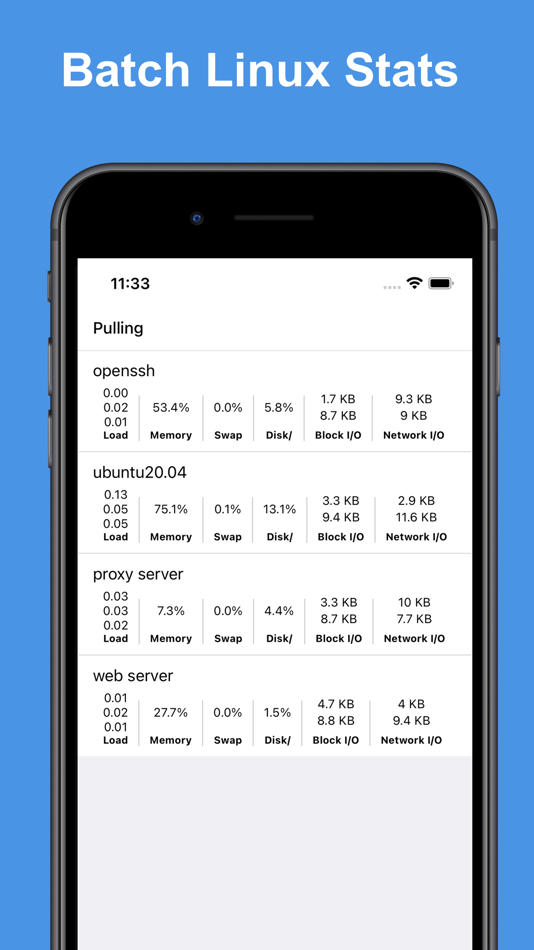
* Load Averages: View load averages over 1 minute, 5 minutes, and 15 minutes.
* CPU Load: Access charts displaying overall and per-core CPU load.
* Memory, Swap & Disk Usage: Monitor memory, swap, and disk utilization in real-time.
* Disk I/O: Get insights into disk transactions per second and read/write rates.
* Network I/O: Track transmission (TX) and reception (RX) rates for comprehensive network monitoring.
Docker Container Management. Easily manage your Docker containers with a user-friendly interface:
* Container Overview: View a list of containers with names, IDs, statuses, and port mappings.
* Container Control: Start, stop, restart, or remove containers as needed.
* Inspect & Logs: Inspect container details and access logs for troubleshooting.
Docker Image Management. Manage your Docker images with powerful tools:
* Image Overview: Access a list of images, including names, IDs, and versions.
* Image Control: Run containers from images, inspect image details, pull new images, or delete unwanted ones.
SSH Terminal: The built-in SSH client offers full access to your host system's command line, empowering you to perform administrative tasks remotely:
* Jump Host & Proxy Support: Connect securely via SSH jump hosts or SOCKS5 proxies, enabling you to manage servers in layered network environments.
* Interactive Terminal: Experience a fully interactive terminal that supports real-time command execution, run complex scripts and commands with ease.
* Command Management: Benefit from features such as command snippets, making it easy to reuse previous commands.
* Copy and Paste Functionality: Quickly copy and paste text between your device and the terminal, simplifying the workflow when working with scripts or configuration files.
* Startup & Batch Snippets: Automate your routine tasks with predefined startup snippets or execute batch commands across multiple sessions, saving time and increasing productivity.
* Session Persistence: Keep your sessions active for long-running tasks, allowing you to disconnect and reconnect without losing your place.
SFTP Explorer: Efficiently manage files on your server:
* File & Directory Management: Upload, download, edit, move, rename, and delete files easily.
* Streamlined Workflow: Perform operations on files and folders effortlessly, ensuring efficient handling of file transfers or system updates.
* User-Friendly Navigation: Browse directories smoothly while managing file permissions directly from the app.
The app is a docker third-party client, the app is not affiliated with Docker Corporation.
Payment will be charged to iTunes Account at confirmation of purchase.
Subscription automatically renews unless auto-renew is turned off at least 24-hours before the end of the current period.
Account will be charged for renewal within 24-hours prior to the end of the current period, and identify the cost of the renewal.
Subscriptions may be managed by the user and auto-renewal may be turned off by going to the user's Account Settings after purchase.
Any unused portion of a free trial period, if offered, will be forfeited when the user purchases a subscription to that publication, where applicable.
Terms of use: https://septudio.com/terms-of-use
Privacy policy: https://septudio.com/privacy-policy
Zrzuty ekranu




Historia cen
- Aktualna cena: Bezpłatny
- Minimalna: Bezpłatny
- Maksymalna: Bezpłatny
Monitoruj ceny
Ad
Dodatkowe informacje
- Data wydania:
- Kategoria:
iOS Aplikacje›Narzędzia - System operacyjny:
iPad,iPhone,iOS 15.1 i nowsze - Rozmiar:
24 Mb - Obsługiwany język:
English - Ocena treści:
4+ - App Store Ocena:
4.7(141) - Witryna internetowa:
 https://septudio.com
Programista
- 婉媚 邵
- Platformy: iOS Aplikacje (14) iOS Gry (1)
- Listy: 4 + 4
- Punkty: 68 + 3,447 ¡
- Rankingi: 0
- Komentarze: 0
- Zniżki: 0
- Filmy: 0
- RSS: Subskrybuj
Listy (0)
0 ☹️
- Docker Server Admin
Punkty (3)
-

- 97 yang xinqi
- +1
-
- 61 Andrey
- +1
-
- 1,121 m374
- +1



Rankingi (0)
0 ☹️
Komentarze (0)
Skomentuj jako pierwszy 🌟
«Docker Server Admin». Platforma: iOS. Kategoria: Narzędzia. Deweloper: «婉媚 邵». Pierwsze wydanie: . Ostatnia aktualizacja: . Aktualna cena: bezpłatnie. Ten tytuł nie otrzymał jeszcze ocen ani recenzji w serwisie AppAgg. Śledzone punkty: potwierdzone 3, pośrednie 141. Sklep: App Store. Ocena sklepu: 4.7. Głosy: 141. Dostępne języki: English. AppAgg śledzi historię cen, oceny i opinie użytkowników «Docker Server Admin». Śledź przyszłe rabaty i aktualizacje za pośrednictwem RSS. AppAgg nie hostuje aplikacji ani nie dystrybuuje oprogramowania. Wszystkie znaki towarowe, logo i zrzuty ekranu należą do ich odpowiednich właścicieli.
Docker Server Admin Krótki URL: Skopiowano!- 🌟 Udostępnij
- App Store
Podobne
-
- Docker Management
- iOS Aplikacje: Narzędzia Przez: Nevis Shkenza
- Bezpłatny
- Listy: 0 0 0
- Punkty: 1 + 2 (2.0) Wersja: 5.9.1 Receive notifications of docker events such as "start,create,delete,tag etc" of "container/image/volume/network" directly to your mobile. Connect via ssh to your Linux/MacOS machine to ⥯
-
- Server Connect
- iOS Aplikacje: Narzędzia Przez: Tobias Krenn
- * Bezpłatny
- Listy: 0 0 0
- Punkty: 0 Wersja: 1.1 Server Connect gives you full control over your servers directly from your iPhone. Monitor system resources, manage containers, execute scripts and keep an eye on your infrastructure ... ⥯
-
- Docker Manager GUI - WhaleDeck
- iOS Aplikacje: Narzędzia Przez: Florian Seida
- * Bezpłatny
- Listy: 1 + 1 0 0
- Punkty: 2 + 34 (4.3) Wersja: 3.2.0 WhaleDeck is your all-in-one Docker environment manager. Reduce complexity and stay productive with a visual dashboard that centralizes performance metrics, container logs, and actions ⥯
-
- Server Dashboard
- iOS Aplikacje: Narzędzia Przez: TxThinking, Inc.
- * $9.99
- Listy: 1 0 0
- Punkty: 0 + 1 (5.0) Wersja: 20260101.0.0 A dashboard for Linux Monitor: CPU, Memory, Disk, Socket, Network, Traffic. ⥯
- Nowa
- JS Server
- iOS Aplikacje: Narzędzia Przez: Tomasz Dbrowski
- $4.99
- Listy: 0 0 0
- Punkty: 0 Wersja: 1.1.1 Server turns your iPhone or iPad into a developer-friendly HTTP host. Point a listener at a file and it gets served. Write JavaScript and it runs. WHAT YOU CAN DO Serve static files ... ⥯
-
- Portainer & Docker: Pourtainer
- iOS Aplikacje: Narzędzia Przez: FarFetched
- Bezpłatny
- Listy: 0 0 0
- Punkty: 0 + 7 (4.1) Wersja: 1.7 The only open source app for managing Portainer! Be the best server admin and keep an eye on your Docker & Portainer servers on the go. Manage: - Stacks - Containers - Volumes - Images ⥯
- Nowa
- DockSSH - SSH & Docker Manager
- iOS Aplikacje: Narzędzia Przez: 志煌 谢
- * Bezpłatny
- Listy: 0 0 0
- Punkty: 0 + 1 (5.0) Wersja: 1.0.5 DockSSH is a mobile tool designed for developers and DevOps engineers to manage Docker environments anytime, anywhere. Key Features: View container status (running, stopped) Start, ... ⥯
-
- ToF AR Server
- iOS Aplikacje: Narzędzia Przez: Sony Semiconductor Solutions Corp.
- Bezpłatny
- Listy: 0 0 0
- Punkty: 0 Wersja: 1.5.0 ToF AR Server is an application used to develop applications using ToF AR. By running ToF AR Server on a smartphone and connecting it to a PC, an application using ToF AR can be ... ⥯
-
- Dockerman: Docker Client
- iOS Aplikacje: Narzędzia Przez: Tejesh Mehta
- $9.99
- Listy: 0 0 0
- Punkty: 0 Wersja: 1.0 A pure Docker client for iPhone, iPad, and Mac. Connect directly to your Docker daemon using standard TLS certificates. No Portainer. No middleware. No complicated setup. Just Docker. ... ⥯
- Nowa
- Portainer Mobile: Docker Admin
- iOS Aplikacje: Narzędzia Przez: UMEGS
- Bezpłatny
- Listy: 0 + 1 0 0
- Punkty: 0 + 1 (2.0) Wersja: 1.0.1 Portainer Mobile is the definitive professional tool for managing your Docker environments directly from your iPhone, iPad, and Mac. Built specifically for DevOps engineers, system ... ⥯
- -100% Nowa
- OpsCat - Server Monitor & SSH
- iOS Aplikacje: Narzędzia Przez: 望 余
- ▼ Bezpłatny
$4.99-100% - Listy: 0 + 1 0 0
- Punkty: 5 Wersja: 1.0.1 OpsCat is a powerful server management app for developers and sysadmins. Connect to your Linux servers via SSH and monitor performance in real time all from your iPhone or iPad. ... ⥯
-
- Harbour - Docker Manager
- iOS Aplikacje: Narzędzia Przez: Kacper Kaczmarzyk
- $2.99
- Listy: 2 0 0
- Punkty: 3 + 10 (5.0) Wersja: 4.2.8 Meet Harbour - Portainer management app for iOS! Note: Portainer (https://portainer.io) is required to use Harbour. Multiple Servers & Endpoints Effortlessly manage multiple Docker ... ⥯
-
- ContainEye - Terminal & Docker
- iOS Aplikacje: Narzędzia Przez: MELANIE RITA DR., NAGEL
- Bezpłatny
- Listy: 0 0 0
- Punkty: 0 + 3 (3.7) Wersja: 1.4 Keep an eye on your containers like never before with ContainEye! Manage your Server and Docker infrastructure, ContainEye provides real-time insights, performance metrics, and alerts ... ⥯
-
- Local LLM Server
- iOS Aplikacje: Narzędzia Przez: Kevin Tang
- Bezpłatny
- Listy: 0 0 0
- Punkty: 1 + 3 (3.7) Wersja: 1.2 Transform your iPhone, iPad, or Mac into a private, local LLM AI server. This powerful utility allows you to run Large Language Models (LLMs) powered by Apple Intelligence directly on ... ⥯