
ที่บันทึกไว้
เลือกชื่อที่จะแสดงในเมนูที่บันทึกไว้ของคุณ
เสร็จแล้ว
| ผู้พัฒนา: | Tejesh Mehta (2) | ||
| ราคา: | $9.99 | ||
| การจัดอันดับ: | 0 | ||
| ความเห็น: | 0 โพสต์ความคิดเห็น | ||
| รายการ: | 0 + 0 | ||
| แต้มแล: | 0 + 0 ¡ | ||
| +1 แต้มแล | |||
คำอธิบาย

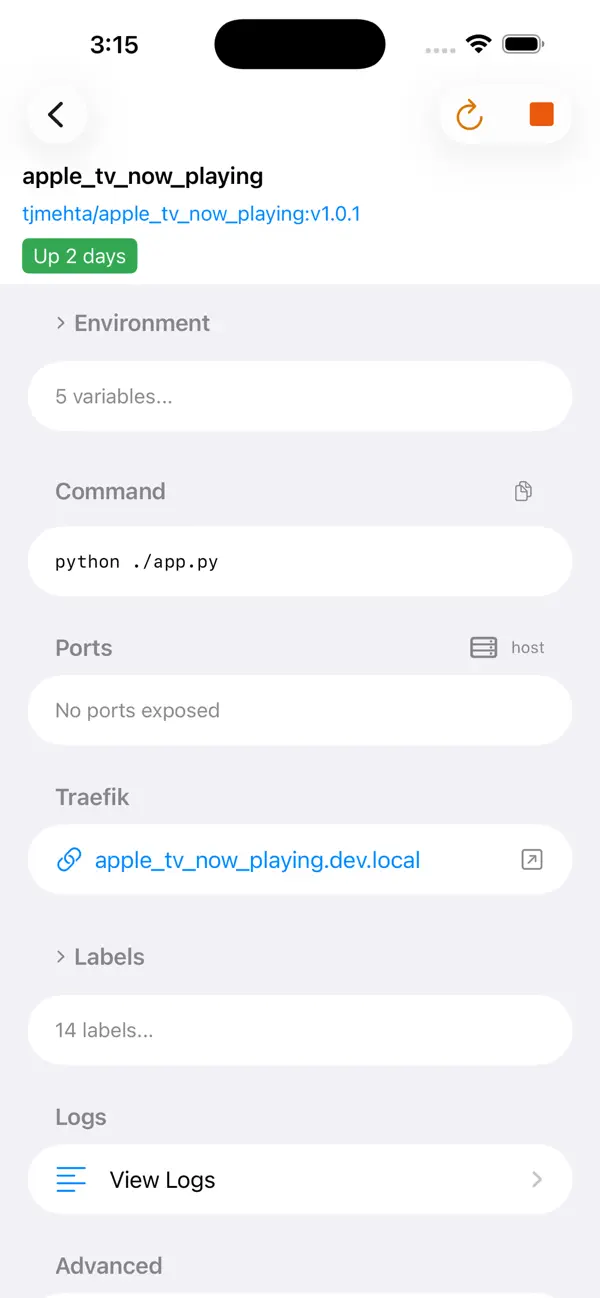
Dockerman connects straight to the Docker Remote API using industry-standard TLS mutual authentication—the same secure method used in production environments everywhere. Your CA certificate, client certificate, and private key authenticate you directly to Docker. Simple. Secure. Powerful.
WHY DOCKERMAN?
• PURE DOCKER CLIENT - Connects directly to the Docker daemon. No third-party services, no web interfaces, no middleware layers between you and your containers.
• STANDARD TLS AUTHENTICATION - Uses the same TLS client certificates that Docker itself uses. Import your CA cert, client cert, and key—done. Industry standard, enterprise grade.
• RUNS EVERYWHERE - One universal app for iPhone, iPad, and Mac. Manage Docker from your phone, tablet, or desktop with identical functionality.
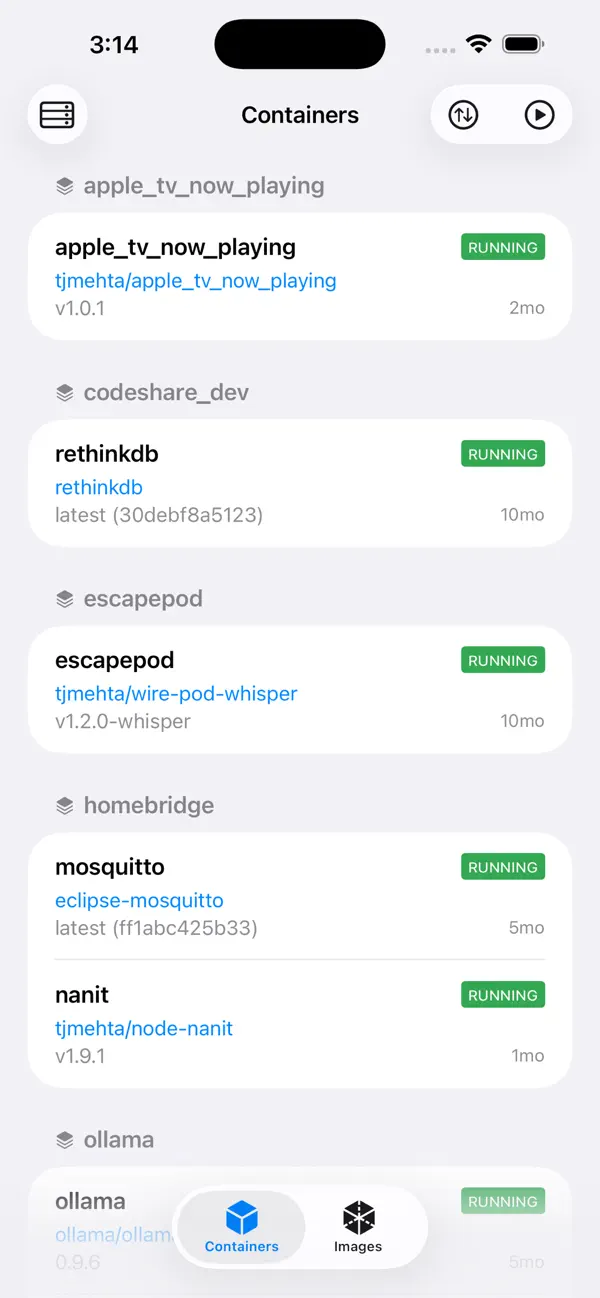
• FULL CONTAINER CONTROL - Start, stop, restart, pause, unpause, kill, and delete containers with a tap. No terminal needed.
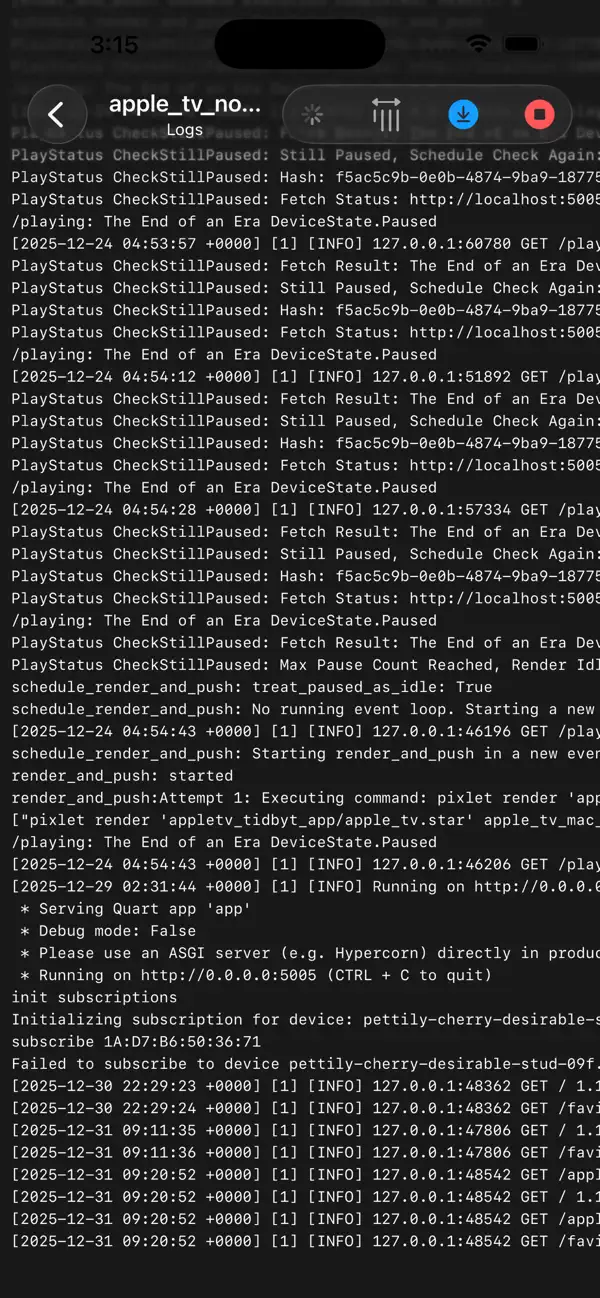
• REAL-TIME LOGS - Stream container logs live with auto-scroll. Full ANSI color support for beautiful, readable output.
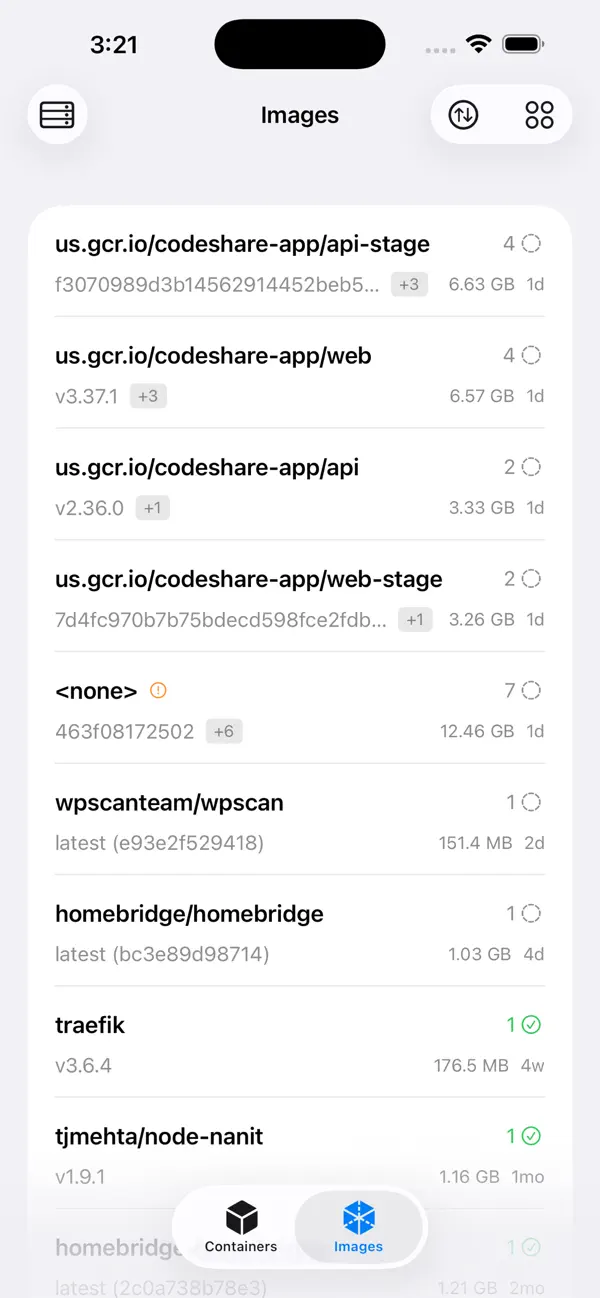
• IMAGE MANAGEMENT - Browse all images, pull new ones from any registry, delete unused images to reclaim disk space.
• COMPOSE SUPPORT - View Docker Compose stacks with grouped containers. See which containers belong together.
• MULTI-HOST SUPPORT - Connect to multiple Docker hosts. Switch between development, staging, and production seamlessly.
CONTAINER ACTIONS:
Start | Stop | Restart | Pause | Unpause | Kill | Delete
IMAGE ACTIONS:
Browse | Pull | Delete | Inspect
LOG FEATURES:
Real-time streaming | Auto-scroll | ANSI colors | Line wrapping toggle
REQUIREMENTS:
• Docker daemon with Remote API enabled (TCP with TLS)
• TLS certificates (CA cert, client cert, client key)
Built with SwiftUI for native performance on all Apple devices. Perfect for DevOps engineers, sysadmins, homelab enthusiasts, and developers who want direct Docker access on the go.
TAGS: container, containers, server, remote, homelab, self-hosted, selfhosted, NAS, Synology, QNAP, TrueNAS, Unraid, OpenMediaVault, OMV, Raspberry Pi, Pi, ARM, Linux, Ubuntu, Debian, terminal, SSH, DevOps, sysadmin, infrastructure, compose, Docker Compose, stacks, images, volumes, networks, logs, monitoring, dashboard, admin, VPS, dedicated server, cloud, home server, home lab, mobile, remote access, remote management, container manager, server manager, Docker manager, Docker client, TLS, certificates, secure, API, REST API, daemon, engine, registry, pull, push, start, stop, restart, pause, delete, kill, swarm, orchestration, deploy, deployment
ภาพหน้าจอ
ประวัติราคา
- ราคาปัจจุบัน: $9.99
- ต่ำสุด: $9.99
- มากที่สุด: $9.99
ติดตามราคา
Ad
ข้อมูลเพิ่มเติม
- วันที่วางจำหน่าย:
- หมวดหมู่:
iOS แอป›เครื่องมือ - ระบบปฏิบัติการ:
iPad,iPhone,iOS 16.0 และสูงกว่า - ขนาด:
15 Mb - ภาษาที่สนับสนุน:
English - การจัดประเภทเนื้อหา:
4+ - App Store คะแนนโดย:
0
มีอะไรใหม่
- เวอร์ชัน: 1.0
- อัปเดต:
ผู้พัฒนา
- Tejesh Mehta
- แพลตฟอร์ม: iOS แอป (2)
- รายการ: 0 + 0
- แต้มแล: 0 + 0 ¡
- การจัดอันดับ: 0
- ความเห็น: 0
- ลดราคา: 0
- วิดีโอ: 0
- RSS: ติดตาม
รายการ (0)
0 ☹️
- Dockerman: Docker Client
แต้มแล (0)
0 ☹️
การจัดอันดับ (0)
0 ☹️
ความเห็น (0)
เป็นคนแรกที่แสดงความเห็น 🌟
«Dockerman: Docker Client». แพลตฟอร์ม: iOS. หมวดหมู่: เครื่องมือ. ผู้พัฒนา: «Tejesh Mehta». การเปิดตัวครั้งแรก: . อัปเดตล่าสุด: . ราคาปัจจุบัน: $9.99. ราคาต่ำสุดที่บันทึกไว้: $9.99. ราคาสูงสุดที่บันทึกไว้: $9.99. ชื่อนี้ยังไม่ได้รับการให้คะแนนหรือบทวิจารณ์บน AppAgg ภาษาที่ใช้ได้: English. AppAgg ติดตามประวัติราคา การให้คะแนน และคำติชมของผู้ใช้ «Dockerman: Docker Client». ส่วนลดและอัปเดตในอนาคต: RSS. AppAgg ไม่ได้โฮสต์แอปพลิเคชันหรือแจกจ่ายซอฟต์แวร์ เครื่องหมายการค้า โลโก้ และภาพหน้าจอทั้งหมดเป็นของเจ้าของที่เกี่ยวข้อง
Dockerman: Docker Client URL แบบสั้น: คัดลอกแล้ว!- 🌟 แชร์
- App Store
คล้ายกัน
-
- Docker Management
- iOS แอป: เครื่องมือ โดย: Nevis Shkenza
- ฟรี
- รายการ: 0 0 0
- แต้มแล: 1 + 2 (2.0) เวอร์ชัน: 5.9.1 Receive notifications of docker events such as "start,create,delete,tag etc" of "container/image/volume/network" directly to your mobile. Connect via ssh to your Linux/MacOS machine to ⥯
-
- Docker Server Admin
- iOS แอป: เครื่องมือ โดย: 婉媚 邵
- ฟรี
- รายการ: 0 0 0
- แต้มแล: 3 + 141 (4.7) เวอร์ชัน: 2.0 Docker Server Admin Comprehensive Docker and Linux Host Management. Monitoring and management of Docker containers, images, and Linux hosts through a secure SSH connection. Docker ... ⥯
-
- Docker Manager GUI - WhaleDeck
- iOS แอป: เครื่องมือ โดย: Florian Seida
- * ฟรี
- รายการ: 1 + 1 0 0
- แต้มแล: 2 + 34 (4.3) เวอร์ชัน: 3.2.0 WhaleDeck is your all-in-one Docker environment manager. Reduce complexity and stay productive with a visual dashboard that centralizes performance metrics, container logs, and actions ⥯
-
- Client for OpenCode
- iOS แอป: เครื่องมือ โดย: Dusan Kosir
- $2.99
- รายการ: 0 + 1 0 0
- แต้มแล: 1 เวอร์ชัน: 1.0 Turn your phone into a powerful developer hub with OpenCode Client! Need to fix a bug or refactor code while away from your desk? OpenCode Client is a sleek Flutter mobile client for ... ⥯
- ใหม่
- DockSSH - SSH & Docker Manager
- iOS แอป: เครื่องมือ โดย: 志煌 谢
- * ฟรี
- รายการ: 0 0 0
- แต้มแล: 0 + 1 (5.0) เวอร์ชัน: 1.0.5 DockSSH is a mobile tool designed for developers and DevOps engineers to manage Docker environments anytime, anywhere. Key Features: View container status (running, stopped) Start, ... ⥯
- ใหม่
- Git_Client
- iOS แอป: เครื่องมือ โดย: Tom Kaden
- * ฟรี
- รายการ: 0 + 1 0 0
- แต้มแล: 1 เวอร์ชัน: 1.0.0 Git Client brings your GitHub workflow to iPhone and iPad. Browse repositories, review changes line-by-line, commit files, manage branches, and automate syncing with Siri and the ... ⥯
-
- API Requester - HTTP Client
- iOS แอป: เครื่องมือ โดย: Volodymyr Sichka
- * ฟรี
- รายการ: 0 0 0
- แต้มแล: 0 เวอร์ชัน: 1.5 Requester is your new go-to native HTTP client, built to make API testing fast, simple, and beautiful across iOS and macOS. Whether you are debugging complex backend services, ... ⥯
-
- Termius - Modern SSH Client
- iOS แอป: เครื่องมือ โดย: Termius Corporation
- ฟรี
- รายการ: 1 + 1 0 5 (1)
- แต้มแล: 7 + 18,151 (4.7) เวอร์ชัน: 7.3.3 Termius is an SSH client and terminal, as it should be. Connect with one tap from any mobile and desktop device no re-entering IP addresses, ports, and passwords. With a free Termius ... ⥯
-
- NeoServer: SSH Client|Terminal
- iOS แอป: เครื่องมือ โดย: Space-Time Transformation Technology Co., Ltd.
- ฟรี
- รายการ: 2 + 5 0 0
- แต้มแล: 18 + 271 (4.7) เวอร์ชัน: 8.1.7 NeoServer offers a comprehensive management solution via SSH without additional software installation for your servers, NAS (Network Attached Storage), and Linux-based routers across ... ⥯
-
- SSH Client - Terminal & SFTP
- iOS แอป: เครื่องมือ โดย: Moon Technolabs Pvt Ltd
- ฟรี
- รายการ: 1 + 2 0 0
- แต้มแล: 5 + 396 (3.5) เวอร์ชัน: 4.9.8 Here is one of the most intelligent & advanced SSH Client apps to manage and connect remote servers for your iOS and Mac devices About SSH Client: SSH Client is an on-the-go SSH-Telnet ⥯
-
- HTTPBot: API & HTTP Client
- iOS แอป: เครื่องมือ โดย: Arvindh Sukumar
- * ฟรี
- รายการ: 2 + 3 0 0
- แต้มแล: 7 + 1,316 (4.5) เวอร์ชัน: 2026.2 HTTPBot is a powerful API client and debugger that lets you send HTTP/HTTPs requests, connect to WebSockets, inspect JSON & HTML responses, and debug APIs on the go. With HTTPBot, you ... ⥯
-
- Harbour - Docker Manager
- iOS แอป: เครื่องมือ โดย: Kacper Kaczmarzyk
- $2.99
- รายการ: 2 0 0
- แต้มแล: 3 + 10 (5.0) เวอร์ชัน: 4.2.8 Meet Harbour - Portainer management app for iOS! Note: Portainer (https://portainer.io) is required to use Harbour. Multiple Servers & Endpoints Effortlessly manage multiple Docker ... ⥯
-
- Termix Pro: SSH & SFTP Client
- iOS แอป: เครื่องมือ โดย: Simon Zvara
- $9.99
- รายการ: 2 + 1 0 0
- แต้มแล: 7 + 62 (4.8) เวอร์ชัน: 1.1.5 Termix is a modern SSH client and terminal developed by a European team of cybersecurity experts. It offers an unrivaled SSH and SFTP experience that enhances your productivity without ⥯
- ใหม่
- Termi - SSH Client & Terminal
- iOS แอป: เครื่องมือ โดย: 艳 罗
- ฟรี
- รายการ: 0 0 0
- แต้มแล: 1 + 5 (5.0) เวอร์ชัน: 1.0.2 Termi is an iPhone app for remote server management, built for developers, sysadmins, SREs, and self-hosting users. It combines SSH client, terminal, shell access, server monitoring, ... ⥯