
| ผู้พัฒนา: | aryan rogye (2) | ||
| ราคา: | ฟรี | ||
| การจัดอันดับ: | 0 | ||
| ความเห็น: | 0 เขียนความเห็น | ||
| ความเห็น: | 0 โพสต์ความคิดเห็น | ||
| รายการ: | 0 + 0 | ||
| แต้มแล: | 0 + 0 ¡ | ||
| Mac App Store | |||
คำอธิบาย

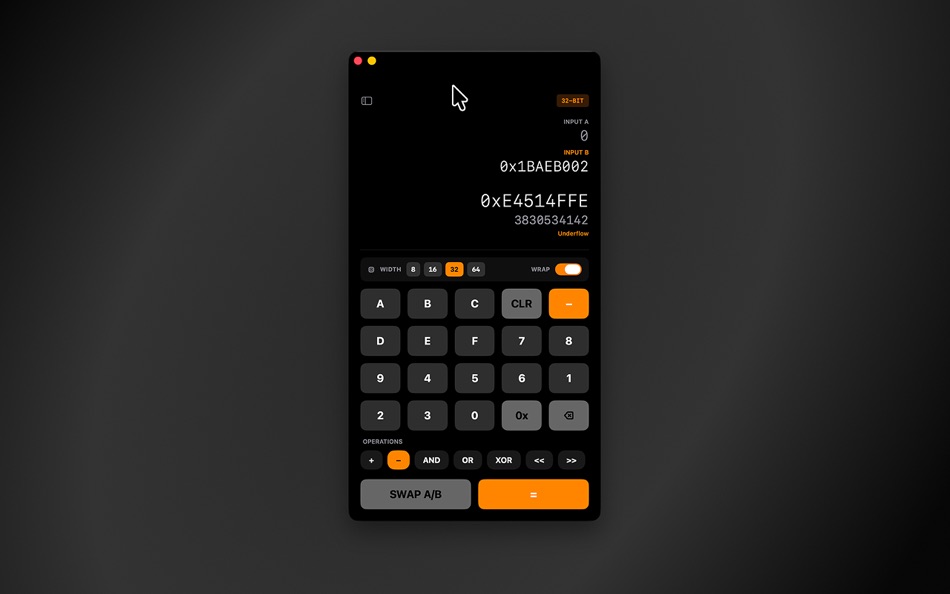
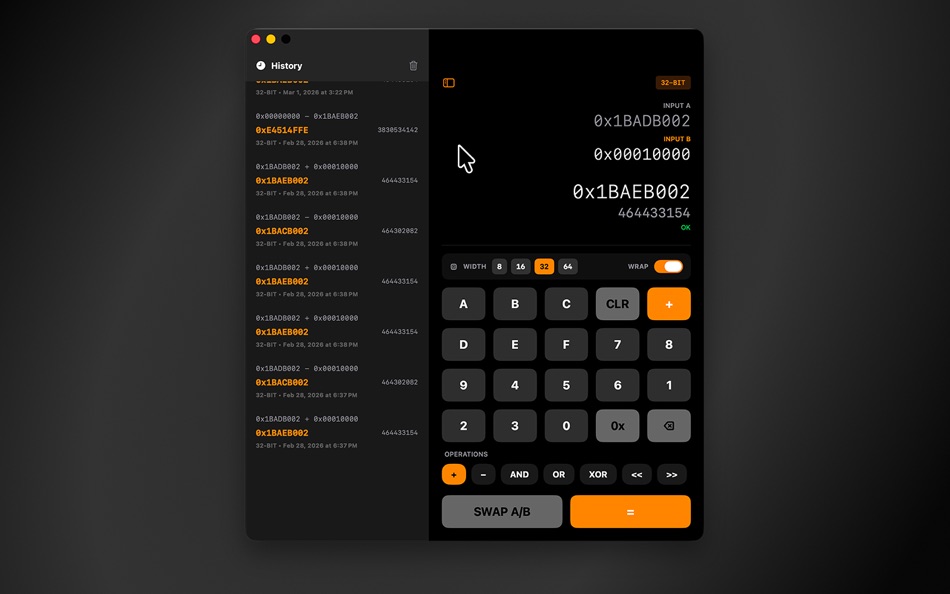
Perform fast hexadecimal math and bitwise operations at fixed widths including 8 bit, 16 bit, 32 bit, and 64 bit, with clearly wrapped results and instant decimal output. Switch operations instantly, compare inputs A and B, and run calculations with overflow aware behavior that reflects real machine constraints.
Key features
Fixed width modes: 8 bit, 16 bit, 32 bit, 64 bit
Hex focused input with instant formatted output
Arithmetic and bitwise operations including Add, Subtract, AND, OR, XOR
Shift operations including Left shift and Right shift
Unary operations including NOT and NEG
Checksum helpers including ones complement and twos complement modes
Wrap on overflow toggle for realistic register style math
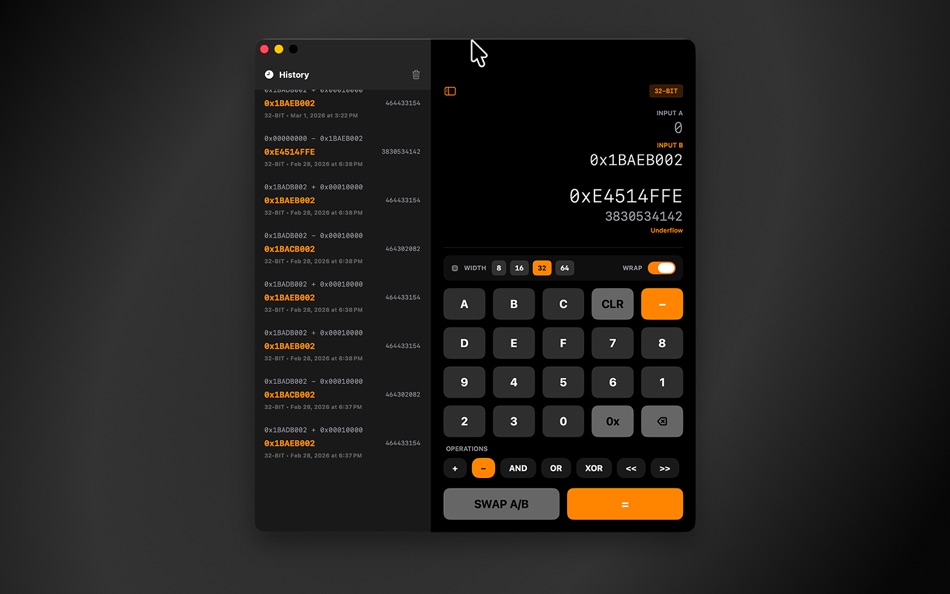
Calculation history with quick recall and deletion
Keyboard first workflow with shortcuts and paste support
Copy hex or decimal results directly from the result view
Optional Float on Top mode for use while coding or debugging
ComfyHexCalc is designed for developers, embedded engineers, reverse engineers, and students who need exact, repeatable binary and hexadecimal behavior instead of generic calculator approximations.
Ad
ภาพหน้าจอ
มีอะไรใหม่
- เวอร์ชัน: 1.0
- อัปเดต:
ประวัติราคา
- วันนี้: ฟรี
- ต่ำสุด: ฟรี
- มากที่สุด: ฟรี
ติดตามราคา
ผู้พัฒนา
- aryan rogye
- แพลตฟอร์ม: iOS แอป (1) macOS แอป (1)
- รายการ: 0 + 0
- แต้มแล: 0 + 3 ¡
- การจัดอันดับ: 0
- ความเห็น: 0
- ความเห็น: 0
- ลดราคา: 0
- วิดีโอ: 0
- RSS: ติดตาม
Ad
แต้มแล (0)
0 ☹️
การจัดอันดับ (0)
0 ☹️
รายการ (0)
0 ☹️
- ComfyHexCalc
ความเห็น (0)
แสดงรีวิวเป็นคนแรกเลย 🌟
ข้อมูลเพิ่มเติม
- เวอร์ชัน: 1.0
- หมวดหมู่:
macOS แอป›เครื่องมือ - ระบบปฏิบัติการ:
macOS,macOS 13.5 และสูงกว่า - ขนาด:
2 Mb - ภาษาที่สนับสนุน:
English - การจัดประเภทเนื้อหา:
4+ - Mac App Store คะแนนโดย:
0 - อัปเดต:
- วันที่วางจำหน่าย:
รายชื่อติดต่อ
 https://github.com/AryanRogye/ComfyHexCalc
ความเห็น (0)
เป็นคนแรกที่แสดงความเห็น 🌟
«ComfyHexCalc». แพลตฟอร์ม: macOS. หมวดหมู่: เครื่องมือ. ผู้พัฒนา: «aryan rogye». การเปิดตัวครั้งแรก: . อัปเดตล่าสุด: . ราคาปัจจุบัน: ฟรี. ชื่อนี้ยังไม่ได้รับการให้คะแนนหรือบทวิจารณ์บน AppAgg ภาษาที่ใช้ได้: English. AppAgg ติดตามประวัติราคา การให้คะแนน และคำติชมของผู้ใช้ «ComfyHexCalc». ส่วนลดและอัปเดตในอนาคต: RSS. AppAgg ไม่ได้โฮสต์แอปพลิเคชันหรือแจกจ่ายซอฟต์แวร์ เครื่องหมายการค้า โลโก้ และภาพหน้าจอทั้งหมดเป็นของเจ้าของที่เกี่ยวข้อง
ComfyHexCalc URL แบบสั้น: คัดลอกแล้ว!- 🌟 แชร์
- Mac App Store
คุณอาจชอบ
-
- Hex Fiend
- macOS แอป: เครื่องมือ โดย: Peter Ammon
- ฟรี
- รายการ: 1 + 0 การจัดอันดับ: 0 ความเห็น: 0
- แต้มแล: 0 + 0 ความเห็น: 0 เวอร์ชัน: 2.15 Hex Fiend is a fast, lean, and powerful hex editor built just for the Mac. - Insert, delete, rearrange. Hex Fiend does not limit you to in-place changes like some hex editors. - Work ... ⥯
-
- Hex Converter
- macOS แอป: เครื่องมือ โดย: App Tyrant Corp
- $1.99
- รายการ: 0 + 0 การจัดอันดับ: 0 ความเห็น: 0
- แต้มแล: 0 + 0 ความเห็น: 0 เวอร์ชัน: 1.2 Hex Converter is the ultimate tool for effortlessly converting between hexadecimal and decimal number systems on your Mac. Whether you re a developer, a student, or anyone dealing with ⥯
-
- Hex Edit Pro for Mac OS X
- macOS แอป: เครื่องมือ โดย: xin jin
- $1.99
- รายการ: 0 + 0 การจัดอันดับ: 0 ความเห็น: 0
- แต้มแล: 0 + 0 ความเห็น: 0 เวอร์ชัน: 1.0 Hex Edit Pro is a fast and clever hex editor. Features Insert, delete, rearrange. Hex Fiend does not limit you to in-place changes like some hex editors. Work with huge files. Hex ... ⥯
- ใหม่
- Hex Lens
- macOS แอป: เครื่องมือ โดย: Palmanac Limited
- $0.99
- รายการ: 0 + 0 การจัดอันดับ: 0 ความเห็น: 0
- แต้มแล: 0 + 0 ความเห็น: 0 เวอร์ชัน: 1.0 Inspect and edit any binary file with precision. HexLens is a hex editor built for developers, security researchers, and anyone who works with raw data at the byte level. Open files of ⥯
-
- Hex To Color
- macOS แอป: เครื่องมือ โดย: Berkan Gunduz
- ฟรี
- รายการ: 0 + 0 การจัดอันดับ: 0 ความเห็น: 0
- แต้มแล: 1 + 0 ความเห็น: 0 เวอร์ชัน: 1.1 Great news for app creators, developers, coders, designers and webmasters! With using our app on your Mac, turning your hexadecimal (HEX) code to a color is just one click away! From ... ⥯
-
- DevUtils.app
- macOS แอป: เครื่องมือ โดย: Dinh Quang Trung
- ฟรี
- รายการ: 2 + 3 การจัดอันดับ: 0 ความเห็น: 0
- แต้มแล: 8 + 0 ความเห็น: 0 เวอร์ชัน: 1.17.0 The free version includes 3 tools: - Unix Time Converter (+ Timezone support) - JSON Format/Validate - Base64 String Encode/Decode List of all current tools: - Unix Time Converter - ... ⥯
-
- System Color Picker
- macOS แอป: เครื่องมือ โดย: Sindre Sorhus
- ฟรี
- รายการ: 1 + 3 การจัดอันดับ: 0 ความเห็น: 0
- แต้มแล: 6 + 0 ความเห็น: 0 เวอร์ชัน: 2.2.1 Pick colors from anywhere using the built-in color picker. Note: On macOS 26, a system bug causes the color sampler to sometimes pick the wrong color. The app relies on macOS's color ... ⥯
-
- More Info - File Checksums
- macOS แอป: เครื่องมือ โดย: Solaz Dazen srl
- $1.99
- รายการ: 2 + 2 การจัดอันดับ: 0 ความเห็น: 0
- แต้มแล: 9 + 0 ความเห็น: 0 เวอร์ชัน: 1.5 More Info shows you additional information about your files. "To sum up, More Info complements the OS X File Info panel with data about the item's checksum and HEX dump. The utility is ⥯
-
- xScope 4
- macOS แอป: เครื่องมือ โดย: The Iconfactory
- $49.99
- รายการ: 3 + 3 การจัดอันดับ: 0 ความเห็น: 0
- แต้มแล: 0 + 0 ความเห็น: 0 เวอร์ชัน: 4.7.2 Created specifically for designers & developers, xScope is a powerful set of tools that are ideal for measuring, inspecting & testing on-screen graphics and layouts. xScope s tools ... ⥯
-
- Color Picker - Pikka
- macOS แอป: เครื่องมือ โดย: Ruslan Sayfutdinov
- * ฟรี
- รายการ: 2 + 1 การจัดอันดับ: 0 ความเห็น: 0
- แต้มแล: 6 + 0 ความเห็น: 0 เวอร์ชัน: 4.0.4 ** Apple's pick for Apps And Games We Love Right Now ** Pikka - Color Picker is an easy-to-use color picker and palette generator for developers and designers that works well with ... ⥯
-
- Penguin - Plist Editor
- macOS แอป: เครื่องมือ โดย: Triplane
- * ฟรี
- รายการ: 1 + 2 การจัดอันดับ: 0 ความเห็น: 0
- แต้มแล: 6 + 0 ความเห็น: 0 เวอร์ชัน: 2.2 Looking for an easier way to edit plist files? Penguin lets you edit any plist file in a beautiful and easy to understand tree view. Drag, drop, expand, reorder and modify your plist ... ⥯
-
- Compare
- macOS แอป: เครื่องมือ โดย: Amsterdamsoft LLC
- * ฟรี
- รายการ: 0 + 1 การจัดอันดับ: 0 ความเห็น: 0
- แต้มแล: 7 + 0 ความเห็น: 0 เวอร์ชัน: 2.22 A tool needed by all developers, AmSo Compare lets you perform side-by-side comparison and merge of your directories, files, and their content. It lets you see changes down to the ... ⥯
-
- Color Picker Plus
- macOS แอป: เครื่องมือ โดย: 万林 彭
- ฟรี
- รายการ: 2 + 1 การจัดอันดับ: 0 ความเห็น: 0
- แต้มแล: 5 + 0 ความเห็น: 0 เวอร์ชัน: 1.8 Color Picker Plus is a simple tool to pick up color for users, which can optimize their workflow and process. Pick HEX, RGB, HSL Main functions Zoom pick up a pixel color Support dark ... ⥯
-
- DevUtilities
- macOS แอป: เครื่องมือ โดย: Hengfei Yang
- $9.99
- รายการ: 0 + 1 การจัดอันดับ: 0 ความเห็น: 0
- แต้มแล: 7 + 0 ความเห็น: 0 เวอร์ชัน: 2.11.1 DevUtilities is a native macOS application providing 23 essential utilities for software developers. It offers a clean, intuitive interface with real-time processing. Core Features: - ... ⥯