
ที่บันทึกไว้
เลือกชื่อที่จะแสดงในเมนูที่บันทึกไว้ของคุณ
เสร็จแล้ว
| ผู้พัฒนา: | Hengfei Yang (1) | ||
| ราคา: | $9.99 | ||
| การจัดอันดับ: | 0 | ||
| ความเห็น: | 0 โพสต์ความคิดเห็น | ||
| รายการ: | 0 + 1 | ||
| แต้มแล: | 7 + 0 ¡ | ||
| +1 แต้มแล | |||
คำอธิบาย

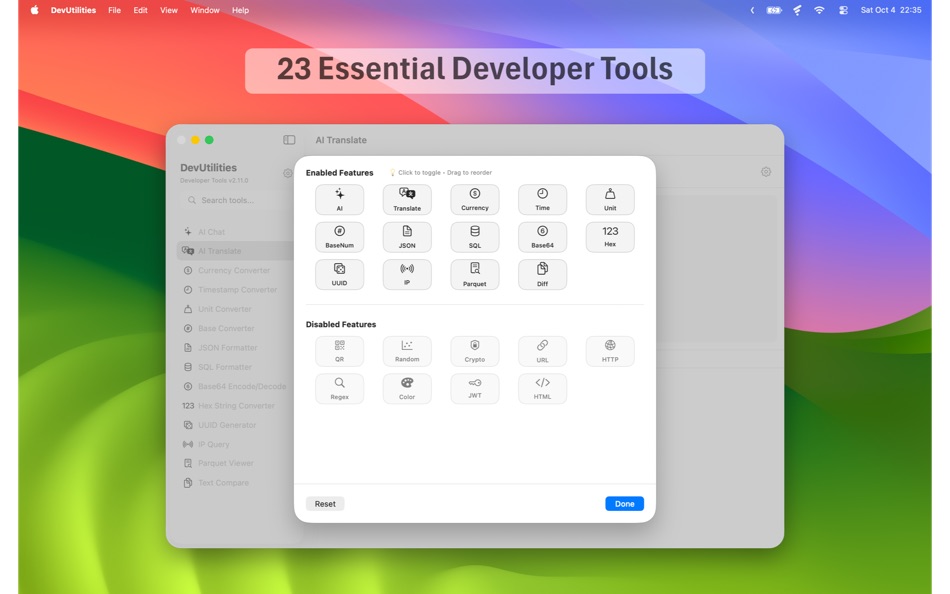
Core Features:
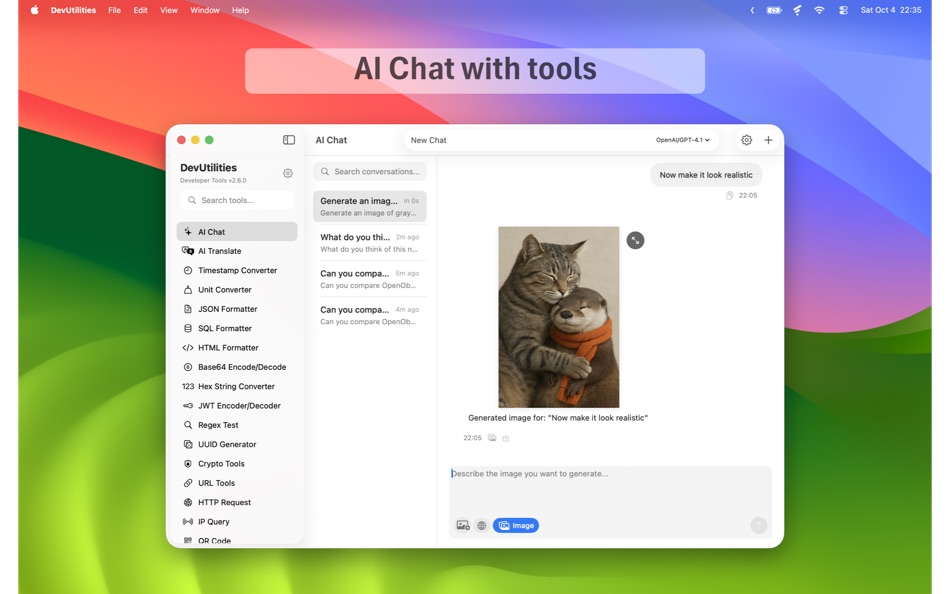
- AI Chat - Intelligent assistant with new Markdown UI, one-click code block copy, DeepSeek reasoning, and custom model support
- AI Translate - Professional translation with TTS model, real-time streaming, and 19 languages
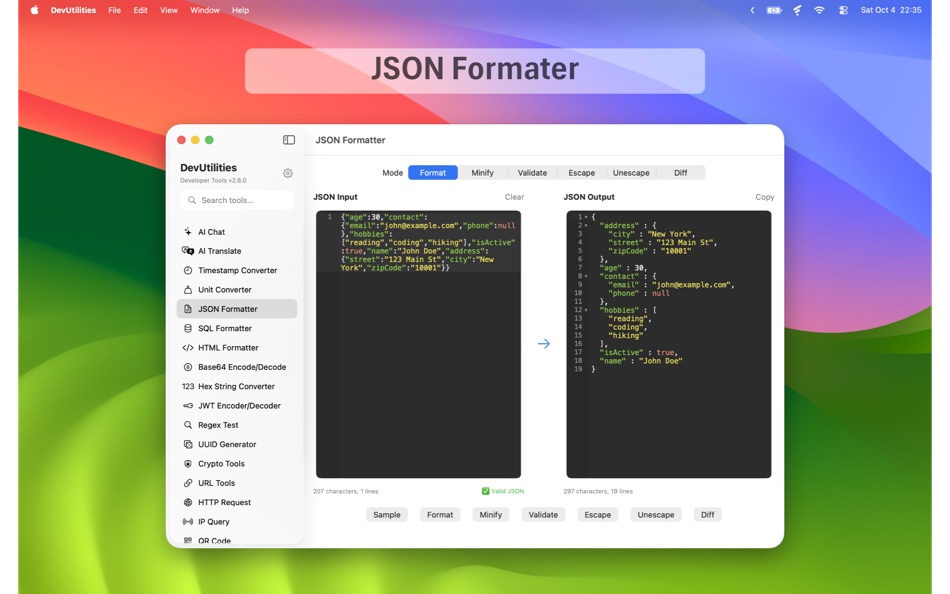
- JSON Formatter - Format, validate, escape/unescape, and diff mode with visual CodeMirror editor
- Text Compare - Side-by-side text comparison with visual diff highlighting and real-time status
- JWT Encoder/Decoder - HMAC and RSA algorithms (RS256, RS384, RS512) with CryptoKit security
- UUID Generator - Multiple versions (v1, v4, v5, v7) with bulk generation
- Regex Test - Pattern matching with capture groups and common patterns
- Base64 Encode/Decode - Text encoding with URL-safe variant
- Hex String Converter - Bidirectional hex-to-string with UTF-8/UTF-16/ASCII
- Color Picker - Professional color format converter for HEX, RGB, RGBA, HSL, HSLA, HSB, and CMYK
- Parquet Viewer - Unified Rust-based API for Parquet and Arrow files
- Crypto Tools - Complete suite with MD5, SHA, AES-GCM-256, and RSA-2048/4096 encryption
- SQL Formatter - Minimal and beautify modes with diff comparison
- HTML Formatter - Proper indentation with diff comparison
- Timestamp Converter - Bidirectional conversion with timezone support
- Unit Converter - 7 categories (Data, Time, Length, Weight, Temperature, Area, Volume)
- Base Converter - Binary, octal, decimal, hexadecimal, and Base62
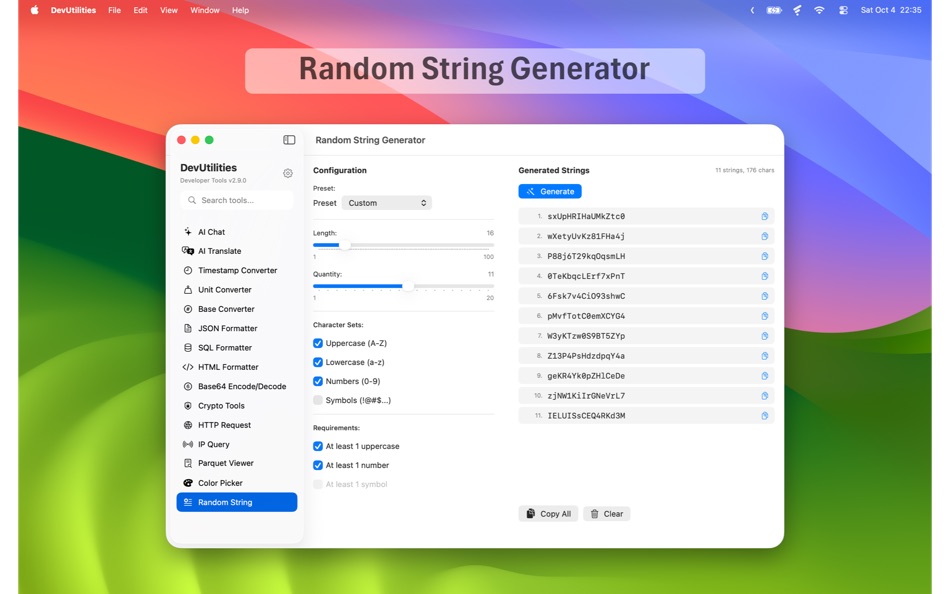
- Random String Generator - Cryptographically secure with presets and requirements
- Currency Converter - Real-time conversion with 38 currencies and 30-day history
- URL Tools - Encoding/decoding and comprehensive parsing
- IP Query - Geolocation with dual network detection
- HTTP Request - Full HTTP client with SSE streaming and JSON tree view
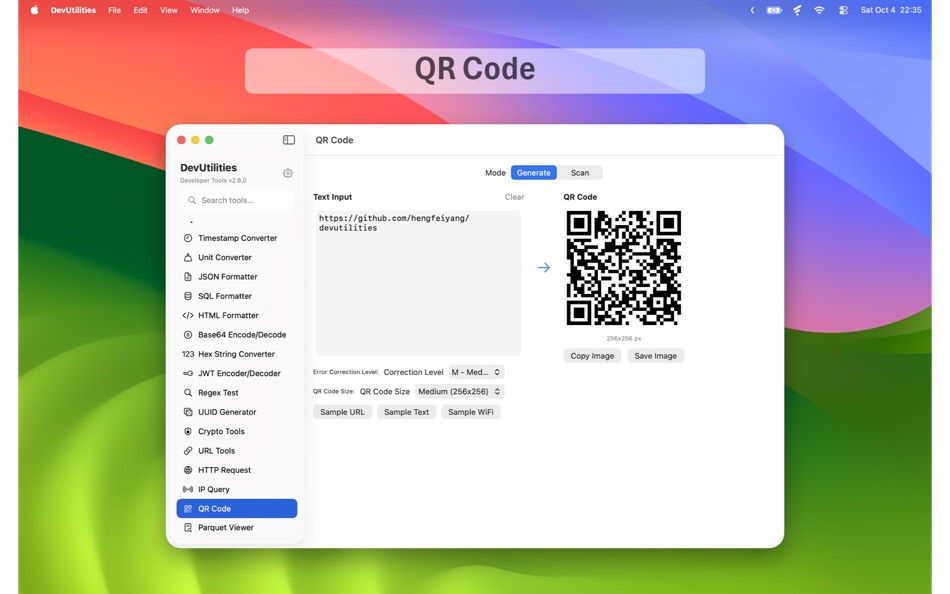
- QR Code - Generation and scanning with multiple formats
Key Benefits:
- Enhanced AI Chat with beautiful Markdown rendering and one-click copy for code blocks
- OpenAI TTS for AI Translate — ultra-low latency voice playback in 13 voices
- OpenAI Responses API support — compatible with the latest GPT models
- Side-by-side diff for Text, JSON, HTML, and SQL
- Cryptographically secure random string and key generation
- Parquet and Arrow file viewer — rare on macOS
- All tools work offline (except AI, currency, and IP features)
- Customizable sidebar with drag-and-drop tool ordering
- Quick search to jump between 23 tools instantly
- Native macOS performance — no Electron, no web views
Perfect for developers who need a reliable Swiss Army knife of utilities without switching context.
ภาพหน้าจอ




ประวัติราคา
- ราคาปัจจุบัน: $9.99
- ต่ำสุด: ฟรี
- มากที่สุด: $9.99
ติดตามราคา
Ad
ข้อมูลเพิ่มเติม
- วันที่วางจำหน่าย:
- หมวดหมู่:
macOS แอป›เครื่องมือ - ระบบปฏิบัติการ:
macOS,macOS 15.0 และสูงกว่า - ขนาด:
14 Mb - ภาษาที่สนับสนุน:
English - การจัดประเภทเนื้อหา:
4+ - Mac App Store คะแนนโดย:
0
 https://hengfeiyang.github.io/devutilities/
ผู้พัฒนา
- Hengfei Yang
- แพลตฟอร์ม: macOS แอป (1)
- รายการ: 0 + 1
- แต้มแล: 7 + 0 ¡
- การจัดอันดับ: 0
- ความเห็น: 0
- ลดราคา: 0
- วิดีโอ: 0
- RSS: ติดตาม
รายการ (0)
0 ☹️
- DevUtilities
แต้มแล (7)
-

- 222 Study Planner
- +1
-
- 4,880 Brain_vv
- +1
-
- 11,370 Simon Chan
- +1
-
- 2,199 Lu Chin
- +1
-
- 3,017 Alan
- +1
-
- 3,777 Dragon
- +1


การจัดอันดับ (0)
0 ☹️
ความเห็น (0)
เป็นคนแรกที่แสดงความเห็น 🌟
«DevUtilities». แพลตฟอร์ม: macOS. หมวดหมู่: เครื่องมือ. ผู้พัฒนา: «Hengfei Yang». การเปิดตัวครั้งแรก: . อัปเดตล่าสุด: . ราคาปัจจุบัน: $9.99. ราคาต่ำสุดที่บันทึกไว้: $0.00 (). ราคาสูงสุดที่บันทึกไว้: $9.99 (). ชื่อนี้ยังไม่ได้รับการให้คะแนนหรือบทวิจารณ์บน AppAgg จุดที่ติดตาม: ยืนยันแล้ว 7, ทางอ้อม 0. ภาษาที่ใช้ได้: English. AppAgg ติดตามประวัติราคา การให้คะแนน และคำติชมของผู้ใช้ «DevUtilities». ส่วนลดและอัปเดตในอนาคต: RSS. AppAgg ไม่ได้โฮสต์แอปพลิเคชันหรือแจกจ่ายซอฟต์แวร์ เครื่องหมายการค้า โลโก้ และภาพหน้าจอทั้งหมดเป็นของเจ้าของที่เกี่ยวข้อง
DevUtilities URL แบบสั้น: คัดลอกแล้ว!- 🌟 แชร์
- Mac App Store
คล้ายกัน
-
- Dev Utils
- macOS แอป: เครื่องมือ โดย: Shaun Hirst
- $2.99
- รายการ: 0 0 0
- แต้มแล: 1 เวอร์ชัน: 1.3.7 Dev Utils is your Swiss Army knife for macOS development. Whether you're debugging, formatting, encoding, or inspecting data, Dev Utils offers a curated set of powerful, offline-first ... ⥯
-
- Dev Cleanup Utility
- macOS แอป: เครื่องมือ โดย: Sergii Koval
- * ฟรี
- รายการ: 0 0 0
- แต้มแล: 0 เวอร์ชัน: 1.0 Keep Xcode fast. Keep your Mac clean. Dev Cleanup Utility helps Apple developers quickly find and remove stale Xcode data without guesswork. Scan, review, and clean the biggest storage ⥯
-
- Dev Assisant-Collection tools
- macOS แอป: เครื่องมือ โดย: 万象 包
- $6.99
- รายการ: 0 + 1 0 0
- แต้มแล: 4 เวอร์ชัน: 1.4.0 Dev Assistant is a collection of little utilities (4 major features and growing) and converter (3 and growing) that are useful during development. AppIcons It supports every type of ... ⥯
-
- Dev Disk Scanner
- macOS แอป: เครื่องมือ โดย: Yuriy Zhuravel
- * ฟรี
- รายการ: 0 0 0
- แต้มแล: 1 เวอร์ชัน: 3.15 Dev Disk Scanner is a lightweight macOS utility designed specifically for iOS and macOS developers who use Xcode. If Xcode takes dozens of gigabytes on your disk and the Other storage ... ⥯
-
- Dev Kit
- macOS แอป: เครื่องมือ โดย: Long Trieu
- $2.99
- รายการ: 0 0 0
- แต้มแล: 1 เวอร์ชัน: 1.1 Introducing the powerful Dev Kit: a comprehensive collection of tools designed to assist developers in their day-to-day tasks. This versatile toolkit includes a range of handy ... ⥯
-
- Dev Connector
- macOS แอป: เครื่องมือ โดย: Alexander Romanov
- * ฟรี
- รายการ: 0 0 0
- แต้มแล: 0 เวอร์ชัน: 1.0.0 AppConnector is a powerful tool for developers and teams managing apps on the App Store. It streamlines everyday tasks like app submissions, versioning, review responses, and metadata ... ⥯
-
- Dev Hub Swiss-Knife
- macOS แอป: เครื่องมือ โดย: Shimon Benichou
- ฟรี
- รายการ: 0 + 1 0 0
- แต้มแล: 1 เวอร์ชัน: 1.34 DevHub Swiss-Knife is a versatile application that provides a collection of tools to assist developers and users alike, In their daily tasks. With various features and functionalities, ⥯
-
- Dev Tunnel Share
- macOS แอป: เครื่องมือ โดย: Oluwatobiloba Aremu
- ฟรี
- รายการ: 0 0 0
- แต้มแล: 1 เวอร์ชัน: 1.0 DevShare (Local Mesh) transforms how development teams collaborate by creating a secure local network mesh for sharing development services. No more port conflicts, complex ... ⥯
-
- Smart Dev Tools
- macOS แอป: เครื่องมือ โดย: Fabian Reyes
- * ฟรี
- รายการ: 0 0 0
- แต้มแล: 1 เวอร์ชัน: 2.0.0 Smart Dev Tools is the ultimate productivity suite for developers, offering 20 essential utilities in one beautifully designed macOS application. Whether you're debugging APIs, ... ⥯
-
- Hotwire Dev Tools
- macOS แอป: เครื่องมือ โดย: Leon Vogt
- ฟรี
- รายการ: 0 0 0
- แต้มแล: 1 เวอร์ชัน: 0.3.3 This extension has the goal of helping developers inspect their Turbo and Stimulus applications. Turbo features: - Highlight Turbo Frames - Monitor incoming Turbo Streams - Display ... ⥯
- ใหม่
- CodeCleaner – Dev Disk Cleanup
- macOS แอป: เครื่องมือ โดย: Sergey Grigorev
- * ฟรี
- รายการ: 0 0 0
- แต้มแล: 0 เวอร์ชัน: 1.2 Developers often accumulate gigabytes of unnecessary files created by development tools. Build artifacts, caches, logs, simulator data, and temporary files can quickly fill up disk ... ⥯
-
- DevLoom Code Utilities
- macOS แอป: เครื่องมือ โดย: Mohamed Ashraf
- ฟรี
- รายการ: 0 0 0
- แต้มแล: 0 เวอร์ชัน: 2.0 evLoom is a powerful, all-in-one developer utilities toolkit designed to streamline your coding workflow. No ads, no trackers, works completely offline. FORMATTERS HTML Formatter - ... ⥯
-
- Movil.dev
- macOS แอป: เครื่องมือ โดย: Ihor Trach
- ฟรี
- รายการ: 0 0 0
- แต้มแล: 0 เวอร์ชัน: 1.0 Movil.dev makes professional iOS, iPadOS, macOS, and watchOS design accessible to Every Developer and Creator. Build polished, production-ready interfaces using reusable SwiftUI ... ⥯
-
- Try in Dev Spaces
- macOS แอป: เครื่องมือ โดย: Red Hat
- ฟรี
- รายการ: 0 0 0
- แต้มแล: 0 เวอร์ชัน: 1.1.1 The Try in Dev Spaces Safari extension adds a "Dev Spaces" button into GitHub repository pages, allowing you to create a cloud development environment for your Red Hat OpenShift Dev ... ⥯