
Ulubione
Wybierz nazwę, która będzie wyświetlana w menu ulubionych.
Gotowe!
| Programista: | 勇 陈 (24) | ||
| Cena: | $4.99 | ||
| Rankingi: | 0 | ||
| Komentarze: | 0 Opublikuj komentarz | ||
| Listy: | 0 + 0 | ||
| Punkty: | 0 + 0 ¡ | ||
| Mac App Store | |||
Opis
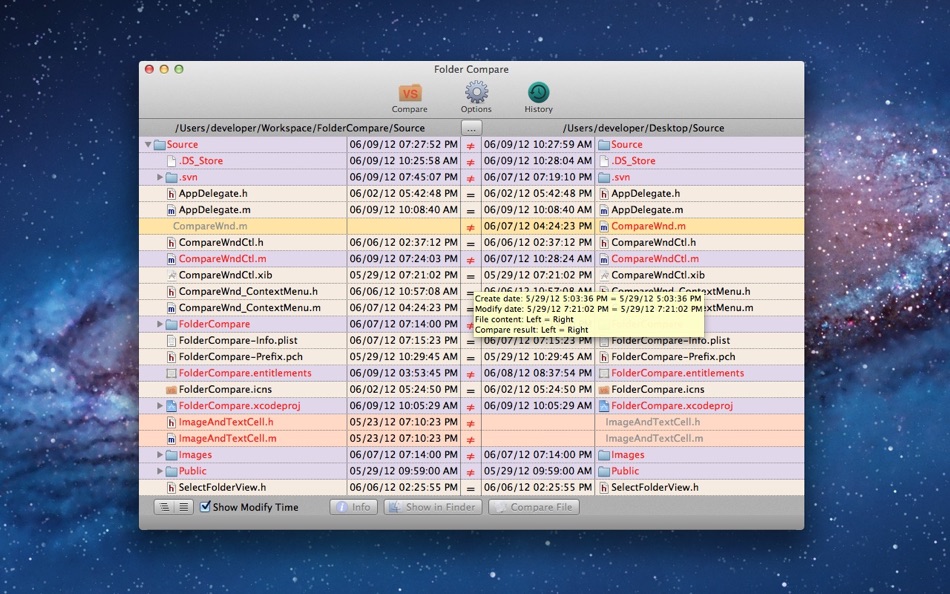
Folder Compare is a tool which helps you to compare the difference between two folders or files with a very friendly and clean UI. It can also help you to merge your files.
With it you can manage your folders, documents and code source effectively. And at last, it's really easy to use.
Key features:
->Support compare both folders and files.
->Support compare sub directories automatically.
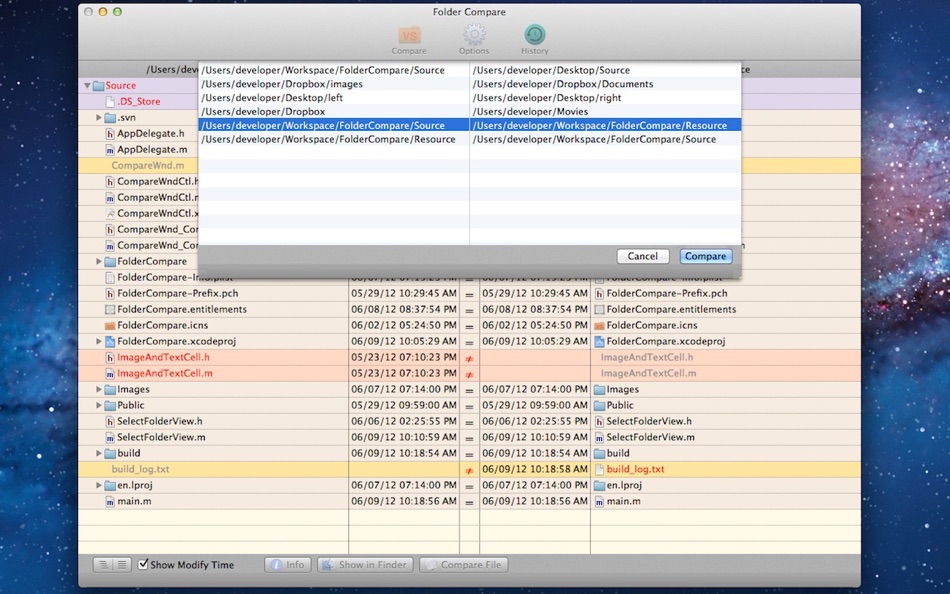
->Recode your comparison history. So you can start your comparison conveniently next time
->Optional comparison options. Comparing file's content, modify time and create time are supported.
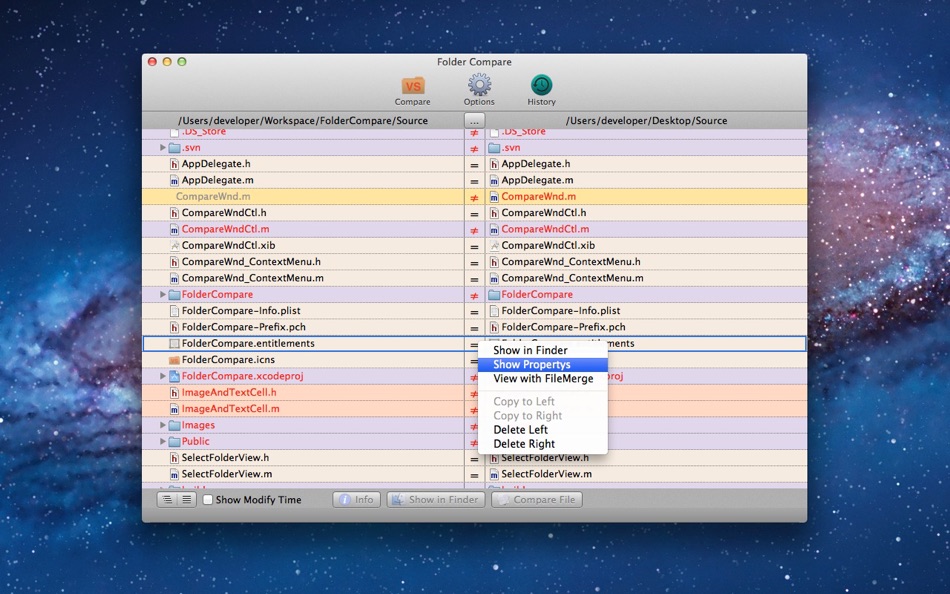
->Show comparison result in a very friendly and clean UI. Different result is showed with different color.
->Compare or merge files with FileMerge directly if you have installed FileMerge.
Note: If you have any problems, please feel free to contact us with our support email:
trybeststudio@126.com
Ad
Zrzuty ekranu


Historia cen
- Dziś: $4.99
- Minimalna: $4.99
- Maksymalna: $4.99
Monitoruj ceny
Dodatkowe informacje
- Data wydania:
- Kategoria:
macOS Aplikacje›Narzędzia - System operacyjny:
macOS,macOS 10.6.6 i nowsze - Rozmiar:
622 Kb - Obsługiwany język:
English - Ocena treści:
4+ - Mac App Store Ocena:
0
Programista
- YONG CHEN
- Platformy: iOS Aplikacje (6) macOS Aplikacje (18)
- Listy: 5 + 2
- Punkty: 8 + 124 ¡
- Rankingi: 5 (1)
- Komentarze: 0
- Zniżki: 0
- Filmy: 0
- RSS: Subskrybuj
Listy (0)
0 ☹️
- Folder Compare
Punkty (0)
0 ☹️
Rankingi (0)
0 ☹️
Komentarze (0)
Skomentuj jako pierwszy 🌟
«Folder Compare». Platforma: macOS. Kategoria: Narzędzia. Deweloper: «勇 陈». Pierwsze wydanie: . Ostatnia aktualizacja: . Aktualna cena: $4.99. Najniższa zarejestrowana cena: $4.99. Najwyższa odnotowana cena: $4.99. Ten tytuł nie otrzymał jeszcze ocen ani recenzji w serwisie AppAgg. Dostępne języki: English. AppAgg śledzi historię cen, oceny i opinie użytkowników «Folder Compare». Śledź przyszłe rabaty i aktualizacje za pośrednictwem RSS. AppAgg nie hostuje aplikacji ani nie dystrybuuje oprogramowania. Wszystkie znaki towarowe, logo i zrzuty ekranu należą do ich odpowiednich właścicieli.
Folder Compare Krótki URL: Skopiowano!- 🌟 Udostępnij
- Mac App Store
Podobne
-
- Folder-Compare-Lite
- macOS Aplikacje: Narzędzia Przez: 勇 陈
- Bezpłatny
- Listy: 0 + 0 0 0
- Punkty: 0 + 0 Wersja: 2.12 Folder-Compare-Lite is a tool which helps you to compare the difference between two folders or files with a very friendly and clean UI. With it you can manage your folders, documents ... ⥯
-
- Compare
- macOS Aplikacje: Narzędzia Przez: Amsterdamsoft LLC
- * Bezpłatny
- Listy: 0 + 1 0 0
- Punkty: 7 + 0 Wersja: 2.22 A tool needed by all developers, AmSo Compare lets you perform side-by-side comparison and merge of your directories, files, and their content. It lets you see changes down to the ... ⥯
-
- Diff Pro Max - File Compare
- macOS Aplikacje: Narzędzia Przez: Ryota Kimura
- * Bezpłatny
- Listy: 0 + 0 0 0
- Punkty: 0 + 0 Wersja: 1.2.0 Diff Pro Max is a professional tool for quickly comparing files and folders. 【Key Features】 Folder Compare - View differences between folders in tree view Text Compare - Code diff with ⥯
-
- JSON Compare
- macOS Aplikacje: Narzędzia Przez: Proxyman LLC
- $4.99
- Listy: 0 + 1 0 0
- Punkty: 0 + 0 Wersja: 1.6.0 Meet JSON Compare, a native macOS app that shows beautiful differences between 2 texts. - Native macOS app - Work OFFLINE - Built with developer mindset: Privacy-first, run locally. ... ⥯
- Nowa
- Duo: Compare app screenshots
- macOS Aplikacje: Narzędzia Przez: Markus Jahnsrud
- Bezpłatny
- Listy: 0 + 0 0 0
- Punkty: 1 + 0 Wersja: 1.1 Duo makes it effortless to create before and after screenshots of your app. Simply paste a before and after image, and you'll get a nicely formatted overview that you can paste right ... ⥯
-
- JuxtaText
- macOS Aplikacje: Narzędzia Przez: Yori Mihalakopoulos
- * Bezpłatny
- Listy: 0 + 1 0 0
- Punkty: 2 + 0 Wersja: 1.1.3 Compare and merge any text with this simple tool. Works intuitively with code, documents or any text-based content. Visual Comparison Instantly see differences between texts with ... ⥯
-
- SnippetsLab
- macOS Aplikacje: Narzędzia Przez: Renfei Song
- Bezpłatny
- Listy: 6 + 8 5 (1) 0
- Punkty: 13 + 0 Wersja: 2.6.4 Mac App Store Best of 2015 Featured in App Store editorial All Your Code, Brilliantly Organized , Keep Your Code at Your Fingertips and Welcome to the Mac App Store! Featured app in ... ⥯
-
- CompareMerge2
- macOS Aplikacje: Narzędzia Przez: Tien Thinh Vu
- Bezpłatny
- Listy: 0 + 0 0 0
- Punkty: 3 + 0 Wersja: 3.8 CompareMerge2 is the professional(*) version of the standard CompareMerge app. It is useful for determining what has changed between versions, and then merging changes between ... ⥯
-
- XCOrganizer
- macOS Aplikacje: Narzędzia Przez: Sergii Kryvoblotskyi
- $1.99
- Listy: 0 + 5 0 0
- Punkty: 13 + 0 Wersja: 1.2.4 XCOrganizer is a tool that lets you easily locate any project on a disk. Browse through Xcode Projects, Xcode Workspaces, Swift Playgrounds, and Swift Packages grouped by types. Assign ⥯
-
- RocketSim for Xcode Simulator
- macOS Aplikacje: Narzędzia Przez: SwiftLee
- * Bezpłatny
- Listy: 1 + 3 0 0
- Punkty: 9 + 0 Wersja: 15.0.2 RocketSim enhances the Xcode Simulator for iOS and iPadOS development: boost productivity and streamline your workflow with capture, networking, build insights, and quick actions ... ⥯
-
- Aqua Swatch
- macOS Aplikacje: Narzędzia Przez: Ohanaware Co., Ltd
- Bezpłatny
- Listy: 1 + 2 0 0
- Punkty: 3 + 0 Wersja: 2.0.5 Make your Mac apps feel more consistent and at home on the Mac platform by using Aqua Swatch Aqua Swatch makes it easy to view system colors and variations, allowing developers to pick ⥯
-
- Dush ( coding utilities )
- macOS Aplikacje: Narzędzia Przez: 伟胜 林
- $0.99
- Listy: 0 + 2 0 0
- Punkty: 11 + 0 Wersja: 3.2 Dush provide Instant search and offline access tool for custom help file , provide toolset in Xcode editor. Features : 1.Quick search from Xcode editor and do not need to select text ... ⥯