
| Programista: | 方俊 文 (5) | ||
| Cena: | Bezpłatny | ||
| Rankingi: | 0 | ||
| Opinie: | 0 Napisać recenzję | ||
| Komentarze: | 0 Opublikuj komentarz | ||
| Listy: | 0 + 0 | ||
| Punkty: | 0 + 0 ¡ | ||
| Mac App Store | |||
Opis

IconForge Pro is a professional icon conversion tool designed for Apple developers and designers, featuring "one-click multi-platform icon generation" and "standard output ready to use."
[7 Core Features]
* One-Click Lightning-Fast Conversion
- Drag in 1024x1024 PNG icon
- Click "Start Conversion" button
- Complete in 3 seconds
- Zero learning curve
* Standard Output, Ready to Use
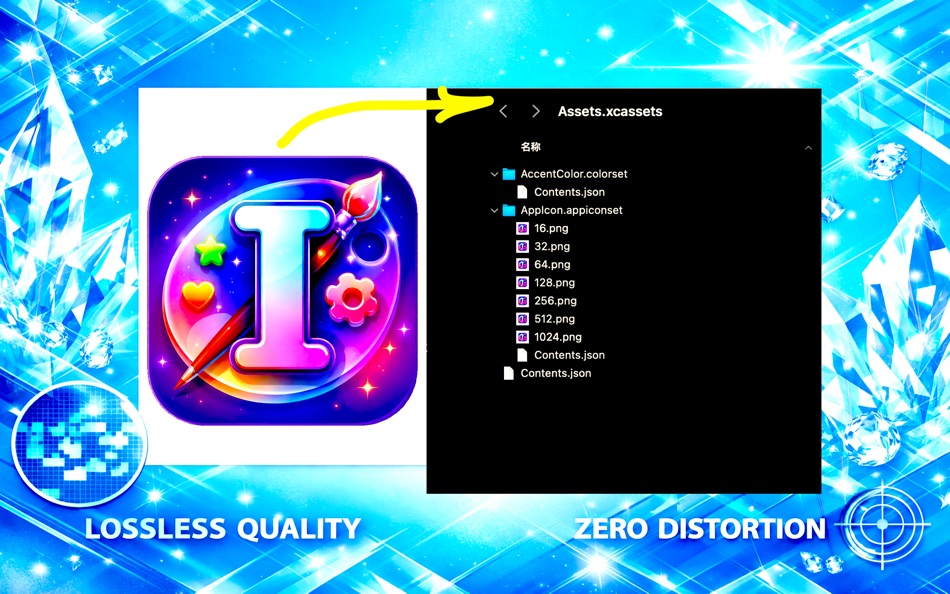
- Auto-generate Assets.xcassets standard directory
- Include complete AppIcon.appiconset folder
- Auto-create Contents.json configuration
- Drag directly into Xcode projects
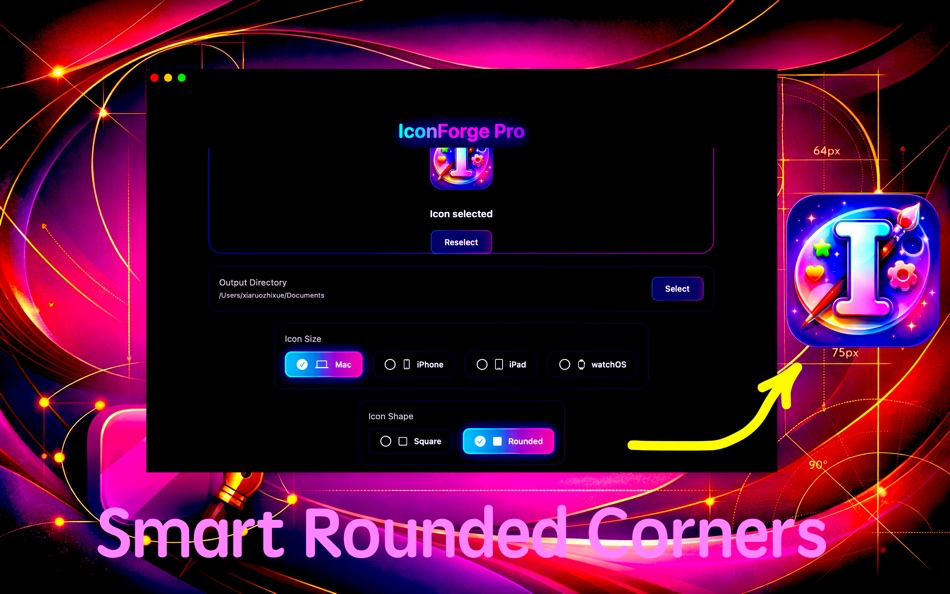
* Smart Rounded Corners, Professional Processing
- Support square/rounded corner styles
- Precise corner radius calculation
- One-click switch with real-time preview
* Lossless Quality, Zero Distortion Scaling
- Industry-leading image scaling algorithm
- GPU hardware acceleration
- Smart fallback to CPU multi-threading
* Auto-Create Directory Structure
- Auto-create Assets.xcassets directory
- Auto-generate all PNG files
- Auto-generate Contents.json configuration
* One-Click Generate All Sizes
- Mac icons: 7 sizes (16-1024px)
- iPhone icons: 8 sizes (40-1024px)
- iPad icons: 10 sizes (20-1024px)
- watchOS icons: 14 sizes (48-1024px)
* Multi-Platform Support (Mac/iPhone/iPad/watchOS)
- Support all platform icon conversion
- Complete coverage of Apple ecosystem
[Typical Use Cases]
Case 1: iOS Developer Quick Icon Generation
- Drag 1024x1024 PNG icon into app
- Select iPhone platform
- Click "Start Conversion"
- Generate 8 sizes in 3 seconds
Case 2: Mac Developer Create App Icon
- Drag icon, select Mac platform
- Enable smart rounded corners
- One-click generate 7 sizes
[Advanced Features]
Smart Validation:
- Auto-detect icon size must be 1024x1024
- File overwrite warning
Drag & Drop Upload:
- Support dragging PNG files from Finder
- Support clicking upload area to select files
[Output Structure]
Standard Assets.xcassets directory:
```
Assets.xcassets/
- AccentColor.colorset/
- Contents.json
- AppIcon.appiconset/
- 16.png
- 32.png
- 64.png
- 128.png
- 256.png
- 512.png
- 1024.png
- Contents.json
- Contents.json
```
Auto-generated Contents.json includes complete configuration, compliant with Xcode format, ready to use.
[Performance Optimization]
- Metal GPU acceleration
- Core Image processing engine
- Real-time progress display
[Operation Steps]
Generate iPhone icons (3 steps):
1. Drag 1024x1024 PNG icon to upload area
2. Select iPhone platform, choose rounded corner style
3. Click "Start Conversion" button
Result:
- Auto-generate Assets.xcassets directory
- Include 8 sizes of iPhone icons
- Auto-create Contents.json configuration
- Drag directly into Xcode project for use
[System Requirements]
- macOS 12.7.6 or higher
- Support all Mac devices (13"-32")
- No additional tools required
[Why Choose IconForge Pro?]
Traditional Method:
- Manually adjust 9 sizes in Photoshop (30 minutes)
- Manually create directory structure and configuration
- Repetitive work, time-wasting, error-prone
IconForge Pro:
- Complete in 3 seconds
- Auto-generate everything
- Save hundreds of hours
Compared to Similar Tools:
- Multi-platform support (Mac/iPhone/iPad/watchOS)
- Auto-generate standard Assets.xcassets
[Tech Stack]
- Swift
- SwiftUI
- Metal
[Privacy]
App does not collect any user data:
- No network access
- No file uploads
- No usage data collection
- No third-party analytics tools
- All operations completed locally
[Permissions]
App requires the following permissions:
- File access: Read and write user-selected files and folders
- No network permissions required
- No other system permissions required
IconForge Pro makes icon conversion simpler, faster, and more professional! One-click generate multi-platform icons, ready to use!
---
Ad
Zrzuty ekranu


Nowości
- Wersja: 1.0.0
- Zaktualizowano:
Cena
- Dziś: Bezpłatny
- Minimalna: Bezpłatny
- Maksymalna: Bezpłatny
Monitoruj ceny
Ad
Programista
- 方俊 文
- Platformy: macOS Aplikacje (5)
- Listy: 0 + 0
- Punkty: 0 + 0 ¡
- Rankingi: 0
- Opinie: 0
- Zniżki: 0
- Filmy: 0
- RSS: Subskrybuj
Punkty (0)
0 ☹️
Rankingi (0)
0 ☹️
Listy (0)
0 ☹️
- IconForge Pro
Opinie (0)
Bądź pierwszą osobą, która napisze recenzję 🌟
Komentarze (0)
Skomentuj jako pierwszy 🌟
Dodatkowe informacje
Kontakty
- Witryna internetowa:
 https://www.macfans.app/icon-forge-pro/index.html
IconForge Pro Krótki URL: Skopiowano!- 🌟 Udostępnij
- Mac App Store
Może ci się spodobać również
-
- iCon - Create And Resize Icons
- macOS Aplikacje: Narzędzia Przez: ShaoBing Fu
- $0.99
- Listy: 0 + 0 Rankingi: 0 Opinie: 0
- Punkty: 0 + 0 Komentarze: 0 Wersja: 1.1.5 iCon is a productivity tool application made for developers. If you are an iOS/Watch OS/Mac OS developer, you definitely need iCon. iCon uses a self-developed algorithm to ensure that ... ⥯
-
- Icon Preview
- macOS Aplikacje: Narzędzia Przez: Sindre Sorhus
- Bezpłatny
- Listy: 0 + 1 Rankingi: 0 Opinie: 0
- Punkty: 3 + 0 Komentarze: 0 Wersja: 1.2.0 Preview how your macOS app icon will look in the Dock and how your menu bar item icon will appear. The icon previews update automatically when the file changes. You can also set the ... ⥯
-
- Icon Resize
- macOS Aplikacje: Narzędzia Przez: WAN LUTFI WAN MD HATTA
- Bezpłatny
- Listy: 1 + 1 Rankingi: 0 Opinie: 0
- Punkty: 6 + 0 Komentarze: 0 Wersja: 1.12 Icons is very important for a developer. This tools help developer to quickly resize icon to multiple size for iOS or Mac. Actually any developer can develop this simple app. But why ... ⥯
-
- Icon Generator Pro
- macOS Aplikacje: Narzędzia Przez: Wicher B Donga
- $17.99
- Listy: 0 + 0 Rankingi: 0 Opinie: 0
- Punkty: 0 + 0 Komentarze: 0 Wersja: 2 Effortless Icon Design with Icon Generator Pro Icon Generator Pro revolutionises icon creation with its AI-driven technology. Perfect for designers and marketers, this tool simplifies ... ⥯
-
- Icon Renderer
- macOS Aplikacje: Narzędzia Przez: Konstantin Adamov
- $2.99
- Listy: 0 + 0 Rankingi: 0 Opinie: 0
- Punkty: 0 + 0 Komentarze: 0 Wersja: 1.4.5 Full featured Application Icon generator. Supports multiply different types of layers with a lot of customizations. - Background - Text - Image Except for background layer, you can ... ⥯
-
- Icon Maker Pro
- macOS Aplikacje: Narzędzia Przez: CluBees Tech
- $1.99
- Listy: 3 + 1 Rankingi: 0 Opinie: 0
- Punkty: 4 + 0 Komentarze: 0 Wersja: 2.6 Icon Maker Pro is the easiest way to create icons of all size required for different platforms i.e. iphone, ipad, mac and apple watch applications. It provides you with a wide variety ... ⥯
-
- Icon Resizer Tool for xCode
- macOS Aplikacje: Narzędzia Przez: Kirill Aust
- Bezpłatny
- Listy: 1 + 0 Rankingi: 0 Opinie: 0
- Punkty: 5 + 0 Komentarze: 0 Wersja: 1.1.5 Icon Resizer Tool will quickly prepare icons of all required sizes for further export in xcode Supported platforms for icon: - macOS - iOS - iOS + iPad OS - watchOS How to use: 1. Drag ⥯
- Nowa
- Forge: Skip the Browser
- macOS Aplikacje: Narzędzia Przez: Baris Bingor
- * Bezpłatny
- Listy: 0 + 0 Rankingi: 0 Opinie: 0
- Punkty: 0 + 0 Komentarze: 0 Wersja: 1.0.1 Forge is a native macOS app that puts your entire app publishing workflow in one fast, keyboard-friendly interface. No browser tabs. No loading spinners. Just a real Mac app built for ... ⥯
-
- Icon Workshop
- macOS Aplikacje: Narzędzia Przez: Kobi Snir
- Bezpłatny
- Listy: 1 + 0 Rankingi: 0 Opinie: 0
- Punkty: 0 + 0 Komentarze: 0 Wersja: 2.5 Icon Workshop is a simple yet very useful tool let you resize and generate all icons resolutions for iOS, MacOS, WatchOS, Android App in a single click. Simply drop your source icon ... ⥯
-
- Forge - Quick Marketing Images
- macOS Aplikacje: Narzędzia Przez: Florian Schweizer
- Bezpłatny
- Listy: 0 + 1 Rankingi: 0 Opinie: 0
- Punkty: 5 + 0 Komentarze: 0 Wersja: 1.5 Painless marketing as a developer! Do you want people to know about your latest app or greatest new update? Are you no fan of spending hours in a graphics editor to create some ... ⥯
-
- Icon Tool for Developers
- macOS Aplikacje: Narzędzia Przez: Hobbyist Software Limited
- Bezpłatny
- Listy: 1 + 0 Rankingi: 0 Opinie: 0
- Punkty: 3 + 0 Komentarze: 0 Wersja: 3.0 Easy icons foriPhone, iPad, CarPlay, Mac, Watch, iMessage and Android You can build from a single large file - or provide multiple files and let Icon Tool fill in the gaps. Note - this ⥯
-
- Icon Resizer
- macOS Aplikacje: Narzędzia Przez: Nicholas Dean
- Bezpłatny
- Listy: 0 + 0 Rankingi: 0 Opinie: 0
- Punkty: 1 + 0 Komentarze: 0 Wersja: 1.6 The quick and foolproof way to create all the required icons for your apps! Drop in a source image, press generate, and done. Every image you need for your app is neatly packaged ... ⥯
-
- Icon Maker (Asset Catalog for App Store Icons) for Mac OS X
- macOS Aplikacje: Narzędzia Przez: Nirmala T V
- Bezpłatny
- Listy: 1 + 0 Rankingi: 0 Opinie: 0
- Punkty: 0 + 0 Komentarze: 0 Wersja: 1.5 Easy way to resize iOS, OS X, Android, Watch App icons and Asset Catalogs in just two clicks. Features: - iOS & Android App Icons - OS X App - Watch App - Custom size Icons Drag and ... ⥯
-
- Icon Adapt
- macOS Aplikacje: Narzędzia Przez: 宇 周
- $2.99
- Listy: 0 + 0 Rankingi: 0 Opinie: 0
- Punkty: 0 + 0 Komentarze: 0 Wersja: 1.0.3 This app is designed to help users adapt and customize their iOS, macOS, and watchOS icons. ⥯