
Zapisane
Wybierz nazwę, która będzie wyświetlana w menu Zapisane.
Gotowe!
| Programista: | James Studt (2) | ||
| Cena: | Bezpłatny | ||
| Rankingi: | 0 | ||
| Komentarze: | 0 Opublikuj komentarz | ||
| Listy: | 0 + 0 | ||
| Punkty: | 0 + 0 ¡ | ||
| +1 Punkty | |||
Opis

If you are training a Create ML object detector, the slow part is often not the training itself. It is getting a clean set of images, drawing boxes around the objects you care about, labeling them consistently, and exporting everything in the format your training workflow expects. Image ML Annotator is a focused desktop tool for that job.
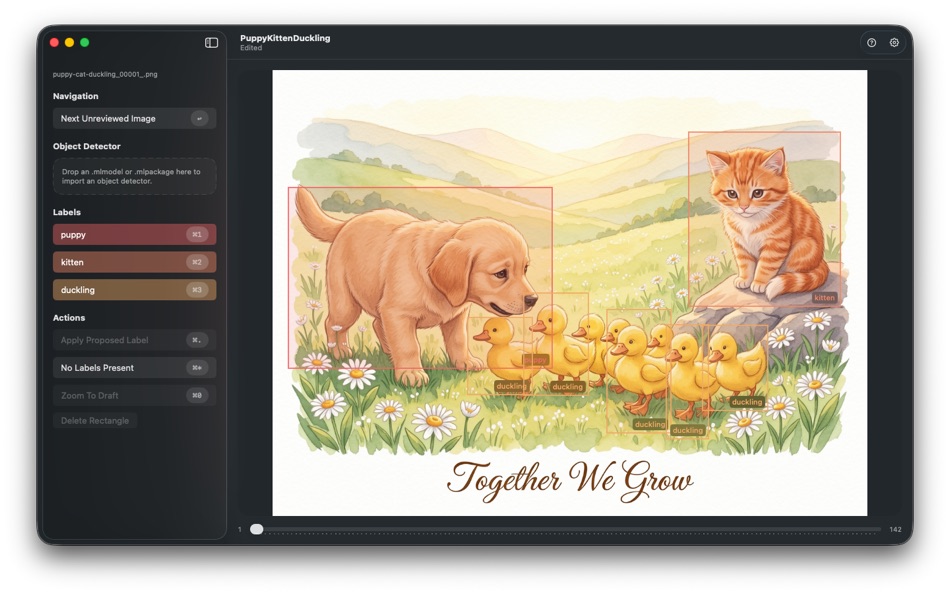
Start by creating a document and importing a folder of images. The app keeps your images, label names, detector choice, and annotations together in one package, so you can stop and resume work later without reconstructing your setup.
Next, define the labels you want to use. For a simple project, that might be one label. For a multi-class detector, you can configure several labels and switch between them quickly from the keyboard.
Then move through your images and mark what matters. Draw rectangles around the objects you want to teach your model to recognize, adjust them by dragging or resizing, and assign labels with fast shortcuts. If an image contains none of your target objects, mark that clearly so your dataset reflects reality instead of leaving ambiguous gaps.
To speed things up, you can also import an existing Core ML detector. Image ML Annotator can use that model to propose rectangles and labels for the current image. You review the proposal, accept it, correct it, resize it, move it, relabel it, or delete it. This makes the app especially useful when you already have a first-generation model and want to use it to help create the next round of training data.
As you work, the app is designed for iterative labeling rather than one-shot export. You can import more images later, paste in screenshots, remove bad images, revisit older annotations, and keep refining the document over time.
When you are ready to train, export your annotated images and Create ML annotations.json into a new folder. If you already have an existing training export, you can also use Export Into to merge the current work into a larger corpus without manually reconciling files and annotations. That makes it practical to grow a dataset in stages instead of rebuilding it from scratch each time.
A typical workflow looks like this:
1. Import a folder of images.
2. Configure the labels for the objects you care about.
3. Optionally import a previously trained detector to generate proposals.
4. Review each image, drawing or correcting boxes and assigning labels.
5. Mark images with no target objects when appropriate.
6. Export the finished annotations for Create ML.
7. Train a model.
8. Bring that model back into Image ML Annotator to accelerate the next labeling pass.
Image ML Annotator is built for people who need a practical way to turn piles of images into usable object detection training data, especially when that work happens in repeated cycles of label, train, improve, and label again.
Ad
Zrzuty ekranu

Historia cen
- Aktualna cena: Bezpłatny
- Minimalna: Bezpłatny
- Maksymalna: Bezpłatny
Monitoruj ceny
Dodatkowe informacje
- Data wydania:
- Kategoria:
macOS Aplikacje›Narzędzia - System operacyjny:
macOS,macOS 26.3 i nowsze - Rozmiar:
2 Mb - Obsługiwany język:
English - Ocena treści:
4+ - Mac App Store Ocena:
0
Nowości
- Wersja: 1.0
- Zaktualizowano:
Programista
- James Studt
- Platformy: iOS Gry (1) macOS Aplikacje (1)
- Listy: 0 + 0
- Punkty: 0 + 6 ¡
- Rankingi: 0
- Komentarze: 0
- Zniżki: 0
- Filmy: 0
- RSS: Subskrybuj
Listy (0)
0 ☹️
- Image ML Annotator
Punkty (0)
0 ☹️
Rankingi (0)
0 ☹️
Komentarze (0)
Skomentuj jako pierwszy 🌟
«Image ML Annotator». Platforma: macOS. Kategoria: Narzędzia. Deweloper: «James Studt». Pierwsze wydanie: . Ostatnia aktualizacja: . Aktualna cena: bezpłatnie. Ten tytuł nie otrzymał jeszcze ocen ani recenzji w serwisie AppAgg. Dostępne języki: English. AppAgg śledzi historię cen, oceny i opinie użytkowników «Image ML Annotator». Śledź przyszłe rabaty i aktualizacje za pośrednictwem RSS. AppAgg nie hostuje aplikacji ani nie dystrybuuje oprogramowania. Wszystkie znaki towarowe, logo i zrzuty ekranu należą do ich odpowiednich właścicieli.
Image ML Annotator Krótki URL: Skopiowano!- 🌟 Udostępnij
- Mac App Store
Podobne
-
- Image Prep
- macOS Aplikacje: Narzędzia Przez: Mike West
- $0.99
- Listy: 0 0 0
- Punkty: 0 Wersja: 1.0 Image Prep for App submissions Stop wasting time manually resizing screenshots for App submission. Image Prep is a powerful utility designed specifically for developers and designers ... ⥯
-
- Image Styler+
- macOS Aplikacje: Narzędzia Przez: 腾 崔
- $2.99
- Listy: 0 0 0
- Punkty: 0 Wersja: 1.3.1 We give you the rendered image and corresponding SOURCE CODE!!! Working on image processing development is time consuming, adjust respective image filter parameters and create various ... ⥯
-
- Image Resize - @2 @3 Creator
- macOS Aplikacje: Narzędzia Przez: 晖 姚
- * $2.99
- Listy: 0 0 0
- Punkty: 0 Wersja: 2.1 Image Resize takes any image and creates a full set for images, icons or universal assets with 3 steps. Drop file or folder, select output type, select output folder. For iOS ... ⥯
-
- ML Highlight
- macOS Aplikacje: Narzędzia Przez: Pawel Ambrozej
- * Bezpłatny
- Listy: 0 0 0
- Punkty: 0 Wersja: 2.0 ML Highlight is a developer tool that helps you create annotation data for training Object Detection models with CoreML, YOLO (Ultralytics), or YOLO (Darknet). Object Detection has ... ⥯
-
- Image Resizer Toolbox
- macOS Aplikacje: Narzędzia Przez: Juan Vicente Guerrero Barria
- Bezpłatny
- Listy: 0 0 0
- Punkty: 0 Wersja: 1.9 Helps you resize images for your iOS and OS X projects. Just drop an image, group of images or even a directory to get the corresponding 1x, 2x and 3x versions. NEW! Get the IRT Viewer ⥯
-
- Image Prepare
- macOS Aplikacje: Narzędzia Przez: Denis Popov
- $1.99
- Listy: 1 0 0
- Punkty: 0 Wersja: 1.10 Created by developers and for developers. You can now easily make icons and images for your applications. Simply add an icon or an image to the App then choose the required devices and ⥯
-
- Simple Image Resizer Instantly
- macOS Aplikacje: Narzędzia Przez: li bin
- $1.99
- Listy: 0 0 0
- Punkty: 0 Wersja: 1.1 Image Resizer is the simplest way to batch resize images on your Mac built for speed, clarity, and privacy. Drag your images into the window, choose Pixels or Percent, optionally lock ... ⥯
-
- Object Annotator
- macOS Aplikacje: Narzędzia Przez: Stebin Alex
- Bezpłatny
- Listy: 0 0 0
- Punkty: 0 Wersja: 1.0 This Object Annotator can be used for annotating objects in images, which is necessary for training object recognition model in CreateML Platform. To create the annotation json file, ... ⥯
-
- Base64 Image Encoder
- macOS Aplikacje: Narzędzia Przez: Friendly, Inc.
- $3.99
- Listy: 1 0 0
- Punkty: 0 Wersja: 2.0 This handy utility will let you encode your images into base64. Converting images to Base64, and embedding them into HTML and CSS, is a great way to speed up your website or ... ⥯
-
- VAS Image Extractor
- macOS Aplikacje: Narzędzia Przez: App Tyrant Corp
- Bezpłatny
- Listy: 0 + 1 0 0
- Punkty: 1 Wersja: 1.0 Quickly and easily extract images out of your Visual Attributed String document files with VAS Image Extractor! VAS is the file format used in the Visual Attributed String Mac ... ⥯
-
- App Image Kit
- macOS Aplikacje: Narzędzia Przez: 龙 金
- * Bezpłatny
- Listy: 1 0 0
- Punkty: 0 Wersja: 3.3 App Image Kit is used for batch create app icons, launch images, Xcode image assets, app screenshots and effect texts. There are lots of built-in size-templates such as iOS, macOS, ... ⥯
-
- B64 - Base64 Image Converter
- macOS Aplikacje: Narzędzia Przez: Mahtca Global S.R.L.
- Bezpłatny
- Listy: 0 + 1 0 0
- Punkty: 1 Wersja: 2.1.0 This tool Is good when: - you want to encode or decode images in no time - you want to import base64 strings directly from file - reconstruct images from a base64 string you already ... ⥯
-
- My App Image
- macOS Aplikacje: Narzędzia Przez: 镇 黄
- Bezpłatny
- Listy: 0 0 0
- Punkty: 0 Wersja: 1.0 An application designed specifically for Mac to conveniently process images for iOS, iPad, macOS development and deployment needs, meeting various requirements. 1 Adjust image size: ... ⥯
-
- PixelConvert – Image Converter
- macOS Aplikacje: Narzędzia Przez: Md Imran Ansari
- $4.99
- Listy: 0 0 0
- Punkty: 0 Wersja: 1.0.0 PixelConvert is a fast and lightweight macOS utility for converting and compressing images. Easily convert images between popular formats including PNG, JPG, HEIC, BMP and TIFF. ... ⥯