
| ผู้พัฒนา: | Tansu Asici (2) | ||
| ราคา: | ฟรี | ||
| การจัดอันดับ: | 0 | ||
| ความเห็น: | 0 เขียนความเห็น | ||
| รายการ: | 0 + 0 | ||
| แต้มแล: | 0 + 0 ¡ | ||
| Mac App Store | |||
คำอธิบาย

FEATURES
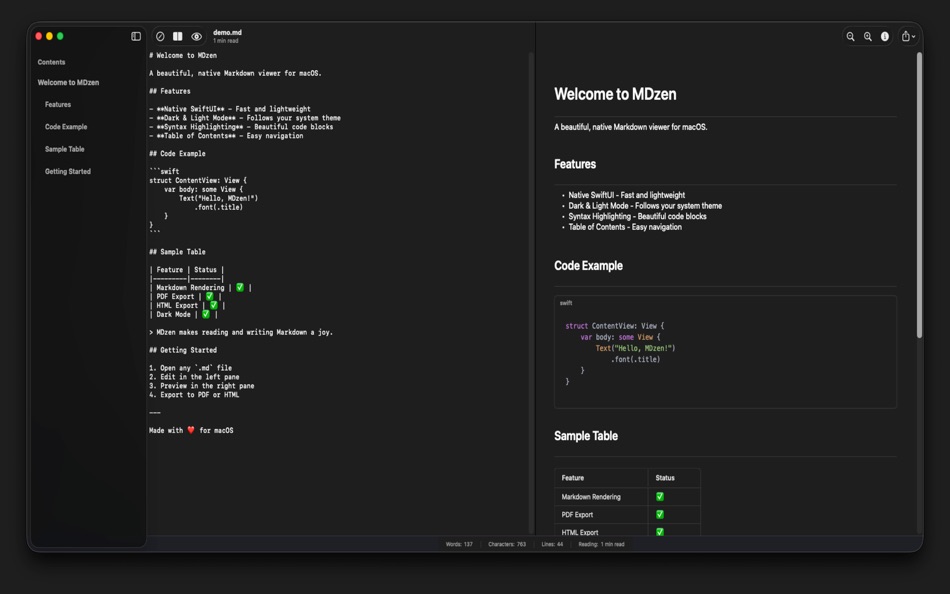
• Workspace Support: Open entire folders and browse all your Markdown files in a convenient sidebar. Switch between documents instantly.
• Split View Editor: Write in the left pane, see your formatted preview instantly on the right. Switch between Editor, Preview, or Split view modes with a single click.
• Beautiful Markdown Rendering: GitHub-flavored Markdown support including tables, code blocks, lists, blockquotes, and more.
• LaTeX Math Support: Write mathematical formulas using $$...$$ syntax. Perfect for academic and scientific documents.
• Syntax Highlighting: Code blocks are beautifully highlighted with support for Swift, Python, JavaScript, and dozens of other languages.
• Dark and Light Mode: Seamlessly adapts to your system appearance, or choose your preferred theme in settings.
• Table of Contents: Navigate long documents easily with the automatic sidebar that shows all your headings.
• Auto-Save: Never lose your work. Changes are automatically saved as you type.
• Synchronized Scrolling: Editor and preview scroll together, keeping your position in sync.
• Export Options: Export your Markdown as PDF or HTML with a single click. Perfect for sharing or printing.
• Document Statistics: See word count, character count, line count, and estimated reading time at a glance.
• Native Performance: Built with SwiftUI for macOS Sonoma and later. Fast, lightweight, and feels right at home on your Mac.
MDzen supports .md, .markdown, and other common Markdown file extensions. Simply double-click any Markdown file to open it in MDzen.
ภาพหน้าจอ

มีอะไรใหม่
- เวอร์ชัน: 1.2
- อัปเดต:
- - Find & Replace with native macOS find bar (Cmd+F)
- Task list support: render - [ ] and - [x] checkboxes
- Nested list rendering with multi-level indentation
- Image rendering in preview (web URLs and local files)
- PDF export support
- Improved editor stability and keyboard shortcuts (undo/redo, copy, paste, cut, select all)
- Code cleanup and performance improvements
ราคา
- วันนี้: ฟรี
- ต่ำสุด: ฟรี
- มากที่สุด: ฟรี
ติดตามราคา
ผู้พัฒนา
- Tansu Asici
- แพลตฟอร์ม: iOS แอป (1) macOS แอป (1)
- รายการ: 0 + 0
- แต้มแล: 0 + 0 ¡
- การจัดอันดับ: 0
- ความเห็น: 0
- ลดราคา: 0
- วิดีโอ: 0
- RSS: ติดตาม
แต้มแล
0 ☹️
การจัดอันดับ
0 ☹️
รายการ
0 ☹️
ความเห็น
แสดงรีวิวเป็นคนแรกเลย 🌟
ข้อมูลเพิ่มเติม
- เวอร์ชัน: 1.2
- หมวดหมู่:
macOS แอป›เครื่องมือ - ระบบปฏิบัติการ:
macOS,macOS 14.0 และสูงกว่า - ขนาด:
3 Mb - ภาษาที่สนับสนุน:
Arabic,Chinese,Dutch,English,French,German,Italian,Japanese,Korean,Polish,Portuguese,Russian,Spanish,Turkish,Vietnamese - การจัดประเภทเนื้อหา:
4+ - Mac App Store คะแนนโดย:
0 - อัปเดต:
- วันที่วางจำหน่าย:
รายชื่อติดต่อ
- เว็บไซท์:
 https://mdzen-74c07.web.app
MDzen URL แบบสั้น: คัดลอกแล้ว!- 🌟 แชร์
- Mac App Store
คุณอาจชอบ
-
- TestFlight
- macOS แอป: เครื่องมือ โดย: Apple
- ฟรี
- รายการ: 8 + 2 การจัดอันดับ: 0 ความเห็น: 0
- แต้มแล: 7 + 781,199 (4.7) เวอร์ชัน: 4.1.0 TestFlight makes it easy to test beta versions of apps and App Clips to provide valuable feedback to developers before they release their apps on the App Store. Developers can invite ... ⥯
-
- WebSSH - Sysadmin Toolbox
- macOS แอป: เครื่องมือ โดย: MENGUS ARNAUD
- ฟรี
- รายการ: 3 + 2 การจัดอันดับ: 0 ความเห็น: 0
- แต้มแล: 10 + 2,362 (4.7) เวอร์ชัน: 30.9 Whether you re on the go or at your desk, WebSSH keeps you connected anytime, anywhere! ٩(^ ^)۶ WebSSH is a powerful and user-friendly SSH, SFTP, Telnet, and Port Forwarding client for ⥯
-
- Bluetooth Inspector
- macOS แอป: เครื่องมือ โดย: George Garside
- * ฟรี
- รายการ: 1 + 1 การจัดอันดับ: 0 ความเห็น: 0
- แต้มแล: 2 + 1,451 (4.6) เวอร์ชัน: 1.7.5 Discover nearby Bluetooth peripherals and inspect their services for information and characteristics. View information and signal strength for all peripherals and devices, updating in ... ⥯
-
- Pastel
- macOS แอป: เครื่องมือ โดย: Steven Troughton-Smith
- ฟรี
- รายการ: 3 + 1 การจัดอันดับ: 0 ความเห็น: 0
- แต้มแล: 2 + 1,378 (4.7) เวอร์ชัน: 2.4.1 Capture and collect color palettes with Pastel! Pastel is an app for amateur developers & artists (like us!) that lets you build up a library of color palettes to use in your projects. ⥯
-
- HTTPBot: API & HTTP Client
- macOS แอป: เครื่องมือ โดย: Arvindh Sukumar
- ฟรี
- รายการ: 2 + 3 การจัดอันดับ: 0 ความเห็น: 0
- แต้มแล: 7 + 1,313 (4.5) เวอร์ชัน: 2026.0.1 HTTPBot is a powerful API client and debugger that lets you send HTTP/HTTPs requests, connect to WebSockets, inspect JSON & HTML responses, and debug APIs on the go. With HTTPBot, you ... ⥯
-
- SSH Client - Secure ShellFish
- macOS แอป: เครื่องมือ โดย: Anders Borum
- ฟรี
- รายการ: 4 + 2 การจัดอันดับ: 0 ความเห็น: 0
- แต้มแล: 12 + 1,213 (4.8) เวอร์ชัน: 2026.5 Lightning fast SSH terminal with remote file access. No other app fuses your SSH servers and iOS devices as well as Secure ShellFish. Tap Get and see for yourself. Terminal supports ... ⥯
-
- ServerCat - SSH Terminal
- macOS แอป: เครื่องมือ โดย: Early Moon, LLC
- ฟรี
- รายการ: 3 + 0 การจัดอันดับ: 0 ความเห็น: 0
- แต้มแล: 3 + 959 (4.6) เวอร์ชัน: 1.30.0 ServerCat is a Linux monitor and Docker Management & SSH Terminal app. ServerCat makes it easy to monitor your server status on your mobile. It shows detail running status of your ... ⥯
-
- HTML Editor
- macOS แอป: เครื่องมือ โดย: Intrepid
- ฟรี
- รายการ: 0 + 0 การจัดอันดับ: 0 ความเห็น: 0
- แต้มแล: 5 + 693 (4.2) เวอร์ชัน: 26.0.0 HTML Editor is a lightweight HTML editor complete with syntax highlighting, focused code completion suggestions and a live preview panel. With HTML Editor, you can open any existing ... ⥯
-
- Resolutioner
- macOS แอป: เครื่องมือ โดย: Sun Apps, LLC
- ฟรี
- รายการ: 0 + 0 การจัดอันดับ: 0 ความเห็น: 0
- แต้มแล: 1 + 490 (4.5) เวอร์ชัน: 1.0 Resolutioner is a simple utility app for calculating resolutions, aspect ratios, and saving resolutions for future reference. The resolution calculator helps you to calculate a ... ⥯
-
- SSH Client - Terminal, Telnet
- macOS แอป: เครื่องมือ โดย: Moon Technolabs Pvt Ltd
- ฟรี
- รายการ: 1 + 2 การจัดอันดับ: 0 ความเห็น: 0
- แต้มแล: 5 + 393 (3.5) เวอร์ชัน: 4.9.4 Here is one of the most intelligent & advanced SSH Client apps to manage and connect remote servers for your iOS and Mac devices About SSH Client: SSH Client is an on-the-go SSH-Telnet ⥯
-
- DetailsPro
- macOS แอป: เครื่องมือ โดย: Fun Focus Software LLC
- * ฟรี
- รายการ: 0 + 2 การจัดอันดับ: 0 ความเห็น: 0
- แต้มแล: 3 + 382 (4.8) เวอร์ชัน: 6.5.0 DetailsPro is a design tool made for Apple designers and SwiftUI. Create with SwiftUI views like VStack, Text, Image, and more Make real designs without writing any code Export to ... ⥯
-
- Interactful
- macOS แอป: เครื่องมือ โดย: Harley Thomas
- ฟรี
- รายการ: 1 + 2 การจัดอันดับ: 0 ความเห็น: 0
- แต้มแล: 1 + 372 (4.9) เวอร์ชัน: 6.0.2 An interactive guide for SwiftUI to help designers and developers build better apps. Code snippets and interactive examples for components like Sliders, Toggles, Lists, and Grids ... ⥯