
| Programista: | Justin Pariente (1) | ||
| Cena: | Bezpłatny | ||
| Rankingi: | 0 | ||
| Opinie: | 0 Napisać recenzję | ||
| Listy: | 0 + 0 | ||
| Punkty: | 0 + 0 ¡ | ||
| Mac App Store | |||
Opis

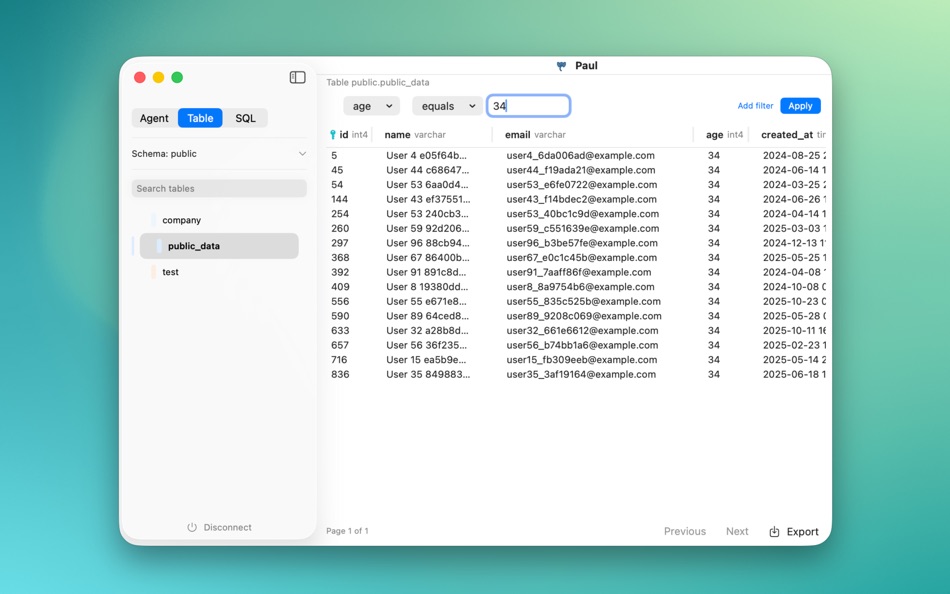
Investigate user data in seconds, not minutes. Paul is a fast, read‑only PostgreSQL viewer for engineers and support teams who need to answer “what’s happening with this user?” without opening heavy database tools. It's built for on‑call, not for DB admin. and it's AI first !!!
Classic tools like PgAdmin or DBeaver are built for admins: they’re slow to open and full of schema/connection/query complexity. When you just need a quick look at a user, Paul gets you there fast. Search a user, see the data, answer your customer in seconds.
What you can do
Connect in seconds — Saved connections and a simple “Add connection” flow; connect to local, staging, or production PostgreSQL.
Browse and filter — Open tables, filter and sort data, and follow relationships without writing SQL.
Trace user data — Follow foreign keys row by row across related tables with visual navigation.
Drop to SQL when needed — Run custom queries when you want more control.
Keep context — Split‑view navigation so you don’t lose your place as you move between tables.
Export — Export filtered data to CSV for further analysis.
Agent mode — Use Paul in agent workflows when you need programmatic access.
Why Paul
Lightweight & fast — Under 20MB, opens in seconds instead of minutes.
Read‑only by design — Safe for production; no accidental edits.
Focused workflow — Built for debugging and support, not schema design or migrations.
No account, no tracking — Free macOS app; your data and usage stay private.
Perfect for Debugging user issues and tracing data to understand bugs.
Quick data investigations without writing ad‑hoc queries.
Exploring table relationships and following foreign keys visually.
What Paul isn’t
Paul is not a general database admin tool, not for schema design or migrations, and not for editing data or writing complex analytics queries.
Feedbacks are very welcome !
Ad
Zrzuty ekranu



Cena
- Dziś: Bezpłatny
- Minimalna: Bezpłatny
- Maksymalna: Bezpłatny
Monitoruj ceny
Ad
Programista
- Justin Pariente
- Platformy: macOS Aplikacje (1)
- Listy: 0 + 0
- Punkty: 0 + 0 ¡
- Rankingi: 0
- Opinie: 0
- Zniżki: 0
- Filmy: 0
- RSS: Subskrybuj
Punkty
0 ☹️
Rankingi
0 ☹️
Listy
0 ☹️
- Paul Gres
Opinie
Bądź pierwszą osobą, która napisze recenzję 🌟
Dodatkowe informacje
- Wersja: 3
- Kategoria:
macOS Aplikacje›Narzędzia - System operacyjny:
macOS,macOS 13.0 i nowsze - Rozmiar:
7 Mb - Obsługiwany język:
English - Ocena treści:
4+ - Mac App Store Ocena:
0 - Zaktualizowano:
- Data wydania:
Paul Gres Krótki URL: Skopiowano!- 🌟 Udostępnij
- Mac App Store
Może ci się spodobać również
-
- TextCompare
- macOS Aplikacje: Narzędzia Przez: Paul BANCAREL
- * Bezpłatny
- Listy: 0 + 0 Rankingi: 0 Opinie: 0
- Punkty: 4 + 0 Wersja: 2.4 Looking for the ultimate tool to compare and contrast text effortlessly? Meet TextCompare, your new best friend for side-by-side text analysis! Whether you're a developer, writer, or ... ⥯
-
- Anchor Key - Shortcut Fixer
- macOS Aplikacje: Narzędzia Przez: Paul Molitschew
- * $9.99
- Listy: 0 + 0 Rankingi: 0 Opinie: 0
- Punkty: 0 + 0 Wersja: 1.1 NEVER MISS A KEYBOARD SHORTCUT AGAIN Are you a multilingual Mac user? Do you constantly forget to switch to English before pressing ⌘+C, ⌘+V, or ⌘+Z? Anchor Key solves this problem ... ⥯