
ที่บันทึกไว้
เลือกชื่อที่จะแสดงในเมนูที่บันทึกไว้ของคุณ
เสร็จแล้ว
| ผู้พัฒนา: | Stackcommander LLC (4) | ||
| ราคา: | * ฟรี | ||
| การจัดอันดับ: | 0 | ||
| ความเห็น: | 0 โพสต์ความคิดเห็น | ||
| รายการ: | 0 + 0 | ||
| แต้มแล: | 1 + 0 ¡ | ||
| +1 แต้มแล | |||
คำอธิบาย

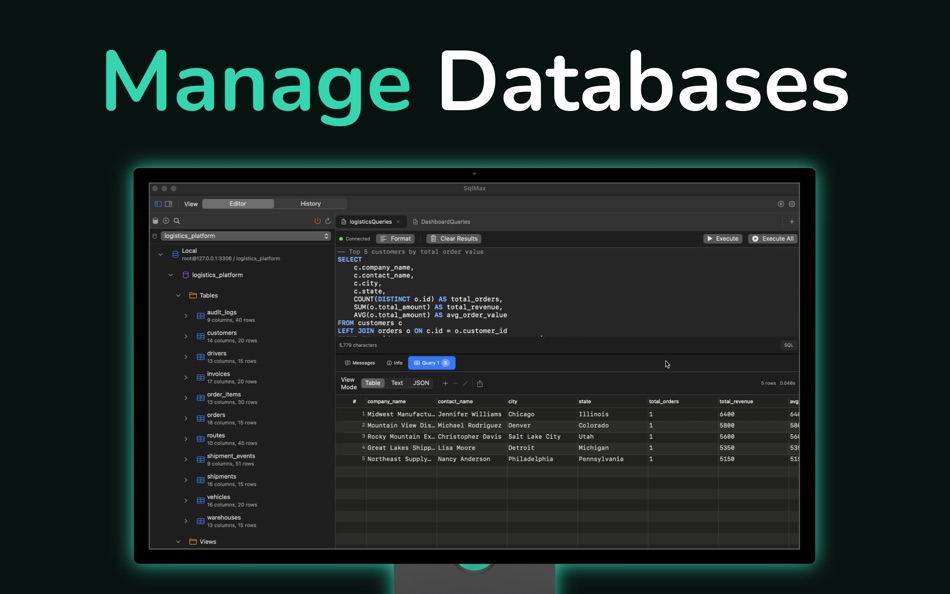
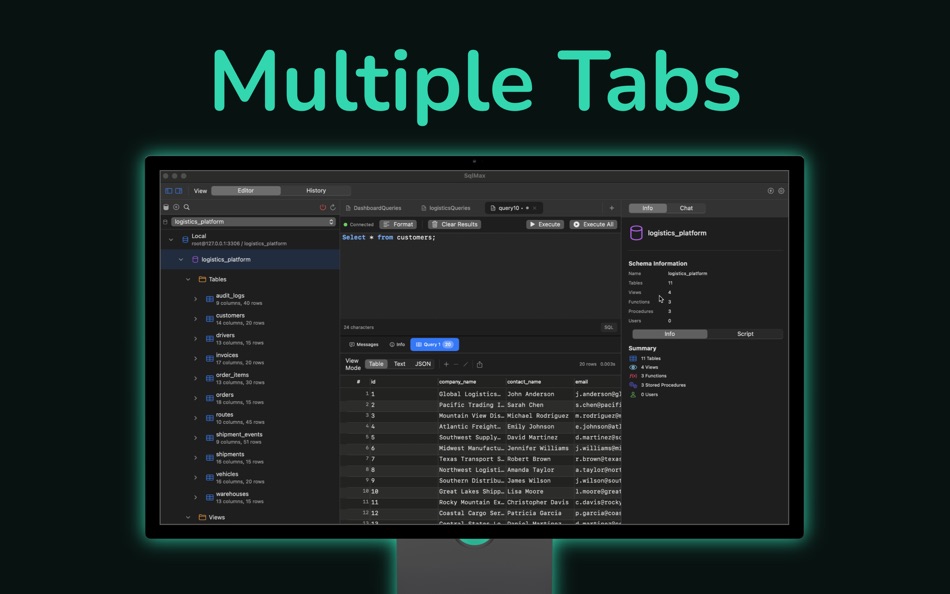
SqlMax provides everything you need to manage your databases effectively. The SQL editor includes syntax highlighting, code completion, and multi-tab support so you can work on multiple queries at once. All your work is automatically saved, so you never lose progress.
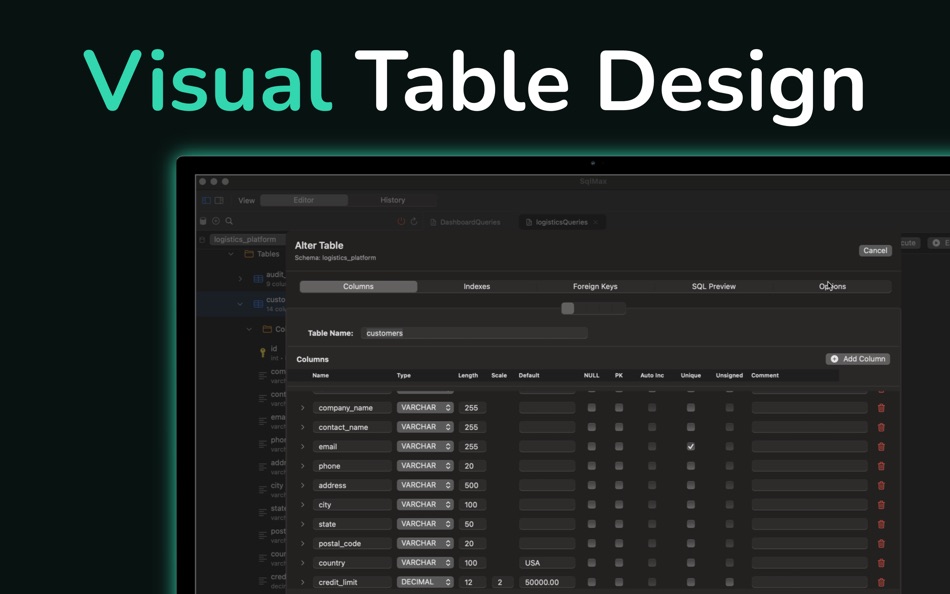
The database explorer gives you a clear view of your schemas, tables, and columns. You can browse your database structure, view table data, and make changes directly in the results grid. The table designer lets you modify columns, indexes, and constraints with a visual interface.
For complex workflows, the dashboard builder lets you create custom views with multiple queries. You can set up master-detail relationships where selecting a row in one query filters another. Variables let you add dynamic filtering, and auto-refresh keeps your data current. This feature is in Preview.
SSH tunnel support is included for secure remote connections. You can connect using username and password authentication. Private key support is coming in a future update.
An AI chat assistant is available to help with query writing and optimization. You can ask questions about your schema and get suggestions for SQL queries.
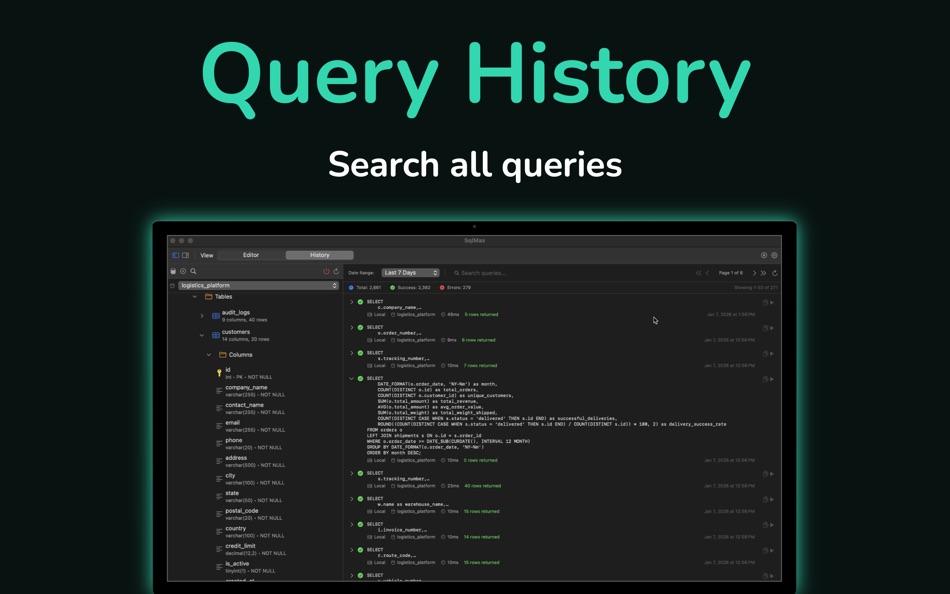
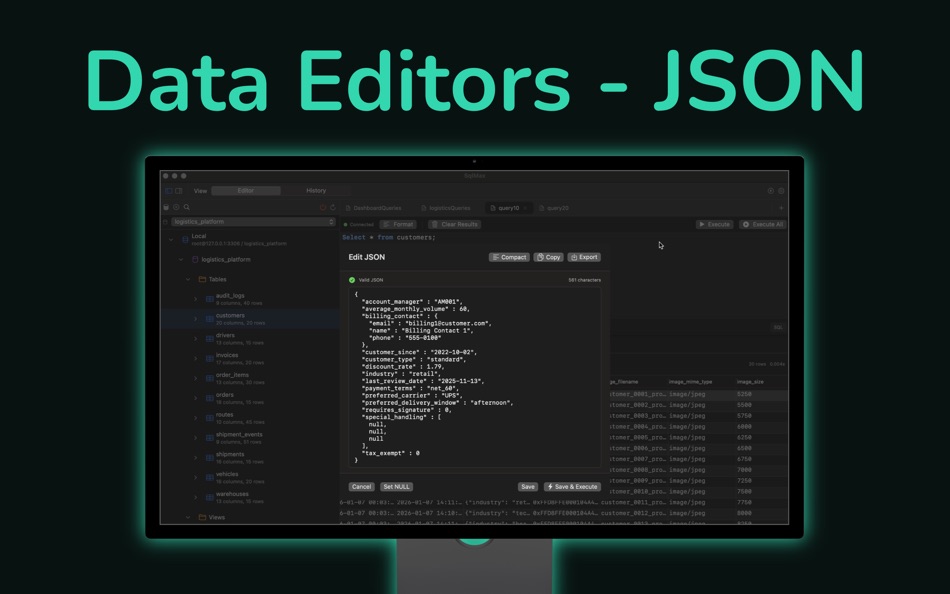
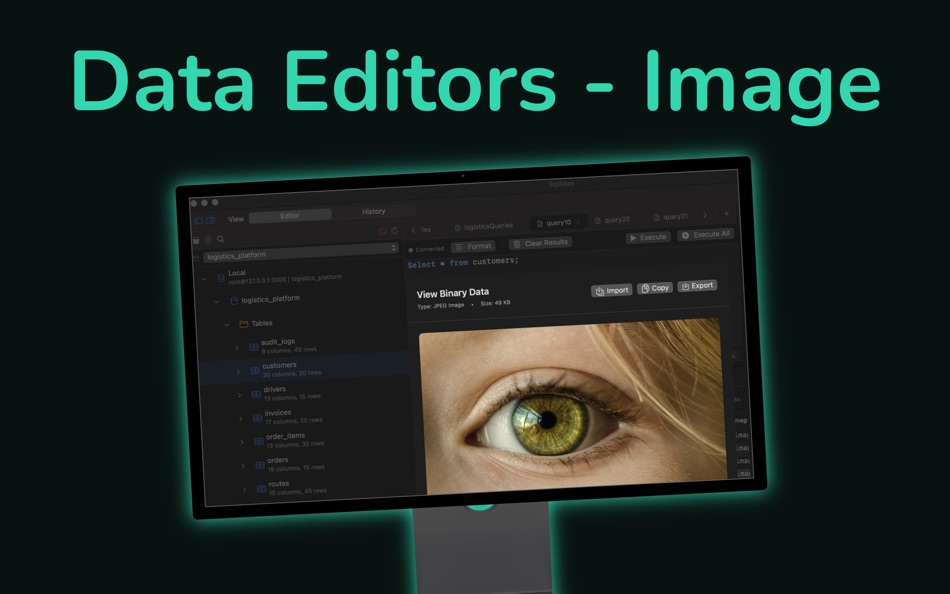
Additional features include query history tracking, database diagrams with relationship detection, user management with privilege controls, and specialized editors for JSON, BLOB, and TEXT fields.
SqlMax is built natively for macOS using SwiftUI. It runs on both Apple Silicon and Intel Macs. All your data stays on your device - we don't collect any usage information or send your data anywhere.
The app uses macOS Keychain to store database credentials securely. SSL and SSH connections are supported for secure communication with your database servers.
SqlMax works with MySQL 5.7 and later, as well as MariaDB 10.x and later. It requires macOS 13.0 or newer.
Privacy Policy: https://stackcommander.com/sqlmax/privacy
Terms of Service: https://stackcommander.com/sqlmax/terms
Support: https://stackcommander.com/sqlmax/support
ภาพหน้าจอ
ประวัติราคา
-
* การซื้อภายในแอพ - ราคาปัจจุบัน: ฟรี
- ต่ำสุด: ฟรี
- มากที่สุด: ฟรี
ติดตามราคา
Ad
ข้อมูลเพิ่มเติม
- วันที่วางจำหน่าย:
- หมวดหมู่:
macOS แอป›เครื่องมือ - ระบบปฏิบัติการ:
macOS,macOS 14.6 และสูงกว่า - ขนาด:
18 Mb - ภาษาที่สนับสนุน:
English - การจัดประเภทเนื้อหา:
4+ - Mac App Store คะแนนโดย:
0 - เว็บไซท์:
 https://stackcommander.com/sqlmax/
มีอะไรใหม่
- เวอร์ชัน: 1.0.9
- อัปเดต:
- Improved AI chat with better markdown rendering, fullscreen responses for complex queries, and more precise schema/object context controls.
Added app color theme templates.
Added AI-powered theme generation so you can create custom themes from natural language prompts or pasted color palettes.
Added cell content preview on hover for truncated result values.
Improved column resizing behavior, database explorer refresh, editor tab cursor-position memory, and SQLite date/time editing.
Fixed crashes when running SQLite queries at cursor position, and improved stability in results/statistics views and tab switching.
ผู้พัฒนา
- Stackcommander LLC
- แพลตฟอร์ม: iOS แอป (3) macOS แอป (1)
- รายการ: 0 + 0
- แต้มแล: 1 + 7 ¡
- การจัดอันดับ: 0
- ความเห็น: 0
- ลดราคา: 0
- วิดีโอ: 0
- RSS: ติดตาม
รายการ (0)
0 ☹️
- QueryMax
แต้มแล (1)
-

- 859 maya hattenstone
- +1

การจัดอันดับ (0)
0 ☹️
ความเห็น (0)
เป็นคนแรกที่แสดงความเห็น 🌟
«QueryMax». แพลตฟอร์ม: macOS. หมวดหมู่: เครื่องมือ. ผู้พัฒนา: «Stackcommander LLC». การเปิดตัวครั้งแรก: . อัปเดตล่าสุด: . ราคาปัจจุบัน: ฟรี. ชื่อนี้ยังไม่ได้รับการให้คะแนนหรือบทวิจารณ์บน AppAgg จุดที่ติดตาม: ยืนยันแล้ว 1, ทางอ้อม 0. ภาษาที่ใช้ได้: English. AppAgg ติดตามประวัติราคา การให้คะแนน และคำติชมของผู้ใช้ «QueryMax». ส่วนลดและอัปเดตในอนาคต: RSS. AppAgg ไม่ได้โฮสต์แอปพลิเคชันหรือแจกจ่ายซอฟต์แวร์ เครื่องหมายการค้า โลโก้ และภาพหน้าจอทั้งหมดเป็นของเจ้าของที่เกี่ยวข้อง
QueryMax URL แบบสั้น: คัดลอกแล้ว!- 🌟 แชร์
- Mac App Store
คล้ายกัน
-
- Max Inspect
- macOS แอป: เครื่องมือ โดย: Max Technology Labs PTY LTD
- ฟรี
- รายการ: 1 + 1 0 0
- แต้มแล: 4 เวอร์ชัน: 5 Ever forgotten to remove a debugging entitlement? Signed an app with the wrong cert? Accidentally linked in an extra framework you didn't need? Don't do that. This developer tool lets ... ⥯
-
- Diff Pro Max - File Compare
- macOS แอป: เครื่องมือ โดย: Ryota Kimura
- * ฟรี
- รายการ: 0 0 0
- แต้มแล: 0 เวอร์ชัน: 1.4.1 Diff Pro Max is a professional-grade file comparison tool designed to be easy for anyone to use no technical expertise required. "What changed?" answered in seconds. Manually comparing ⥯
-
- JSON Query for Mac OS X
- macOS แอป: เครื่องมือ โดย: Satish Mahalingam
- ฟรี
- รายการ: 0 0 0
- แต้มแล: 3 เวอร์ชัน: 2.2 The first app for OS X that allows you to query JSON data structures. Use the simple search syntax to perform a lookup by key or value, or drill into the data with literals (square ... ⥯
-
- HY SQL Query
- macOS แอป: เครื่องมือ โดย: HY System CO. Limited
- ฟรี
- รายการ: 0 0 0
- แต้มแล: 0 เวอร์ชัน: 1.6.1 This simple Tools is for connect Database system to submit SQL Query and export the Result set to Excel file The below Database System: Microsoft SQL Server Microsoft Azure SQL Server ... ⥯
-
- SQL Formatter – Query Editor
- macOS แอป: เครื่องมือ โดย: Moca LLC
- $2.99
- รายการ: 0 0 0
- แต้มแล: 0 เวอร์ชัน: 1.0.1 SQL Formatter is a lightweight macOS tool that instantly transforms messy SQL into clean, readable queries. KEY FEATURES: One-click SQL formatting with real-time preview Syntax ... ⥯
-
- JS King
- macOS แอป: เครื่องมือ โดย: Max Schlee
- $2.99
- รายการ: 0 0 0
- แต้มแล: 0 เวอร์ชัน: 1.25 Supercharge your JavaScript workflow with JS King the all-in-one coding environment for writing, debugging, and compressing JavaScript code. Whether you re building algorithms, testing ⥯
-
- Bonsai JSON Editor
- macOS แอป: เครื่องมือ โดย: Jerry COMBS
- $5.99
- รายการ: 0 0 0
- แต้มแล: 0 เวอร์ชัน: 2.0 Bonsai is a native macOS JSON viewer, editor, and query tool built for developers who work with JSON every day. Open any JSON file and instantly explore it as an interactive, ... ⥯
-
- SQLiteFlow - SQLite Editor
- macOS แอป: เครื่องมือ โดย: 晨亮 贾
- * ฟรี
- รายการ: 1 0 0
- แต้มแล: 6 เวอร์ชัน: 6.8.3 Two-week free trial! So you can purchase SQLiteFlow after you know you like it! SQLiteFlow is an SQLite editor for Mac & iOS which is intuitive, stable and reliable to use. It includes ⥯
-
- Network Kit
- macOS แอป: เครื่องมือ โดย: Fausto Ristagno
- $2.99
- รายการ: 1 + 1 0 0
- แต้มแล: 8 เวอร์ชัน: 9.2.1 Keep under control your network with Network Kit, an user friendly set of network tools that will help you to analyze your LAN, and not only that. NETWORK INFO A complete and easy to ... ⥯
-
- Medis 2 - GUI for Redis
- macOS แอป: เครื่องมือ โดย: 子骅 李
- * ฟรี
- รายการ: 1 + 1 0 0
- แต้มแล: 8 เวอร์ชัน: 2.16.1 Medis is a modern, delightful, and professional Redis GUI. It's designed and developed by Redis experts, making it trustworthy even in critical situations. Notable Features: Support ... ⥯
-
- SQLMate
- macOS แอป: เครื่องมือ โดย: YEVHENI PYLYPENKO
- * ฟรี
- รายการ: 0 + 1 0 0
- แต้มแล: 5 เวอร์ชัน: 1.5 SQLMate is a powerful yet elegant SQLite database manager built exclusively for macOS. Whether you re a developer debugging your app s database, a data analyst exploring datasets, or ... ⥯
-
- Screenshot Creator
- macOS แอป: เครื่องมือ โดย: BRIDGETECH SOLUTIONS LIMITED
- * ฟรี
- รายการ: 0 0 0
- แต้มแล: 3 เวอร์ชัน: 1.86 Create beautiful, engaging, screenshots for your apps and maximise your downloads. Screenshot Creator makes it easy for you to design your own professional-looking screenshots that ... ⥯
-
- Kodika - No Code App Builder
- macOS แอป: เครื่องมือ โดย: Konstantinos Antonopoulos
- $9.99
- รายการ: 1 + 1 0 0
- แต้มแล: 6 เวอร์ชัน: 3.6.0 Create unique, native mobile applications without any coding skills, only with drag and drop! Design custom screens, give them life by connecting code blocks, link your REST API and ... ⥯