
| Developer: | Kalavathi Ekambaram (9) | ||
| Price: | $0.99 | ||
| Rankings: | 0 | ||
| Reviews: | 0 Write a Review | ||
| Lists: | 0 + 0 | ||
| Points: | 0 + 0 ¡ | ||
| Mac App Store | |||
Description

Never miss a meeting again. MiniCalendar sits quietly in your menu bar, giving you instant access to your calendar, events, and meetings with just a single click. Whether you need to check what's next, join a video call, or create a new event, everything is right at your fingertips.
### KEY FEATURES
** Always Accessible**
• Lives in your menu bar for instant access
• No need to switch apps or open Calendar.app
• Clean, distraction-free interface
** Flexible Views**
• Month view for full overview
• Week view for detailed daily planning
• Quick navigation with keyboard shortcuts
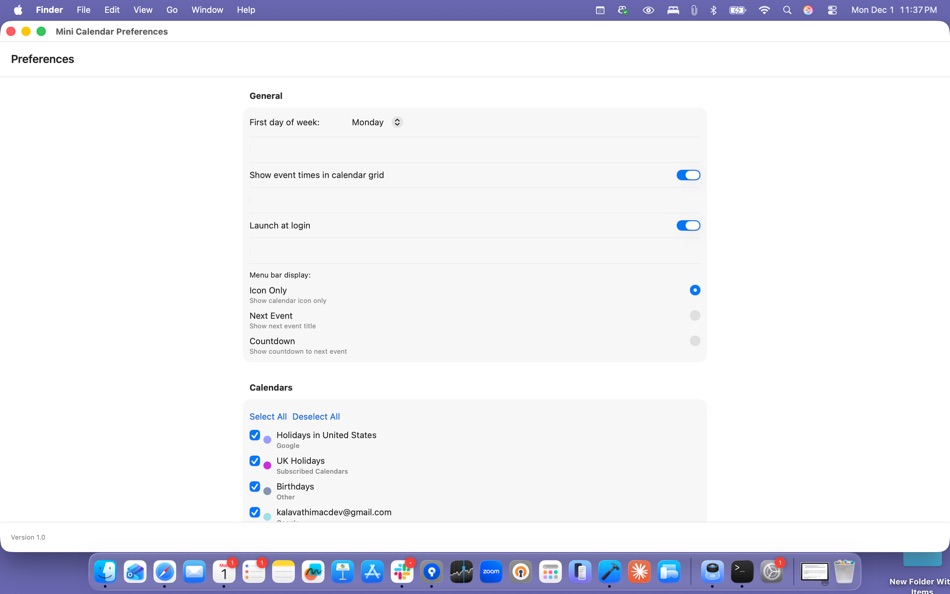
• Customizable first day of week
** Smart Meeting Integration**
• Automatic meeting link detection (Zoom, Google Meet, Microsoft Teams, and more)
• One-click join for video meetings
• See upcoming meetings at a glance
• Meeting countdown in menu bar (optional)
** Quick Actions**
• Create events with natural language
• Fast event creation with keyboard shortcuts (press 'N')
• Navigate months/weeks with arrow keys
• Jump to today instantly (press 'T')
**Customizable Display**
• Choose what shows in your menu bar: icon only, next event, or countdown
• Filter which calendars to display
• See event times directly in calendar grid
• Color-coded events by calendar
** Keyboard Shortcuts**
• Cmd + ← / → : Navigate months/weeks
• T : Jump to today
• N : Create new event
• Cmd + , : Open preferences
** Privacy First**
• All calendar data stays on your Mac
• No cloud syncing or data collection
• Works with your existing macOS Calendar
**Productivity Features**
• Launch at login (optional)
• Real-time calendar sync
• Multi-calendar support
• Event location display
• All-day event support
### PERFECT FOR
• Professionals managing busy schedules
• Remote workers juggling multiple meetings
• Anyone who wants quick calendar access
• Users who prefer keyboard-driven workflows
• Teams using Zoom, Meet, or Teams
### SYSTEM REQUIREMENTS
• macOS 13.0 or later
• Calendar access permission
• Compatible with macOS Calendar, iCloud, Google Calendar, Exchange, and more
Screenshots




What's new
- Version: 2.0
- Updated:
- ## What's New (Current Version)
**Version 2.0**
• Initial release
• Month and week calendar views
• Smart meeting link detection and quick join
• Keyboard shortcuts for navigation
• Customizable menu bar display
• Launch at login support
• Multi-calendar filtering
• Natural language event creation
• Clean, native macOS design
Support: kalavathimacdev@gmail.com
Privacy Policy: https://vnavink16.github.io/minicalendar-website/privacy.html
Terms and Condition : https://vnavink16.github.io/minicalendar-website/terms.html
Price History
- Today: $0.99
- Minimum: $0.99
- Maximum: $0.99
Track prices
Developer
- Kalavathi Ekambaram
- Platforms: iOS Apps (3) macOS Apps (6)
- Lists: 0 + 0
- Points: 2 + 0 ¡
- Rankings: 0
- Reviews: 0
- Discounts: 0
- Videos: 0
- RSS: Subscribe
Points
0 ☹️
Rankings
0 ☹️
Lists
0 ☹️
Reviews
Be the first to review 🌟
Additional Information
- Version: 2.0
- Category:
macOS Apps›Productivity - OS:
macOS,macOS 14.0 and up - Size:
2 Mb - Supported Languages:
English - Content Rating:
4+ - Mac App Store Rating:
0 - Updated:
- Release Date:
«Mini Calendar - Menu Bar» is a Productivity app for macOS, developed by «Kalavathi Ekambaram». It was first released on and last updated on . The lowest historical price was $0.99, and the highest was $0.99. This app has not yet received any ratings or reviews on AppAgg. Available languages: English. AppAgg continuously tracks the price history, ratings, and user feedback for «Mini Calendar - Menu Bar». Subscribe to this app or follow its RSS feed to get notified about future discounts or updates.
Mini Calendar - Menu Bar Short URL: Copied!- 🌟 Share
- Mac App Store
You may also like
-
- Menu Bar Calendar
- macOS Apps: Productivity By: Sindre Sorhus
- Free
- Lists: 1 + 1 Rankings: 0 Reviews: 0
- Points: 4 + 0 Version: 1.6.2 Quickly access a monthly calendar from your menu bar. You can click a date in the calendar to reveal it in the Calendar app or Google Calendar. The calendar displays dates and days in ... ⥯
-
- Menu AI: Ask AI in menu bar.
- macOS Apps: Productivity By: INII Co., Ltd.
- * Free
- Lists: 0 + 0 Rankings: 0 Reviews: 0
- Points: 0 + 0 Version: 1.2.0 Menu AI - Ask AI in menu bar. Menu AI is a powerful AI chat assistant that lives in your menu bar, providing instant access to both GPT and Claude AI capabilities. With its sleek and ... ⥯
-
- Mini Calendar
- macOS Apps: Productivity By: AntLogic
- Free
- Lists: 0 + 0 Rankings: 0 Reviews: 0
- Points: 2 + 0 Version: 1.6.0 Mini Calendar is a lightweight application that helps you quickly and easily access a monthly calendar. Choose the most convenient way to open the calendar: Click on the menu bar icon ... ⥯
-
- Menu Bar Timer
- macOS Apps: Productivity By: Efe Ertugrul
- $0.99
- Lists: 0 + 0 Rankings: 0 Reviews: 0
- Points: 1 + 0 Version: 2.4.5 Menu Bar Timer adds a Stopwatch or a Timer to your menu bar so you can keep track of time whatever you've been working on without an extra app icon on your dock. You can choose ... ⥯
-
- InstaCal - Menu Bar Calendar
- macOS Apps: Productivity By: Higher Bar, LLC
- $4.99
- Lists: 1 + 2 Rankings: 0 Reviews: 0
- Points: 1 + 0 Version: 1.9.8 InstaCal is the missing menu bar calendar macOS deserves. InstaCal is an affordable, yet powerful calendar app that puts all your events right at your fingertips, always available in ... ⥯
-
- Menu bar Launcher
- macOS Apps: Productivity By: Pawan Dixit
- $1.99
- Lists: 1 + 1 Rankings: 0 Reviews: 0
- Points: 1 + 0 Version: 1.4 This is a simple menu bar utility to keep your frequent Files and Apps right into the menu bar so that you can quickly launch them when you want to work on them without locating then ... ⥯
-
- Menu Bar Reminder: Dojo
- macOS Apps: Productivity By: Florian Schweizer
- Free
- Lists: 0 + 1 Rankings: 0 Reviews: 0
- Points: 2 + 0 Version: 1.1 Add a single reminder to your menu bar - always visible. You can enter any text that you'd like to have on the menu bar and it will be shown to you at all times. You can also activate ... ⥯
-
- Menu Bar Hub: work.bench
- macOS Apps: Productivity By: Dimitri Giani
- * Free
- Lists: 0 + 0 Rankings: 0 Reviews: 0
- Points: 0 + 0 Version: 1.2 work.bench is the ultimate menu bar utility for macOS that revolutionizes your workflow. Designed exclusively for Mac with a beautiful notch-inspired interface, work.bench brings ... ⥯
-
- Availability Sync Menu Bar
- macOS Apps: Productivity By: David Fuerst
- Free
- Lists: 0 + 1 Rankings: 0 Reviews: 0
- Points: 7 + 0 Version: 1.14 Availability Sync Menu Bar: Your Availability at a Glance Tired of the endless back-and-forth when scheduling meetings? Meet Availability Sync, your new availability superpower! Key ... ⥯
-
- ToDoBar-Tasks on your menu bar
- macOS Apps: Productivity By: Ram Patra
- $2.99
- Lists: 1 + 0 Rankings: 5 (1) Reviews: 0
- Points: 2 + 0 Version: 2.1.0 ToDoBar is a minimalistic yet powerful to-do list app for your menu bar. It lets you create tasks effortlessly and reminds you to complete them before their deadline. ToDoBar offers a ... ⥯
-
- Motivational Menu Bar
- macOS Apps: Productivity By: Veskisoft OÜ
- $1.99
- Lists: 0 + 1 Rankings: 0 Reviews: 0
- Points: 6 + 0 Version: 1.0.6 Unleash daily inspiration right at your fingertips with our Motivational Menu Bar App! Designed for those who crave a sprinkle of positivity throughout their day, our app seamlessly ... ⥯
-
- Calinsight - Menu Bar Calendar
- macOS Apps: Productivity By: Magus Inc.
- $12.99
- Lists: 0 + 1 Rankings: 0 Reviews: 0
- Points: 0 + 0 Version: 1.2.8 Quickly manage the events and reminders from the menu bar in calendar. Finished events and already completed reminders are displayed in a graph that helps to create an effective ... ⥯
-
- FloatCal - A Quick Access Calendar on the Menu Bar
- macOS Apps: Productivity By: Praveen Gowda I V
- Free
- Lists: 0 + 0 Rankings: 0 Reviews: 0
- Points: 1 + 0 Version: 1.1 A quick access Calendar Application that lives in the Menu bar. FloatCal is a OS X menu bar application that provides an intuitive calendar that pops out of the menu bar. You can ... ⥯
-
- MenuTimer menu bar tiny timer
- macOS Apps: Productivity By: Pranoy Chowdhury
- * Free
- Lists: 0 + 1 Rankings: 0 Reviews: 0
- Points: 4 + 0 Version: 27 MenuTimer is a 1-Click Timer. It's minimal, yet powerful. It does one thing and does it perfectly without any confusing bells and whistles. It stays in your Mac's menu bar and shows ... ⥯