
| Programista: | CSci Computer Science GmbH (2) | ||
| Cena: | * Bezpłatny | ||
| Rankingi: | 0 | ||
| Opinie: | 0 Napisać recenzję | ||
| Komentarze: | 0 Opublikuj komentarz | ||
| Listy: | 0 + 0 | ||
| Punkty: | 2 + 0 ¡ | ||
| Mac App Store | |||
Opis

What exactly has changed, what is really the same? How often do you get back a document and are still uncertain about the changes? Why is it such a hard task to juggle with revisions edited by many authors? If you just want to *see* what happened, then PDiff Express is made for you!
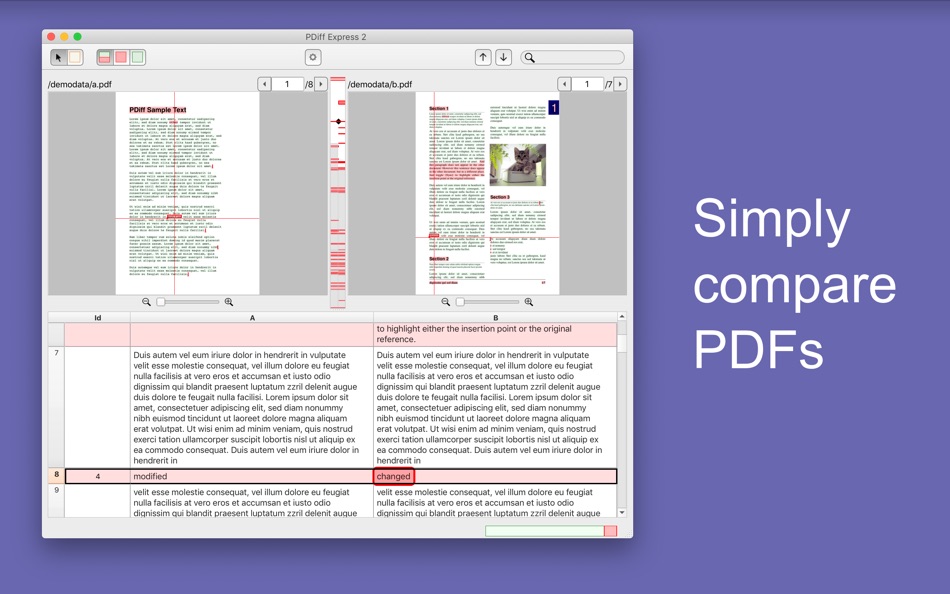
PDiff Express allows you to compare the content of two PDFs in order to pinpoint all textual changes. Just drag and drop two versions into PDiff and you will see all differences at a glance. This still works if fonts, layout, hyphenation or even page breaks were altered.
PDiff Express is an ideal solution to compare versions of your
• important office documents
• mission critical technical manuals
• legal texts and business contracts
• financial reports
• manuscripts and thesis texts
• scientific articles, reports, and proceedings
• fictional books and non-fiction books
• copywriting to ready-to-print layout
FREEMIUM LICENCE MODEL WITH IN-APP PURCHASE
• free version compares PDF files with up to 3 pages (max. 1000 words)
• in-app purchase for unlimited PDF input (free upgrade for PDiff Express 1.x users)
• in-app purchase for comparison reports as annotated PDFs
KEY FEATURES
• fast and reliable PDF text comparison for multipage documents
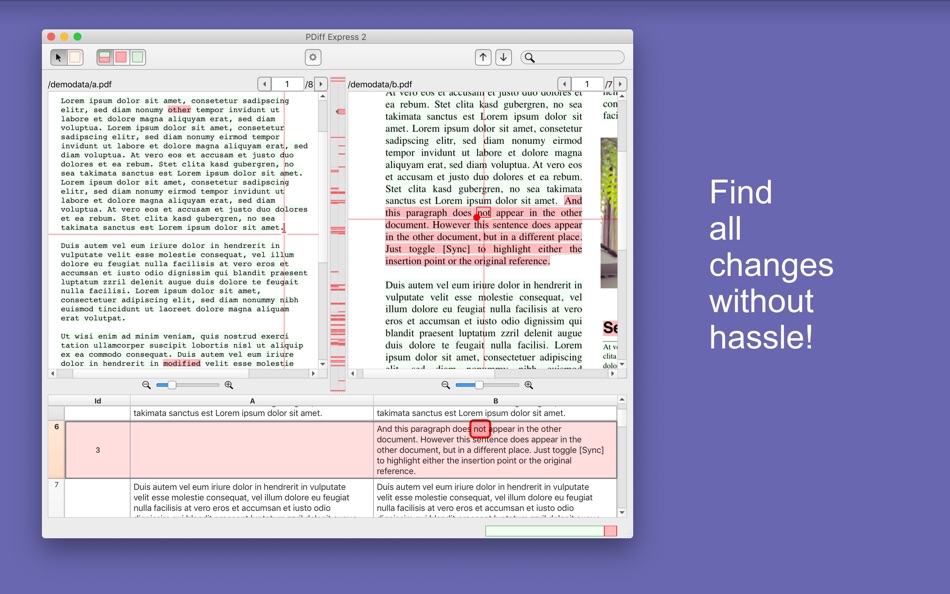
• highlighting of differences (changes, insertions, and deletions) in the PDF files
• text synopsis display with synchronized text and highlighted differences
• synchronized side-by-side display of two PDFs: see corresponding words in all displays by hovering with the mouse over the text
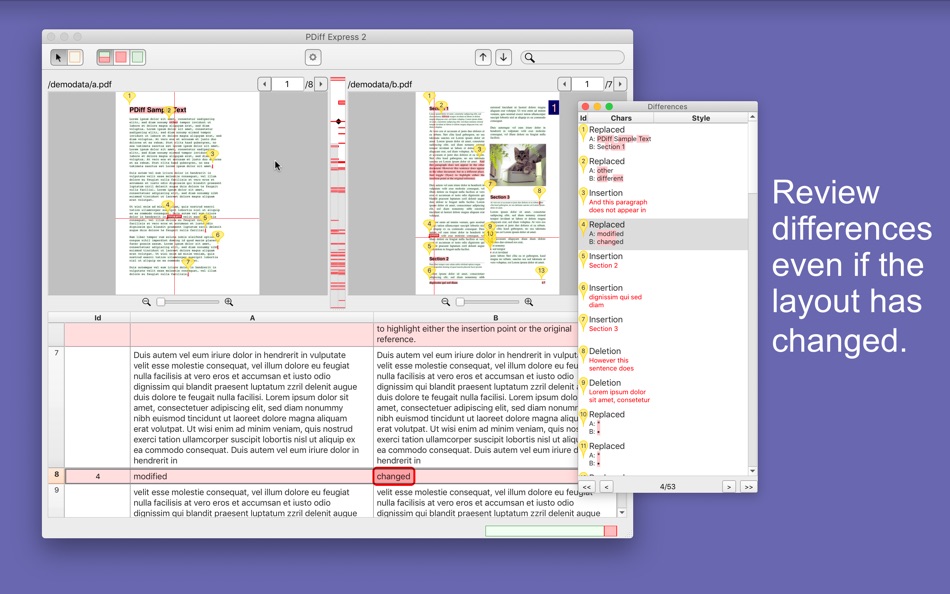
• comparison handles layout changes (e.g. single vs. multi column), font, size and style changes, added hyphenation and different page breaks
• spot light display to distinguish text from non-text areas
• thumbnail widget of all differences for quick overview and navigation
• navigable list of differences including differences per character (tool window)
• GUI supports splitting separate windows to work in dual monitor environments
• full text search function
• easy-to-use interface for best user experience
• full Unicode support for international scripts
• retina display support
INTERFACE LANGUAGES
English, German
REQUIREMENTS
• Both PDFs must contain searchable text (i.e. text from scans/images cannot be extracted, neither text from fonts converted to paths)
• PDFs must not be encrypted
• Text is extracted in PDF text order (i.e. regions with multicolumn layouts and tables, should have the same text order - row first or column first - in both documents)
• To test above requirements, open your PDFs in Preview.app: check if text is searchable and inspect text order by selecting growing regions with the mouse.
Ad
Zrzuty ekranu
Historia cen
-
* Zakupy w aplikacji - Dziś: Bezpłatny
- Minimalna: Bezpłatny
- Maksymalna: Bezpłatny
Monitoruj ceny
Programista
- CSci Computer Science GmbH
- Platformy: macOS Aplikacje (2)
- Listy: 0 + 0
- Punkty: 2 + 0 ¡
- Rankingi: 0
- Opinie: 0
- Komentarze: 0
- Zniżki: 0
- Filmy: 0
- RSS: Subskrybuj
Punkty (2)
-

- 14,454 cahiba7911@agenra.com
- +1
-
- 106 YH
- +1


Rankingi (0)
0 ☹️
Listy (0)
0 ☹️
- PDiff Express 2 - PDF Diff
Opinie (0)
Bądź pierwszą osobą, która napisze recenzję 🌟
Dodatkowe informacje
- Wersja: 2.5.3
- Kategoria:
macOS Aplikacje›Produktywność - System operacyjny:
macOS,macOS 13.0.0 i nowsze - Rozmiar:
36 Mb - Ocena treści:
4+ - Mac App Store Ocena:
0 - Zaktualizowano:
- Data wydania:
Kontakty
- Witryna internetowa:
 https://www.csci.de/en/pdiff-express/
«PDiff Express 2 - PDF Diff». Platforma: macOS. Kategoria: Produktywność. Deweloper: «CSci Computer Science GmbH». Pierwsze wydanie: . Ostatnia aktualizacja: . Aktualna cena: bezpłatnie. Ten tytuł nie otrzymał jeszcze ocen ani recenzji w serwisie AppAgg. Śledzone punkty: potwierdzone 2, pośrednie 0. AppAgg śledzi historię cen, oceny i opinie użytkowników «PDiff Express 2 - PDF Diff». Śledź przyszłe rabaty i aktualizacje za pośrednictwem RSS. AppAgg nie hostuje aplikacji ani nie dystrybuuje oprogramowania. Wszystkie znaki towarowe, logo i zrzuty ekranu należą do ich odpowiednich właścicieli.
Komentarze (0)
Skomentuj jako pierwszy 🌟
PDiff Express 2 - PDF Diff Krótki URL: Skopiowano!- 🌟 Udostępnij
- Mac App Store
Ad
Może ci się spodobać również
-
- PDF Master - AI & PDF
- macOS Aplikacje: Produktywność Przez: PDF Technologies, Inc.
- Bezpłatny
- Listy: 0 + 0 Rankingi: 0 Opinie: 0
- Punkty: 6 + 0 Komentarze: 0 Wersja: 1.3.0 PDF Master incorporates AI technology to empower your productivity. AI enables advanced features like AI translation, AI rewriting and AI error correction. Besides, PDF Master s rich ... ⥯
-
- PDF Editor ℠
- macOS Aplikacje: Produktywność Przez: Free PDF Inc
- * Bezpłatny
- Listy: 0 + 0 Rankingi: 0 Opinie: 0
- Punkty: 0 + 0 Komentarze: 0 Wersja: 1.4 PDF Editor is a professional, efficient, and user-friendly PDF editing and management tool designed specifically for Mac users. Whether you are handling study materials, work reports, ... ⥯
-
- PDF Editor ゜
- macOS Aplikacje: Produktywność Przez: Netron
- * Bezpłatny
- Listy: 0 + 0 Rankingi: 0 Opinie: 0
- Punkty: 0 + 0 Komentarze: 0 Wersja: 1.0.3 PDF Convertor is a modern and efficient PDF workspace built for macOS. With fast conversions, essential PDF tools, secure signing, OCR, and AI-powered PDF chat, it helps you manage ... ⥯
-
- PDF Photos - Converter
- macOS Aplikacje: Produktywność Przez: 崴 杨
- * Bezpłatny
- Listy: 0 + 0 Rankingi: 0 Opinie: 0
- Punkty: 0 + 0 Komentarze: 0 Wersja: 1.3.2 "PDF Photos" is a special converter for PDF files and images. Supports batch conversion of PDF files to image files, supports image output quality customization, and image compression ... ⥯
-
- PDF Attributes
- macOS Aplikacje: Produktywność Przez: Alexey Nikitin & Alexandr Bondar
- Bezpłatny
- Listy: 1 + 1 Rankingi: 0 Opinie: 0
- Punkty: 2 + 0 Komentarze: 0 Wersja: 2.1.2 PDF Attributes are perfect to view and edit basic information about a document Base featured * Edit basic attributes * Detail info about the document * Preview and read PDF document ... ⥯
-
- PDF Squeezer 4
- macOS Aplikacje: Produktywność Przez: Daniel Witt
- $19.99
- Listy: 2 + 3 Rankingi: 0 Opinie: 0
- Punkty: 2 + 0 Komentarze: 0 Wersja: 4.6.2 PDF Squeezer for macOS makes compressing PDFs easier than ever. Simply drag and drop your file into the app, and it quickly reduces the file size without compromising quality. At the ... ⥯
-
- PDF ScanMerger
- macOS Aplikacje: Produktywność Przez: Patricius Albu
- $2.99
- Listy: 0 + 0 Rankingi: 0 Opinie: 0
- Punkty: 0 + 0 Komentarze: 0 Wersja: 2.0.0 PDF ScanMerger makes it effortless to turn single side scanner output into correctly ordered, double sided PDFs. FEATURES Two panel workflow load odd (front) pages and even (back) ... ⥯
-
- PDF to JPG - A Batch Converter
- macOS Aplikacje: Produktywność Przez: RootRise Technologies Pvt. Ltd.
- $2.99
- Listy: 0 + 0 Rankingi: 0 Opinie: 0
- Punkty: 0 + 0 Komentarze: 0 Wersja: 9.0 PDF to JPG is as simple as effective conversion tool for fastest way to batch convert PDF documents into best quality images. PDF to JPG converts each PDF page into JPEG, JPEG2000, ... ⥯
-
- PDF Converter, Reader & Editor
- macOS Aplikacje: Produktywność Przez: Muhammad Afzal Noor Muhammad
- * Bezpłatny
- Listy: 0 + 1 Rankingi: 0 Opinie: 0
- Punkty: 5 + 0 Komentarze: 0 Wersja: 6.4 PDF converter is for everyone who wants to convert File to PDF or into other formats or vice versa, without any hassle. This PDF Maker , PDF Reader, PDF Viewer comes with multiple ... ⥯
-
- PDF Merge & Split Assistant
- macOS Aplikacje: Produktywność Przez: SHIWEN OUYANG
- * Bezpłatny
- Listy: 0 + 0 Rankingi: 0 Opinie: 0
- Punkty: 0 + 0 Komentarze: 0 Wersja: 2.1.0 PDF Merge & Split Assistant A smarter way to handle PDFs on macOS Here's what you can do: Combine multiple PDFs into one or pull out just the pages you need batch processing included ... ⥯
-
- PDF Shrink: Compress your PDFs
- macOS Aplikacje: Produktywność Przez: Erik Wegener
- $2.99
- Listy: 0 + 1 Rankingi: 0 Opinie: 0
- Punkty: 4 + 0 Komentarze: 0 Wersja: 1.2.2 PDF Shrink makes it quick and easy to compress your PDF files! There are two presets (High and Medium) that should work for the majority of users, but you can also select custom ... ⥯
-
- PDF Vault
- macOS Aplikacje: Produktywność Przez: 坤 刘
- Bezpłatny
- Listy: 0 + 1 Rankingi: 0 Opinie: 0
- Punkty: 1 + 0 Komentarze: 0 Wersja: 3.0.1 PDF Vault is an easy to use utility to store and encrypt your PDF files. Store and encrypt PDF files - 2 Steps: 1. Launch "PDF Vault", set your password. (First time required). 2. ... ⥯
-
- PDF-Form-Filler Lite
- macOS Aplikacje: Produktywność Przez: Yong Chen
- Bezpłatny
- Listy: 0 + 0 Rankingi: 0 Opinie: 0
- Punkty: 1 + 0 Komentarze: 0 Wersja: 2.2.3 PDF-Form-Filler Lite is a app help you to edit your pdf files. With it you can overlay the text, images, check mark, cross mark and signature onto your pdf files. So you can use it to ... ⥯
-
- PDF Editor - for Adobe PDF Annotate, Sign & Modify
- macOS Aplikacje: Produktywność Przez: Global Mobile Game Limited
- $29.99
- Listy: 0 + 0 Rankingi: 0 Opinie: 0
- Punkty: 0 + 0 Komentarze: 0 Wersja: 1.0.2 PDF Editor is a must-have app for anyone who reads, annotates or edits PDF documents on Mac.PDF Editor is for those who want to go beyond PDF Editor to create interactive forms, add ... ⥯