
| ผู้พัฒนา: | Daniel Fredrich (2) | ||
| ราคา: | ฟรี | ||
| การจัดอันดับ: | 0 | ||
| ความเห็น: | 0 เขียนความเห็น | ||
| ความเห็น: | 0 โพสต์ความคิดเห็น | ||
| รายการ: | 0 + 0 | ||
| แต้มแล: | 0 + 0 ¡ | ||
| Mac App Store | |||
คำอธิบาย

Features:
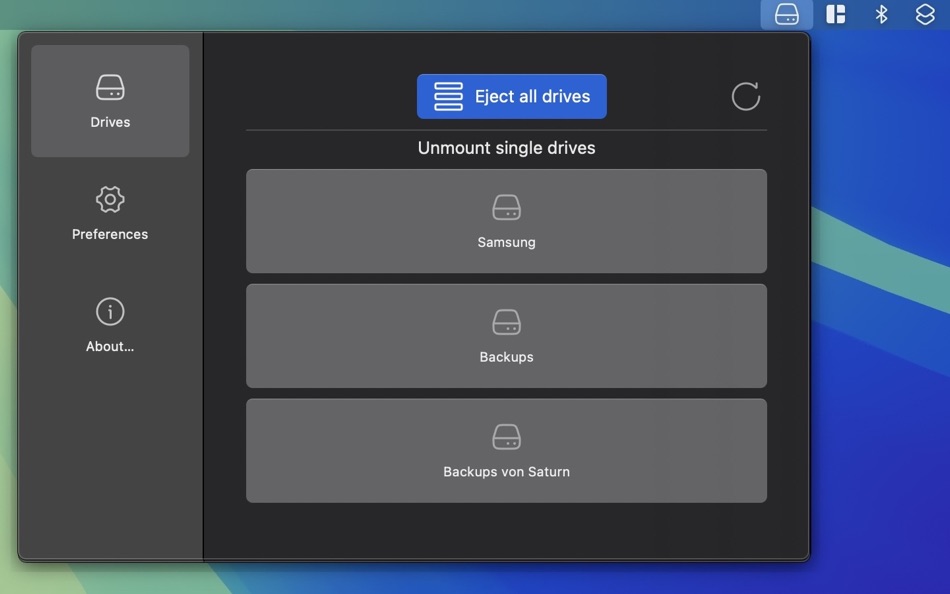
· Quick Eject: Safely remove external drives with just one click in the status bar.
· Siri Integration: Eject your drives hands-free using Siri voice commands.
· Shortcuts Support: Add EjectNow! to your custom automation flows in the Shortcuts app for seamless control.
· User-Friendly: The simple and sleek UI ensures a smooth, hassle-free experience.
EjectNow! is the perfect solution to manage your external drives safely and efficiently, offering greater control and convenience for your daily workflow!
Ad
ภาพหน้าจอ
มีอะไรใหม่
- เวอร์ชัน: 1.0.2
- อัปเดต:
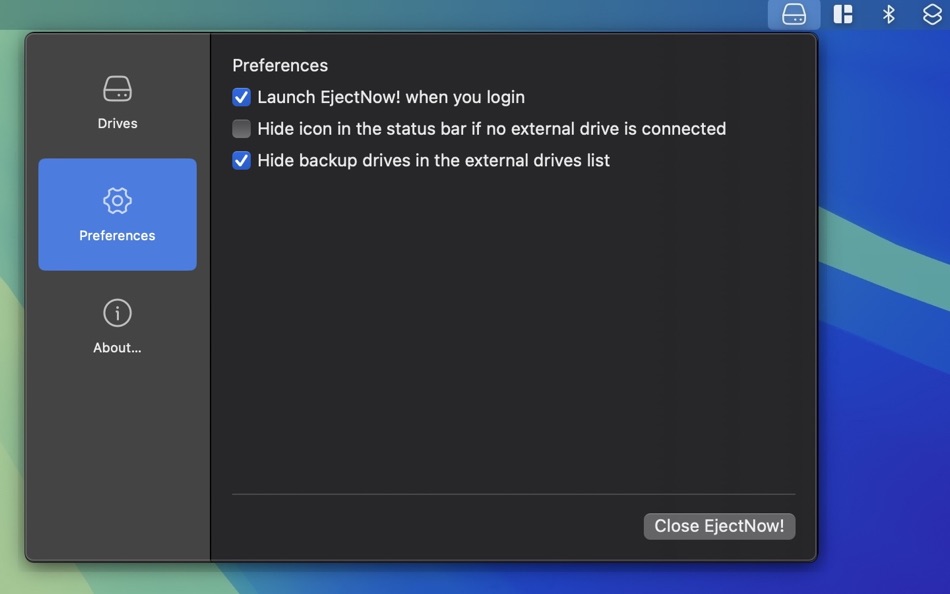
- We now also hide the Recovery partition when you selected the setting to hide backup drives in the drive list.
ประวัติราคา
- วันนี้: ฟรี
- ต่ำสุด: ฟรี
- มากที่สุด: ฟรี
ติดตามราคา
ผู้พัฒนา
- Daniel Fredrich
- แพลตฟอร์ม: iOS แอป (1) macOS แอป (1)
- รายการ: 0 + 0
- แต้มแล: 0 + 0 ¡
- การจัดอันดับ: 0
- ความเห็น: 0
- ความเห็น: 0
- ลดราคา: 0
- วิดีโอ: 0
- RSS: ติดตาม
Ad
แต้มแล (0)
0 ☹️
การจัดอันดับ (0)
0 ☹️
รายการ (0)
0 ☹️
- EjectNow!
ความเห็น (0)
แสดงรีวิวเป็นคนแรกเลย 🌟
ข้อมูลเพิ่มเติม
รายชื่อติดต่อ
- เว็บไซท์:
 https://danielfredrich.de/ejectnow/
ความเห็น (0)
เป็นคนแรกที่แสดงความเห็น 🌟
«EjectNow!». แพลตฟอร์ม: macOS. หมวดหมู่: ยูทิลิตี้. ผู้พัฒนา: «Daniel Fredrich». การเปิดตัวครั้งแรก: . อัปเดตล่าสุด: . ราคาปัจจุบัน: ฟรี. ชื่อนี้ยังไม่ได้รับการให้คะแนนหรือบทวิจารณ์บน AppAgg ภาษาที่ใช้ได้: English, German. AppAgg ติดตามประวัติราคา การให้คะแนน และคำติชมของผู้ใช้ «EjectNow!». ส่วนลดและอัปเดตในอนาคต: RSS. AppAgg ไม่ได้โฮสต์แอปพลิเคชันหรือแจกจ่ายซอฟต์แวร์ เครื่องหมายการค้า โลโก้ และภาพหน้าจอทั้งหมดเป็นของเจ้าของที่เกี่ยวข้อง
EjectNow! URL แบบสั้น: คัดลอกแล้ว!- 🌟 แชร์
- Mac App Store
คุณอาจชอบ
-
- Eject
- macOS แอป: ยูทิลิตี้ โดย: Shiro Wilde
- $3.99
- รายการ: 0 + 0 การจัดอันดับ: 0 ความเห็น: 0
- แต้มแล: 0 + 0 ความเห็น: 0 เวอร์ชัน: 1.8.5 Eject is an extremely simple and convenient menu that allows you to eject removable disk volumes with a single click from within any application. Visual notifications can also be ... ⥯
-
- Eject Drives - Disk Unmounter
- macOS แอป: ยูทิลิตี้ โดย: Letricia Angeloni
- $2.99
- รายการ: 0 + 0 การจัดอันดับ: 0 ความเห็น: 0
- แต้มแล: 0 + 0 ความเห็น: 0 เวอร์ชัน: 1.0 Quickly and safely remove external drives from your Mac from the menubar. Key Features: - Menubar interface showing connected drive count - Organized drives by type (USB, SD Card, Disk ⥯
-
- Eject Volumes
- macOS แอป: ยูทิลิตี้ โดย: Sachin Deshpande
- $0.99
- รายการ: 1 + 0 การจัดอันดับ: 0 ความเห็น: 0
- แต้มแล: 0 + 0 ความเห็น: 0 เวอร์ชัน: 1.0 Eject Volumes is a small menu bar app that allow you to eject mounted volumes in your macOS. Your can use this app to eject any mounted external disks, disk images, network volumes.The ⥯
-
- Eject All
- macOS แอป: ยูทิลิตี้ โดย: GEORGE MARK TURNER
- $0.99
- รายการ: 0 + 0 การจัดอันดับ: 0 ความเห็น: 0
- แต้มแล: 0 + 0 ความเห็น: 0 เวอร์ชัน: 1.0 This app unlocks a feature that should be part of macOS, the ability to eject all removable media with one click. Simply click the eject button that lives in an app in you menu bar, ... ⥯
-
- Now Translate - Text & OCR
- macOS แอป: ยูทิลิตี้ โดย: 泰宁 陆
- ฟรี
- รายการ: 0 + 0 การจัดอันดับ: 0 ความเห็น: 0
- แต้มแล: 2 + 0 ความเห็น: 0 เวอร์ชัน: 1.9 in macOS - Click on "N" icon in menu bar to start the translator - Configure keyboard shortcuts to translate the selected text on screen In Safari - Select text on page to translate. ... ⥯
-
- Auto Eject
- macOS แอป: ยูทิลิตี้ โดย: Jiulong Zhao
- $7.99
- รายการ: 0 + 1 การจัดอันดับ: 0 ความเห็น: 0
- แต้มแล: 2 + 0 ความเห็น: 0 เวอร์ชัน: v2.87 Every time you sleep or shut down your Mac, Auto Eject will safely unmount (eject) all your removable disks in the background. Never care about those connected external drives before a ⥯
-
- UTC Now
- macOS แอป: ยูทิลิตี้ โดย: SCORPIOX, INC LIMITED
- $2.99
- รายการ: 0 + 0 การจัดอันดับ: 0 ความเห็น: 0
- แต้มแล: 0 + 0 ความเห็น: 0 เวอร์ชัน: 1.0 Never miss a beat with UTC Now - your essential companion for accurate universal time coordination. Whether you're a developer debugging API calls, a project manager coordinating ... ⥯
-
- Say IT Right Now
- macOS แอป: ยูทิลิตี้ โดย: Thijs Xhaflaire
- ฟรี
- รายการ: 0 + 0 การจัดอันดับ: 0 ความเห็น: 0
- แต้มแล: 0 + 0 ความเห็น: 0 เวอร์ชัน: 2.1 A simple text to speech application which populates all installed voices on macOS and can be used as voice. ⥯
-
- My Wifi Now
- macOS แอป: ยูทิลิตี้ โดย: a Rausa
- $0.99
- รายการ: 0 + 0 การจัดอันดับ: 0 ความเห็น: 0
- แต้มแล: 0 + 0 ความเห็น: 0 เวอร์ชัน: 1.0.3 Scan and monitor wireless networks using your Mac's built-in Wi-Fi adapter. ⥯
- ใหม่
- RecollectExtension
- macOS แอป: ยูทิลิตี้ โดย: DEALS NOW LLC
- ฟรี
- รายการ: 0 + 0 การจัดอันดับ: 0 ความเห็น: 0
- แต้มแล: 0 + 0 ความเห็น: 0 เวอร์ชัน: 1.1 Add all your bookmarks on videos, social mediate, website and more into ReCollect which organizes all your content in one place. you can search and get insight into any of your stored ... ⥯
-
- DiskMate
- macOS แอป: ยูทิลิตี้ โดย: Imagam.com
- $5.99
- รายการ: 0 + 0 การจัดอันดับ: 0 ความเห็น: 0
- แต้มแล: 0 + 0 ความเห็น: 0 เวอร์ชัน: 1.2.0 Eject all your drives with one click or global shortcut before you unplug your MacBook. - Eject all drives with one click - Alert sound and screen flash indicating when all drives have ⥯
-
- SuBinary 10
- macOS แอป: ยูทิลิตี้ โดย: Enes Akkus
- $0.99
- รายการ: 0 + 1 การจัดอันดับ: 0 ความเห็น: 0
- แต้มแล: 1 + 0 ความเห็น: 0 เวอร์ชัน: 4.0.2 Now you can convert Binary to Decimal, HexaDecimal to OctaDecimal or whatever you want. Just tap on the text area and enter values. Then, let them app convert for you. ⥯
-
- GPU Switch
- macOS แอป: ยูทิลิตี้ โดย: Zhenyu Jin
- ฟรี
- รายการ: 0 + 0 การจัดอันดับ: 0 ความเห็น: 0
- แต้มแล: 1 + 0 ความเห็น: 0 เวอร์ชัน: 2.03 Now you can activate integrated GPU or high performance GPU as you wish. Features: Indicate which GPU is active Switch GPU manually Compatible only with dual-GPU MacBook Pro, like: ... ⥯
-
- ColorSay M • Color Scanner
- macOS แอป: ยูทิลิตี้ โดย: White Marten GmbH
- $3.99
- รายการ: 0 + 0 การจัดอันดับ: 0 ความเห็น: 0
- แต้มแล: 0 + 0 ความเห็น: 0 เวอร์ชัน: 2.3.0 Now you can make the environment sound! By using a camera, you can scan your surroundings and ColorSay M will make the colors audible to you. It also lets you examine colors on your ... ⥯