
| Programista: | christopher reed (5) | ||
| Cena: | $2.99 | ||
| Rankingi: | 0 | ||
| Opinie: | 0 Napisać recenzję | ||
| Komentarze: | 0 Opublikuj komentarz | ||
| Listy: | 0 + 0 | ||
| Punkty: | 0 + 0 ¡ | ||
| Mac App Store | |||
Opis

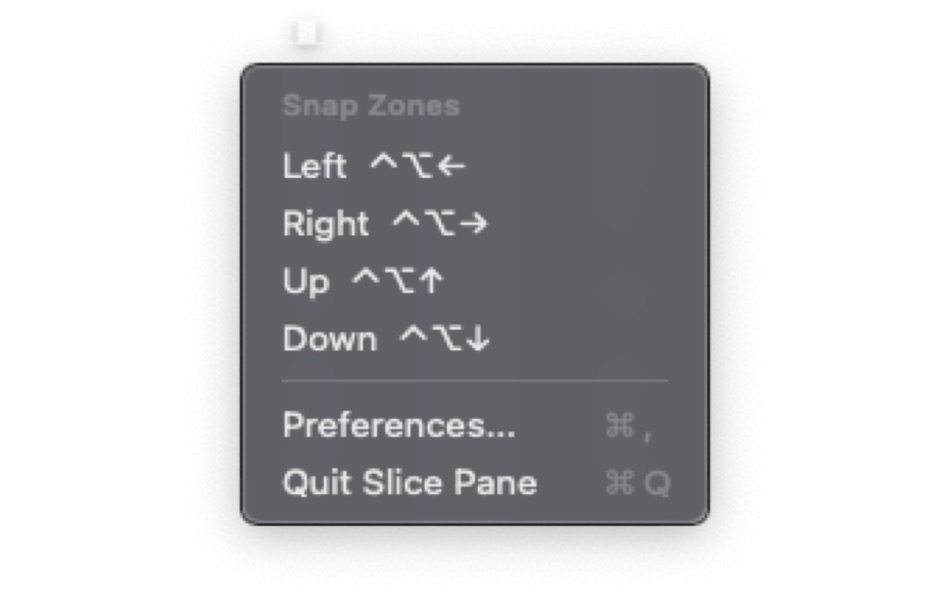
• Ctrl+Option+Left — Left half → Left third → Left two-thirds
• Ctrl+Option+Right — Right half → Right third → Right two-thirds
• Ctrl+Option+Up — Top half → Fullscreen
• Ctrl+Option+Down — Bottom half → Center → Center third
POWER SHORTCUTS (enable in Preferences)
• Ctrl+Option+U — Top-left quarter → Top-left sixth → Top-center sixth
• Ctrl+Option+I — Top-right quarter → Top-right sixth
• Ctrl+Option+J — Bottom-left quarter → Bottom-left sixth → Bottom-center sixth
• Ctrl+Option+K — Bottom-right quarter → Bottom-right sixth
CHEAT SHEET
Hold Ctrl+Option for half a second without pressing another key and a visual overlay appears showing all available snap zones with their shortcuts. Release to dismiss.
CUSTOM GRID LAYOUTS
Create your own grid layouts with any number of rows and columns. Define custom regions and assign hotkeys to them independently.
Slice Pane lives in your menu bar and uses minimal resources. No dock icon, no clutter.Press Ctrl+Option and an arrow key to snap any window into position. Press the same key again to cycle through sizes — left arrow goes from half, to third, to two-thirds and back. Eight keys cover all 21 snap positions, so there's nothing to memorize.SlicePane is a lightweight window manager that lets you organize your screen with keyboard shortcuts.
Ad
Zrzuty ekranu


Nowości
- Wersja: 1.1
- Zaktualizowano:
- Better use and workflow and a help page to assist new users with changes and adoption
Historia cen
- Dziś: $2.99
- Minimalna: $2.99
- Maksymalna: $2.99
Monitoruj ceny
Programista
- christopher reed
- Platformy: iOS Aplikacje (3) macOS Aplikacje (2)
- Listy: 0 + 0
- Punkty: 0 + 1 ¡
- Rankingi: 0
- Opinie: 0
- Komentarze: 0
- Zniżki: 0
- Filmy: 0
- RSS: Subskrybuj
Punkty (0)
0 ☹️
Rankingi (0)
0 ☹️
Listy (0)
0 ☹️
- SlicePane
Opinie (0)
Bądź pierwszą osobą, która napisze recenzję 🌟
Dodatkowe informacje
- Wersja: 1.1
- Kategoria:
macOS Aplikacje›Narzędzia - System operacyjny:
macOS,macOS 13.0 i nowsze - Rozmiar:
2 Mb - Obsługiwany język:
English - Ocena treści:
4+ - Mac App Store Ocena:
0 - Zaktualizowano:
- Data wydania:
«SlicePane». Platforma: macOS. Kategoria: Narzędzia. Deweloper: «christopher reed». Pierwsze wydanie: . Ostatnia aktualizacja: . Aktualna cena: $2.99. Najniższa zarejestrowana cena: $2.99. Najwyższa odnotowana cena: $2.99. Ten tytuł nie otrzymał jeszcze ocen ani recenzji w serwisie AppAgg. Dostępne języki: English. AppAgg śledzi historię cen, oceny i opinie użytkowników «SlicePane». Śledź przyszłe rabaty i aktualizacje za pośrednictwem RSS. AppAgg nie hostuje aplikacji ani nie dystrybuuje oprogramowania. Wszystkie znaki towarowe, logo i zrzuty ekranu należą do ich odpowiednich właścicieli.
Komentarze (0)
Skomentuj jako pierwszy 🌟
SlicePane Krótki URL: Skopiowano!- 🌟 Udostępnij
- Mac App Store
Ad
Może ci się spodobać również
-
- Pane- window control tool
- macOS Aplikacje: Narzędzia Przez: 宁波上官科技有限公司
- Bezpłatny
- Listy: 0 + 0 Rankingi: 0 Opinie: 0
- Punkty: 3 + 0 Komentarze: 0 Wersja: 1.1.0 [Native Support for Apple M Series and Intel Chips] Pane is a window management software that makes moving windows, resizing windows, placing multiple windows side-by-side, or ... ⥯
-
- Sprite Slice
- macOS Aplikacje: Narzędzia Przez: xiao dong zhou
- $0.99
- Listy: 0 + 1 Rankingi: 0 Opinie: 0
- Punkty: 1 + 0 Komentarze: 0 Wersja: 1.0 Sprite Slice can quickly cut the tile map into separate pictures and export them as JPG or PNG. The import format supports JPG, JPEG, PNG. Simply set the pixel size, padding, and ... ⥯
-
- HomeControl Menu for HomeKit
- macOS Aplikacje: Narzędzia Przez: Pedro Jose Pereira Vieito
- * Bezpłatny
- Listy: 2 + 3 Rankingi: 5 (1) Opinie: 0
- Punkty: 15 + 0 Komentarze: 0 Wersja: 2.15.1 HomeControl is the ultimate HomeKit companion on macOS. Manage and automate your smart home directly from the menu bar: check your home status, trigger scenes, adjust devices, or ... ⥯
-
- Commander One: File Manager
- macOS Aplikacje: Narzędzia Przez: Electronic Team, Inc.
- * Bezpłatny
- Listy: 2 + 2 Rankingi: 0 Opinie: 0
- Punkty: 7 + 0 Komentarze: 0 Wersja: 3.17.2 A high level of file management can be reached with the updated version of Commander One v3.0. Commander One is a free file manager created in Swift, has a dual-pane interface that ... ⥯
-
- DCommander
- macOS Aplikacje: Narzędzia Przez: DevStorm
- $3.99
- Listy: 0 + 2 Rankingi: 0 Opinie: 0
- Punkty: 5 + 0 Komentarze: 0 Wersja: 2.9.0 DISCOUNTED DUE TO RELEASE OF DCOMMANDER 3 DCommander is a two-pane file manager that gives you full control over your computer's filesystem. Optimized for quick access and ... ⥯
- -100%
- Captain's Deck
- macOS Aplikacje: Narzędzia Przez: ATHANASIOS CHONIAS
- ▼ * Bezpłatny
$17.99-100% - Listy: 0 + 1 Rankingi: 0 Opinie: 0
- Punkty: 7 + 0 Komentarze: 0 Wersja: 1.3.0 Captain's Deck is a dual-pane file manager for power users. Navigate with Vim keys, connect to SFTP/S3/cloud storage, browse archives, track Git changes, and sync folders all from one ... ⥯
-
- Disk Manager-manage all disks
- macOS Aplikacje: Narzędzia Przez: 刚刚 孔
- $4.99
- Listy: 1 + 1 Rankingi: 0 Opinie: 0
- Punkty: 1 + 0 Komentarze: 0 Wersja: 5.8 Import disk content to database, browse and search disk content offline anywhere anytime. [ How to use it: ] 1. Add or drag disks/folders to the left disk list pane of App 2. After ... ⥯
-
- Nimble Commander
- macOS Aplikacje: Narzędzia Przez: Michael Kazakov
- Bezpłatny
- Listy: 1 + 1 Rankingi: 0 Opinie: 0
- Punkty: 3 + 0 Komentarze: 0 Wersja: 1.8.0 Nimble Commander is a dual-pane file manager designed exclusively for Mac users. Optimized for efficiency, it delivers blazing-fast performance and instant user interface feedback. ... ⥯
-
- Text Comparator Wizard
- macOS Aplikacje: Narzędzia Przez: UMIT KAS
- Bezpłatny
- Listy: 0 + 0 Rankingi: 0 Opinie: 0
- Punkty: 1 + 0 Komentarze: 0 Wersja: 0.1 Headline: The Most Magical Way to Compare Text. Stop hunting for changes manually. Whether you are a developer debugging code, a writer proofing drafts, or a student comparing notes, ... ⥯
-
- Handy Calculator for Mac OS X
- macOS Aplikacje: Narzędzia Przez: Alice Dev Team
- Bezpłatny
- Listy: 0 + 1 Rankingi: 0 Opinie: 0
- Punkty: 1 + 0 Komentarze: 0 Wersja: 2.3.2 Handy Calculator: nothing unneeded just functional, convenient and stylish! IN BRIEF: Single-color Apple-style that won t strain your eyes Becomes nearly invisible when inactive! Basic ⥯
-
- Virtual Machines House
- macOS Aplikacje: Narzędzia Przez: Senthilkumar Eswaran
- Bezpłatny
- Listy: 1 + 0 Rankingi: 0 Opinie: 0
- Punkty: 1 + 0 Komentarze: 0 Wersja: 1.5.3 This app facilitates creating and managing virtual machines. On Apple Silicon systems, both Mac and Linux virtual machines are supported. On Intel systems, only Linux virtual machines ... ⥯
-
- Deckard
- macOS Aplikacje: Narzędzia Przez: Elliot Lockerman
- $2.99
- Listy: 0 + 0 Rankingi: 0 Opinie: 0
- Punkty: 0 + 0 Komentarze: 0 Wersja: 1.3 Organize your pictures and free up space! All on your own computer - no cloud or servers needed. Deckard searches a folder (and all subfolders) for groups of images that look similar. ... ⥯
-
- OmniFile Pro
- macOS Aplikacje: Narzędzia Przez: ERLEND JOHNSRUD VAAGE
- Bezpłatny
- Listy: 0 + 0 Rankingi: 0 Opinie: 0
- Punkty: 1 + 0 Komentarze: 0 Wersja: 2.0 OmniFile is a powerful, intuitive, and secure file transfer client designed for macOS professionals. Experience seamless file management with an advanced dual-pane interface, multiple ... ⥯
-
- Explore Folder Sizes
- macOS Aplikacje: Narzędzia Przez: Verenes LLC
- * Bezpłatny
- Listy: 0 + 0 Rankingi: 0 Opinie: 0
- Punkty: 0 + 0 Komentarze: 0 Wersja: 1.0.3 Explore Folder Sizes is a professional dual-pane file manager designed specifically for macOS users who need to efficiently manage and analyze their file systems. KEY FEATURES ... ⥯