
| ผู้พัฒนา: | Arjun Dureja (5) | ||
| ราคา: | ฟรี | ||
| การจัดอันดับ: | 0 | ||
| ความเห็น: | 0 เขียนความเห็น | ||
| ความเห็น: | 0 โพสต์ความคิดเห็น | ||
| รายการ: | 0 + 0 | ||
| แต้มแล: | 0 + 0 ¡ | ||
| Mac App Store | |||
คำอธิบาย

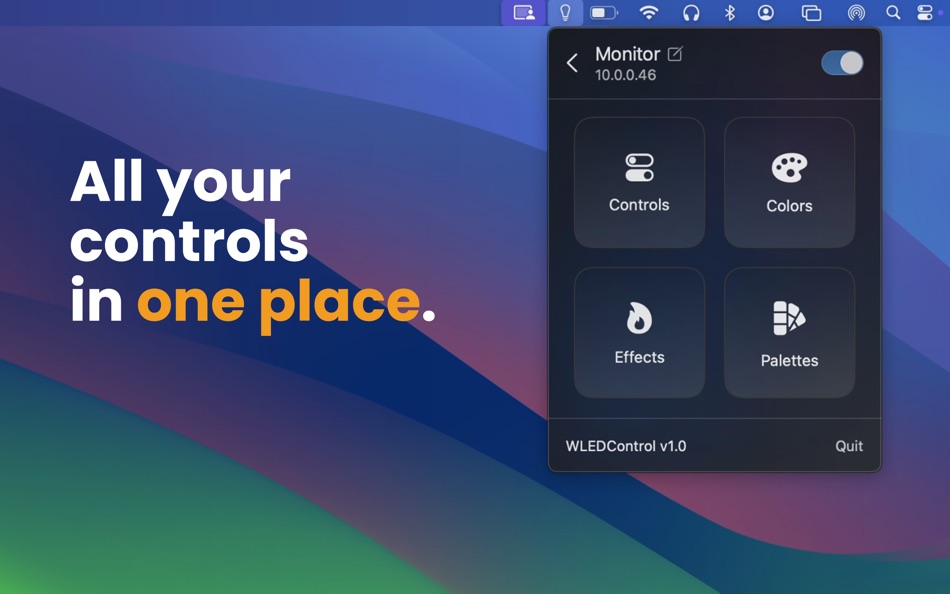
WLEDControl helps you quickly add your WLED devices, adjust brightness, choose colors, switch effects, and manage palettes without opening a browser tab. It is built for fast everyday control with a clean interface and real-time updates.
Features:
• Quick access from the macOS menu bar
• Discover WLED devices on your local network or add devices manually
• Power on/off and adjust brightness
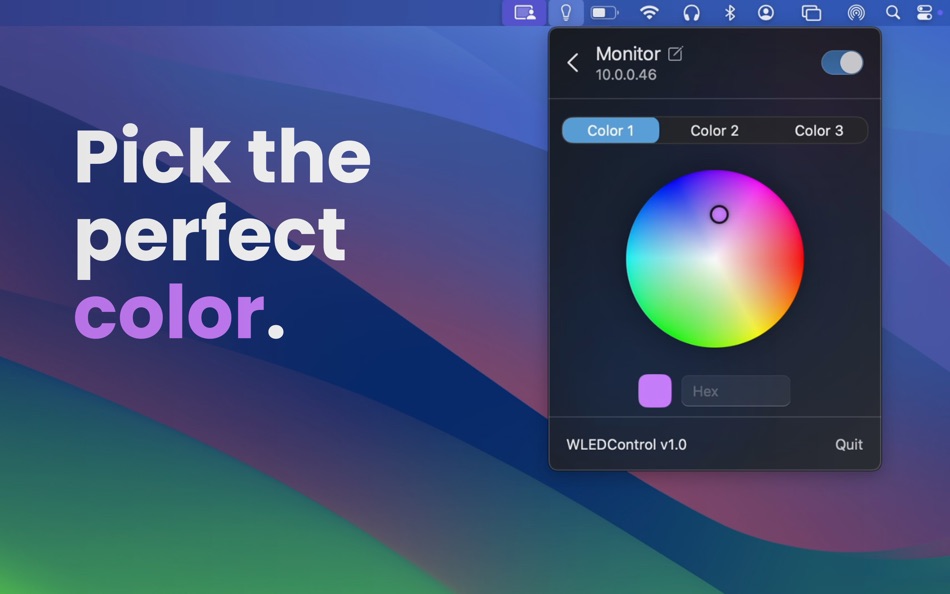
• Pick colors with a color wheel and hex input
• Browse and apply effects and palettes
• Rename devices for easier organization
Designed for WLED users who want simple, reliable desktop control.
Terms: https://www.apple.com/legal/internet-services/itunes/dev/stdeula/
Privacy Policy: https://doc-hosting.flycricket.io/wledcontrol-privacy-policy/5e4a182d-4dc3-4e91-85a1-371919c469f3/privacy
Ad
ภาพหน้าจอ


มีอะไรใหม่
- เวอร์ชัน: 1.0
- อัปเดต:
ประวัติราคา
- วันนี้: ฟรี
- ต่ำสุด: ฟรี
- มากที่สุด: ฟรี
ติดตามราคา
ผู้พัฒนา
แต้มแล (0)
0 ☹️
การจัดอันดับ (0)
0 ☹️
รายการ (0)
0 ☹️
- WLEDControl
ความเห็น (0)
แสดงรีวิวเป็นคนแรกเลย 🌟
ข้อมูลเพิ่มเติม
«WLEDControl». แพลตฟอร์ม: macOS. หมวดหมู่: ยูทิลิตี้. ผู้พัฒนา: «Arjun Dureja». การเปิดตัวครั้งแรก: . อัปเดตล่าสุด: . ราคาปัจจุบัน: ฟรี. ชื่อนี้ยังไม่ได้รับการให้คะแนนหรือบทวิจารณ์บน AppAgg ภาษาที่ใช้ได้: English. AppAgg ติดตามประวัติราคา การให้คะแนน และคำติชมของผู้ใช้ «WLEDControl». ส่วนลดและอัปเดตในอนาคต: RSS. AppAgg ไม่ได้โฮสต์แอปพลิเคชันหรือแจกจ่ายซอฟต์แวร์ เครื่องหมายการค้า โลโก้ และภาพหน้าจอทั้งหมดเป็นของเจ้าของที่เกี่ยวข้อง
ความเห็น (0)
เป็นคนแรกที่แสดงความเห็น 🌟
WLEDControl URL แบบสั้น: คัดลอกแล้ว!- 🌟 แชร์
- Mac App Store
Ad
คุณอาจชอบ
-
- SwiftyMenu
- macOS แอป: ยูทิลิตี้ โดย: 圣罡 汤
- ฟรี
- รายการ: 0 + 2 การจัดอันดับ: 0 ความเห็น: 0
- แต้มแล: 22 + 0 ความเห็น: 0 เวอร์ชัน: 26.5.5 SwiftyMenu is a powerful macOS Finder extension that enhances your workflow with customizable context menus for quick file and folder operations. Key Features: Custom Context Menus: ... ⥯
-
- CrystalFetch ISO Downloader
- macOS แอป: ยูทิลิตี้ โดย: Turing Software, LLC
- ฟรี
- รายการ: 6 + 0 การจัดอันดับ: 0 ความเห็น: 0
- แต้มแล: 20 + 0 ความเห็น: 0 เวอร์ชัน: 2.2.0 CrystalFetch is a macOS application that creates Windows® 11 installer ISO images. It can be used with UTM virtual machines as well as other VM solutions. Note: CrystalFetch is not ... ⥯
-
- Parallel Disk Scanner
- macOS แอป: ยูทิลิตี้ โดย: Pedro Yamada
- ฟรี
- รายการ: 0 + 1 การจัดอันดับ: 0 ความเห็น: 0
- แต้มแล: 20 + 0 ความเห็น: 0 เวอร์ชัน: 1.2.2 FileSaver is a really fast disk usage scanner. It can scan a fully used SSD in a minute by scanning folder sizes in parallel. All information is displayed immediately with no waiting ... ⥯
-
- HotLaunch - App Launchpad
- macOS แอป: ยูทิลิตี้ โดย: 方 刘
- * ฟรี
- รายการ: 2 + 3 การจัดอันดับ: 0 ความเห็น: 0
- แต้มแล: 19 + 0 ความเห็น: 0 เวอร์ชัน: 2.5.9 Efficiently switch and open apps, folders, files, URLs. characteristic: 1 Support Option, Control, Command, Shift,fn combination shortcut keys to display switching window view. 2 When ... ⥯
-
- Duplicate Files Sweeper
- macOS แอป: ยูทิลิตี้ โดย: Wise Tech Labs Private Limited
- * ฟรี
- รายการ: 0 + 1 การจัดอันดับ: 0 ความเห็น: 0
- แต้มแล: 18 + 0 ความเห็น: 0 เวอร์ชัน: 3.1 Duplicate Files Sweeper is an ultimate Duplicate Files Cleaner that help you get rid of duplicate files from your Mac easily. Duplicate Files Sweeper helps you give a thorough scan to ... ⥯
-
- Shortery
- macOS แอป: ยูทิลิตี้ โดย: Unit Numberfive oHG
- * ฟรี
- รายการ: 3 + 4 การจัดอันดับ: 1 (1) ความเห็น: 0
- แต้มแล: 18 + 0 ความเห็น: 0 เวอร์ชัน: 8.6 Run your Shortcuts automatically with Shortery. Automate your workflows without lifting a finger. Shortery allows you to run shortcuts automatically in response to system events, ... ⥯
-
- Max NTFS - NTFS Disk Helper
- macOS แอป: ยูทิลิตี้ โดย: 全利 谢
- * ฟรี
- รายการ: 0 + 0 การจัดอันดับ: 0 ความเห็น: 0
- แต้มแล: 17 + 0 ความเห็น: 0 เวอร์ชัน: 2.7.6 Max NTFS is a small tool that can open NTFS format disks in read-write mode. We can support the read and write of NTFS format disks very effectively. Start the application, it will ... ⥯
-
- QuickFTP Server
- macOS แอป: ยูทิลิตี้ โดย: Leszek Szary
- ฟรี
- รายการ: 0 + 2 การจัดอันดับ: 0 ความเห็น: 0
- แต้มแล: 16 + 0 ความเห็น: 0 เวอร์ชัน: 1.1.0 QuickFTP Server allows you to share files stored on your Mac with other devices. FTP is a standard network protocol supported by many applications available on almost any device with a ⥯
-
- nthLink
- macOS แอป: ยูทิลิตี้ โดย: nthLink
- ฟรี
- รายการ: 2 + 0 การจัดอันดับ: 0 ความเห็น: 0
- แต้มแล: 16 + 0 ความเห็น: 0 เวอร์ชัน: 6.8.5 nthLink is a powerful VPN capable of getting through even the toughest network environment. Most importantly, it incorporates strong encryption to protect the users' information. ... ⥯
-
- Clip Log
- macOS แอป: ยูทิลิตี้ โดย: WARNER WEB DEVELOPMENT LLC
- * ฟรี
- รายการ: 0 + 1 การจัดอันดับ: 0 ความเห็น: 0
- แต้มแล: 16 + 0 ความเห็น: 0 เวอร์ชัน: 3.3.84 Clip Log The Clipboard Manager You ve Been Waiting For! Say goodbye to losing important snippets of text and images! Clip Log is the ultimate clipboard manager, combining intelligent ... ⥯
-
- Disk Diag
- macOS แอป: ยูทิลิตี้ โดย: Rocky Sand Studio Ltd.
- * ฟรี
- รายการ: 4 + 1 การจัดอันดับ: 5 (1) ความเห็น: 0
- แต้มแล: 16 + 0 ความเห็น: 0 เวอร์ชัน: 2.0.7 Disk Diag is an amazing all-in-one disk cleaner to help you clean up your hard drive with ease. First time I ve been speechless & husband is amazed" It works with just two clicks and ... ⥯
-
- HomeControl Menu for HomeKit
- macOS แอป: ยูทิลิตี้ โดย: Pedro Jose Pereira Vieito
- * ฟรี
- รายการ: 2 + 3 การจัดอันดับ: 5 (1) ความเห็น: 0
- แต้มแล: 15 + 0 ความเห็น: 0 เวอร์ชัน: 2.15.1 HomeControl is the ultimate HomeKit companion on macOS. Manage and automate your smart home directly from the menu bar: check your home status, trigger scenes, adjust devices, or ... ⥯