
Zakładki
| Deweloper: | Nicolas Pinzon (1) | ||
| Cena: | Za darmo Nowa | ||
| Wynik: | 710 Srebro | ||
| Rankingi: | 0 | ||
| Komentarze: | 0 Opublikuj komentarz | ||
| Listy: | 0 0 | ||
| Punkty: | 0 | ||
| +1 Punkt | |||
Podsumowanie
Poznaj Agents Keeper, aplikację od Nicolas Pinzon z kategorii „Narzędzia programistyczne”.
Nowość, wyszła , więc jesteś wśród pierwszych.
Za darmo, bez reklam i bez zakupów w aplikacji. Tylko ty i aplikacja.
Microsoft Store jest wbudowany w system Windows, więc instalujesz w kilka kliknięć.
Wynik AppAgg to 710. „Srebro”, i to wcale nieźle.
Kategoria wiekowa „EVERYONE”, więc nadaje się też dla dzieci.
Zna 2 języki, ale polskiego jeszcze się nie nauczyła.
Na razie kompletna cisza: zero ocen, zero komentarzy. Przerwij milczenie.
To jedyna aplikacja tego dewelopera w AppAgg. Na razie.
Chcesz dowiadywać się o aktualizacjach i nowych aplikacjach przed innymi? Obserwuj dewelopera albo subskrybuj kanał RSS. Powiadomienia push przychodzą w aplikacji AppAgg Alerts na Android i iOS.
Inne platformy 0
Historia cen 0
- Aktualna cena: Za darmo
- Minimum: Za darmo
- Maksimum: Za darmo
Własny kanał na stronie głównej
Zrzuty ekranu 4
Opis

- Runs a background service that is part of the app. The Agents Keeper service runs your agent sessions and keeps them alive after the window closes. It ships inside the app, starts when you sign in, and is not a Windows service: it needs no administrator rights. You can turn the start at sign-in off in Settings → Apps → Startup.
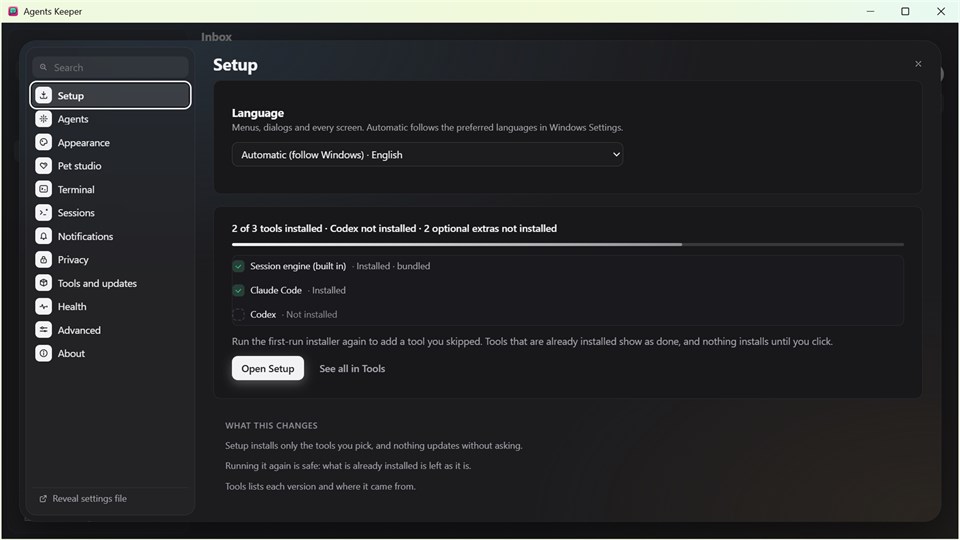
- Installs coding-agent command-line tools only when you ask. The first-run Setup can install Claude Code (Anthropic), Codex (OpenAI), Git, Node.js and the GitHub CLI with Windows Package Manager (winget) or the vendor's own installer, after checking the download. Nothing is installed without your confirmation, and you can skip any of them. Some of these installers may ask Windows for permission (a UAC prompt) because they install for all users.
- Each agent runs in a sandbox. Agents run at low integrity: they can work in the project folders you open in Agents Keeper, but not in the rest of your user profile. Because of this, each agent keeps its own settings and asks you to sign in once inside Agents Keeper, even if you already use it elsewhere on this computer.
- Needs your own accounts with the agent vendors. Claude Code needs an Anthropic account or API key; Codex needs an OpenAI account or API key. Agents Keeper never sees your passwords or keys and is not affiliated with Anthropic, OpenAI, Google or Amazon.
- Updates never close your terminals. When the Store has a new version ready, Agents Keeper says so and installs it the next time it restarts with no terminal open (or the next time you sign in).
- Uninstalling: use Settings → Advanced → Uninstall… in the app first. It stops the service, ends its terminals and removes the app's data, then opens Windows Settings → Apps, where you remove the app itself. Agent tools that Setup installed stay installed; remove them in Settings → Apps like any other program.
What Agents Keeper does
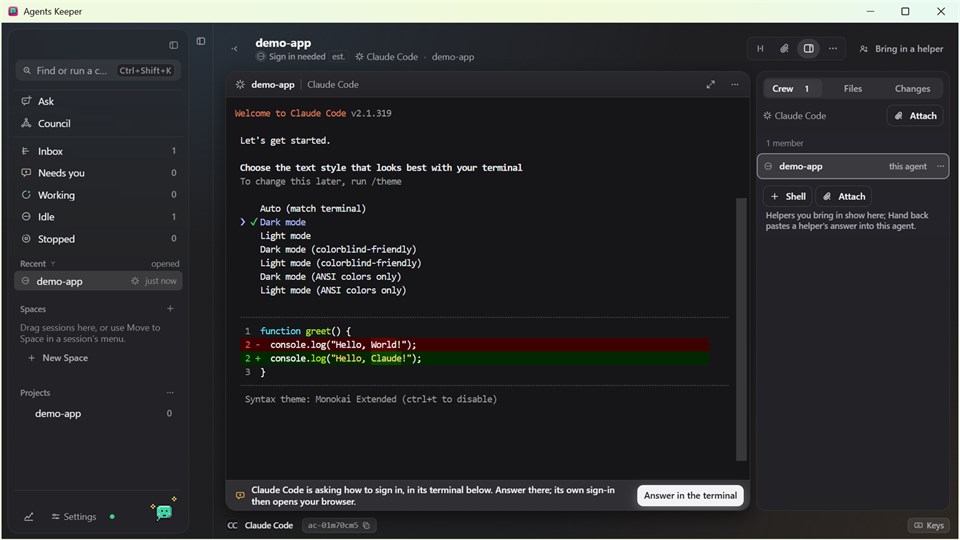
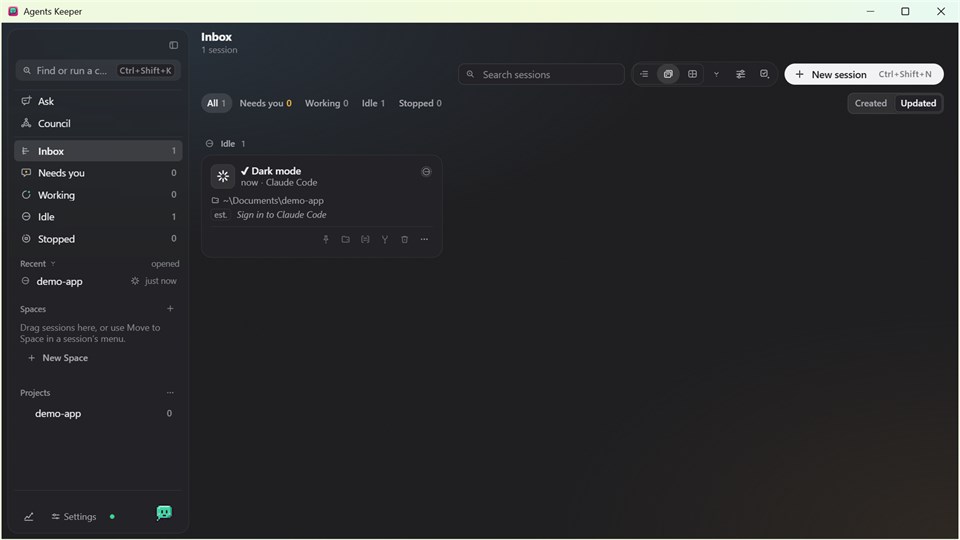
Agents Keeper is a home for the coding agents you run in your terminal. Start Claude Code or Codex sessions in your projects, leave them working, and come back when one needs you: questions, permission requests and finished work land in one inbox instead of being scattered across terminal windows.
- Every session in one list, with live status: working, waiting for you, done.
- Answer an agent's question or approve a step without hunting for the right terminal.
- Sessions keep running after you close the window, and you reattach to the exact terminal later.
- A real terminal for each session, with full scrollback.
- Ask: search your sessions in plain language.
- Spaces to group sessions by project.
- English and Spanish.
Privacy: your prompts, code and replies stay on your computer and go only to the agent vendors you use. An anonymous daily check-in (on by default, off in Settings → Privacy) sends counts such as the app version and which features were used yesterday, never content. Details: the privacy policy linked on this page.
Agents Keeper is independent and not affiliated with Anthropic, OpenAI, Google or Amazon. Claude Code is a product of Anthropic; Codex is a product of OpenAI.
Od dewelopera
Listy 0
-
 Agents Keeper
Punkty 0
-

- +1 Punkt

Rankingi 0
-
- Twoja ocena
Deweloper 1
- Nicolas Pinzon
- Obserwujący: 0
- Platformy: Windows Aplikacje (1)
- Promocje: 0
- Listy: 0 0
- Punkty: 0
- Rankingi: 0
- Komentarze: 0
- Filmy: 0
- RSS: Subskrybuj
Co nowego
- Wersja: PC
- Ostatnia aktualizacja:
Dodatkowe informacje
- Data wydania:
- Kategoria:
Aplikacje na platformę Windows›Narzędzia programistyczne - System operacyjny:
PC - Rozmiar:
176 Mb - Obsługiwane języki:
Angielski,Hiszpański - Klasyfikacja treści:
EVERYONE - Windows Store Ocena: ¡
0 - Witryna internetowa:
 https://agentskeeper.com/
Wynik AppAgg
Szacowany wynik AppAgg dla
Agents Keeper
Deweloper: Nicolas Pinzon
Wyższy wynik zwykle oznacza lepsze rezultaty w zakresie wskaźników śledzonych przez AppAgg.
Na podstawie: popularności · ocen użytkowników · świeżości · promocji · danych sklepów · aktywności społeczności
Przeliczane codziennie na podstawie aktualnych danych AppAgg.
Komentarze 0 ¡
Udostępnij
Agents Keeper Krótki URL: Skopiowano!- Windows Store
Może Ci się również spodobać
- Aplikacje na platformę Windows
- Nowe Aplikacje na platformę Windows
- Promocje Aplikacje na platformę Windows
- Popularne Aplikacje na platformę Windows
- Rankingi Aplikacje na platformę Windows
- Komentarze Aplikacje na platformę Windows
- Listy Aplikacje na platformę Windows
- Punkty Aplikacje na platformę Windows

