
Zakładki
| Deweloper: | Aelyo Softworks (14) | ||
| Cena: | * Za darmo | ||
| Wynik: | 1420 Złoto | ||
| Rankingi: | 0 | ||
| Komentarze: | 0 Opublikuj komentarz | ||
| Listy: | 0 0 | ||
| Punkty: | 0 | ||
| +1 Punkt | |||
Podsumowanie
Poznaj Code Contour, aplikację od Aelyo Softworks z kategorii „Narzędzia programistyczne”.
Wyszła , więc wciąż jest całkiem świeża.
Pobranie nic nie kosztuje, a dalej decydujesz ty. W aplikacji są zakupy.
Microsoft Store jest wbudowany w system Windows, więc instalujesz w kilka kliknięć.
Wynik AppAgg to 1420. To poziom „Złoto”.
Kategoria wiekowa „EVERYONE”, więc nadaje się też dla dzieci.
Mówi tylko w jednym języku i nie jest to polski.
Na razie kompletna cisza: zero ocen, zero komentarzy. Przerwij milczenie.
Ten deweloper ma w AppAgg jeszcze 13 aplikacji. Warto zajrzeć.
A tak przy okazji, ten deweloper ma teraz 1 produkt w promocji.
Chcesz dowiadywać się o aktualizacjach i nowych aplikacjach przed innymi? Obserwuj dewelopera albo subskrybuj kanał RSS. Powiadomienia push przychodzą w aplikacji AppAgg Alerts na Android i iOS.
Inne platformy 0
Historia cen 0
- Aktualna cena: Za darmo
- Minimum: Za darmo
- Maksimum: Za darmo
Własny kanał na stronie głównej
Zrzuty ekranu 10
Opis

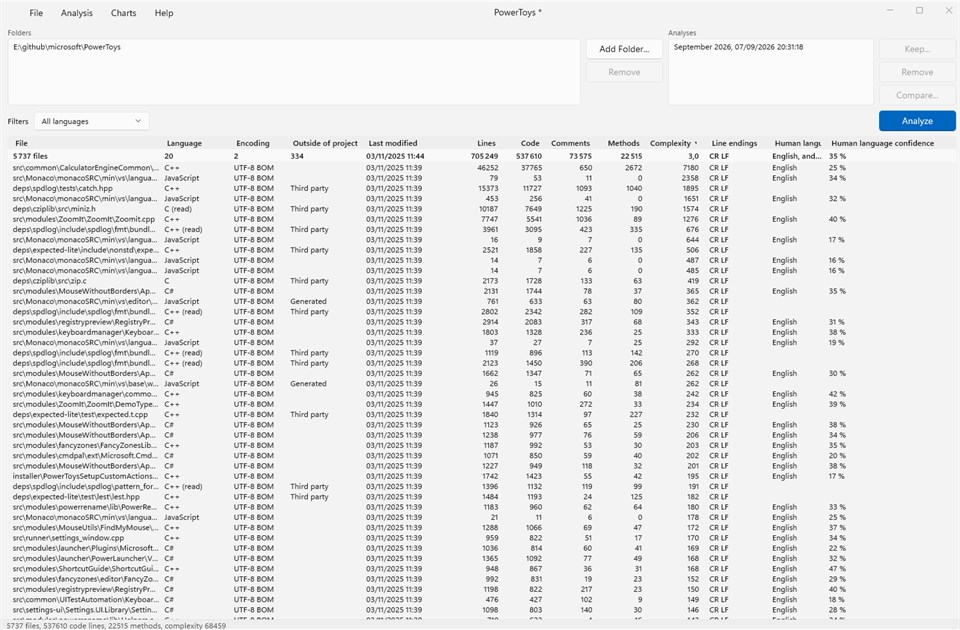
Point it at a folder and it reads every file it finds, in 81 programming, markup and data languages at once, and reports lines, code lines, comments, statements, methods, block depth, calls, cyclomatic and cognitive complexity, Halstead volume and maintainability, file by file and method by method. A codebase of five thousand files is measured in seconds, and what comes back is a table you can sort, filter and act on.
Numbers with a source
Every measure here is somebody's published work rather than this tool's idea of one. Cyclomatic complexity is McCabe's, cognitive complexity is Campbell's, the maintainability index is the form used in Visual Studio, and the volume is Halstead's. The user guide states exactly how each number is arrived at, including where we knowingly differ, so you can check any figure against your own reading of the code.
The counting rules belong to the project rather than to the application. Whether a whole switch counts as one, whether blank lines and comment lines leave the code count, whether markup and data files are looked at, all of it is settled before the first analysis and frozen with it, so a history is never measured two different ways.
Charts you can act on
Seven charts, all drawn from the rows on screen and all of them clickable.
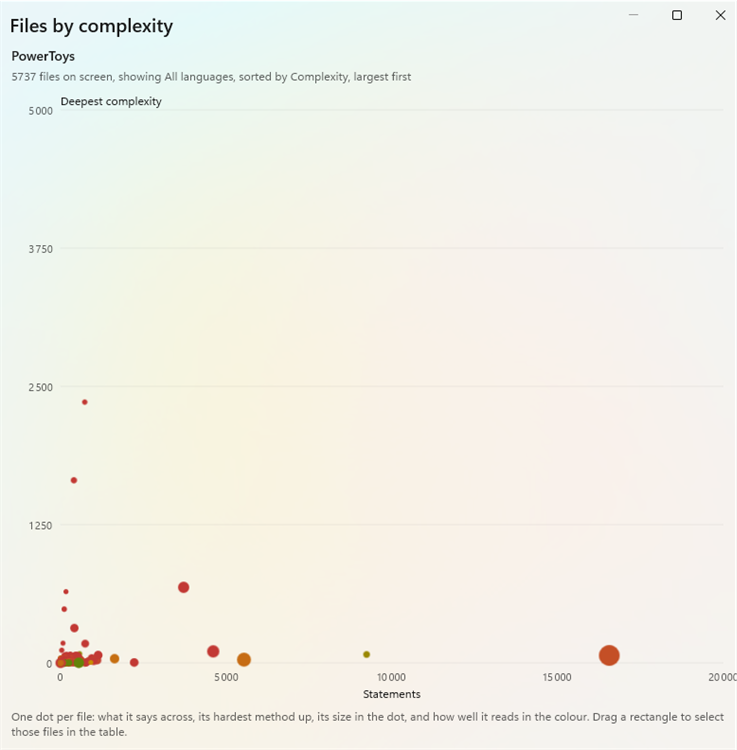
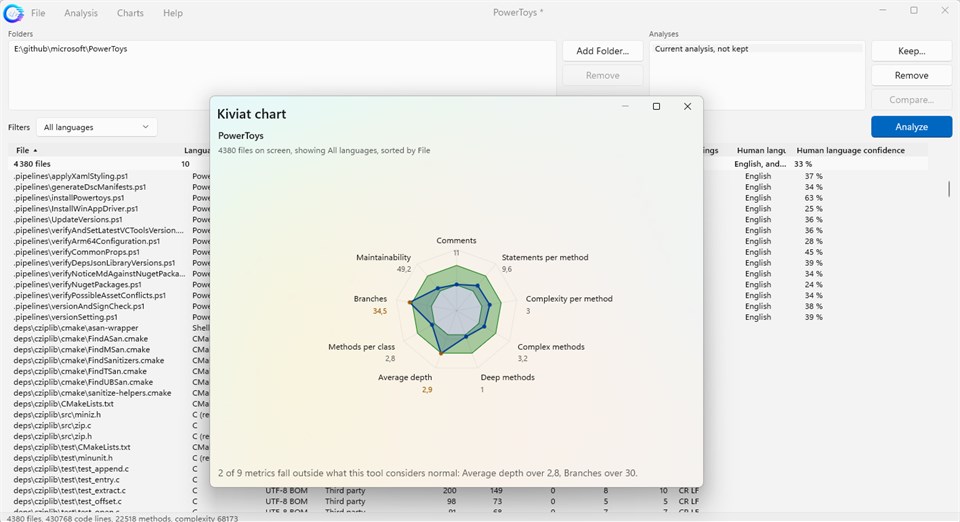
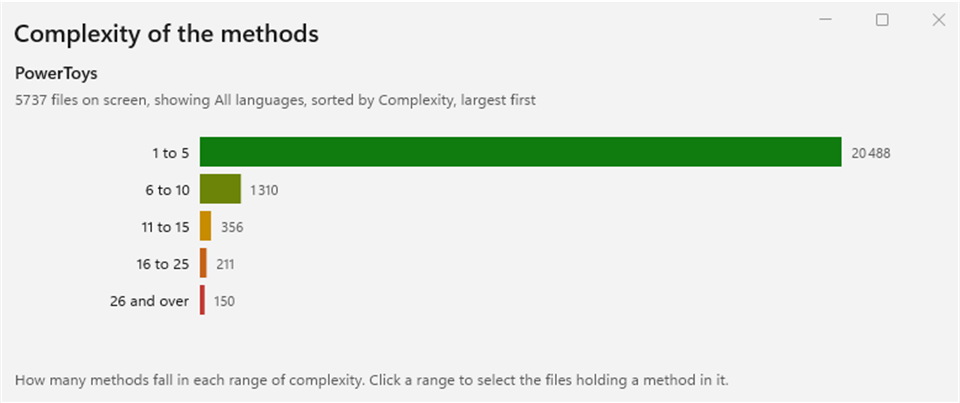
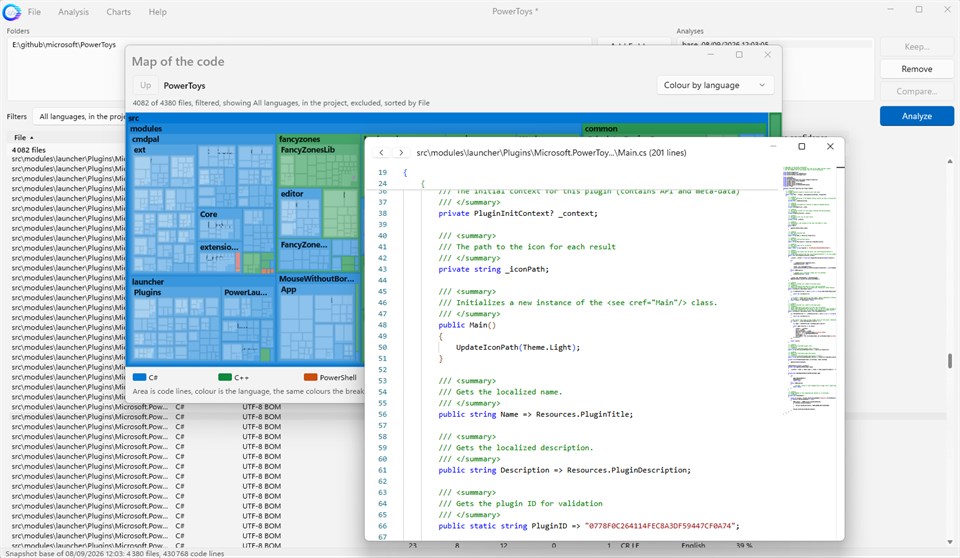
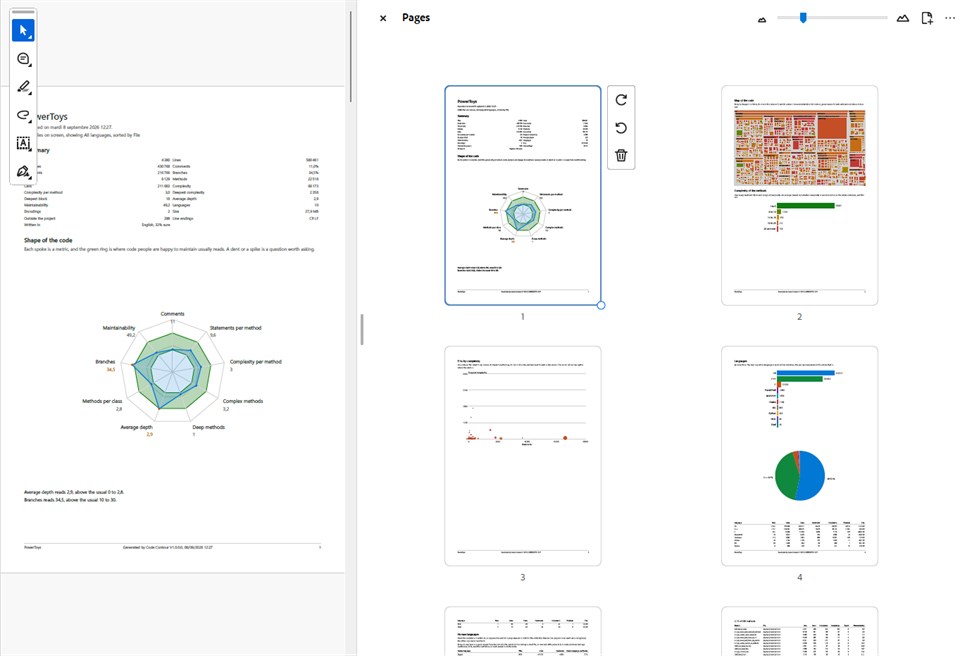
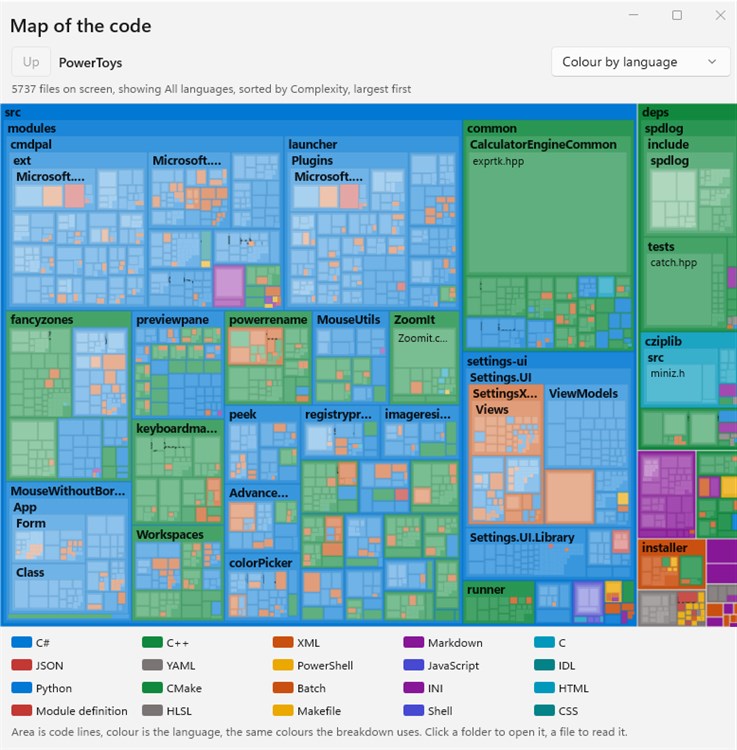
The Kiviat chart puts the whole codebase against what your project calls normal, and clicking a spoke selects the files that pushed it out. The map of the code draws every file as a rectangle, sized by its lines and nested inside its folders, coloured by language, complexity, maintainability, change or by how much of it is your team's work. The complexity histogram turns "we have complex code somewhere" into a list of files. The scatter puts size against difficulty so the outliers stand out, and a rectangle swept over it selects them.
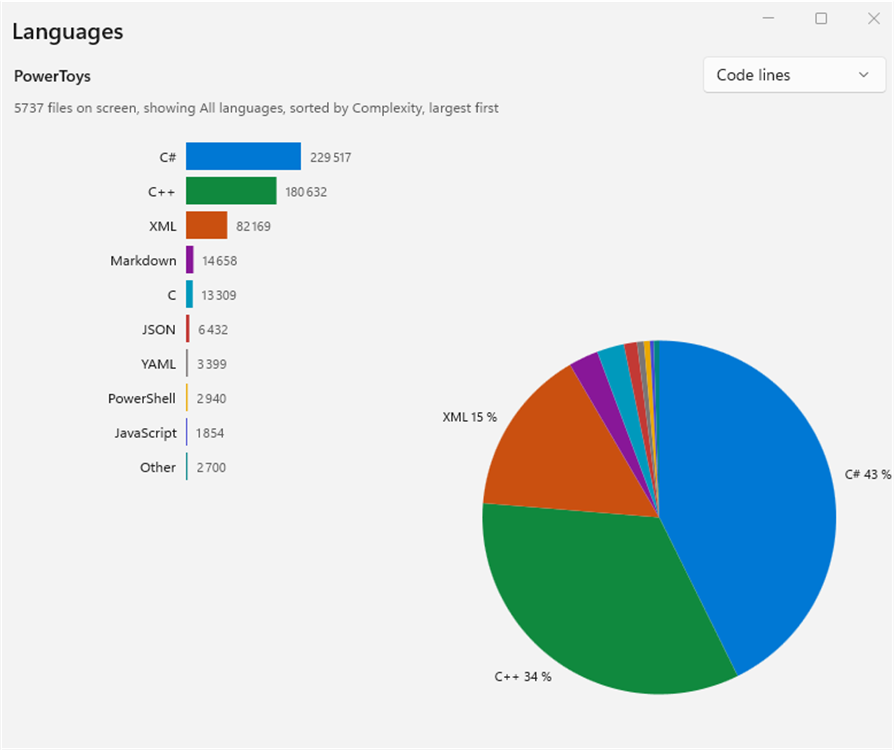
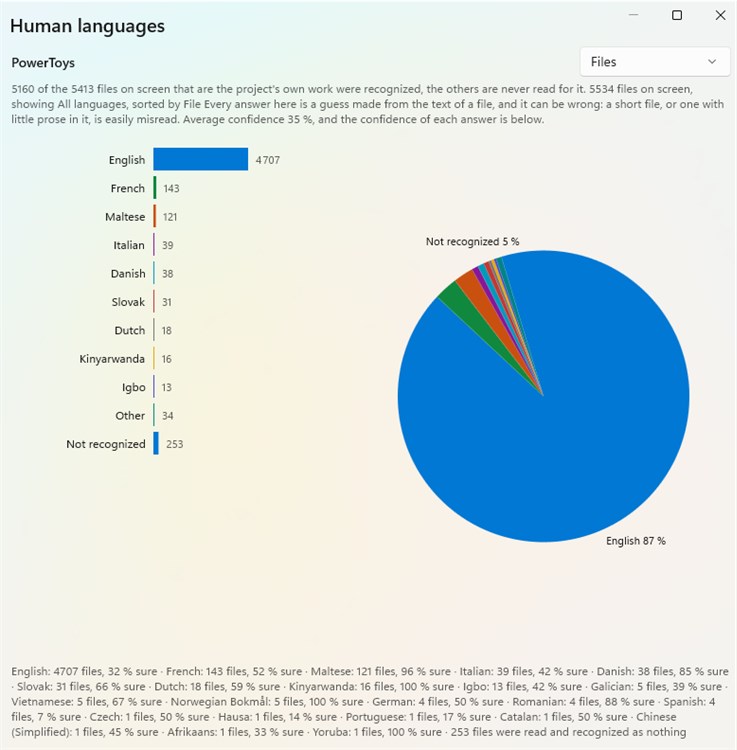
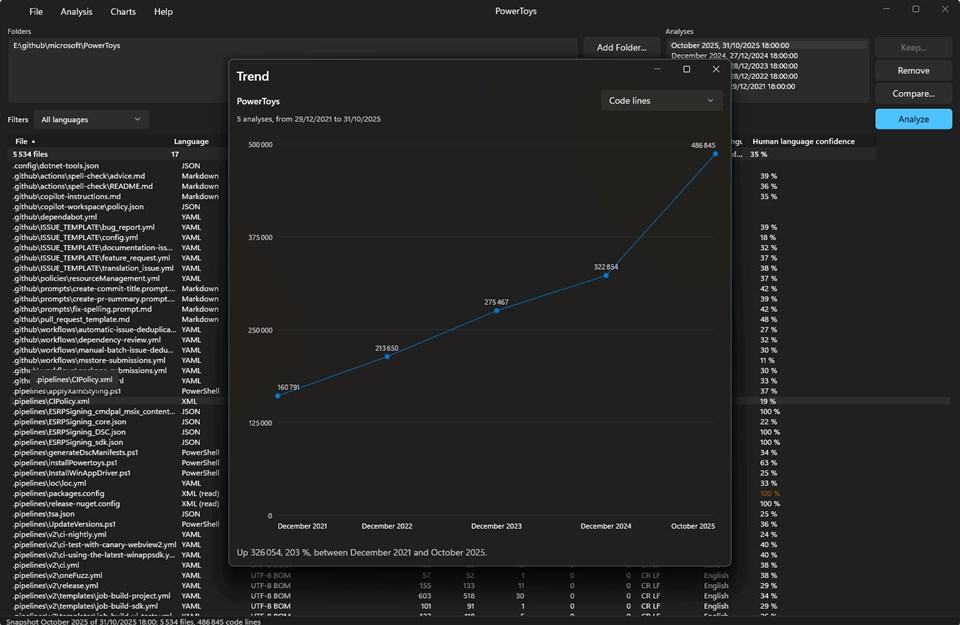
Two more say what a codebase is made of, one for the languages it is programmed in and one for the language its people write in, and the trend chart shows where a number went across everything the project has kept.
Honest about what it found
A file that could not be read is listed with the reason rather than quietly dropped from the totals. A language it is not certain of carries a certainty. Code that is not your team's work, generated files, vendored third party code, anything the repository ignores, is marked in its own column rather than silently counted, and it stays countable so the totals remain honest.
Rather than guess from file names, Code Contour reads the rules the repository already keeps, its .gitignore and its .gitattributes, implementing git's own glob so a rule behaves exactly as it does for git.
It also reports the encoding of every file, out of the 116 Windows knows, and how each file ends its lines, including how many disagree with the rest. And it can tell you what human language the comments and strings are written in, with a confidence for each answer, which on a codebase worked on by several teams is often the most surprising column in the table.
A history, not a snapshot
Keep an analysis in the project and it becomes a point you can return to. Show it again months later with its own numbers, its own charts and its own reports, compare any two, and read the work report: how many lines were written, deleted and rewritten between them, which files absorbed the effort, and which way complexity and maintainability went. The period is named at the top, because the same amount of work over a week and over a year describes two different codebases.
What the repository already knows
Your repository has been keeping its own account since the first commit, and Code Contour reads it. The churn chart shows what was written into it month by month, lines added above the line and removed below it, or person by person with names resolved through the repository's own .mailmap. A moved file is counted as a move, the way git counts it, so an afternoon of tidying does not read as a heroic week.
It needs no analysis and no setup: a folder inside a checkout is enough, and a project spanning several repositories adds them up. The same history goes into the HTML, PDF and JSON reports when the project asks for it.
Nothing leaves your computer for any of this. The library Code Contour reads repositories with is built without any network transport at all, so it reads the checkout on your machine and cannot contact a server even if it were asked to.
Reports people can read
The whole report exports as one self contained HTML page, charts included, drawn as vectors so it prints and zooms cleanly, with nothing fetched from anywhere when it opens. The file names in it are links that open the file in Code Contour at the right line, so a report you hand to somebody is a report they can walk into.
The rows export as CSV in the dialect Excel opens as columns on a double click. The analysis exports as JSON with a versioned schema, written field by field so it is a contract rather than an internal type, which is what a build reads. And the report prints as a real PDF, laid out the way a document should be, with no browser anywhere in it.
Built into your build
Code Contour carries a command line tool that measures from a script under the same rules the window uses. It writes any of the four shapes, keeps its runs in the project so a build gets a history of its own, and answers with an exit code: nought when the run was made, one when it could not be, two when something it was asked to watch crossed a limit. Set a maximum complexity or a minimum maintainability and the build fails the day the codebase does.
Yours, and quiet
Code Contour is a native Windows application with no runtime to install. It works entirely offline. There is no cloud service, no telemetry, nothing to sign in to, and your source never leaves your PC. Files are opened read only and shared as widely as a reader can share them, so a file another program is still writing is read without getting in its way, and nothing here ever edits your code.
Free, and Premium
The whole of the analysis is free: every language, every metric, every chart, the source viewer, and the CSV, HTML, JSON and PDF reports of the current analysis. A free project keeps three analyses, a baseline, the previous one and the current one, which is enough to see a trend.
Code Contour Premium, a one time purchase, keeps the complete history of your codebase, compares any two analyses, explains the work between them in detail, reads the churn of your git history, and lets you write the command line tool out for your build. Nothing you have already measured is ever hidden or taken away.
Od dewelopera
Listy 0
-
 Code Contour
Punkty 0
-

- +1 Punkt

Rankingi 0
-
- Twoja ocena
Deweloper 14
- Aelyo Softworks
- Obserwujący: 0
- Platformy: Windows Aplikacje (14)
- Promocje: 1
- Listy: 0 0
- Punkty: 0
- Rankingi: 0
- Komentarze: 0
- Filmy: 0
- RSS: Subskrybuj
Co nowego
- Wersja: PC
- Ostatnia aktualizacja:
Dodatkowe informacje
- Data wydania:
- Kategoria:
Aplikacje na platformę Windows›Narzędzia programistyczne - System operacyjny:
PC - Rozmiar:
68 Mb - Dostępne funkcje:
Mixed reality - Obsługiwane języki:
Angielski - Klasyfikacja treści:
EVERYONE - Windows Store Ocena: ¡
0
Wynik AppAgg
Szacowany wynik AppAgg dla
Code Contour
Deweloper: Aelyo Softworks
Wyższy wynik zwykle oznacza lepsze rezultaty w zakresie wskaźników śledzonych przez AppAgg.
Na podstawie: popularności · ocen użytkowników · świeżości · promocji · danych sklepów · aktywności społeczności
Przeliczane codziennie na podstawie aktualnych danych AppAgg.
Komentarze 0 ¡
Udostępnij
Code Contour Krótki URL: Skopiowano!- Windows Store
Może Ci się również spodobać
- Aplikacje na platformę Windows
- Nowe Aplikacje na platformę Windows
- Promocje Aplikacje na platformę Windows
- Popularne Aplikacje na platformę Windows
- Rankingi Aplikacje na platformę Windows
- Komentarze Aplikacje na platformę Windows
- Listy Aplikacje na platformę Windows
- Punkty Aplikacje na platformę Windows

