
기술

Complete Text Cleanup
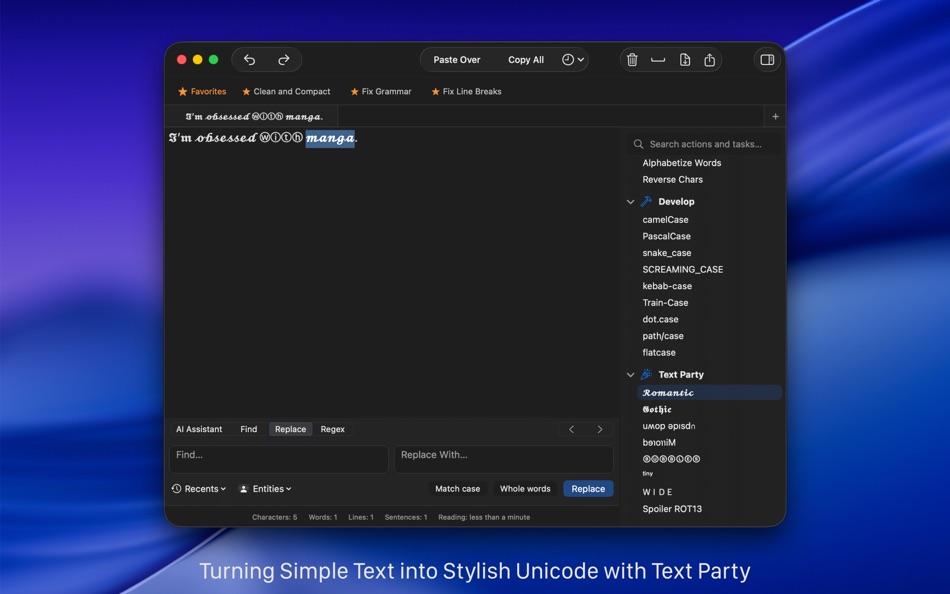
Clean Text solves the most common formatting issues that appear when copying text from emails, PDFs, web pages, or chat messages. Remove empty lines, extra spaces, tabs, unwanted characters, smart quotes, or line breaks in seconds. A rich set of cleanup tools helps you standardize content with one click, making messy text instantly usable.
AI-Assisted Editing
Clean Text includes built-in, on-device AI tools that work alongside all the classic text-cleaning and formatting features. You can choose to use these AI tools to fix grammar and punctuation, simplify complex sentences, generate short summaries, or instantly turn paragraphs into bullet or numbered lists. The goal is to help you refine your text while keeping your content private on your Mac. These AI tools focus on precision and productivity, helping you get better results with less effort.
Custom Tasks for Faster Workflows
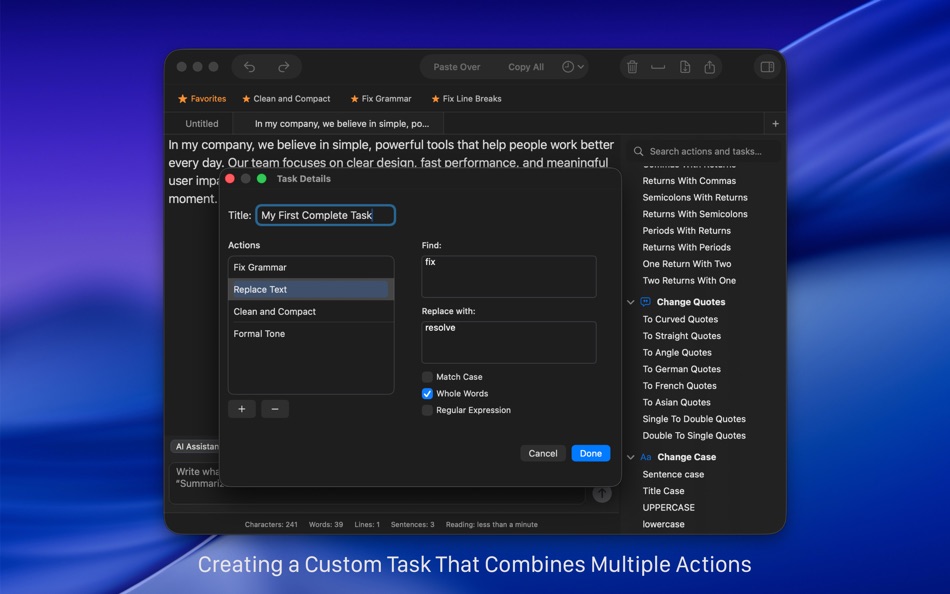
If you often repeat the same cleanup steps, you can combine them into a single custom task. Create your own workflows without coding. Power users can also add Regular Expressions to handle advanced transformations, making Clean Text adaptable to simple and complex editing needs.
Seamless integration with macOS and iOS
Write on your Mac and instantly access your texts on your iPhone or iPad through iCloud. Your most recent changes are always available on every device. Just open the iCloud menu to send or retrieve your text with a single tap. (Clean Text for iOS is sold separately.)
Powerful Find & Replace Tools
Live search highlights results instantly, making it easy to locate words, phrases, or patterns in long documents. Options such as Ignore Case, Contains, Starts With, and Full Word give you precise control. Replace text confidently with real-time previews and step-by-step navigation.
Designed for the Mac Ecosystem
Clean Text fits naturally into the way you work:
• iCloud sync for seamless access across devices
• Share menu to send text to Mail, Messages, Notes, Reminders, and social apps
• Tabbed documents for managing multiple texts at once
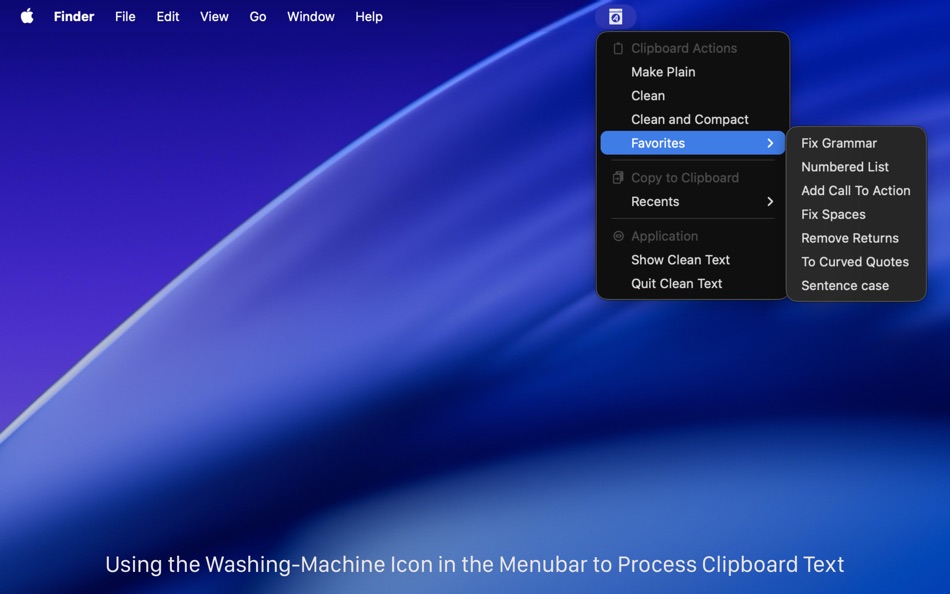
• Menu bar tools for quick clipboard cleanup without switching apps
• macOS Services integration to process text from any application
• Shortcuts support for automation and custom workflows
• Unlimited undo and redo for safe, flexible editing
Made for Everyday Productivity
Whether you're formatting a document, cleaning up a blog post, preparing an email, organizing notes, or refining text for publication, Clean Text gives you reliable, fast, and consistent tools. It’s a practical companion for anyone who writes, edits, or formats text on the Mac, helping you focus on your content instead of fighting formatting problems.
Note on AI tools in Clean Text
All AI-based features in Clean Text are optional and clearly separated from the traditional tools, which continue to be developed and improved independently. No actions are performed automatically — AI features run only when the user chooses to use them.
Ad
스크린샷



새로운 기능
- 버전: 26.8.3
- 업데이트:
- - Improved subscription trial information
- Updated app icon
- Performance improvements
가격 내역
-
* 인앱 구매 - 오늘: 무료
- 최소: 무료
- 최대: $29.99
가격 추적
개발자
포인트 (4)
-

- 523 expat4i
- +1
-
- 219 Olivier Sztabowicz
- +1
-
- 555 zhuc4
- +1
-
- 29 Alex Chen
- +1




순위 (0)
0 ☹️
목록 (2)
- Clean Text

리뷰 (0)
첫 번째 리뷰를 남겨보세요 🌟
추가 정보
주소록
 http://www.apimac.com/cleantext/
 «Clean Text». 플랫폼: macOS. 카테고리: 생산성. 개발자: «Apimac». 첫 번째 릴리스: . 마지막 업데이트: . 현재 가격: 무료. 이 타이틀은 아직 AppAgg에서 평가나 리뷰를 받지 못했습니다. 목록: 공개: 2, 비공개: 0. 추적된 포인트: 확인됨: 4, 간접: 0. 사용 가능한 언어: Dutch, English, French, German, Italian, Japanese, Polish, Portuguese, Spanish, Swedish. AppAgg는 «Clean Text»의 가격 기록, 평점 및 사용자 피드백을 추적합니다. 향후 할인 및 업데이트 받기: RSS에서 확인할 수 있습니다. AppAgg는 애플리케이션을 호스팅하거나 소프트웨어를 배포하지 않습니다. 모든 상표, 로고 및 스크린샷은 해당 소유자의 자산입니다.
댓글 (0)
가장 먼저 댓글을 남겨주세요 🌟
Clean Text 단축 URL: 복사됨!- 🌟 공유하기
- Mac App Store
Ad
유사 항목
-
- Clean Email — Inbox Cleanup
- macOS 앱: 생산성 게시자: Clean Email, LLC
- * 무료
- 목록: 0 + 0 순위: 0 리뷰: 0
- 포인트: 0 + 0 0 버전: 3.0.40 Drowning in emails? Take control of your inbox with Clean Email! Bulk-delete, unsubscribe, block, and automatically organize your emails everything you need to clean your inbox and ... ⥯
-
- Text to Speech-AI Audio Maker
- macOS 앱: 생산성 게시자: 崴 杨
- * 무료
- 목록: 0 + 0 순위: 0 리뷰: 0
- 포인트: 0 + 0 0 버전: 1.0.4 Text to Speech is a professional AI-powered voice synthesis app that makes converting text into natural speech simple and efficient. Core Features Voice Cloning Upload audio samples to ⥯
-
- Text Spacing Editor
- macOS 앱: 생산성 게시자: Actum s.r.o.
- 무료
- 목록: 0 + 0 순위: 0 리뷰: 0
- 포인트: 3 + 0 0 버전: 2.1.1 This extension allows you to set custom values for the following text spacing properties: Line height, letter spacing, word spacing, and paragraph spacing. You can use it also as a way ⥯
-
- Text Lens
- macOS 앱: 생산성 게시자: Sindre Sorhus
- $6.00
- 목록: 0 + 0 순위: 0 리뷰: 0
- 포인트: 1 + 0 0 버전: 1.2.0 Extract text from anywhere on your screen (OCR). Perfect for capturing text from videos, PDFs, presentations, or any app where copying isn't possible. Highlights - Extract text from ... ⥯
-
- Text Expansion Pro
- macOS 앱: 생산성 게시자: Ruchira Ramesh
- $4.99
- 목록: 0 + 0 순위: 0 리뷰: 0
- 포인트: 0 + 0 0 버전: 8.0 ** The application supports Auto Paste, Images and text formatting.When you search for the abbreviation, the expanded text will automatically be pasted into the application in which ... ⥯
- 새로운
- Text Extraction
- macOS 앱: 생산성 게시자: 金玲 李
- 무료
- 목록: 0 + 0 순위: 0 리뷰: 0
- 포인트: 0 + 0 0 버전: 6.7.3 Text Extraction is a macOS tool focused on efficient text extraction, helping you quickly extract editable text from documents, web pages, and screen content, and then centrally ... ⥯
-
- Text Collector
- macOS 앱: 생산성 게시자: Taliyo Ltd
- 무료
- 목록: 1 + 1 순위: 0 리뷰: 0
- 포인트: 2 + 0 0 버전: 1.0 Text Collector lets you use your webcam, Facetime or any USB camera to collect text into a list of text snippets that you can edit and rearrange. You can copy text from any book page, ... ⥯
-
- Text to Speech X
- macOS 앱: 생산성 게시자: 松平 洪
- $3.99
- 목록: 0 + 0 순위: 0 리뷰: 0
- 포인트: 0 + 0 0 버전: 2.3 Text to Speech X is a useful tool that to convert text into speech and to create spoken audio files of any text. You can convert text into spoken words with over 20 voices. Easy copy ... ⥯
-
- Text Catalyst
- macOS 앱: 생산성 게시자: Sense LLC
- * 무료
- 목록: 0 + 0 순위: 0 리뷰: 0
- 포인트: 0 + 0 0 버전: 1.0 Text Catalyst is a clipboard manager and text expander. It comes with a lot of features to help you manage clipboard history and frequently-used snippets. ## Features - Save clipboard ... ⥯
-
- Text Clipboard Manager
- macOS 앱: 생산성 게시자: Pradap Pandiyan
- 무료
- 목록: 0 + 0 순위: 0 리뷰: 0
- 포인트: 1 + 0 0 버전: 1.1 Transform Your Mac's Clipboard Into a Powerful Productivity Tool Text Clipboard Manager is the ultimate clipboard management solution for macOS, designed to revolutionize how you ... ⥯
-
- Text.dev
- macOS 앱: 생산성 게시자: HYUNWOO LEE
- 무료
- 목록: 1 + 0 순위: 0 리뷰: 0
- 포인트: 4 + 0 0 버전: 1.0 [STREAM] Stream - Simulate a Dart Stream [SVG] Kroki - Creates diagrams from textual descriptions [TEXT] Add Interest - Add interest to the given amount [TEXT] Alphabet to Number - ... ⥯
-
- Text Scanner - PDF & Document
- macOS 앱: 생산성 게시자: 潇 罗
- * 무료
- 목록: 0 + 1 순위: 0 리뷰: 0
- 포인트: 1 + 0 0 버전: 1.8.1 A text information tool for identifying pictures, which mainly includes text recognition, form recognition, card identification, and supports more than ten language special ... ⥯
-
- Text Selector
- macOS 앱: 생산성 게시자: Maksym Martyniuk
- $2.99
- 목록: 0 + 0 순위: 0 리뷰: 0
- 포인트: 1 + 0 0 버전: 1.0 Select any unselectable text on your display with character precision and interact with selected text as you do in regular text editor (with hotkeys or contextual menu): Copy, Look Up, ⥯
-
- Text Summary: AI Summarizer
- macOS 앱: 생산성 게시자: Mahwish Hasnat
- * 무료
- 목록: 0 + 0 순위: 0 리뷰: 0
- 포인트: 0 + 0 0 버전: 1.1 AI Text Summarizer Quickly Summarize Text with AI Tired of reading long documents, reports, or articles? AI Text Summarizer helps you instantly generate clear, concise summaries of any ⥯