
ที่บันทึกไว้
เลือกชื่อที่จะแสดงในเมนูที่บันทึกไว้ของคุณ
เสร็จแล้ว
| ผู้พัฒนา: | s-joys Co., Ltd. (7) | ||
| ราคา: | $4.99 | ||
| การจัดอันดับ: | 0 | ||
| ความเห็น: | 0 โพสต์ความคิดเห็น | ||
| รายการ: | 1 + 0 | ||
| แต้มแล: | 6 + 205 (4.4) ¡ | ||
| App Store | |||
คำอธิบาย

- zFuse supports ASS/SSA/SUP effect subtitles, enabling you to experience full subtitle effects just like on your PC/Mac.
- zFuse features powerful networking technologies that allow you to play media from your PC or NAS directly, without occupying any space on your limited device storage and without needing to download anything.
- zFuse also allows you to easily download files or directories directly from your PC or NAS, making it the perfect companion for your trips.
- zFuse supports a variety of gestures - simply move your fingers to adjust playback position, font size, volume, and brightness.
- zFuse carefully protects your privacy with folder encryption, so you no longer need to worry about privacy issues.
- zFuse's detailed features include:
* SMB/CIFS playback and discovery (easily play media files from your PC).
* Download media files or directories from SAMBA/DLNA/WebDAV/FTP directly.
* UPnP/DLNA playback and discovery.
* Emby and Jellyfin media server support.
* AirPlay playback.
* Picture-in-Picture mode support.
* iPad split-screen multitasking support.
* Hardware acceleration.
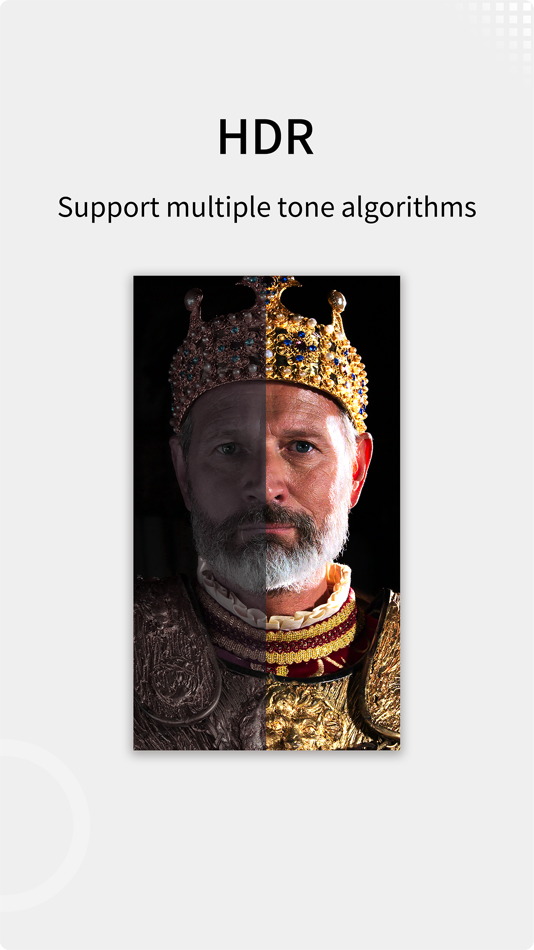
* HDR Tone Mapping support on non-HDR displays.
* Subtitle effects support.
* 0.5x-3.0x playback speed control.
* 0.5x-5.0x screen zoom.
* Media preview while seeking.
* Built-in audio enhancement.
* Multi-soundtrack selection.
* Embedded/external subtitle track selection.
* Subtitle synchronization.
* Audio synchronization.
* External subtitle font selection support.
* Playlist file preview before playback.
* Blu-ray directory playback.
* Real-time playlist management and editing.
* Screen mirroring.
* File Management:
- Delete, move, rename, create folders.
- Wi-Fi file transfer support without USB cable connection.
- Streaming media playlist creation support.
- File decompression support: 7z, zip, rar, tar, bz, bz2, etc.
* Gesture Controls:
- Horizontal drag: adjust playback position.
- Vertical drag on left side: adjust volume.
- Vertical drag on right side: adjust brightness.
- Pinch to zoom: adjust screen size.
- Double-tap: play/pause.
- Two-finger double-tap: change video aspect ratio.
* External Keyboard Support:
- Space: pause/play.
- Left Arrow: backward seek.
- Right Arrow: forward seek.
- Esc: exit playback.
- S: change playback speed.
- B: play previous.
- N: play next.
- Z: change screen scale.
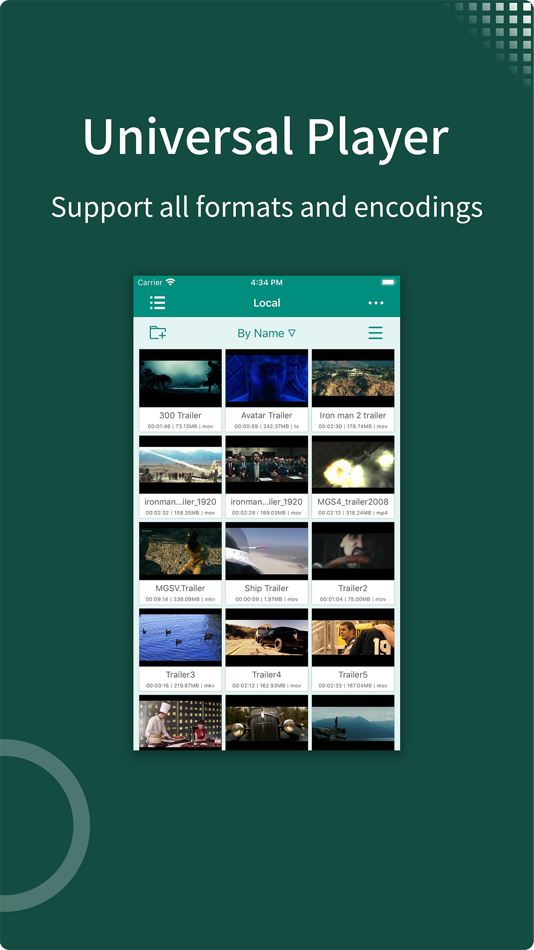
* Supported Video Formats: MP4, MOV, MKV, AVI, WMV, FLV, RMVB, ASF, OGV, Blu-ray ISO and more.
* Supported Audio Formats: MP3, WAV, WMA, FLAC, APE and more.
* Supported Subtitle Formats: SRT, SSA, ASS, SUP, VTT.
* Supported Image Formats: JPG, PNG, BMP, TIFF, GIF, HEIC and more.
* Supported eBook Formats: EPUB, TXT, PDF.
* Code Editor Supported Languages: JSON, HTML, XML, C/C++, Lua, Java, Objective-C, Swift, Python, JavaScript.
* Supported Document Formats: Word, Excel, PowerPoint, Numbers, Keynote, Pages, RTF, CSV.
Ad
ภาพหน้าจอ




ประวัติราคา
- วันนี้: $4.99
- ต่ำสุด: $0.99
- มากที่สุด: $5.99
ติดตามราคา
มีอะไรใหม่
- เวอร์ชัน: 1.12.126
- อัปเดต:
- 1. Added local media clipping: you can mark video segments during playback, and they will be automatically clipped and saved locally after closing the player.
2. Fully upgraded popup animations with a more natural bottom-up slide effect.
3. Playback history now prioritizes showing the playback date for clearer information.
4. Optimized scrolling performance of the playback history list.
5. Added a loading state to live channel editing operations to prevent duplicate submissions.
6. Added a unified confirmation dialog for file deletion to reduce accidental deletions.
7. The player control panel now auto-hides by default for a more immersive viewing experience.
8. Fixed an issue where the live source detection page could not keep the screen awake.
9. Fixed a brief flicker that could occur when switching themes.
10. Fixed inaccurate file extension detection when exporting live channels.
ข้อมูลเพิ่มเติม
ผู้พัฒนา
รายการ (1)
- zFuse - Video Player





การจัดอันดับ (0)
0 ☹️
ความเห็น (0)
เป็นคนแรกที่แสดงความเห็น 🌟
«zFuse - Video Player». แพลตฟอร์ม: iOS. หมวดหมู่: บันเทิง. ผู้พัฒนา: «s-joys Co., Ltd.». การเปิดตัวครั้งแรก: . อัปเดตล่าสุด: . ราคาปัจจุบัน: $4.99. ราคาต่ำสุดที่บันทึกไว้: $0.99 (). ราคาสูงสุดที่บันทึกไว้: $5.99 (). ชื่อนี้ยังไม่ได้รับการให้คะแนนหรือบทวิจารณ์บน AppAgg รายการ: สาธารณะ 1, ส่วนตัว 0. จุดที่ติดตาม: ยืนยันแล้ว 6, ทางอ้อม 205. ร้านค้า: App Store. คะแนนร้านค้า: 4.4. โหวต: 205. ภาษาที่ใช้ได้: Chinese, English, Japanese, Korean, Russian, Spanish. AppAgg ติดตามประวัติราคา การให้คะแนน และคำติชมของผู้ใช้ «zFuse - Video Player». ส่วนลดและอัปเดตในอนาคต: RSS. AppAgg ไม่ได้โฮสต์แอปพลิเคชันหรือแจกจ่ายซอฟต์แวร์ เครื่องหมายการค้า โลโก้ และภาพหน้าจอทั้งหมดเป็นของเจ้าของที่เกี่ยวข้อง
zFuse - Video Player URL แบบสั้น: คัดลอกแล้ว!- 🌟 แชร์
- App Store
คล้ายกัน
-
- zFuse - Media Player
- iOS แอป: บันเทิง โดย: s-joys Co., Ltd.
- ฟรี
- รายการ: 0 + 0 0 0
- แต้มแล: 7 + 1,133 (4.7) เวอร์ชัน: 1.10.132 - zFuse can play all video formats and encodings, allowing you to play video files on your mobile device without the need to convert to MP4. - zFuse supports ASS/SSA/SUP effect ... ⥯
-
- Video Player: HD & All Format
- iOS แอป: บันเทิง โดย: Bhalala Hiren Bharatbai
- ฟรี
- รายการ: 0 + 0 0 0
- แต้มแล: 2 + 2,334 (4.5) เวอร์ชัน: 1.0.26 Video Player supports all video formats like 4K, HD,HQ, Ultra HD, 1080P, subtitle, HW Decode, HD Sound, Dual Audio. MX Video Player is an advanced video player for ios. Our Video ... ⥯
-
- Video Player : All-in-One
- iOS แอป: บันเทิง โดย: SHELL INFRASTRUCTURE PRIVATE LIMITED
- ฟรี
- รายการ: 0 + 0 0 0
- แต้มแล: 1 + 676 (4.5) เวอร์ชัน: 6.6 MX Video Player is your ultimate media companion on iOS. Whether you're watching Telegram videos, streaming online, or editing your favorite clips this app does it all. == Play ... ⥯
-
- Video Player HD - Video Editor
- iOS แอป: บันเทิง โดย: Parsottambhai Dhameliya
- ฟรี
- รายการ: 0 + 0 0 0
- แต้มแล: 1 + 60 (4.7) เวอร์ชัน: 5.6 Video Player HD - Video Editor is a smart and convenient video player that makes you feel like you are enjoying an unprecedented audiovisual experience! High-quality video player. ... ⥯
-
- Video Player for iPhone All
- iOS แอป: บันเทิง โดย: Kruti Viradiya
- * ฟรี
- รายการ: 0 + 0 0 0
- แต้มแล: 1 + 48 (4.2) เวอร์ชัน: 1.7 Video Player application is a stunning player for the iOS device. You can watch all the popular any video on your phone with multiple functionality. Video player is the easiest phone ... ⥯
-
- Video Player - MKV PiP Player
- iOS แอป: บันเทิง โดย: 杏娣 吴
- ฟรี
- รายการ: 0 + 0 0 0
- แต้มแล: 1 + 12 (4.1) เวอร์ชัน: 1.2.0 Video Player - MKV PiP Player is a multi-functional video player. It supports picture in picture playing, multiple speed playing, multiple video formats, providing smooth and seamless ... ⥯
-
- Video Player - EplayerX
- iOS แอป: บันเทิง โดย: 星 黎
- ฟรี
- รายการ: 0 + 0 0 0
- แต้มแล: 6 + 19 (3.9) เวอร์ชัน: 1.7.0 EplayerX is a powerful video player designed for media enthusiasts. Connect to your Emby servers and aggregate multiple content sources enjoy seamless, high-quality video playback like ⥯
-
- Video Player : All in One
- iOS แอป: บันเทิง โดย: Piyushkumar Bhut
- * ฟรี
- รายการ: 0 + 0 0 0
- แต้มแล: 1 + 0 เวอร์ชัน: 1.3 This is an easy-to-use video player app that offers wide range of video playing features like loop play, volume control and many more. It is easy to manage your videos and music with ... ⥯
-
- Player Xtreme – Video Player
- iOS แอป: บันเทิง โดย: Media Concept
- ฟรี
- รายการ: 0 + 0 0 0
- แต้มแล: 7 + 35 (4.0) เวอร์ชัน: 1.5.11 Max Media Player is a powerful, feature-packed, app designed for high-definition media playback. Whether watching movies, listening to music, or streaming online, it delivers your ... ⥯
-
- ProPlayer - Video player
- iOS แอป: บันเทิง โดย: Technozer Solution
- ฟรี
- รายการ: 0 + 0 0 0
- แต้มแล: 3 + 9 (4.6) เวอร์ชัน: 3.4 Introducing ProPlayer, the ultimate iOS Video Player that supports all popular Video Formats like AVI, 3GP, M4V, MOV, MP4, VLC, WMV, RMVB, MKV, TS, MPG, FLV, etc. ProPlayer is a ... ⥯
-
- RSS Video Player
- iOS แอป: บันเทิง โดย: Phi Long
- ฟรี
- รายการ: 0 + 0 0 0
- แต้มแล: 0 + 148 (2.1) เวอร์ชัน: 3.9.13 RSS Player is video player which help you playing video from a RSS video feed, based on RSS 2.0 with the media enclosure tag. RSS Player support playing in the background. Sample RSS: ... ⥯
-
- Glass Video Player
- iOS แอป: บันเทิง โดย: Dhaval Chandegara
- ฟรี
- รายการ: 0 + 0 0 0
- แต้มแล: 0 + 0 เวอร์ชัน: 1.0 Video Reel Player is a powerful and intuitive media player designed to provide a seamless experience for watching videos and listening to music stored on your device. With support for ... ⥯
-
- Mi Video Player
- iOS แอป: บันเทิง โดย: Chirag Rangani
- ฟรี
- รายการ: 0 + 0 0 0
- แต้มแล: 0 + 8 (4.0) เวอร์ชัน: 1.0 Search online for subtitles, even for local videos. You can choose the language you need without any hassle. Mi Video is an easy-to-use local video player. It's easy to play, stream, ... ⥯
-
- OPlayer - video player
- iOS แอป: บันเทิง โดย: Suzhou Totoro Network Technology Co., Ltd.
- $2.99
- รายการ: 2 + 1 0 0
- แต้มแล: 2 + 960 (4.6) เวอร์ชัน: 4.8 Play all your videos directly without having to convert them! OPlayer supports almost every format for video/audio playback. It gives you the flexibility to be able to download your ... ⥯