
ที่บันทึกไว้
เลือกชื่อที่จะแสดงในเมนูที่บันทึกไว้ของคุณ
เสร็จแล้ว
| ผู้พัฒนา: | Zoho Corporation (326) | ||
| ราคา: | * ฟรี | ||
| การจัดอันดับ: | 0 | ||
| ความเห็น: | 0 โพสต์ความคิดเห็น | ||
| รายการ: | 1 + 0 | ||
| แต้มแล: | 0 + 0 ¡ | ||
| Mac App Store | |||
คำอธิบาย

SCAN
Use your iPhone or iPad to scan any document and let it appear instantly on the Zoho Scanner Mac app. Scan anything of your choice, ranging from business cards, receipts to multi-page documents. Zoho Scanner smartly identifies the paper document's edges and adds a crisp scan of the document. You can also add document images from your photo gallery and Finder.
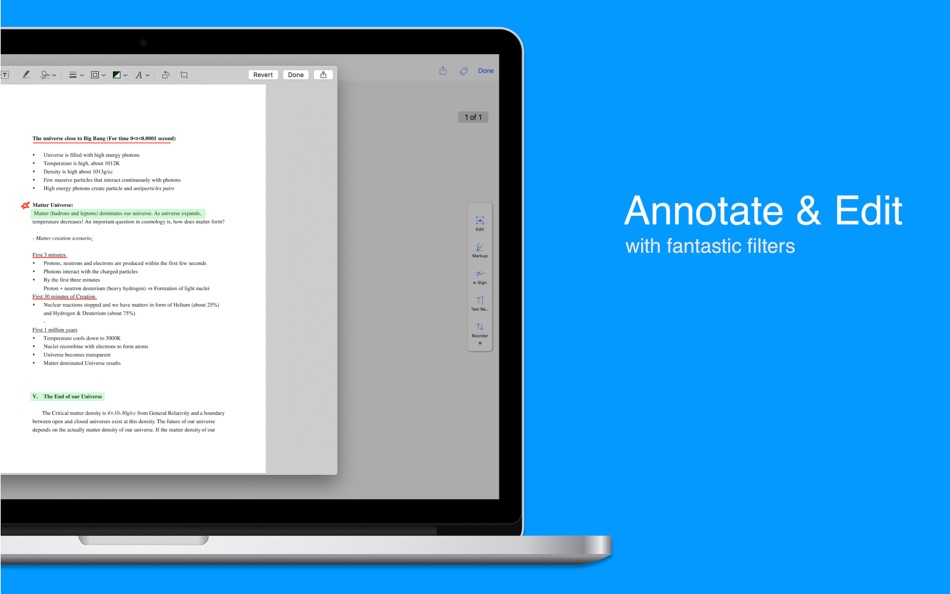
ANNOTATE AND FILTER
Crop, edit, rotate and annotate your scanned docs. Re-order pages within a document and choose from a variety of filters to apply for the scanned documents.
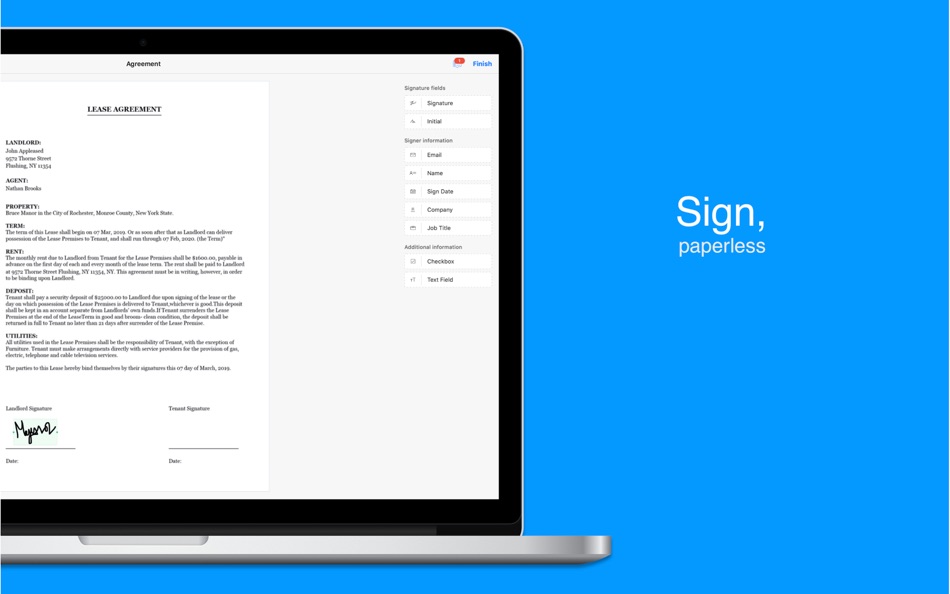
E-SIGNATURE
Verify your identity by adding your signature, powered by Zoho Sign. Digitally sign documents yourself and email the signed documents to others.
OCR AND TRANSLATE
Zoho Scanner uses Optical Character Recognition (OCR) to convert documents to text. OCR enables you to search for a document based on its content, so you can always find what you need. You can even translate the extracted content into 15 different languages in the app.
SHARE AND AUTOMATE
Set Zoho Scanner to automatically upload your scanned documents to other apps, so you can share and use them. Zoho Scanner integrates with Google Drive, Dropbox, OneDrive, Zoho WorkDrive, Zoho Expense, and more. Easily share scanned docs via email and other apps as well. Create workflows to automate tasks and save time.
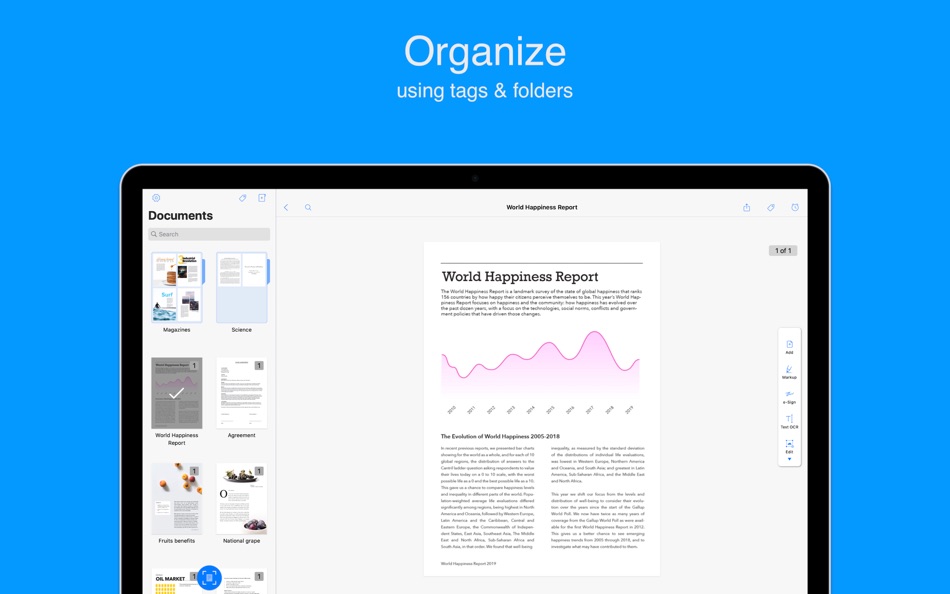
ORGANIZE
Stay organized by creating folders, setting reminders, and adding tags to categorize and find documents easily. Zoho Scanner intelligently recommends tags for your scanned docs based on their contents.
SYNC ACROSS DEVICES
Connect your iCloud account with Zoho Scanner to sync your documents across all your Apple devices. Scan a document on a device and see it appear on your other device automatically. You can also use iCloud Drive to back up and restore your documents securely.
ONLY ON MAC
- Initiate a scan, share documents, set reminders, and more, using Touch Bar on MacBook Pro devices.
- Use Sidecar to add your iPad as a secondary monitor.
- Zoho Scanner supports accessibility through Voice Control.
- The Finder extension lets you quickly add document images from Finder.
- Zoho Scanner automatically go dark for you when you set your Mac to Dark Mode.
- Quickly find and access your documents using Spotlight.
PREMIUM
Zoho Scanner's premium price levels are:
• Premium Monthly — 1.99 USD
• Premium Yearly — 19.99 USD
Sign up for a year's subscription and get 50% off!!
• Payment will be charged to your iTunes account after confirmation of purchase.
• Account will be charged for renewal within 24 hours before the end of the current subscription period.
• Subscriptions may be managed by the user and auto-renewal may be turned off by going to the user's Account Settings after the purchase.
• Any unused portion of a free trial period will be forfeited when the user purchases a subscription to that publication.
Privacy - zoho.com/privacy.html
Terms & Conditions - zoho.com/terms.html
If you have any questions, please reach out to us at support@zohoscanner.com
Additional information about the app is available at docscanner.app
Ad
ภาพหน้าจอ



ประวัติราคา
-
* การซื้อภายในแอพ - ราคาปัจจุบัน: ฟรี
- ต่ำสุด: ฟรี
- มากที่สุด: ฟรี
ติดตามราคา
ข้อมูลเพิ่มเติม
- วันที่วางจำหน่าย:
- หมวดหมู่:
macOS แอป›ประสิทธิภาพการผลิต - ระบบปฏิบัติการ:
macOS,macOS 13.5 และสูงกว่า - ขนาด:
23 Mb - ภาษาที่สนับสนุน:
Chinese,Dutch,English,French,German,Gujarati,Hindi,Italian,Japanese,Korean,Marathi,Norwegian,Polish,Portuguese,Russian,Spanish,Swedish,Tamil,Telugu,Turkish,Vietnamese - การจัดประเภทเนื้อหา:
4+ - Mac App Store คะแนนโดย:
0 - เว็บไซท์:
 https://docscanner.app
ผู้พัฒนา
- Zoho Corporation
- แพลตฟอร์ม: Android แอป (163) iOS แอป (150) macOS แอป (13)
- รายการ: 7 + 7
- แต้มแล: 66 + 801,421 ¡
- การจัดอันดับ: 0
- ความเห็น: 0
- ลดราคา: 0
- วิดีโอ: 22
- RSS: ติดตาม
รายการ (1)
- Zoho Scanner - Scan PDF

แต้มแล (0)
0 ☹️
การจัดอันดับ (0)
0 ☹️
ความเห็น (0)
เป็นคนแรกที่แสดงความเห็น 🌟
«Zoho Scanner - Scan PDF». แพลตฟอร์ม: macOS. หมวดหมู่: ประสิทธิภาพการผลิต. ผู้พัฒนา: «Zoho Corporation». การเปิดตัวครั้งแรก: . อัปเดตล่าสุด: . ราคาปัจจุบัน: ฟรี. ชื่อนี้ยังไม่ได้รับการให้คะแนนหรือบทวิจารณ์บน AppAgg รายการ: สาธารณะ 1, ส่วนตัว 0. ภาษาที่ใช้ได้: Chinese, Dutch, English, French, German, Gujarati, Hindi, Italian, Japanese, Korean, Marathi, Norwegian, Polish, Portuguese, Russian, Spanish, Swedish, Tamil, Telugu, Turkish, Vietnamese. AppAgg ติดตามประวัติราคา การให้คะแนน และคำติชมของผู้ใช้ «Zoho Scanner - Scan PDF». ส่วนลดและอัปเดตในอนาคต: RSS. AppAgg ไม่ได้โฮสต์แอปพลิเคชันหรือแจกจ่ายซอฟต์แวร์ เครื่องหมายการค้า โลโก้ และภาพหน้าจอทั้งหมดเป็นของเจ้าของที่เกี่ยวข้อง
Zoho Scanner - Scan PDF URL แบบสั้น: คัดลอกแล้ว!- 🌟 แชร์
- Mac App Store
คล้ายกัน
-
- Zoho Sheet - Spreadsheet App
- macOS แอป: ประสิทธิภาพการผลิต โดย: Zoho Corporation
- ฟรี
- รายการ: 0 0 0
- แต้มแล: 1 เวอร์ชัน: 1.1.1 Work on your spreadsheets offline and online with the Zoho Sheet app for free. Install the app, skip the signup process, and start working on device files right away. Sign up is only ... ⥯
-
- PDF Reader Pro - Edit&Convert
- macOS แอป: ประสิทธิภาพการผลิต โดย: PDF Technologies, Inc.
- * $79.99
- รายการ: 1 + 1 0 0
- แต้มแล: 1 เวอร์ชัน: 5.3.0 PDF Reader Pro, available on Mac, iPad, and iPhone, fulfills all your document needs across platforms. Building on features like AI tools, comment, text and image edit, merge, ... ⥯
-
- PDF Merge Files - PDF Tools
- macOS แอป: ประสิทธิภาพการผลิต โดย: PDF Merge Files
- ฟรี
- รายการ: 0 0 0
- แต้มแล: 0 เวอร์ชัน: 1.0 PDF Merge Files - PDF Tools is a powerful Safari extension that puts 20 essential PDF tools at your fingertips - all working directly in your browser with no uploads required. CORE ... ⥯
-
- PDF Editor: Scan & Reader
- macOS แอป: ประสิทธิภาพการผลิต โดย: Free PDF Inc
- * ฟรี
- รายการ: 0 0 0
- แต้มแล: 0 เวอร์ชัน: 1.4.2 PDF Editor is a professional, efficient, and user-friendly PDF editing and management tool designed specifically for Mac users. Whether you are handling study materials, work reports, ... ⥯
-
- PDFelement – Edit & Scan PDF
- macOS แอป: ประสิทธิภาพการผลิต โดย: Wondershare Technology Group Co.,LTD
- * ฟรี
- รายการ: 1 0 0
- แต้มแล: 5 เวอร์ชัน: 12.1.13 PDFelement is a one-stop PDF solution powered by AI. Fast, affordable, and easy way to edit, convert, sign PDFs, and more Using PDFelement, you will become a real PDF expert. BUILT FOR ⥯
-
- Prizmo 5 › Scanner to PDF
- macOS แอป: ประสิทธิภาพการผลิต โดย: Creaceed SRL
- * ฟรี
- รายการ: 0 0 0
- แต้มแล: 0 เวอร์ชัน: 5.0.2 ** Macworld editors award winner (San Francisco) Featured in an Apple Keynote ** Prizmo 5 lets you scan paper or import digital files, recognize text with OCR, and export everything as ⥯
-
- PDF Editor ゜
- macOS แอป: ประสิทธิภาพการผลิต โดย: Netron
- * ฟรี
- รายการ: 0 0 0
- แต้มแล: 0 เวอร์ชัน: 1.0.3 PDF Convertor is a modern and efficient PDF workspace built for macOS. With fast conversions, essential PDF tools, secure signing, OCR, and AI-powered PDF chat, it helps you manage ... ⥯
-
- PDF Photos - Converter
- macOS แอป: ประสิทธิภาพการผลิต โดย: 崴 杨
- * ฟรี
- รายการ: 0 0 0
- แต้มแล: 0 เวอร์ชัน: 1.3.2 "PDF Photos" is a special converter for PDF files and images. Supports batch conversion of PDF files to image files, supports image output quality customization, and image compression ... ⥯
-
- PDF ScanMerger
- macOS แอป: ประสิทธิภาพการผลิต โดย: Patricius Albu
- $2.99
- รายการ: 0 0 0
- แต้มแล: 0 เวอร์ชัน: 2.0.0 PDF ScanMerger makes it effortless to turn single side scanner output into correctly ordered, double sided PDFs. FEATURES Two panel workflow load odd (front) pages and even (back) ... ⥯
-
- PDF Attributes
- macOS แอป: ประสิทธิภาพการผลิต โดย: Alexey Nikitin & Alexandr Bondar
- ฟรี
- รายการ: 1 + 1 0 0
- แต้มแล: 2 เวอร์ชัน: 2.1.2 PDF Attributes are perfect to view and edit basic information about a document Base featured * Edit basic attributes * Detail info about the document * Preview and read PDF document ... ⥯
-
- PDF Squeezer 4
- macOS แอป: ประสิทธิภาพการผลิต โดย: Daniel Witt
- $19.99
- รายการ: 2 + 3 0 0
- แต้มแล: 2 เวอร์ชัน: 4.7.2 PDF Squeezer for macOS makes compressing PDFs easier than ever. Simply drag and drop your file into the app, and it quickly reduces the file size without compromising quality. At the ... ⥯
-
- PDF to JPG - A Batch Converter
- macOS แอป: ประสิทธิภาพการผลิต โดย: RootRise Technologies Pvt. Ltd.
- $2.99
- รายการ: 0 0 0
- แต้มแล: 0 เวอร์ชัน: 9.0 PDF to JPG is as simple as effective conversion tool for fastest way to batch convert PDF documents into best quality images. PDF to JPG converts each PDF page into JPEG, JPEG2000, ... ⥯
-
- PDF Converter, Reader & Editor
- macOS แอป: ประสิทธิภาพการผลิต โดย: Muhammad Afzal Noor Muhammad
- * ฟรี
- รายการ: 0 + 1 0 0
- แต้มแล: 5 เวอร์ชัน: 6.4 PDF converter is for everyone who wants to convert File to PDF or into other formats or vice versa, without any hassle. This PDF Maker , PDF Reader, PDF Viewer comes with multiple ... ⥯
-
- PDF Merge & Split Assistant
- macOS แอป: ประสิทธิภาพการผลิต โดย: SHIWEN OUYANG
- * ฟรี
- รายการ: 0 0 0
- แต้มแล: 0 เวอร์ชัน: 2.1.0 PDF Merge & Split Assistant A smarter way to handle PDFs on macOS Here's what you can do: Combine multiple PDFs into one or pull out just the pages you need batch processing included ... ⥯