
| Programista: | Wise Tech Labs Private Limited (30) | ||
| Cena: | $4.99 | ||
| Rankingi: | 0 | ||
| Opinie: | 0 Napisać recenzję | ||
| Komentarze: | 0 Opublikuj komentarz | ||
| Listy: | 2 + 2 | ||
| Punkty: | 14 + 0 ¡ | ||
| Mac App Store | |||
Opis

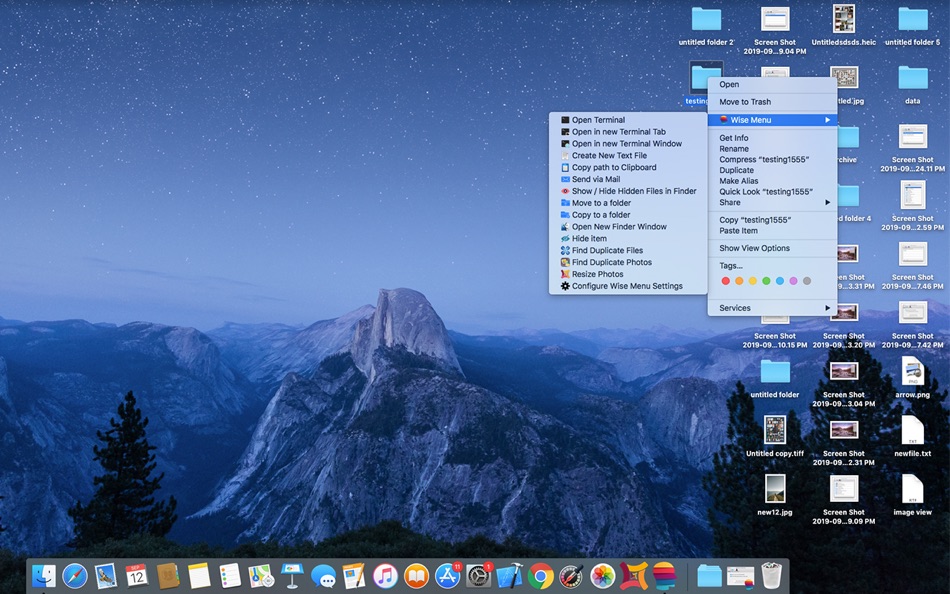
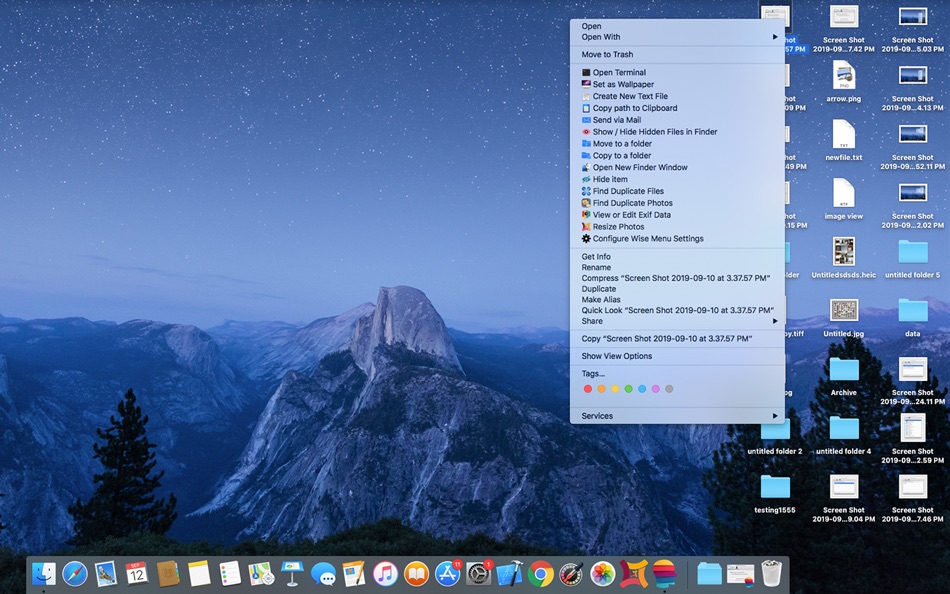
Let's take a look as what all additional Menu options are available in Wise Menu:
1. Open Terminal
This Menu Item action allows you to open Terminal instantly.
2. Open in new Terminal Tab
This Menu Item action allows you to open a new Terminal tab in an open Terminal window and will change the directory to the location of the selected directory in the Finder.
3. Open in new Terminal Window
This Menu Item action allows you to open a Terminal window at the location of the selected directory in the Finder.
4. Set as Wallpaper
This menu item option is available when you right click on an image and you can set that image as desktop Wallpaper in just a click.
5. Create New Text File
Sometimes we need to quickly create a new document file but Finder lacks to give an easy way to create new text files option in the Context menu. Wise Menu makes this possible with just few clicks using the Right Click Menu item.
6. Copy path to Clipboard
This menu item action copies the entire full file path of the selected file to your clipboard.
7. Send via Mail
Select a file within Finder, right click and then use this menu item action to attach them to an email automatically. Your mail client must be configured to support this functionality.
8. Show / Hide Hidden Files in Finder
The menu item allows you to easily toggle whether to allow Finder to show or hide the hidden files.
9. Move to a folder
Moving files and folders on your Mac is made much easier with Wise Menu, simply right click on any file or folder, click menu option to move that item, authorize in Open panel and instantly choose destination and the selected file/folder will be moved.
10. Copy to a folder
Copying files and folders on your Mac is made much easier with Wise Menu, simply right click on any file or folder that you want to copy to another location, click menu option to copy that item, authorize in Open panel and instantly choose destination and the selected file/folder will be copied.
11. Open New Finder Window
Wise Menu makes it very easy to quickly open a new Finder window at a specific location. Having this menu item in the Context Menu can result in a huge improvement to your Finder workflow as well as will help to save time by getting quick actions.
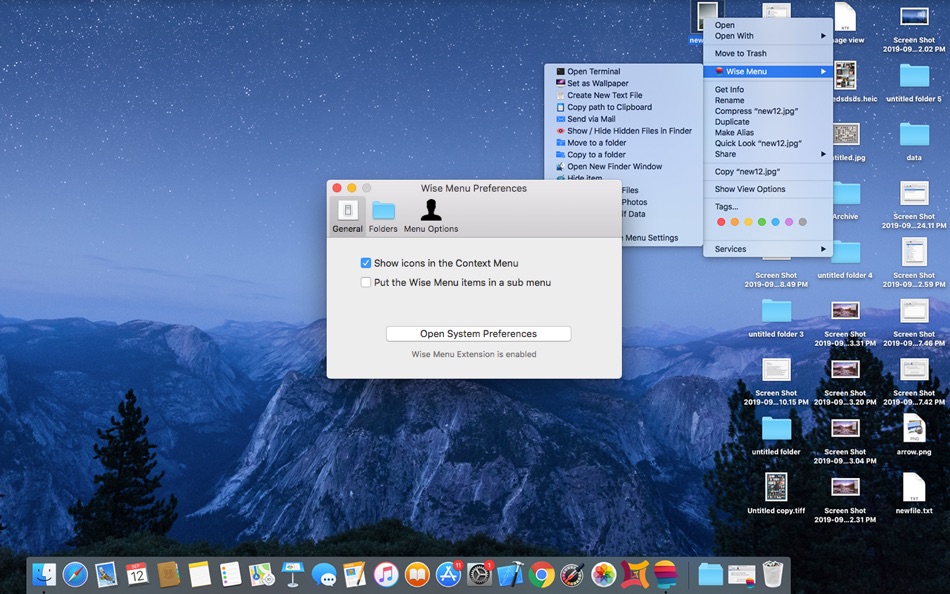
You can have the added menu items directly listed in the Context Menu or you can choose to put them in a Sub menu under 'Wise Menu'.
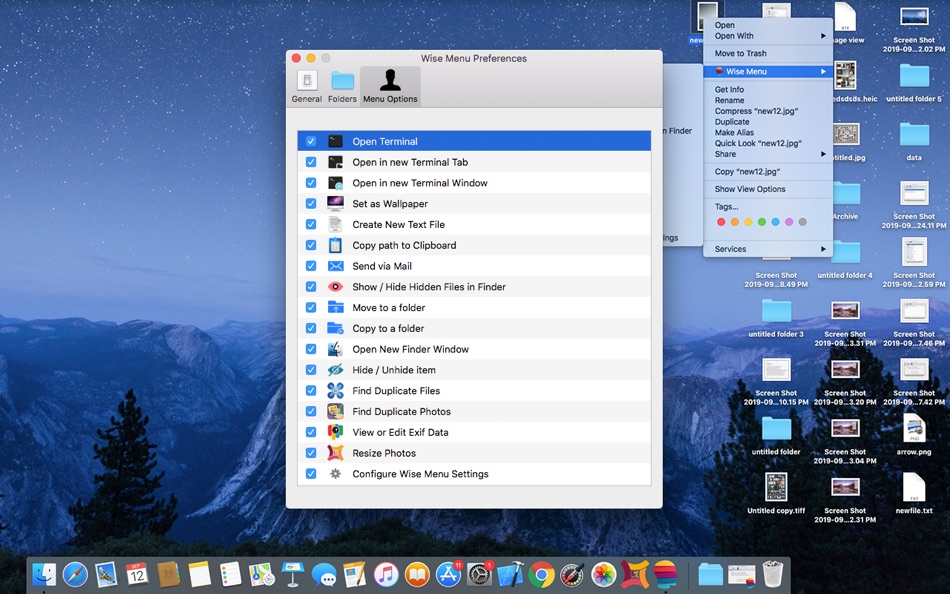
You can configure as which menu items you want or do not want from the Application Settings.
You will need to allow the extension to work in System Preferences when installing Wise Menu.
Menu item option to Scan for Duplicate Files will need the application "Duplicate Files Sweeper" to be installed on your Mac. This is available on the Mac App Store.
Menu item option to Scan for Similar Photos will need the application "Duplicate Photos Sweepoff" to be installed on your Mac. This is available on the Mac App Store.
Menu item option to Resize Photos will need the application "Photos Resizer" to be installed on your Mac from the Mac App Store.
Menu item option to View or edit Exif Data will need the application "EXIF Studio" to be installed on your Mac from the Mac App Store.
We are committed to give you the best services. Let us know if you need any additional menu item and we will try to include that in the next update.
Visit our blog at http://blogs.wisetechlabs.com to remain updated about latest technology updates and learn daily how to articles for various tasks.
Ad
Zrzuty ekranu

Historia cen
- Dziś: $4.99
- Minimalna: Bezpłatny
- Maksymalna: $9.99
Monitoruj ceny
Komentarze (0)
Skomentuj jako pierwszy 🌟
Programista
- Wise Tech Labs Private Limited
- Platformy: iOS Aplikacje (1) macOS Aplikacje (29)
- Listy: 6 + 6
- Punkty: 202 + 24 ¡
- Rankingi: 0
- Opinie: 0
- Komentarze: 0
- Zniżki: 0
- Filmy: 1
- RSS: Subskrybuj
Punkty (14)





Rankingi (0)
0 ☹️
Listy (2)
- Wise Menu


Opinie (0)
Bądź pierwszą osobą, która napisze recenzję 🌟
Dodatkowe informacje
- Wersja: 2.2
- Kategoria:
macOS Aplikacje›Produktywność - System operacyjny:
macOS,macOS 10.12 i nowsze - Rozmiar:
7 Mb - Obsługiwany język:
English - Ocena treści:
4+ - Mac App Store Ocena:
0 - Zaktualizowano:
- Data wydania:
Kontakty
- Witryna internetowa:
 http://blogs.wisetechlabs.com
«Wise Menu». Platforma: macOS. Kategoria: Produktywność. Deweloper: «Wise Tech Labs Private Limited». Pierwsze wydanie: . Ostatnia aktualizacja: . Aktualna cena: $4.99. Najniższa zarejestrowana cena: $0.00 (). Najwyższa odnotowana cena: $9.99 (). Ten tytuł nie otrzymał jeszcze ocen ani recenzji w serwisie AppAgg. Listy: publiczne 2, prywatne 2. Śledzone punkty: potwierdzone 14, pośrednie 0. Dostępne języki: English. AppAgg śledzi historię cen, oceny i opinie użytkowników «Wise Menu». Śledź przyszłe rabaty i aktualizacje za pośrednictwem RSS. AppAgg nie hostuje aplikacji ani nie dystrybuuje oprogramowania. Wszystkie znaki towarowe, logo i zrzuty ekranu należą do ich odpowiednich właścicieli.
Wise Menu Krótki URL: Skopiowano!- 🌟 Udostępnij
- Mac App Store
Ad
Podobne
-
- Menu AI: Ask AI in menu bar.
- macOS Aplikacje: Produktywność Przez: INII Co., Ltd.
- * Bezpłatny
- Listy: 0 + 0 Rankingi: 0 Opinie: 0
- Punkty: 0 + 0 0 Wersja: 1.2.0 Menu AI - Ask AI in menu bar. Menu AI is a powerful AI chat assistant that lives in your menu bar, providing instant access to both GPT and Claude AI capabilities. With its sleek and ... ⥯
-
- Menu Bar Quick Calc
- macOS Aplikacje: Produktywność Przez: Mark Huber
- $0.99
- Listy: 0 + 0 Rankingi: 0 Opinie: 0
- Punkty: 0 + 0 0 Wersja: 1.0 Menu Bar Calculator is a lightweight, always-accessible calculator that lives in your Mac's menu bar. Perfect for quick calculations without interrupting your workflow. Features: ... ⥯
-
- Menu Bar Calendar
- macOS Aplikacje: Produktywność Przez: Sindre Sorhus
- Bezpłatny
- Listy: 1 + 1 Rankingi: 0 Opinie: 0
- Punkty: 4 + 0 0 Wersja: 1.7.0 Quickly access a monthly calendar from your menu bar. You can click a date in the calendar to reveal it in the Calendar app or Google Calendar. The calendar displays dates and days in ... ⥯
- Nowa
- Menu Quotes
- macOS Aplikacje: Produktywność Przez: Tyler Durette
- Bezpłatny
- Listy: 0 + 0 Rankingi: 0 Opinie: 0
- Punkty: 1 + 0 0 Wersja: 1.0 A lightweight, simple app built natively for macOS Tahoe. Keeps and rotates through your favorite quotes in your menu bar throughout the day. Open source on GitHub: ... ⥯
-
- Menu Bar Timer
- macOS Aplikacje: Produktywność Przez: Efe Ertugrul
- $0.99
- Listy: 0 + 0 Rankingi: 0 Opinie: 0
- Punkty: 1 + 0 0 Wersja: 2.4.5 Menu Bar Timer adds a Stopwatch or a Timer to your menu bar so you can keep track of time whatever you've been working on without an extra app icon on your dock. You can choose ... ⥯
-
- Menu QuickNote
- macOS Aplikacje: Produktywność Przez: Oyvind Snekkestad
- * Bezpłatny
- Listy: 0 + 0 Rankingi: 0 Opinie: 0
- Punkty: 0 + 0 0 Wersja: 1.1.2 Menu QuickNote - Quick Notes for Your Mac Menu Bar Transform your note-taking experience with Menu QuickNote, the elegant and lightweight app that puts beautiful, colorful notes right ... ⥯
-
- Menu bar Launcher
- macOS Aplikacje: Produktywność Przez: Pawan Dixit
- $1.99
- Listy: 1 + 1 Rankingi: 0 Opinie: 0
- Punkty: 2 + 0 0 Wersja: 1.4 This is a simple menu bar utility to keep your frequent Files and Apps right into the menu bar so that you can quickly launch them when you want to work on them without locating then ... ⥯
-
- Menu Bar Reminder: Dojo
- macOS Aplikacje: Produktywność Przez: Florian Schweizer
- Bezpłatny
- Listy: 0 + 1 Rankingi: 0 Opinie: 0
- Punkty: 2 + 0 0 Wersja: 1.1 Add a single reminder to your menu bar - always visible. You can enter any text that you'd like to have on the menu bar and it will be shown to you at all times. You can also activate ... ⥯
-
- Menu Timers - High Precision
- macOS Aplikacje: Produktywność Przez: DevStorm
- Bezpłatny
- Listy: 0 + 0 Rankingi: 0 Opinie: 0
- Punkty: 1 + 0 0 Wersja: 1.0 Time your important tasks straight from the menu bar with this utility app! With millisecond precision, any task can be precisely measured. Features always on screen. The app lives in ... ⥯
-
- Menu Bar Hub: work.bench
- macOS Aplikacje: Produktywność Przez: Dimitri Giani
- * Bezpłatny
- Listy: 0 + 0 Rankingi: 0 Opinie: 0
- Punkty: 0 + 0 0 Wersja: 1.2 work.bench is the ultimate menu bar utility for macOS that revolutionizes your workflow. Designed exclusively for Mac with a beautiful notch-inspired interface, work.bench brings ... ⥯
-
- Menu Muncher
- macOS Aplikacje: Produktywność Przez: 经纬 宛
- $1.99
- Listy: 0 + 0 Rankingi: 0 Opinie: 0
- Punkty: 0 + 0 0 Wersja: 1.5 Q: How should I use this software? A: After opening the software for the first time, two icons will be generated on the leftmost side of the status bar, please drag the word "吃" (hold ... ⥯
-
- Cool Menu
- macOS Aplikacje: Produktywność Przez: SolutionShare Technologies Private Limited
- $3.99
- Listy: 1 + 0 Rankingi: 0 Opinie: 0
- Punkty: 3 + 0 0 Wersja: 1.57 Cool Menu is an assortment of 10 super useful features that are not available on macOS. Instead of multiple menubar apps for each feature wasting your menubar s precious real estate, ... ⥯
- -25%
- Notepad Menu Edition
- macOS Aplikacje: Produktywność Przez: Solaz Dazen srl
- $2.99
$3.99-25% - Listy: 0 + 1 Rankingi: 0 Opinie: 0
- Punkty: 3 + 0 0 Wersja: 2.0 Write your ideas quickly without disturbing your window setup. Notepad Menu Edition allows you to jot down text fast anywhere, any time. Focus entirely on the text you write with the ... ⥯
-
- WaitingFor Menu
- macOS Aplikacje: Produktywność Przez: Phil Seielberg
- Bezpłatny
- Listy: 0 + 0 Rankingi: 0 Opinie: 0
- Punkty: 1 + 0 0 Wersja: 1.3 WaitingFor Menu monitors your most anticipated upcoming events conveniently located in your Menu Bar. Key Features: - Easily create events from your Menu Bar. - Get a quick overview of ⥯