
ที่บันทึกไว้
เลือกชื่อที่จะแสดงในเมนูที่บันทึกไว้ของคุณ
เสร็จแล้ว
| ผู้พัฒนา: | Best App Limited (17) | ||
| ราคา: | * ฟรี | ||
| การจัดอันดับ: | 0 | ||
| ความเห็น: | 0 โพสต์ความคิดเห็น | ||
| รายการ: | 2 + 0 | ||
| แต้มแล: | 1 + 0 ¡ | ||
| Mac App Store | |||
คำอธิบาย

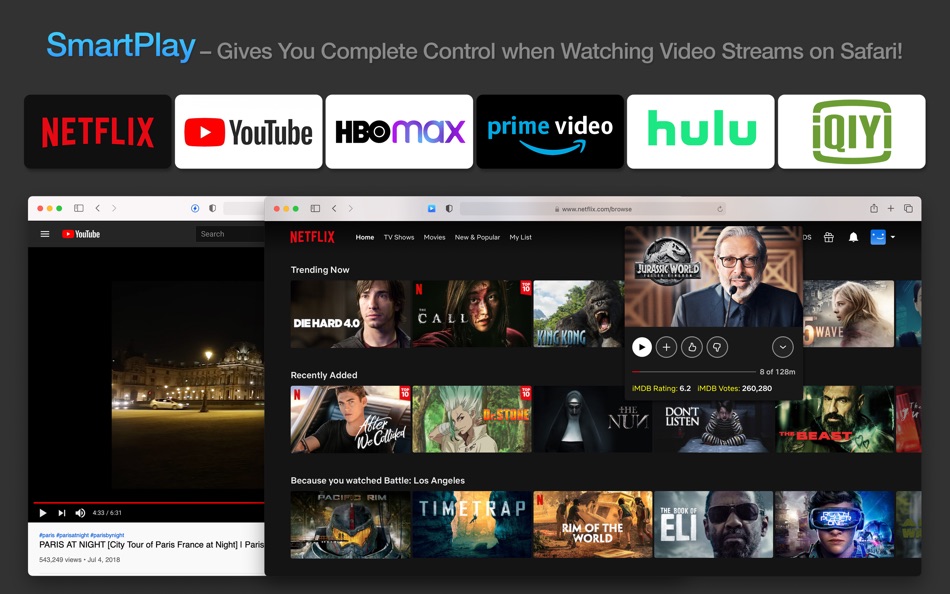
** Supports Netflix, YouTube, Prime Video, HBO, Hulu, iQIYI, ESPN, Linkedin, Lynda, Udemy, etc.
** It's easy to use and doesn't track you or collect any personal information.
Just play your favorite movie, TV show, or video, and a new control panel will appear on top of the player!
"Safari Web Extension" was first introduced at WWDC 2020 June. This is the first Safari Web Extension that gives you complete control over your online video streams.
-- KEY FEATURES --
Shows IMDB Rating and Votes for each movie or TV show (Netflix Only).
Access Netflix Hidden Categories and Search for Categories.
Adjust video brightness, saturation, contrast, and gray scale. Live preview of changes.
Control Playback Speed (from 0.01x slower to 5x faster).
When watching a slow movie, you can speed it up; if you're learning a new language using Netflix, you can watch the video in slow motion.
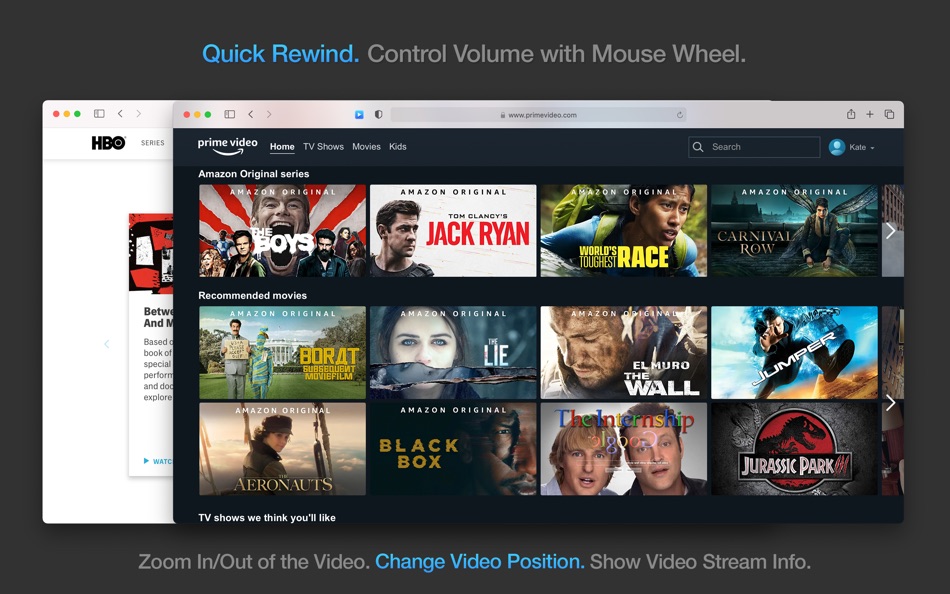
Quick Rewind (60 seconds).
Auto-Skip Intros and Recaps. No need to press the Skip button each time (Netflix Only).
Add Multiple Custom Subtitles (in SRT or VTT format) to your video stream.
Supports any language. Customize subtitle position, color, size, background color, background opacity, time offset, font family, and font encoding.
Control Volume with Mouse Wheel.
Zoom in and out of the video.
Change video position.
Show Detailed Information about the Video Stream (Netflix Only).
Includes detailed video, audio, and network information (e.g., Resolution, Frame Rate, Bitrate, Codec, HDR Support, Current CDN, Throughput, Movie ID, etc.).
Supports Netflix, YouTube, Prime Video, HBO, Hulu, iQIYI, ESPN, Linkedin, Lynda, Udemy, and etc.
-- HOW TO SETUP --
1. Please run the app and click the button on the welcome screen. This will take you to the Extensions Preferences pane in Safari. Click the checkbox next to the item called SmartPlay.
2. Go to a website (e.g., Netflix.com), click the SmartPlay icon in your Safari toolbar, then click "Always Allow on This Website" to grant SmartPlay access to this website. You're all set! Click the SmartPlay icon again to customize the extension's settings.
Note: Safari may show you a notice saying that the extension can read your sensitive information and browsing history. It's just a general reminder that shows up for every extension. SmartPlay never reads or collects any of your personal information such as passwords or credit card numbers. It's completely safe to use. You have my word!
The extension will work on Safari version 14 for MacOS version 11, 10.15, and 10.14.
-- DISCLAIMER --
This browser extension is not endorsed or affiliated with any of the aforementioned websites or services in any way. All product names, logos, and brands are property of their respective owners.
-- SUBSCRIPTION --
Payment will be charged to iTunes Account at confirmation of purchase.
Subscription automatically renews unless auto-renew is turned off at least 24-hours before the end of the current period.
Account will be charged for renewal within 24-hours prior to the end of the current period. The cost depends on the selected plan.
Subscriptions may be managed by the user and auto-renewal may be turned off by going to the user's Account Settings after purchase.
Any unused portion of the free trial will be forfeited when the user purchases a subscription.
Privacy Policy: http://www.9bestapp.com/resources/privacy-policy.html
Terms: http://www.9bestapp.com/terms/
Ad
ภาพหน้าจอ

ประวัติราคา
-
* การซื้อภายในแอพ - ราคาปัจจุบัน: ฟรี
- ต่ำสุด: ฟรี
- มากที่สุด: ฟรี
ติดตามราคา
ข้อมูลเพิ่มเติม
ผู้พัฒนา
รายการ (2)
- SmartPlay for Safari


แต้มแล (1)
-

- 26 Samuel
- +1

การจัดอันดับ (0)
0 ☹️
ความเห็น (0)
เป็นคนแรกที่แสดงความเห็น 🌟
«SmartPlay for Safari». แพลตฟอร์ม: macOS. หมวดหมู่: บันเทิง. ผู้พัฒนา: «Best App Limited». การเปิดตัวครั้งแรก: . อัปเดตล่าสุด: . ราคาปัจจุบัน: ฟรี. ชื่อนี้ยังไม่ได้รับการให้คะแนนหรือบทวิจารณ์บน AppAgg รายการ: สาธารณะ 2, ส่วนตัว 0. จุดที่ติดตาม: ยืนยันแล้ว 1, ทางอ้อม 0. ภาษาที่ใช้ได้: English. AppAgg ติดตามประวัติราคา การให้คะแนน และคำติชมของผู้ใช้ «SmartPlay for Safari». ส่วนลดและอัปเดตในอนาคต: RSS. AppAgg ไม่ได้โฮสต์แอปพลิเคชันหรือแจกจ่ายซอฟต์แวร์ เครื่องหมายการค้า โลโก้ และภาพหน้าจอทั้งหมดเป็นของเจ้าของที่เกี่ยวข้อง
SmartPlay for Safari URL แบบสั้น: คัดลอกแล้ว!- 🌟 แชร์
- Mac App Store
คล้ายกัน
-
- Play the Media
- macOS แอป: บันเทิง โดย: Ebey Tech LLC
- $3.99
- รายการ: 0 + 1 0 0
- แต้มแล: 4 เวอร์ชัน: 1.0 Play the Media allows users to choose directories and then cycle through media content from those directories. Substantial options are available to customize the media presentation ... ⥯
-
- Smart App Screensaver
- macOS แอป: บันเทิง โดย: Stefan Hollekamp
- $2.99
- รายการ: 0 0 0
- แต้มแล: 0 เวอร์ชัน: 1.3 Smart App Screensaver brings you three visually stunning and fully customizable screensavers in one easy-to-install app all optimized for smooth performance on both Intel and Apple ... ⥯
-
- Smart IPTV Player Pro
- macOS แอป: บันเทิง โดย: 柱荣 李
- $3.99
- รายการ: 0 + 1 0 0
- แต้มแล: 12 เวอร์ชัน: 1.0.3 This is a media player. Users can easily watch live TV from all over the world, such as high-resolution live broadcasts, sports matches, current movies, new season series, and TV ... ⥯
-
- Send to TV for Safari
- macOS แอป: บันเทิง โดย: Denk Alexandru
- * ฟรี
- รายการ: 2 + 1 0 0
- แต้มแล: 12 เวอร์ชัน: 5.5.4 Enable Samsung, LG, Roku, Chromecast, Google TV, and Android TV in Safari! Send to TV is a simple Safari extension that can send video and web pages from your browser to your smart TV. ⥯
-
- Mirror - for Smart TV
- macOS แอป: บันเทิง โดย: 成浩 吴
- * ฟรี
- รายการ: 1 + 1 0 0
- แต้มแล: 3 เวอร์ชัน: 1.1.11 With Mirror - for Smart TV, you can watch anything from your Mac on your TV! - Screen Mirroring Use this option to cast your Mac's screen on your TV. From the source, you can select ... ⥯
-
- Popcorn for Safari
- macOS แอป: บันเทิง โดย: Nikola Novak
- ฟรี
- รายการ: 0 0 0
- แต้มแล: 0 เวอร์ชัน: 3.0 Popcorn is a simple Safari extension that will show you IMDb, Metascore and Rotten Tomatoes ratings on Netflix. Just expand a movie or TV Show details to check the ratings. It doesn t ... ⥯
-
- zFuse - Play For Everything
- macOS แอป: บันเทิง โดย: s-joys Co., Ltd.
- ฟรี
- รายการ: 0 0 0
- แต้มแล: 7 เวอร์ชัน: 1.7.66 zFuse for macOS: as simple, lightweight, and powerful as the iOS version. Key features include: * Play multiple media files simultaneously. * Video rotation. * Hardware acceleration. * ⥯
-
- GSE SMART IPTV LITE
- macOS แอป: บันเทิง โดย: droidvision
- ฟรี
- รายการ: 0 0 0
- แต้มแล: 3 เวอร์ชัน: 3.0 Support : RECORDING LIVE TV Support: EPG TIMELINE Support: XTREAM-CODES API Support: Parental control Support: Automatic live stream reconnection Support: Dynamic language switching ... ⥯
-
- Fig Player - play mp4 mkv mp3
- macOS แอป: บันเทิง โดย: JingZhi He
- * ฟรี
- รายการ: 0 0 0
- แต้มแล: 6 เวอร์ชัน: 1.3.33 Fig Player, is a media player for Mac that supports a wide variety of media files and allows you to listen to music, watch videos and movies. If you have an extensive media library but ⥯
-
- Chess Learn and Play: Master
- macOS แอป: บันเทิง โดย: Умное Потребление
- * ฟรี
- รายการ: 0 0 0
- แต้มแล: 2 เวอร์ชัน: 1.3.9 Learn to play chess lesson by lesson, get to know the rules of the game, and become a real expert in the world of chess! Take theoretical lessons made for learning from scratch and ... ⥯
-
- ott-play lite
- macOS แอป: บันเทิง โดย: Alex Skrypnyk
- ฟรี
- รายการ: 0 0 0
- แต้มแล: 1 เวอร์ชัน: 1.00 ott-play is simple iptv player IMPORTANT!!! The player does not contain video content! You must use your playlist! ⥯
-
- SpeedTube - Video for Safari
- macOS แอป: บันเทิง โดย: Metromedya Digital Ad Agency
- $0.99
- รายการ: 0 0 0
- แต้มแล: 0 เวอร์ชัน: 1.0 SpeedTube lets you change YouTube video playback speed with one click on the toolbar. Just click and watch at the pace you prefer. No menus, no sliders, no hassle. ONE-CLICK SPEED ... ⥯
-
- Mindfulread Browser Helper
- macOS แอป: บันเทิง โดย: Nickolay Kopylov
- ฟรี
- รายการ: 0 0 0
- แต้มแล: 0 เวอร์ชัน: 1.0 Add articles to the MindfulRead reading list right from your Safari browser. ⥯
-
- Netclicker Extension
- macOS แอป: บันเทิง โดย: RBT
- ฟรี
- รายการ: 0 0 0
- แต้มแล: 0 เวอร์ชัน: 14.2.1 Because Streaming Should Feel Effortless We believe watching shows and movies on your laptop shouldn t mean hovering over a trackpad, squinting at the screen, or constantly getting up ... ⥯