
ที่บันทึกไว้
เลือกชื่อที่จะแสดงในเมนูที่บันทึกไว้ของคุณ
เสร็จแล้ว
| ผู้พัฒนา: | 枭波 王 (4) | ||
| ราคา: | * ฟรี | ||
| การจัดอันดับ: | 0 | ||
| ความเห็น: | 0 โพสต์ความคิดเห็น | ||
| รายการ: | 1 + 0 | ||
| แต้มแล: | 4 + 0 ¡ | ||
| Mac App Store | |||
คำอธิบาย

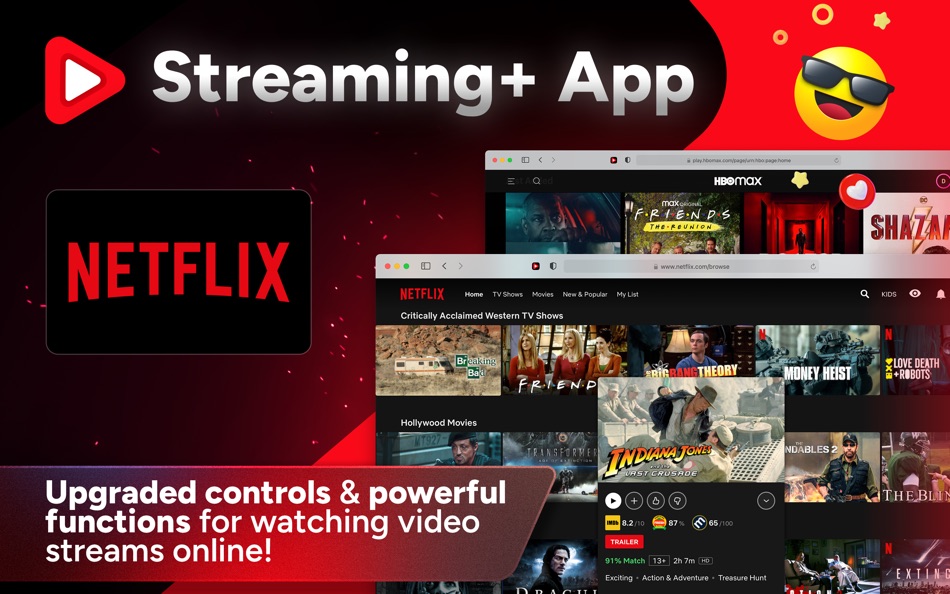
Supports Netflix, YouTube, Hulu, HBO, Amazon Prime Video, etc.
EXCLUSIVE FEATURES
• Shows the Official Trailer for each movie or TV show (Netflix Only), so you can watch the trailer before deciding which movie or TV show you want to watch tonight.
• Show IMDb, Rotten Tomatoes, and Metacritic ratings for each movie and TV shows (Netflix Only).
• Stop Autoplay Videos on the Netflix home and search screens. (Sometimes, autoplay is quite annoying.)
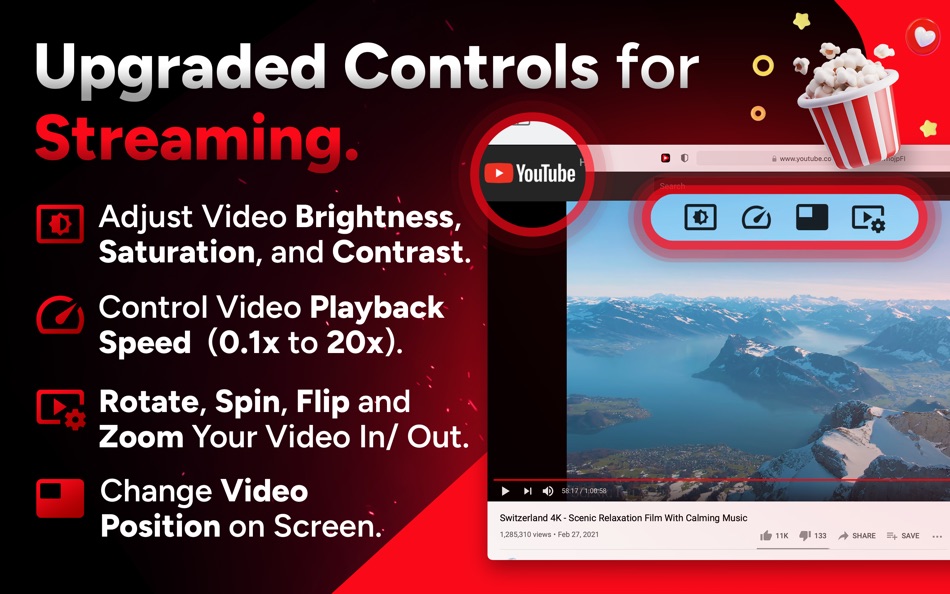
• Control Video Playback Speed (0.1x to 20x) to speed up playback to get through slow lectures or binge-watch a slow TV series.
• Adjust Video Brightness, Saturation, and Contrast.
• Rotate, Spin, Flip and Zoom your video in or out for comfortable watching, even when laying sideways in bed.
• Change Video Position (Up/Down/Left/Right).
• Search by Genre, Topic, Actor, Director, and other parameters (Netflix Only).
• Fully Tested. Works on Netflix, YouTube, Hulu, HBO, and Amazon Prime Video.
QUICK SETUP GUIDE
1. Open the app and click the button on the welcome screen to open the Safari Extensions preferences window. Click the checkbox next to "Streaming+" and close the window.
2. Browse to the website you want (e.g., Netflix), click the "Streaming+" icon in your Safari toolbar, and select "Always Allow on Every Website" to grant permission.
Note: Safari will notify you that the extension can read your personal information and browsing history. This is a general reminder that shows up for every Safari extension. The app and extension don't read or collect any personal data. It runs only on your Mac.
3. If some functions don't work properly, please refresh the web page or restart Safari.
Note: The extension will work in Safari version 14 and macOS versions 11, 10.15, and 10.14.
HOW TO USE
• Click the "Streaming+" icon in your Safari toolbar and choose the desired settings.
• While watching a video stream in Safari, you should see a new overlay menu. You can use this to control your video playback.
DISCLAIMER
This browser extension is not endorsed or affiliated with any of the aforementioned websites or services in any way. All product names, logos, and brands are the property of their respective owners.
SUBSCRIPTION
Your account will be charged for renewal within 24 hours of the end of the current billing period. The cost depends on the selected plan. The subscription automatically renews unless it is turned off in the App Store at least 24 hours before the end of the current billing period. Your iTunes Account will be charged when the purchase is confirmed. If you subscribe before your free trial ends, the rest of your free trial period will be forfeited once your purchase is confirmed.
Privacy Policy: https://appsupport11.blogspot.com/2020/07/privacy-policy.html
Terms of Use: https://appsupport11.blogspot.com/2020/10/terms.html
Ad
ภาพหน้าจอ

ประวัติราคา
-
* การซื้อภายในแอพ - ราคาปัจจุบัน: ฟรี
- ต่ำสุด: ฟรี
- มากที่สุด: ฟรี
ติดตามราคา
ข้อมูลเพิ่มเติม
ผู้พัฒนา
รายการ (1)
- Streaming+ for Netflix




การจัดอันดับ (0)
0 ☹️
ความเห็น (0)
เป็นคนแรกที่แสดงความเห็น 🌟
«Streaming+ for Netflix». แพลตฟอร์ม: macOS. หมวดหมู่: ยูทิลิตี้. ผู้พัฒนา: «枭波 王». การเปิดตัวครั้งแรก: . อัปเดตล่าสุด: . ราคาปัจจุบัน: ฟรี. ชื่อนี้ยังไม่ได้รับการให้คะแนนหรือบทวิจารณ์บน AppAgg รายการ: สาธารณะ 1, ส่วนตัว 0. จุดที่ติดตาม: ยืนยันแล้ว 4, ทางอ้อม 0. ภาษาที่ใช้ได้: English. AppAgg ติดตามประวัติราคา การให้คะแนน และคำติชมของผู้ใช้ «Streaming+ for Netflix». ส่วนลดและอัปเดตในอนาคต: RSS. AppAgg ไม่ได้โฮสต์แอปพลิเคชันหรือแจกจ่ายซอฟต์แวร์ เครื่องหมายการค้า โลโก้ และภาพหน้าจอทั้งหมดเป็นของเจ้าของที่เกี่ยวข้อง
Streaming+ for Netflix URL แบบสั้น: คัดลอกแล้ว!- 🌟 แชร์
- Mac App Store
คล้ายกัน
-
- Streaming For Youtube .
- macOS แอป: ยูทิลิตี้ โดย: MUHAMMAD HAAD MAHMOOD
- * ฟรี
- รายการ: 0 0 0
- แต้มแล: 0 เวอร์ชัน: 1.1 Watch YouTube Videos Seamlessly A complete video browsing, watching, and productivity experience. YouTube Ad Blocker is more than a basic player. It lets you browse videos, watch them ... ⥯
-
- Boom3D-5.1 Audio for Netflix
- macOS แอป: ยูทิลิตี้ โดย: Global Delight Technologies Pvt. Ltd
- $0.99
- รายการ: 0 0 0
- แต้มแล: 3 เวอร์ชัน: 1.0.6 Hey there! We're the team behind Boom 3D, and we've created the ultimate Safari extension to give you an incredible Netflix experience. With our extension, you can enjoy high-quality ... ⥯
- ใหม่
- NotchBrowser
- macOS แอป: ยูทิลิตี้ โดย: Block Browser
- $4.99
- รายการ: 0 0 0
- แต้มแล: 0 เวอร์ชัน: 1.0 Ever wanted to watch a YouTube tutorial and actually have room to follow along? Or keep a Twitch stream going while you work? Or binge Netflix on your lunch break without covering your ⥯
-
- OysterVPN
- macOS แอป: ยูทิลิตี้ โดย: Oyster Digital Solution
- * ฟรี
- รายการ: 0 0 0
- แต้มแล: 0 เวอร์ชัน: 1.0.7 OysterVPN is a VPN service built to protect your privacy and give you true online freedom. Connecting to VPN allows you to protect your data through encryption to browse the web ... ⥯
- -100%
- WhisperShortcuts
- macOS แอป: ยูทิลิตี้ โดย: Magnus Godde
- ▼ ฟรี
$1.99-100% - รายการ: 0 + 1 0 0
- แต้มแล: 18 เวอร์ชัน: 6.7.1 Key Features Accurate speech-to-text and dictation powered by Google Gemini AI assistant system-wide via voice or selected text Custom keyboard shortcuts for writing, coding, and ... ⥯
-
- Speediness
- macOS แอป: ยูทิลิตี้ โดย: Sindre Sorhus
- ฟรี
- รายการ: 1 + 2 0 0
- แต้มแล: 3 เวอร์ชัน: 2.0.1 Quickly check your internet connection speed. It also includes your internet connection ping and RPM, which are two different ways of measuring latency. By default, tests are run in ... ⥯
-
- Unbar: Cinema View for Safari
- macOS แอป: ยูทิลิตี้ โดย: DUKHYUN HWANG
- $1.99
- รายการ: 0 0 0
- แต้มแล: 0 เวอร์ชัน: 1.3.0 Unbar: The intelligent way to scale your favorite movies to full-screen. Designed for Mac, perfected for ultrawide displays. Stop letting black bars (letterboxing) shrink your viewing ... ⥯
-
- NeverNap
- macOS แอป: ยูทิลิตี้ โดย: Lucas Raggers
- ฟรี
- รายการ: 1 + 1 0 0
- แต้มแล: 12 เวอร์ชัน: 1.4 NeverNap is perfect for scenarios where uninterrupted activity is essential, such as during presentations, video streaming, or while running long processes like backups, rendering, or ... ⥯
-
- Camera Filters - Xamera
- macOS แอป: ยูทิลิตี้ โดย: Marko Hlebar
- * ฟรี
- รายการ: 0 + 2 0 0
- แต้มแล: 9 เวอร์ชัน: 2.6.1 Xamera makes it easy to apply consistent camera filters, using any webcam, meeting app, or streaming platform. Protect your privacy during video meets, and remote work with Xamera. ... ⥯
-
- DFXP Converter
- macOS แอป: ยูทิลิตี้ โดย: 明碧 张
- $1.99
- รายการ: 0 0 0
- แต้มแล: 0 เวอร์ชัน: 2.1.3 This is an unique application on the app store that can convert any popular .SRT subtitle files into Netflix-compatible or general .DFXP subtitle formats. Now you can watch Netflix ... ⥯
-
- Timely - menu bar app
- macOS แอป: ยูทิลิตี้ โดย: Rivolu LLC
- $1.99
- รายการ: 0 + 1 0 0
- แต้มแล: 10 เวอร์ชัน: 2.3.2 The essential productivity timer, timezone tracker, and reminder app all in one app. Accessible right from the menu bar. 1) Productivity Timer Built-in countdown timer with ... ⥯
-
- Internet Speed Test: Speedio
- macOS แอป: ยูทิลิตี้ โดย: AppYogi Software
- * ฟรี
- รายการ: 0 + 1 0 0
- แต้มแล: 6 เวอร์ชัน: 4.1 Internet Speed Test uses a unique algorithm to perform a speed test. It cannot be tricked by Power Boost or similar speed enhancement tools. So, the results you achieved will be ... ⥯
-
- Jolt of Caffeine
- macOS แอป: ยูทิลิตี้ โดย: Pocket Bits LLC
- ฟรี
- รายการ: 1 + 1 0 0
- แต้มแล: 3 เวอร์ชัน: 1.1 #1 TRUSTED solution to keep your Mac awake 100% FOREVER FREE. No ads. No in-app purchases. FREE lifetime updates and support. NO MONTHLY FEES OR HIDDEN COSTS. Wake up with Jolt of ... ⥯
-
- Rocket Fiber VPN UK
- macOS แอป: ยูทิลิตี้ โดย: Dotlines
- ฟรี
- รายการ: 0 0 0
- แต้มแล: 0 เวอร์ชัน: 1.0.20250820 Take control of your online privacy with Rocket Fibre VPN the best UK VPN for iOS. Stream, browse, and game securely, whether you re at home or on public Wi-Fi. Why Rocket Fibre VPN is ⥯