
Zapisane
Wybierz nazwę, która będzie wyświetlana w menu Zapisane.
Gotowe!
| Programista: | ABBYY USA Software House Inc (10) | ||
| Cena: | Bezpłatny | ||
| Ocena: | 6,760 | ||
| Rankingi: | 0 | ||
| Komentarze: | 0 Opublikuj komentarz | ||
| Listy: | 1 + 1 | ||
| Punkty: | 6 + 0 ¡ | ||
| +1 Punkty | |||
Opis

FEATURES
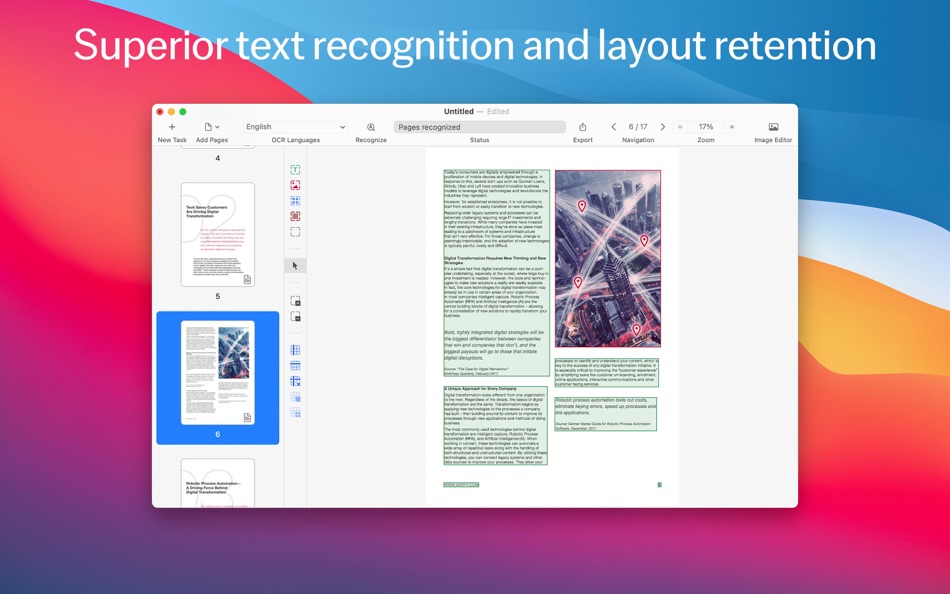
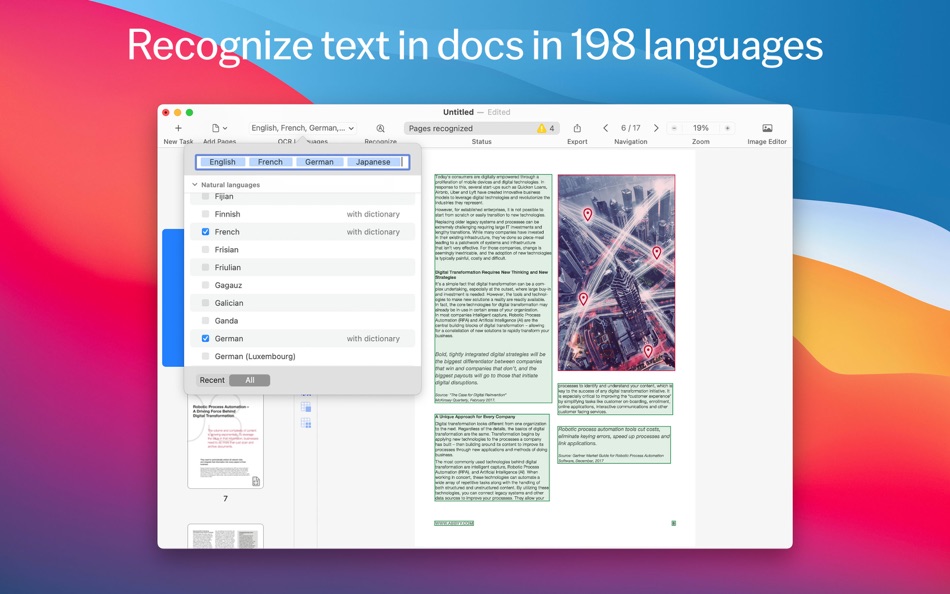
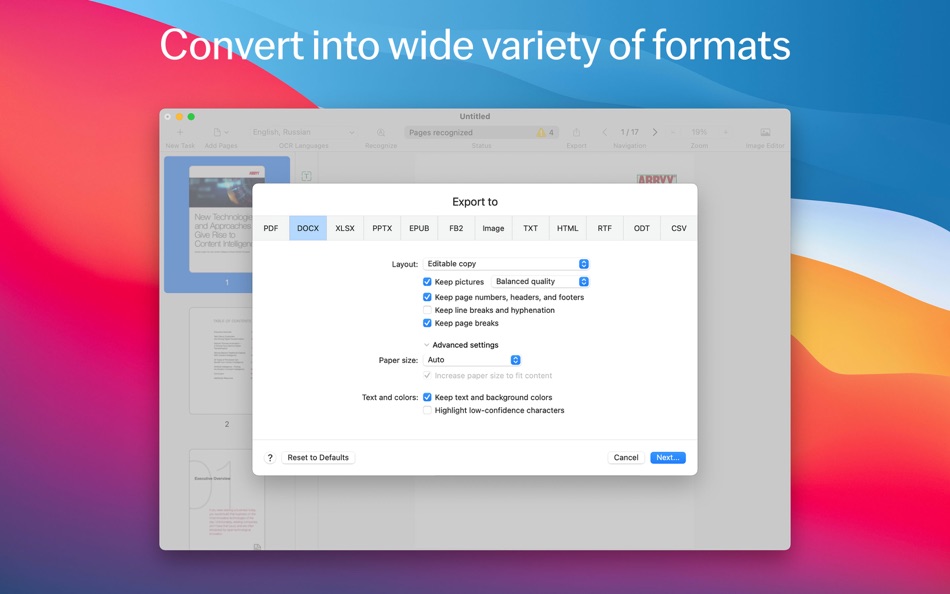
• Extract, reuse, and edit content of PDFs, paper documents, and their scanned images by converting them to editable formats such as DOCX, XLSX, RTF, ODT, and others.
• Digitize the documents into PDFs to work with, archive, or share:
• searchable PDFs for easy retrieval,
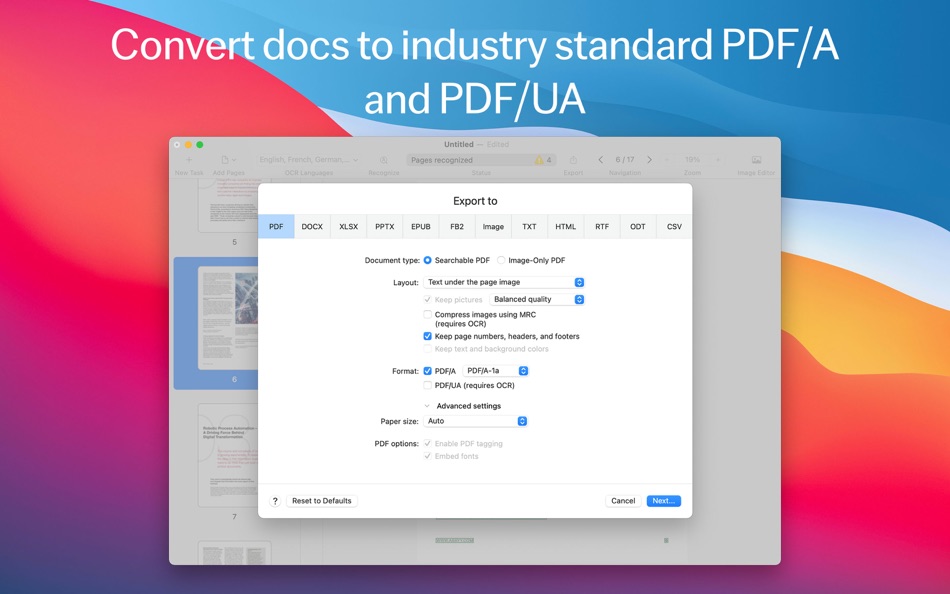
• industry-standard PDF/A for reliable long-term archiving,
• PDF/UA to ensure accessibility.
• Protect documents digitized into PDFs with passwords.
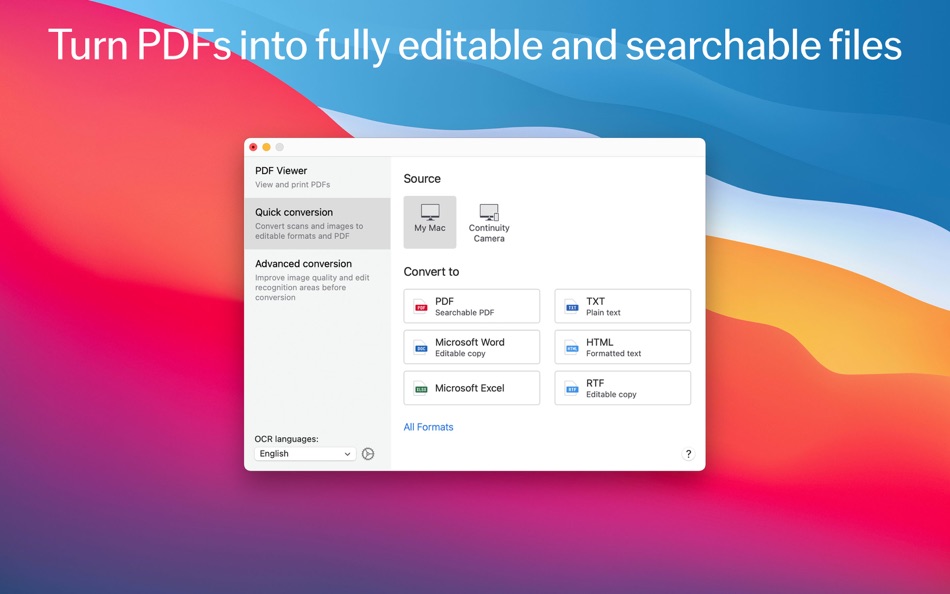
• Manage document conversion: choose between Quick conversion scenarios to get the task done in a few clicks, or Advanced conversion to control all details of the process.
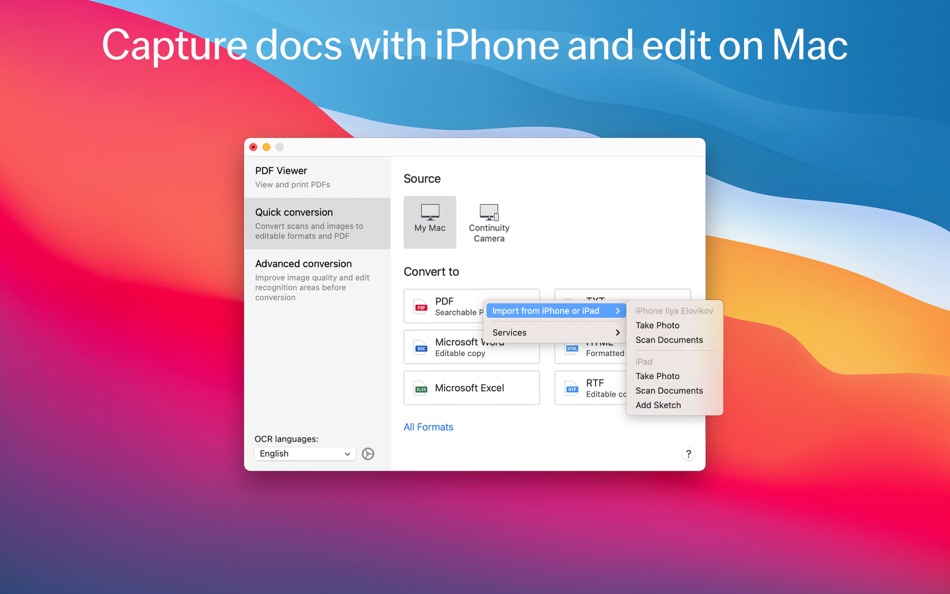
• Digitize without a scanner: capture the documents with iPhone® or iPad® directly to FineReader PDF with Continuity Camera, or transfer images taken earlier to convert them.
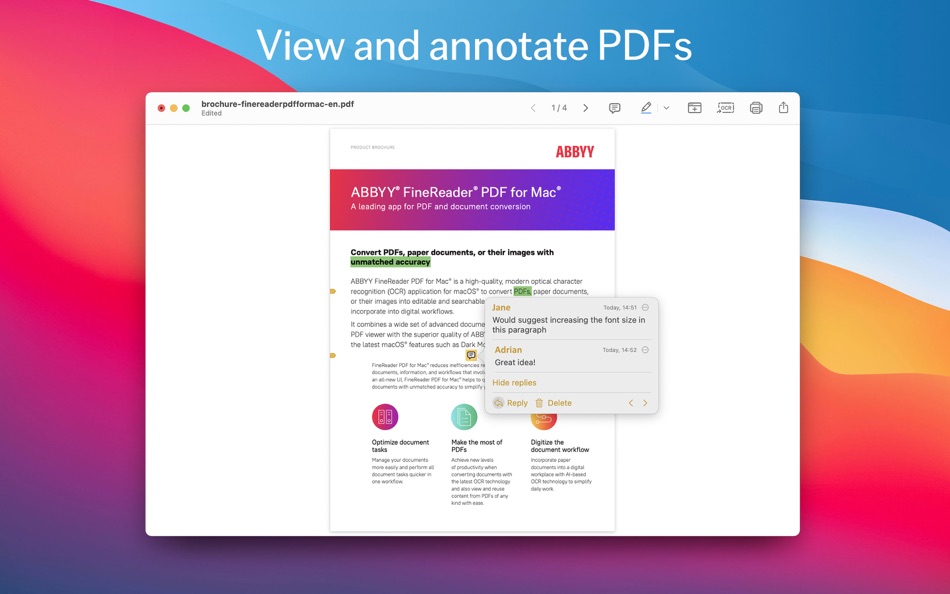
• Preview, read, annotate and print your PDF documents with a built-in PDF Viewer.
• Support of Apple Silicon chip (via Rosetta 2).
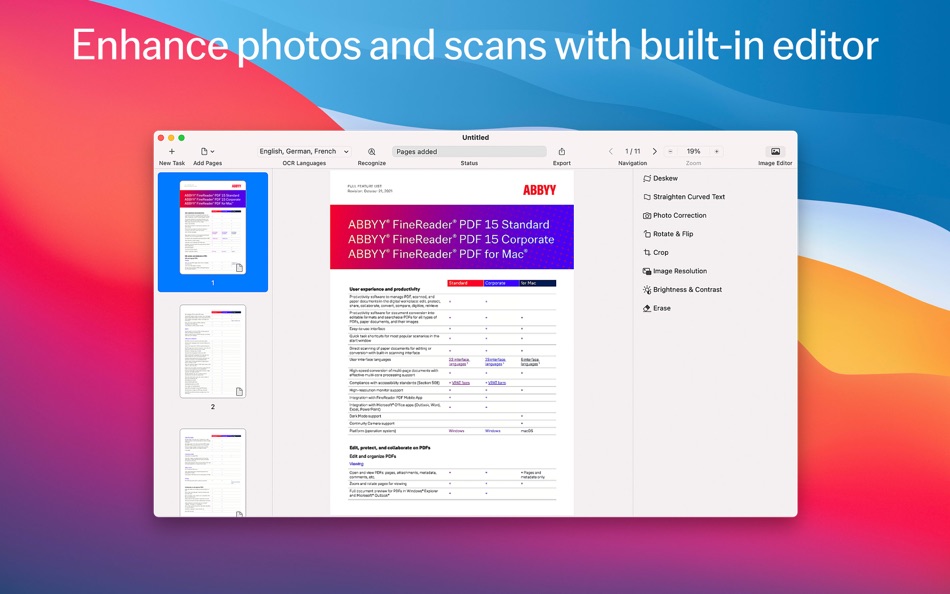
• Image Editor to improve the quality of document photos and scans.
WHEN TO USE
• Edit information “sealed” in a PDF, scan, or paper document
• Reuse it! Extract portions of text for further quotation, copying/pasting, and translation
• Protect your digital documents
• Create reliable and searchable archives of PDF documents
• Make your documents accessible
• Create document copies for reading on the go
• Capture your documents with a mobile device and edit on a computer
• Correct photos and images of documents for best conversion results
WHO NEEDS FINEREADER PDF
Suitable for anyone who works with PDFs, scans, and paper documents on a day to day basis and need to edit and reuse their content, digitize them, or convert them to formats suitable for sharing, storing, and archiving. Especially useful in:
• Legal Services
• Government / Public Sector
• Education
FREE TRIAL, FREE INTRODUCTORY OFFER, AND PREMIUM
The app is free to download. It provides a Free Trial with full access to all features for 7 days, with a 100-page limit on saving/exporting conversion results. After the Free Trial is over, to continue using all features of the software, enable Premium by choosing one of the following:
• 1-year paid subscription plan with annual auto-renewal. It provides a free introductory offer at the beginning (additional 7 days for free without page limitation before the paid 1-year period starts)
• 1-month paid subscription plan with monthly auto-renewal.
You can also choose to stay with the Free plan, with the app functionality limited to viewing and commenting in PDF files only, and no time limitation.
The subscription is automatically renewed at the end of every subscription period unless you choose to cancel it at least 24 hours before the end of the current period. Payment will be charged to your iTunes Account at confirmation of purchase. You can manage your subscription and switch off the auto-renewal by accessing your Account Settings after purchase. When you purchase a subscription, any unused portion of the Free Trial period will be forfeited.
LICENSING FOR BUSINESS
Progressive volume discounts are available starting from 5 licenses to maximize savings across your organization. To learn more, please contact ABBYY.
Do you like FineReader PDF? Please leave a review in Mac App Store, G2 or Capterra software comparison platforms.
Zrzuty ekranu
Ad
Historia cen
- Aktualna cena: Bezpłatny
- Minimalna: Bezpłatny
- Maksymalna: $129.99
Monitoruj ceny
Ocena AppAgg
6,760
Szacowana ocena AppAgg dla
FineReader PDF: OCR Converter
6,760
Wyższe oceny zwykle oznaczają silniejsze sygnały w AppAgg.
Na podstawie: 🔥 popularności · ⭐ ocen użytkowników · 🕒 świeżości · 🏷️ okazji · 🏬 danych sklepów · 👥 aktywności społeczności
Przeliczane codziennie na podstawie aktualnych danych AppAgg.
Krótki URL: Skopiowano!
Nowości
- Wersja: 15.2.14
- Ostatnia aktualizacja:
- With this release, FineReader PDF for Mac gets more PDF features to highlight and comment in PDF documents, capability to save conversion results into separate documents, and bugfix:
• Save conversion results as a separate file (document) for every page.
• When making a support request, easily provide your Customer Support service agent with comprehensive information about the software functioning with extended logging supported.
• Bugfix.
The most important improvements in the previous release:
• Annotate in PDFs: Make, edit, delete and reply to the text comments in PDFs. Use “sticky notes” to add comments to non-textual content.
• Save conversion results into separate documents: When opening multiple documents in the Advanced Conversion, it is possible to save the conversion results into separate output documents that correspond to the input documents.
Stay tuned! New features are coming soon. Read more at pdf.abbyy.com/blog! Please write a review in the App Store. If you need us, please contact us at support.abbyy.com
Dodatkowe informacje
- Data wydania:
- Kategoria:
macOS Aplikacje›Produktywność - System operacyjny:
macOS,macOS 11.0 i nowsze - Rozmiar:
891 Mb - Obsługiwany język:
Chinese,Dutch,English,French,German,Italian,Portuguese,Russian,Spanish - Ocena treści:
4+ - Mac App Store Ocena:
0 - Witryna internetowa:
 https://pdf.abbyy.com/finereader-pdf-for-mac/?source=appstore
Programista
- ABBYY USA Software House Inc
- Platformy: Android Aplikacje (2) iOS Aplikacje (7) macOS Aplikacje (1)
- Listy: 11 + 12
- Punkty: 23 + 43,600 ¡
- Rankingi: 0
- Komentarze: 0
- Zniżki: 0
- Filmy: 0
- RSS: Subskrybuj
Listy (1)
- FineReader PDF: OCR Converter

Punkty (6)
-

- 1 Zhu Changlin
- +1
-
- 43 George
- +1
-
- 2,930 바람처어럼
- +1
-
- 6 Игорь
- +1
-
- 11,480 Simon Chan
- +1
-
- 114 Денис
- +1





Rankingi (0)
0 ☹️
Komentarze (0)
Skomentuj jako pierwszy 🌟
«FineReader PDF: OCR Converter». Platforma: macOS. Kategoria: Produktywność. Deweloper: «ABBYY USA Software House Inc». Pierwsze wydanie: . Ostatnia aktualizacja: . Aktualna cena: bezpłatnie. Ten tytuł nie otrzymał jeszcze ocen ani recenzji w serwisie AppAgg. Listy: publiczne 1, prywatne 1. Śledzone punkty: potwierdzone 6, pośrednie 0. Dostępne języki: Chinese, Dutch, English, French, German, Italian, Portuguese, Russian, Spanish. AppAgg śledzi historię cen, oceny i opinie użytkowników «FineReader PDF: OCR Converter». Śledź przyszłe rabaty i aktualizacje za pośrednictwem RSS. AppAgg nie hostuje aplikacji ani nie dystrybuuje oprogramowania. Wszystkie znaki towarowe, logo i zrzuty ekranu należą do ich odpowiednich właścicieli.
FineReader PDF: OCR Converter Krótki URL: Skopiowano!- 🌟 Udostępnij
- Mac App Store
Podobne
-
- PDF Photos - Converter
- macOS Aplikacje: Produktywność Przez: 崴 杨
- * Bezpłatny
- Listy: 0 0 0
- Punkty: 0 + 0 3K Wersja: 1.3.2 "PDF Photos" is a special converter for PDF files and images. Supports batch conversion of PDF files to image files, supports image output quality customization, and image compression ... ⥯
-
- PDF OCR X Community Edition
- macOS Aplikacje: Produktywność Przez: Web Lite Solutions Corp.
- Bezpłatny
- Listy: 0 + 1 0 0
- Punkty: 1 + 0 3K Wersja: 3.0.37 PDF OCR X Community Edition is a simple drag-and-drop utility that converts your single-page PDFs and images into text documents or searchable PDF files. It uses advanced OCR (optical ... ⥯
-
- PDF Editor : Converter & Sign
- macOS Aplikacje: Produktywność Przez: Muhammad Farooq
- * Bezpłatny
- Listy: 0 0 0
- Punkty: 0 + 0 3K Wersja: 1.2 Ultimate PDF Toolkit Convert, Edit, Merge & Conversions Turn your files into professional PDFs in seconds! Ultimate PDF Toolkit is your all-in-one PDF solution, offering fast file ... ⥯
-
- PDF Reader: PDF Editor,Convert
- macOS Aplikacje: Produktywność Przez: CYNOBLE TECHNOLOGY LIMITED
- * Bezpłatny
- Listy: 0 0 0
- Punkty: 2 + 0 6K Wersja: 2.5 PDF Reader is a PDF software with all the tools and functions users need. In addition to viewing and printing PDFs with Cos PDF, users also have access to a variety of commonly used ... ⥯
-
- PDF Reader Pro: Convert & Edit
- macOS Aplikacje: Produktywność Przez: PDF Technologies, Inc.
- * Bezpłatny
- Listy: 0 0 0
- Punkty: 3 + 0 9K Wersja: 5.3.0 PDF Reader Pro, available on Mac, iPad, and iPhone, fulfills all your document needs across platforms. Building on features like AI tools, comment, text and image edit, merge, ... ⥯
-
- PDF Merge Files - PDF Tools
- macOS Aplikacje: Produktywność Przez: PDF Merge Files
- Bezpłatny
- Listy: 0 0 0
- Punkty: 0 + 0 3K Wersja: 1.0 PDF Merge Files - PDF Tools is a powerful Safari extension that puts 20 essential PDF tools at your fingertips - all working directly in your browser with no uploads required. CORE ... ⥯
-
- UPDF: AI PDF Editor, Converter
- macOS Aplikacje: Produktywność Przez: Superace Software Technology Co., Ltd.
- * Bezpłatny
- Listy: 0 + 1 0 0
- Punkty: 4 + 0 10K Wersja: 2.5.1 UPDF is an all-in-one AI-powered PDF editor for Mac. Read, edit, annotate, convert, and sign PDFs or AI chat with your documents to summarize, translate, and get instant answers. One ... ⥯
-
- Image To PDF - Pdfs Converter
- macOS Aplikacje: Produktywność Przez: 辉英 钟
- $8.99
- Listy: 0 0 0
- Punkty: 0 + 0 3K Wersja: 2.3 It does not get any easier than this! With ImageToPDF, You can create high quality and beautiful PDF documents in seconds. Forget about overcomplicated apps with nonsense features. ... ⥯
-
- CHM to PDF Fast Converter
- macOS Aplikacje: Produktywność Przez: 跃军 龚
- * Bezpłatny
- Listy: 0 + 1 0 0
- Punkty: 0 + 0 4K Wersja: 5.0 KEY FEATURES: 1. Support convert chm file to pdf file. 2. Support convert chm file to pdf file in a batch. ⥯
-
- PDF Editor: Scan & Reader
- macOS Aplikacje: Produktywność Przez: Free PDF Inc
- * Bezpłatny
- Listy: 0 0 0
- Punkty: 0 + 0 3K Wersja: 1.4.2 PDF Editor is a professional, efficient, and user-friendly PDF editing and management tool designed specifically for Mac users. Whether you are handling study materials, work reports, ... ⥯
-
- PDFify - PDF OCR tools & more
- macOS Aplikacje: Produktywność Przez: Dirk Holtwick
- * Bezpłatny
- Listy: 1 0 0
- Punkty: 3 + 0 5K Wersja: 4.4 Turn scans, images, emails & websites into searchable PDFs. Features 100+ languages OCR, PDF/A archiving, and Finder Quick Actions. Fast, secure, and intuitive! Stop searching, start ... ⥯
-
- SpeakGPT - PDF Audio Converter
- macOS Aplikacje: Produktywność Przez: Usama Daood
- Bezpłatny
- Listy: 0 0 0
- Punkty: 0 + 0 3K Wersja: 1.0 Turn Documents & Text into Audio Instantly PDF to Audio Text to Speech helps you convert PDFs and written text into clear, natural-sounding audio on macOS. Whether you re studying, ... ⥯
-
- PDF Converter, Reader & Editor
- macOS Aplikacje: Produktywność Przez: Muhammad Afzal Noor Muhammad
- * Bezpłatny
- Listy: 0 + 1 0 0
- Punkty: 5 + 0 5K Wersja: 6.4 PDF converter is for everyone who wants to convert File to PDF or into other formats or vice versa, without any hassle. This PDF Maker , PDF Reader, PDF Viewer comes with multiple ... ⥯
-
- PDF Scanner Pro Photos to PDF
- macOS Aplikacje: Produktywność Przez: Tahir Jamil
- * Bezpłatny
- Listy: 0 0 0
- Punkty: 0 + 0 5K Wersja: 1.6 This powerful all-in-one PDF Maker, Converter, Scanner, Reader, and Editor app is designed to make document management simple, fast, and efficient. Whether you are a student, ... ⥯
Może ci się spodobać również
Ostatnio oglądane
Ostatnia aktualizacja:
Operatory wyszukiwania dostępne w AppAggu