
รายการโปรด
เลือกชื่อที่จะแสดงในเมนูรายการโปรดของคุณ
เสร็จแล้ว
| ผู้พัฒนา: | 自力 黄 (12) | ||
| ราคา: | * ฟรี | ||
| การจัดอันดับ: | 4 (1) | ||
| ความเห็น: | 0 โพสต์ความคิดเห็น | ||
| รายการ: | 1 + 3 | ||
| แต้มแล: | 9 + 0 ¡ | ||
| Mac App Store | |||
คำอธิบาย

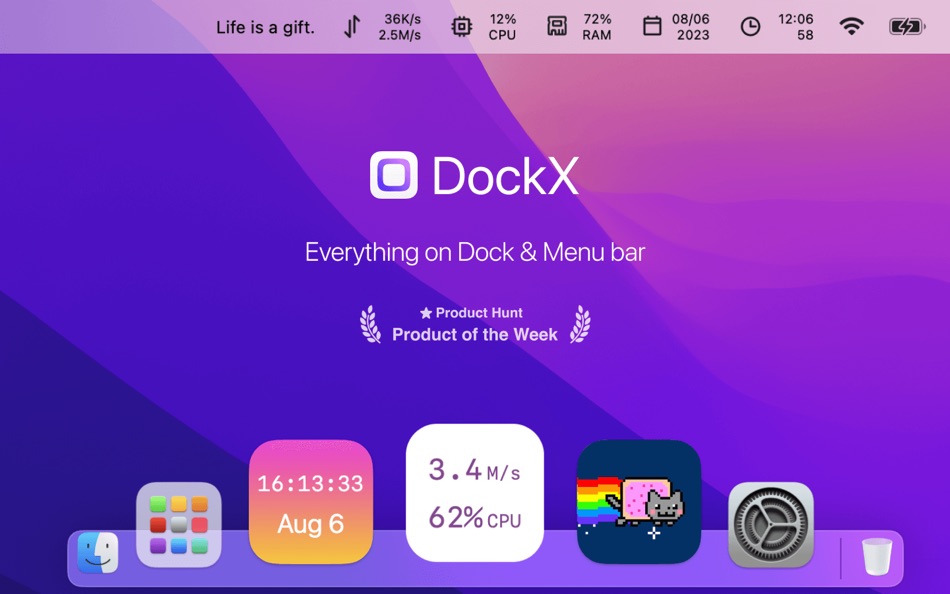
Whether you want to monitor network speed(download/upload), CPU/Memory usage, Date and clock with a second hand, even a reminder memo with red badges, or showing funky and entertaining GIFs, DockX makes it easy.
* Awarded on ProductHunt Daily and Weekly
* Reviewed as the most worthy DIY App (@monograph)
It perfectly blends with the native macOS interface, enhancing your user experience and productivity in the most stylish way. With limitless fun and endless possibilities for creative thinking, it's the perfect platform for you to explore and unleash your imagination. It is a useful system activity monitor.
Up to 20+ features:
1. Show on Dock
2. Show on Menu bar
3. Network Speed
4. CPU Usage / CPU Temperature
5. Memory Usage
6. Free Disk / Used Disk
7. Battery / Battery Health / Battery Cycle Count
8. Data & Time & Week & World Time
9. Weather, Simple Memo
10. Refresh Frequency
11. Quick Access
12 Dark Mode
13. 8 Default Themes
14. Custom Themes
15. Custom Animation Stickers
16. URL Scheme API
17. Multi-language
18. Quick Switch Shortcut
19. Hide Menu bar Icon
20. Uptime After Boot
21. Daily Network Traffic
22. IP Address: Public IP / Local IP
23. Lifetime Purchase
Please encourage us with five stars, More powerful features will be developed.
Also, feedback are welcome to tell me on Twitter:@DockX or DockXApp@gmail.com
Ad
ภาพหน้าจอ


ประวัติราคา
-
* การซื้อภายในแอพ - วันนี้: ฟรี
- ต่ำสุด: ฟรี
- มากที่สุด: ฟรี
ติดตามราคา
มีอะไรใหม่
- เวอร์ชัน: 1.1.21
- อัปเดต:
- • Improve: Display IP supports two lines showing public and local IP separately
• Fix: Occasional blurriness of menu bar icons after switching external display
• Fix: Network speed issue caused by proxy
Recent Updates:
• New: Display IP addresses: Public IP / Local IP
• New: Custom menu bar icon for quick launching specified App
• New: Memory field supports displaying absolute numbers / • entages
• Improve: Optimized settings page layout for scroll support
• Improve: GIF support for play/pause on Logo/Sticker pages
• Fix: Fixed crash issues and thread instability
ข้อมูลเพิ่มเติม
- วันที่วางจำหน่าย:
- หมวดหมู่:
macOS แอป›ยูทิลิตี้ - ระบบปฏิบัติการ:
macOS,macOS 11.0 และสูงกว่า - ขนาด:
3 Mb - ภาษาที่สนับสนุน:
Arabic,Chinese,Dutch,English,French,German,Greek,Italian,Japanese,Korean,Polish,Portuguese,Russian,Spanish,Thai,Turkish - การจัดประเภทเนื้อหา:
4+ - Mac App Store คะแนนโดย:
0 - X: DockX
- เว็บไซท์:
 https://dockx.app
ผู้พัฒนา
รายการ (1)
- DockX - System Status on Dock

แต้มแล (9)
-

- 11,191 Simon Chan
- +1
-
- 1 Alex Wtopp
- +1
-
- 10 tony
- +1
-
- 43 Szabó József
- +1
-
- 474 QenTox
- +1
-
- 217 Carlos V
- +1


การจัดอันดับ (1)

ความเห็น (0)
เป็นคนแรกที่แสดงความเห็น 🌟
«DockX - System Status on Dock». แพลตฟอร์ม: macOS. หมวดหมู่: ยูทิลิตี้. ผู้พัฒนา: «自力 黄». การเปิดตัวครั้งแรก: . อัปเดตล่าสุด: . ราคาปัจจุบัน: ฟรี. คะแนน AppAgg: 4 / 5. โหวต: 1. รายการ: สาธารณะ 1, ส่วนตัว 3. จุดที่ติดตาม: ยืนยันแล้ว 9, ทางอ้อม 0. ภาษาที่ใช้ได้: Arabic, Chinese, Dutch, English, French, German, Greek, Italian, Japanese, Korean, Polish, Portuguese, Russian, Spanish, Thai, Turkish. AppAgg ติดตามประวัติราคา การให้คะแนน และคำติชมของผู้ใช้ «DockX - System Status on Dock». ส่วนลดและอัปเดตในอนาคต: RSS. AppAgg ไม่ได้โฮสต์แอปพลิเคชันหรือแจกจ่ายซอฟต์แวร์ เครื่องหมายการค้า โลโก้ และภาพหน้าจอทั้งหมดเป็นของเจ้าของที่เกี่ยวข้อง
DockX - System Status on Dock URL แบบสั้น: คัดลอกแล้ว!- 🌟 แชร์
- Mac App Store
คล้ายกัน
-
- System-i NetworkTest
- macOS แอป: ยูทิลิตี้ โดย: System-i snc
- ฟรี
- รายการ: 0 + 0 0 0
- แต้มแล: 0 + 0 เวอร์ชัน: 2026.4.1 Easy to use (and totally free) internet connection checking app! HOW IT WORKS NetworkTest simply does a lot of pings to your gateway and to an external and indipendent server. At the ... ⥯
-
- System Indicators
- macOS แอป: ยูทิลิตี้ โดย: Binarycraft Pty Ltd
- $1.99
- รายการ: 0 + 0 0 0
- แต้มแล: 1 + 0 เวอร์ชัน: 1.13 System indicators is a lightweight monitoring tool that resides on OS X menubar. It provides a glimpse of the current system status including CPU, RAM, disks, network and ... ⥯
-
- System Monitor Premium
- macOS แอป: ยูทิลิตี้ โดย: Mehmet Sami Aslangil
- $2.99
- รายการ: 0 + 0 0 0
- แต้มแล: 0 + 0 เวอร์ชัน: 1.0 System Monitor Premium - Comprehensive real-time system performance monitoring for macOS. Track CPU, memory, disk, network, temperature, and battery health with precision. KEY ... ⥯
-
- status-monitor
- macOS แอป: ยูทิลิตี้ โดย: 俊琦 端木
- $1.99
- รายการ: 0 + 0 0 0
- แต้มแล: 0 + 0 เวอร์ชัน: 1.0 status-monitor 一款简洁高效的 macOS 系统监控工具 实时掌握 Mac 运行状态 菜单栏常驻 一目了然。 主要功能 实时监控 CPU、内存、磁盘、电池、网络、温度全方位追踪 历史趋势 - 自动记录系统数据 可视化展示性能变化 进程管理 快速定位资源占用高的应用程序 智能通知 自定义阈值 系统异常时及时提醒 菜单栏显示 关键指标实时展示 一键查看详情 ⥯
-
- system-monitor
- macOS แอป: ยูทิลิตี้ โดย: Thomas Leterme
- ฟรี
- รายการ: 0 + 0 0 0
- แต้มแล: 0 + 0 เวอร์ชัน: 2.0 Une application de monitoring system ⥯
-
- System Insights
- macOS แอป: ยูทิลิตี้ โดย: ATHANASIOS CHONIAS
- * ฟรี
- รายการ: 0 + 2 0 0
- แต้มแล: 1 + 0 เวอร์ชัน: 1.1.0 System Insights is Activity Monitor reimagined as a gorgeous, native SwiftUI dashboard with historical analytics and a menu bar companion. REAL-TIME MONITORING Track your Mac's ... ⥯
-
- Status Clock
- macOS แอป: ยูทิลิตี้ โดย: Pulsely Consulting
- ฟรี
- รายการ: 0 + 1 0 0
- แต้มแล: 2 + 0 เวอร์ชัน: 1.6.0 Status Clock shows an additional clock on your macOS status bar, with the time zone of your choice. You can enable and disable the seconds as necessary. ⥯
-
- System utility. monitor status
- macOS แอป: ยูทิลิตี้ โดย: luca calciano
- $2.99
- รายการ: 0 + 0 0 0
- แต้มแล: 0 + 0 เวอร์ชัน: 2.4 System Utility is the new app that allows you to keep everything under control! Optimize the status of your mac with this app! Take 100% advantage of your Mac s power. ⥯
-
- System Monitor
- macOS แอป: ยูทิลิตี้ โดย: Marcel Bresink Software-Systeme
- $4.99
- รายการ: 0 + 1 0 0
- แต้มแล: 1 + 0 เวอร์ชัน: 6.5 System Monitor is an application for the menu bar of your Mac, designed to inform you unobtrusively about the activity of your computer. You can retrieve up-to-date technical data any ... ⥯
-
- System Cleaner - Disk Cleanup
- macOS แอป: ยูทิลิตี้ โดย: Wise Tech Labs Private Limited
- $9.99
- รายการ: 0 + 0 0 0
- แต้มแล: 1 + 0 เวอร์ชัน: 2.1 System Cleaner is a brand new professional System utility app to keeping your Mac clean, healthy and optimized. Our latest app, System Cleaner, has been built with love for helping you ⥯
-
- System Data Cleaner
- macOS แอป: ยูทิลิตี้ โดย: Behlulcan Sahin
- $2.99
- รายการ: 0 + 0 0 0
- แต้มแล: 0 + 0 เวอร์ชัน: 1.2 System Data Cleaner Free Up Space from System Data! Is your System Data folder taking up too much space? Say goodbye to bloated storage! Find & Remove Cache Files Quickly scan and ... ⥯
-
- System Guardian
- macOS แอป: ยูทิลิตี้ โดย: Mantvydas Vaitkaitis
- $4.99
- รายการ: 0 + 0 0 0
- แต้มแล: 0 + 0 เวอร์ชัน: 1.0.1 System Guardian is a professional menu bar system monitor for CPU, GPU, memory, swap, and processes, with local alerts and real-time resource diagnostics. Built for resource-intensive ... ⥯
-
- System Toolkit
- macOS แอป: ยูทิลิตี้ โดย: Sascha Simon
- $0.99
- รายการ: 1 + 2 0 0
- แต้มแล: 9 + 0 เวอร์ชัน: 6.2.0 The System Toolkit is an all-in-one information and maintenance app designed for macOS. Information: System Information Keep track of all your system loads. This includes CPU load, ... ⥯
-
- Dock Battery
- macOS แอป: ยูทิลิตี้ โดย: Marian Raafat
- $3.99
- รายการ: 0 + 0 0 0
- แต้มแล: 0 + 0 เวอร์ชัน: 1.4 - Tired of Tracking your Mouse, Trackpad, keyboard battery percentage? Get them now at glance! - Dock Battery is a small little live App on your dock that could help you to keep track ... ⥯