
ที่บันทึกไว้
เลือกชื่อที่จะแสดงในเมนูที่บันทึกไว้ของคุณ
เสร็จแล้ว
| ผู้พัฒนา: | Alessio Pollero (4) | ||
| ราคา: | $2.99 | ||
| การจัดอันดับ: | 0 | ||
| ความเห็น: | 0 โพสต์ความคิดเห็น | ||
| รายการ: | 1 + 0 | ||
| แต้มแล: | 1 + 0 ¡ | ||
| Mac App Store | |||
คำอธิบาย

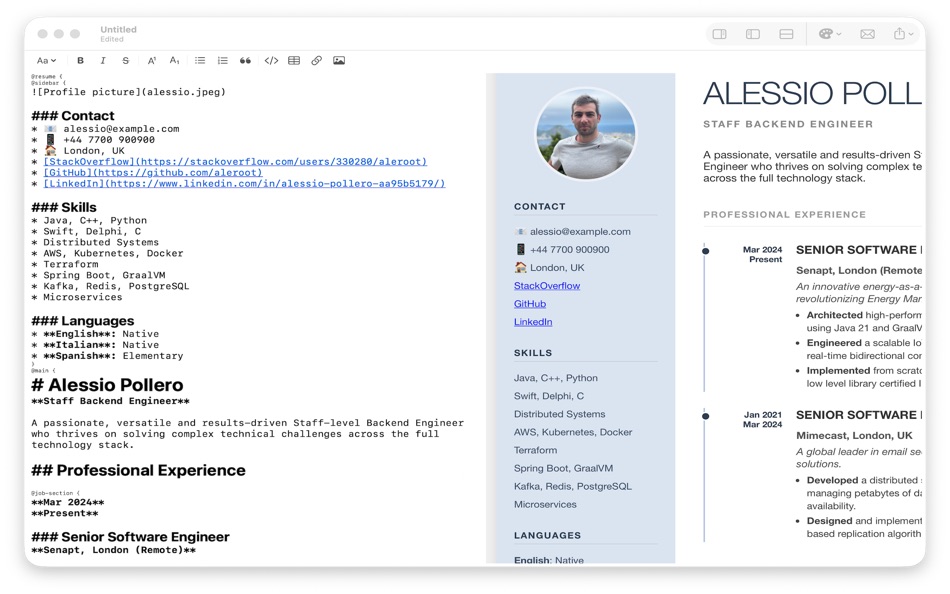
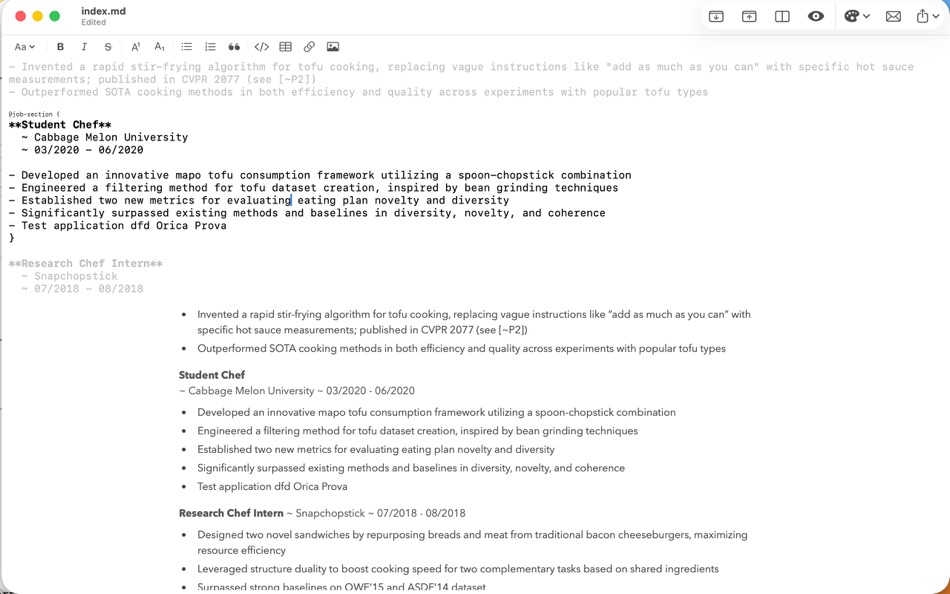
MarkdownResume is the native macOS application designed to build, manage, and export professional Curriculum Vitae using standard Markdown. Built for developers, designers, and professionals who value precision over drag-and-drop, it separates your content from your presentation, allowing you to focus on what matters: your experience.
Whether you are refactoring your entire career history or just tweaking a skill for a specific job application, MarkdownResume provides the power of a coding environment with the elegance of a native Mac app.
Key Features:
● Smart Page Breaks: never worry about a job description getting cut in half at the bottom of a page. Simply wrap your roles in smart blocks like @job-section {}, and MarkdownResume ensures they stay together perfectly in the PDF export. No more manual line breaks.
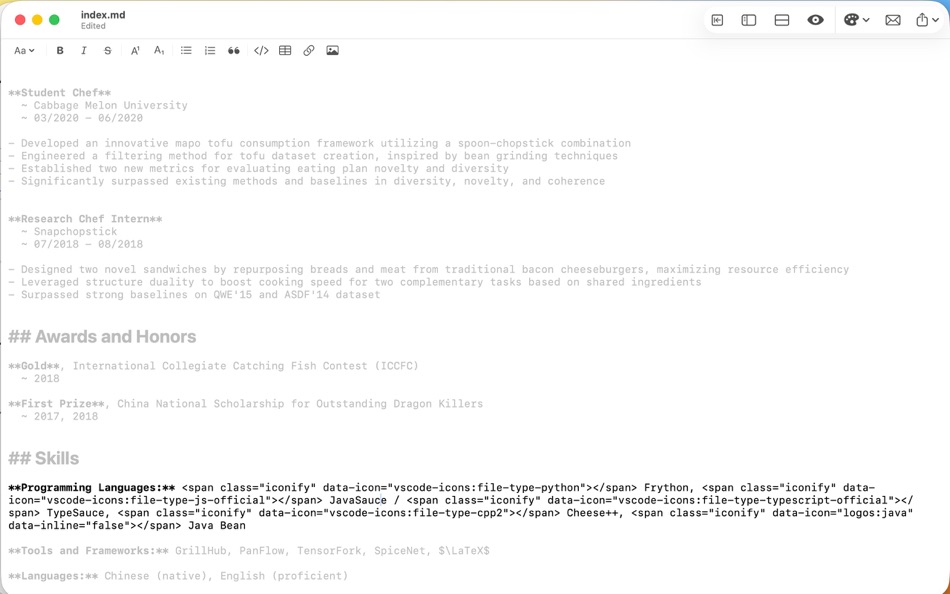
● Focus Mode: Need to concentrate on a specific role? Toggle Focus Mode to dim the rest of your document and highlight only the block you are currently editing.
● Live Style Hot-Reloading: you are not limited to built-in styles. MarkdownResume is designed to work alongside your favourite tools. Open your custom CSS file in an external editor like VS Code or Sublime Text; every time you save changes to the stylesheet, MarkdownResume detects the file change and instantly updates the preview.
● Advanced Search: Refactor your resume using full Regular Expression (Regex) support for Find and Replace.
● Professional PDF Export: MarkdownResume generates high-quality, selectable, and ATS-friendly PDFs.
● Sync-Scroll Preview: reviewing long CVs is effortless. The live preview pane automatically scrolls to match your cursor position in the editor, ensuring you are always looking at the rendered version of the text you are currently editing.
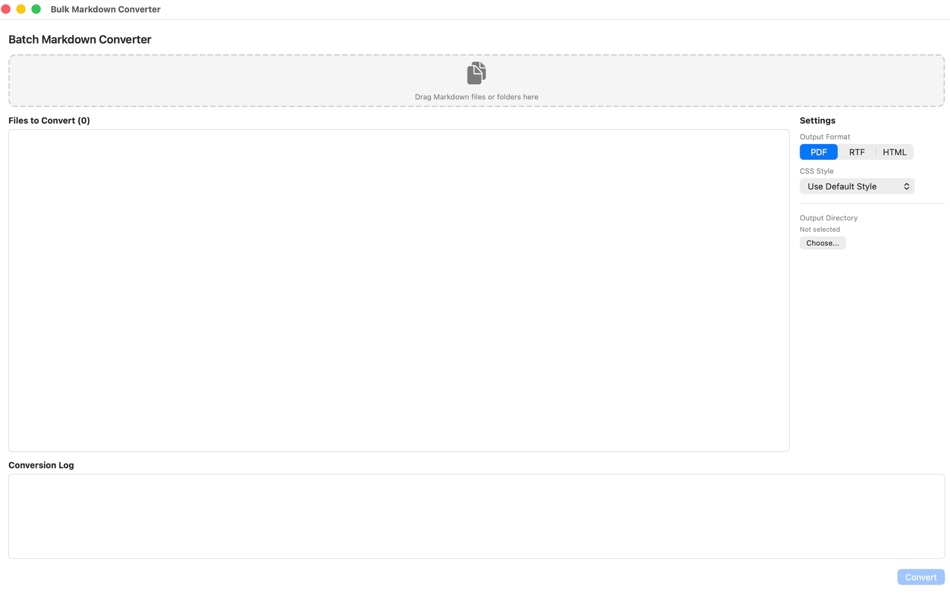
● Batch Conversion: maintain multiple versions of your resume or cover letters for different tech stacks? The built-in Batch Converter allows you to drop in a folder of Markdown files and export them all to PDF, RTF, or HTML simultaneously, applying your chosen style to every single one.
● Quick Look Extension: Preview your resumes directly in Finder. Simply press Spacebar on any markdown file to see it fully rendered, without even opening the app.
● Privacy First: MarkdownResume runs entirely offline. Your career history, personal data, and files never leave your Mac.
Ad
ภาพหน้าจอ


ประวัติราคา
- วันนี้: $2.99
- ต่ำสุด: $1.99
- มากที่สุด: $4.99
ติดตามราคา
มีอะไรใหม่
- เวอร์ชัน: 1.1
- อัปเดต:
- ● New Quick Look integration: preview your markdown files directly in Finder.
● New Focus mode: dim the rest of your document and highlight only the block you are currently editing.
● New Typewriter Mode: Stay in the flow. The editor automatically scrolls to keep your active line vertically centred.
● New Smart Image paste: simply copy an image(png) and paste it directly into the editor.
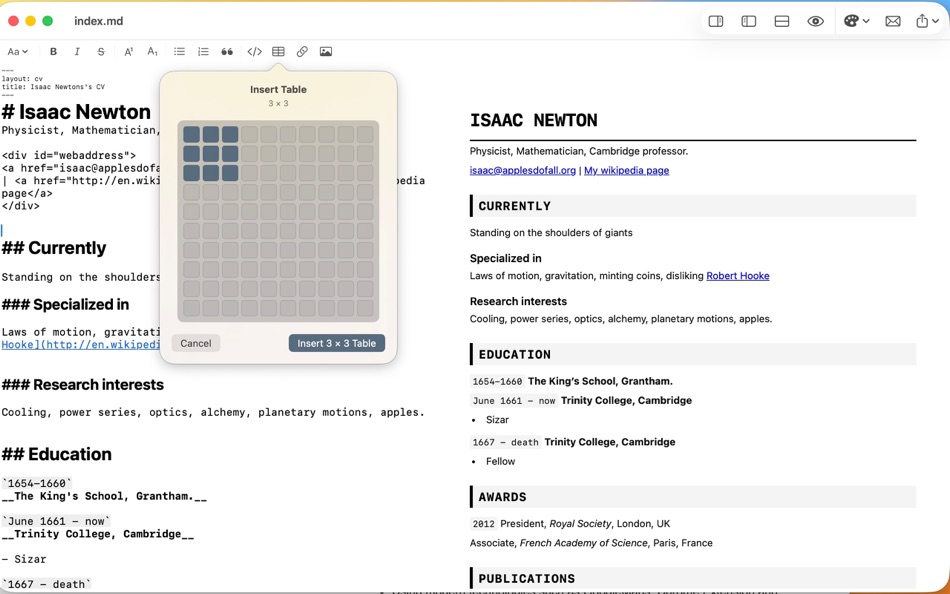
● New Visual Table Builder: use the visual grid selector to define rows and columns without writing a single pipe character manually.
● Accessibility Improvements: Full VoiceOver support added.
ข้อมูลเพิ่มเติม
- วันที่วางจำหน่าย:
- หมวดหมู่:
macOS แอป›ประสิทธิภาพการผลิต - ระบบปฏิบัติการ:
macOS,macOS 15.4 และสูงกว่า - ขนาด:
3 Mb - ภาษาที่สนับสนุน:
Italian - การจัดประเภทเนื้อหา:
4+ - Mac App Store คะแนนโดย:
0
ผู้พัฒนา
รายการ (1)
- MarkdownResume

แต้มแล (1)
-

- 195 Brandon
- +1
การจัดอันดับ (0)
0 ☹️
ความเห็น (0)
เป็นคนแรกที่แสดงความเห็น 🌟
«MarkdownResume». แพลตฟอร์ม: macOS. หมวดหมู่: ประสิทธิภาพการผลิต. ผู้พัฒนา: «Alessio Pollero». การเปิดตัวครั้งแรก: . อัปเดตล่าสุด: . ราคาปัจจุบัน: $2.99. ราคาต่ำสุดที่บันทึกไว้: $1.99 (). ราคาสูงสุดที่บันทึกไว้: $4.99 (). ชื่อนี้ยังไม่ได้รับการให้คะแนนหรือบทวิจารณ์บน AppAgg รายการ: สาธารณะ 1, ส่วนตัว 0. จุดที่ติดตาม: ยืนยันแล้ว 1, ทางอ้อม 0. ภาษาที่ใช้ได้: Italian. AppAgg ติดตามประวัติราคา การให้คะแนน และคำติชมของผู้ใช้ «MarkdownResume». ส่วนลดและอัปเดตในอนาคต: RSS. AppAgg ไม่ได้โฮสต์แอปพลิเคชันหรือแจกจ่ายซอฟต์แวร์ เครื่องหมายการค้า โลโก้ และภาพหน้าจอทั้งหมดเป็นของเจ้าของที่เกี่ยวข้อง
MarkdownResume URL แบบสั้น: คัดลอกแล้ว!- 🌟 แชร์
- Mac App Store
คล้ายกัน
-
- Markdown - Enjoy writing
- macOS แอป: ประสิทธิภาพการผลิต โดย: 潇 罗
- $7.99
- รายการ: 1 + 0 0 0
- แต้มแล: 0 + 0 เวอร์ชัน: 1.3.3 I'm Markdown, the Markdown editor for OS X. This is a powerful Markdown editor, very design, UI simple and user-friendly interactive experience, let us focus more on writing. Markdown ... ⥯
-
- Markdown Pro
- macOS แอป: ประสิทธิภาพการผลิต โดย: RADSense Software
- $5.99
- รายการ: 1 + 0 0 0
- แต้มแล: 0 + 0 เวอร์ชัน: 1.0.9 Best Markdown Syntax Editor With Markdown PRO you can write beautiful documentation, notes, essays, term papers all by using plain text to tag your formatting such as bold, italic, ... ⥯
-
- Resume Maker®
- macOS แอป: ประสิทธิภาพการผลิต โดย: individual Software, Inc.
- $14.99
- รายการ: 0 + 0 0 0
- แต้มแล: 1 + 0 เวอร์ชัน: 1.7 ResumeMaker® Write a better resume. Get a better job!™ Resume Maker® makes writing a professional resume easy. We provide all the tools you need to write a high quality resume that ... ⥯
-
- Markdown Peek
- macOS แอป: ประสิทธิภาพการผลิต โดย: Michael Thingmand
- ฟรี
- รายการ: 0 + 0 0 0
- แต้มแล: 1 + 0 เวอร์ชัน: 1.0 Description: Markdown Peek is a simple, elegant markdown viewer for macOS. Set it as your default app for .md files and enjoy instant, beautiful rendering. Features: Instant Preview ... ⥯
-
- Markdown+
- macOS แอป: ประสิทธิภาพการผลิต โดย: InSili.co
- $14.99
- รายการ: 0 + 0 0 0
- แต้มแล: 0 + 0 เวอร์ชัน: 3.3 Edit, style, preview and export your Markdown in macOS. With style. Like a breeze. Easy-to-use Getting started is really easy. Just open the editor and start writing. Your text will be ⥯
- -100%
- Markdown Web Writer
- macOS แอป: ประสิทธิภาพการผลิต โดย: Eric Kampman
- ▼ ฟรี
$19.99-100% - รายการ: 0 + 1 0 0
- แต้มแล: 9 + 0 เวอร์ชัน: 1.1.0 Markdown Web Writer is a macOS application for converting Markdown into clean HTML and PDF output. It s designed as a single-purpose tool, without plugins, build steps, or ... ⥯
-
- Resume Builder by Nobody
- macOS แอป: ประสิทธิภาพการผลิต โดย: Till-Eugen Koenitzer
- $19.99
- รายการ: 0 + 1 0 0
- แต้มแล: 2 + 0 เวอร์ชัน: 2.0.0 Resume Builder by Nobody allows you to write your resume without the need to format or design it. It enables you to focus on what matters most: the content. 20+ RESUME TEMPLATES Pick ... ⥯
-
- Markdown Inbox
- macOS แอป: ประสิทธิภาพการผลิต โดย: Solutions Cay LLC
- $14.99
- รายการ: 0 + 0 0 0
- แต้มแล: 0 + 0 เวอร์ชัน: 1.2 Markdown Inbox is a clean, focused markdown reader designed for people who work with lots of markdown files. Whether you re managing AI-generated documentation, personal notes, or ... ⥯
-
- Markdown Book Compiler
- macOS แอป: ประสิทธิภาพการผลิต โดย: Lotus Core
- $34.99
- รายการ: 0 + 0 0 0
- แต้มแล: 0 + 0 เวอร์ชัน: 1.1.2 Markdown Book Compiler makes it easy for self-publishers, authors, bloggers, and educators to turn plain-text .md files into fully formatted, beautifully styled eBooks without using ... ⥯
-
- Markdown Editor
- macOS แอป: ประสิทธิภาพการผลิต โดย: Satoshi Iwaki
- ฟรี
- รายการ: 0 + 0 0 0
- แต้มแล: 1 + 0 เวอร์ชัน: 1.5.0 Markdown Editor is a lightweight markdown editor. MAIN FEATURES - Syntax highlighting - Display line numbers - Auto preview - Export to HTML ⥯
-
- Resume & CV Templates by CA
- macOS แอป: ประสิทธิภาพการผลิต โดย: CONTENT ARCADE (UK) LTD.
- $7.99
- รายการ: 0 + 0 0 0
- แต้มแล: 0 + 0 เวอร์ชัน: 3.0 Resume Maker with an amazing collection of easy resume & templates. Creating a Magically Professional CV & Resume is not more than five minutes task if you have Resume & CV Templates ... ⥯
-
- Markdown Viewer Offline
- macOS แอป: ประสิทธิภาพการผลิต โดย: Hopebest Inc Limited
- ฟรี
- รายการ: 0 + 0 0 0
- แต้มแล: 1 + 0 เวอร์ชัน: 1.0 In today s fast-paced digital landscape, clear and structured documentation is essential. Whether you are a developer writing technical guides, a student organizing lecture notes, or a ⥯
-
- Markdown Clip
- macOS แอป: ประสิทธิภาพการผลิต โดย: Tomoaki Yagishita
- * ฟรี
- รายการ: 0 + 0 0 0
- แต้มแล: 2 + 0 เวอร์ชัน: 6.2.4 simple MarkdownEditor - new-style Markdown WYSIWYG editor Simple markdown editor without preview mode. apply markdown decoration on the spot. - TODO management (simple TODO and Dated ... ⥯
-
- Markdown Email
- macOS แอป: ประสิทธิภาพการผลิต โดย: Roger Oba
- $14.99
- รายการ: 0 + 0 0 0
- แต้มแล: 0 + 0 เวอร์ชัน: 3.2.1 Write in Markdown and send beautiful emails with one click! Tired of messy email formatting? Markdown Email lets you write in Markdown and instantly transform your emails into clean, ... ⥯