
ที่บันทึกไว้
เลือกชื่อที่จะแสดงในเมนูที่บันทึกไว้ของคุณ
เสร็จแล้ว
| ผู้พัฒนา: | JOAO PEDRO CANELAS PEREGRINO RAMOS (1) | ||
| ราคา: | ▼ * ฟรี | ||
| การประเมิน: | 6,990 แพลทินัม | ||
| การจัดอันดับ: | 0 | ||
| ความเห็น: | 0 โพสต์ความคิดเห็น | ||
| รายการ: | 1 + 1 | ||
| แต้มแล: | 4 + 0 ¡ | ||
| +1 แต้มแล | |||
คำอธิบาย

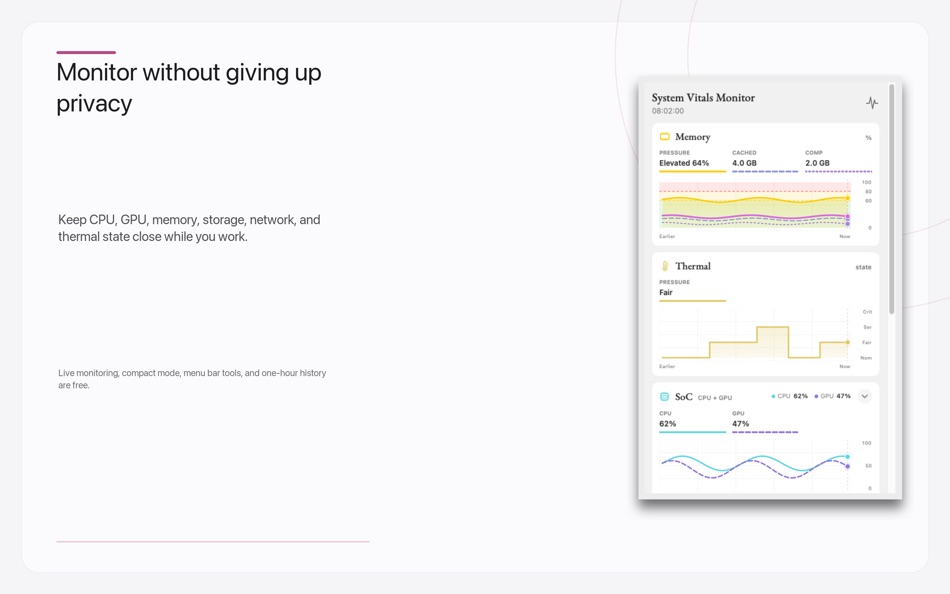
Open the live Performance Monitor on another display while you game, render video, or run a demanding creative workload. It keeps aggregate CPU, GPU, memory, thermal, power, network, and disk activity visible with 5-, 15-, and 60-minute views, without claiming FPS or tracking another app.
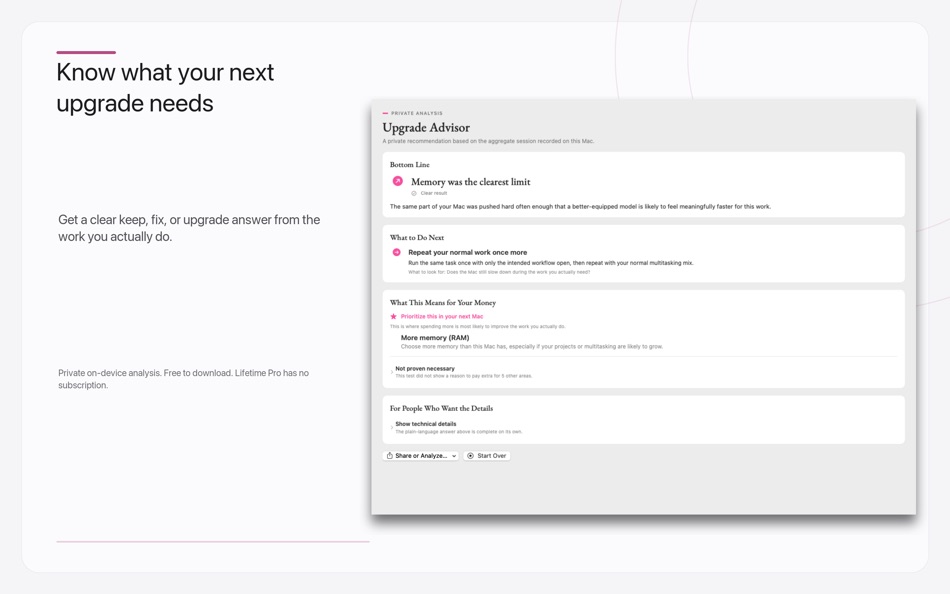
System Vitals Monitor turns private, on-device monitoring into a clear Upgrade Advisor. Start a 30-minute, 2-hour, 8-hour, or 24-hour session, keep using your Mac normally, and mark the moments that feel slow. When the session ends, the app explains whether memory, CPU/GPU capability, storage, sustained performance—or no Mac upgrade at all—deserves your money.
You get a plain-language keep, fix, or upgrade answer; confidence and coverage; supporting and counter-evidence; spending priorities; and a controlled retest so you can check whether a cheaper fix solved the problem.
Upgrade Advisor does not use a chatbot or send your workload to a server. Its deterministic analysis runs on your Mac using aggregate, sandbox-compatible system signals. It does not inspect documents, websites, network destinations, or activity inside other apps. Reports stay on your Mac unless you deliberately export or copy one.
Included free:
- Monitor CPU, GPU, memory pressure, swap, disk, network, battery, power, and Apple’s qualitative thermal state.
- Fill another display with a focused Performance Monitor for gaming, video and rendering, or 3D/AI work.
- Review private aggregate trends from the last hour.
- Pin a resizable compact monitor above your work or use optional menu bar indicators.
- Inspect total, user, system, and per-core CPU load.
- Complete one qualifying 30-minute Upgrade Advisor session and receive the full private recommendation.
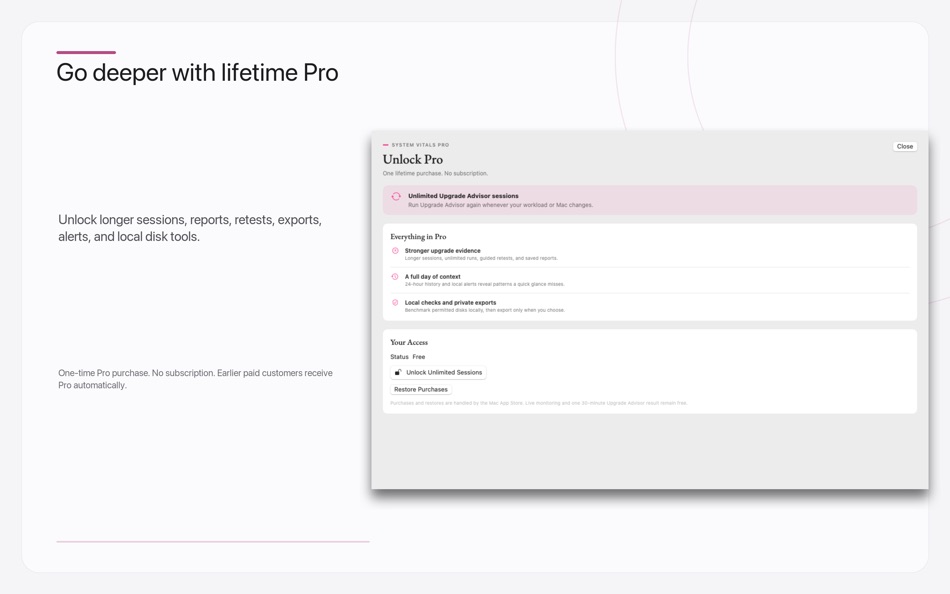
Lifetime Pro unlocks longer and repeat Upgrade Advisor sessions, saved reports, guided retests, privacy-filtered Markdown and JSON exports, 24-hour history, local sustained alerts, and local disk benchmarks. Pro is a one-time purchase with no subscription. Everyone who purchased an earlier paid version receives Pro automatically.
No account, advertising, tracking, or developer analytics is included. Monitoring, history, alerts, Upgrade Advisor sessions, reports, and preferences stay on your computer.
The app uses App Sandbox and Apple-supported public system information. Metric availability varies by Mac model and macOS version. The App Store build uses macOS thermal state and cannot show other apps’ process details. Recommendations identify the hardware dimension supported by the evidence; they do not guarantee a speed-up or recommend a specific Mac model. For the best result, record a representative workload for at least 30 minutes with good coverage.
โฆษณา
ภาพหน้าจอ


ประวัติราคา
-
* การซื้อภายในแอพ - ราคาปัจจุบัน: ฟรี
$3.99-100% - ต่ำสุด: ▼ ฟรี
- มากที่สุด: $3.99
ติดตามราคา เพิ่มลงในรายการเพื่อรับการแจ้งเตือนส่วนลดทางอีเมลหรือพุช
การประเมิน AppAgg
6,990
การประเมิน AppAgg โดยประมาณสำหรับ
System Vitals Monitor
ผู้พัฒนา: JOAO PEDRO CANELAS PEREGRINO RAMOS
6,990 แพลทินัม
การประเมินที่สูงขึ้นมักหมายถึงสัญญาณบน AppAgg ที่แข็งแกร่งขึ้น
อิงจาก: ความนิยม · คะแนนจากผู้ใช้ · ความสดใหม่ · ดีล · ข้อมูลร้านค้า · กิจกรรมชุมชน
คำนวณใหม่ทุกวันจากข้อมูล AppAgg ล่าสุด.
URL แบบสั้น: คัดลอกแล้ว!
มีอะไรใหม่
- เวอร์ชัน: 2.1
- อัปเดตล่าสุด:
- Version 2.1 adds a focused Performance Monitor for games, video exports, renders, and 3D/AI work. Move it to another display, choose 5-, 15-, or 60-minute timelines, compare current, average, and peak readings, and mark slow moments during an Advisor recording. Dock reopening, first-run guidance, and Upgrade Advisor recommendations are clearer too. Monitoring stays aggregate, private, and free; it does not measure FPS or track individual apps.
ข้อมูลเพิ่มเติม
- วันที่วางจำหน่าย:
- หมวดหมู่:
แอปสำหรับ macOS›ยูทิลิตี้ - ระบบปฏิบัติการ:
macOS,macOS 14.0 และสูงกว่า - ขนาด:
2 Mb - ภาษาที่สนับสนุน:
English,Portuguese,Romanian - การจัดประเภทเนื้อหา:
4+ - Mac App Store คะแนนโดย:
0 - เว็บไซท์:
 https://lunaperegrino.studio
ผู้พัฒนา
รายการ (1)
- System Vitals Monitor

แต้มแล (4)
-

- 4 Oleksandr Makaruk
- +1
-
- 3,277 Alan
- +1
-
- 12,944 Simon Chan
- +1
-
- 6,730 Brain_vv
- +1


การจัดอันดับ (0)
0
ความเห็น (0)
เป็นคนแรกที่แสดงความเห็น
สรุป
System Vitals Monitor URL แบบสั้น: คัดลอกแล้ว!- แชร์
- Mac App Store
“System Vitals Monitor” เป็นแอปหมวด ยูทิลิตี้ สำหรับ macOS แอปนี้พัฒนาโดย “JOAO PEDRO CANELAS PEREGRINO RAMOS” เปิดตัวครั้งแรกเมื่อ และอัปเดตล่าสุดเมื่อ ขณะนี้แอปนี้เปิดให้ใช้งานฟรี แอปนี้ยังไม่ได้รับคะแนนบน AppAgg แอปนี้อยู่ในรายการสาธารณะของผู้ใช้ 1 รายการ และรายการส่วนตัว 1 รายการ คะแนน AppAgg ของแอปนี้: ยืนยันแล้ว 4 คะแนน และทางอ้อม 0 คะแนน แอปนี้รองรับภาษาต่อไปนี้: English, Portuguese, Romanian AppAgg ติดตามประวัติราคา คะแนน และรีวิวจากผู้ใช้ของแอป “System Vitals Monitor” AppAgg ไม่ได้โฮสต์หรือแจกจ่ายแอปนี้ เครื่องหมายการค้า โลโก้ และภาพหน้าจอทั้งหมดที่เกี่ยวข้องกับแอปเป็นของเจ้าของแต่ละราย ติดตามส่วนลดและอัปเดตในอนาคตของแอปผ่าน ฟีด RSS
คล้ายกัน
-
- System utility. monitor status
- macOS แอป: ยูทิลิตี้ โดย: luca calciano
- $2.99
- รายการ: 0 0 0
- แต้มแล: 0 + 0 560 · บรอนซ์ เวอร์ชัน: 2.4 System Utility is the new app that allows you to keep everything under control! Optimize the status of your mac with this app! Take 100% advantage of your Mac s power.
-
- System-i NetworkTest
- macOS แอป: ยูทิลิตี้ โดย: System-i snc
- ฟรี
- รายการ: 0 0 0
- แต้มแล: 0 + 0 600 · เงิน เวอร์ชัน: 2026.4.2 Easy to use (and totally free) internet connection checking app! HOW IT WORKS NetworkTest simply does a lot of pings to your gateway and to an external and indipendent server. At the ...
-
- SAM: System Activity Monitor
- macOS แอป: ยูทิลิตี้ โดย: Meerkey Inc.
- $2.99
- รายการ: 0 0 0
- แต้มแล: 1 + 0 660 · เงิน เวอร์ชัน: 1.0.1 Descriptions: A simple, fast system monitor app that does not overload your pc! System Activity Monitor allows you to quickly display important system information on your menu bar, ...
-
- CoreVitals : System Vitals
- macOS แอป: ยูทิลิตี้ โดย: Ahmet Cetinkaya
- ฟรี
- รายการ: 0 0 0
- แต้มแล: 0 + 0 500 · บรอนซ์ เวอร์ชัน: 1.0 Discover everything you need to know about your MacBook's health and performance in one beautifully designed app. MacBook System Monitor provides real-time monitoring and detailed ...
-
- Pulse - System Health Monitor
- macOS แอป: ยูทิลิตี้ โดย: Nate Cheng
- ฟรี
- รายการ: 0 0 0
- แต้มแล: 0 + 0 1K · เงิน เวอร์ชัน: 1.2.6 Pulse Lite is a beautiful menu bar app that monitors your Mac's health in real time. See CPU, memory, storage, battery, and network stats at a glance always one click away. DASHBOARD ...
-
- System Monitor Premium
- macOS แอป: ยูทิลิตี้ โดย: Mehmet Sami Aslangil
- $2.99
- รายการ: 0 0 0
- แต้มแล: 0 + 0 1K · เงิน เวอร์ชัน: 1.0 System Monitor Premium - Comprehensive real-time system performance monitoring for macOS. Track CPU, memory, disk, network, temperature, and battery health with precision. KEY ...
-
- Monitor Portals - Multi Screen
- macOS แอป: ยูทิลิตี้ โดย: Marcus Gunn
- ฟรี
- รายการ: 0 + 1 0 0
- แต้มแล: 2 + 0 1K · ทอง เวอร์ชัน: 2.2 Monitor Portals is a lightweight utility that creates visual indicators where your displays connect, making multi-monitor navigation intuitive and efficient. Key Features: Illuminated ...
-
- Monitor-Caffeine
- macOS แอป: ยูทิลิตี้ โดย: Steffen Waskowsky
- $0.99
- รายการ: 0 0 0
- แต้มแล: 0 + 0 570 · บรอนซ์ เวอร์ชัน: 1.1 Monitor-Koffein is a minimalist utility for the macOS menu bar that prevents your screen or Mac from automatically going to sleep. Perfect for presentations, long downloads, file ...
-
- System Monitor: CPU RAM & Disk
- macOS แอป: ยูทิลิตี้ โดย: Appy Labs, LLC
- ฟรี
- รายการ: 0 0 0
- แต้มแล: 0 + 0 560 · บรอนซ์ เวอร์ชัน: 1.0 Keep your Mac s essential system information visible from the menu bar. System Monitor: CPU RAM & Disk provides a clear, read-only view of storage capacity, CPU activity, memory use, ...
-
- system-monitor
- macOS แอป: ยูทิลิตี้ โดย: Thomas Leterme
- ฟรี
- รายการ: 0 0 0
- แต้มแล: 0 + 0 500 · บรอนซ์ เวอร์ชัน: 2.1 Une application de monitoring system
-
- Monitor Banda Larga
- macOS แอป: ยูทิลิตี้ โดย: NIC.br
- ฟรี
- รายการ: 0 0 0
- แต้มแล: 0 + 0 500 · บรอนซ์ เวอร์ชัน: 1.1.1 O Monitor Banda Larga verifica a qualidade e a velocidade de sua internet fixa, de maneira automatizada e com relatórios de fácil compreensão, oferecendo também uma ferramenta que ...
-
- System Monitor
- macOS แอป: ยูทิลิตี้ โดย: Marcel Bresink Software-Systeme
- $4.99
- รายการ: 0 + 1 0 0
- แต้มแล: 1 + 0 1K · เงิน เวอร์ชัน: 6.6 System Monitor is an application for the menu bar of your Mac, designed to inform you unobtrusively about the activity of your computer. You can retrieve up-to-date technical data any ...
-
- System Insights
- macOS แอป: ยูทิลิตี้ โดย: ATHANASIOS CHONIAS
- * ฟรี
- รายการ: 0 + 2 0 0
- แต้มแล: 1 + 0 6K · แพลทินัม เวอร์ชัน: 1.2.9 System Insights is Activity Monitor reimagined as a gorgeous, native SwiftUI dashboard with historical analytics and a menu bar companion. REAL-TIME MONITORING Track your Mac's ...
-
- System Guardian
- macOS แอป: ยูทิลิตี้ โดย: Mantvydas Vaitkaitis
- $4.99
- รายการ: 0 0 0
- แต้มแล: 0 + 0 590 · บรอนซ์ เวอร์ชัน: 1.0.1 System Guardian is a professional menu bar system monitor for CPU, GPU, memory, swap, and processes, with local alerts and real-time resource diagnostics. Built for resource-intensive ...

